
Veescope Live Green Screen App


Transform any space into a professional set with real-time chroma keying, 6-layer video editing, and advanced light guides designed for creators, educators, and indie filmmakers.
Publisher
Category
Photo & VideoDownloads
1M+User Rating
Total Ratings
4K+Locales
8Discover the interface used by 1M+ users.
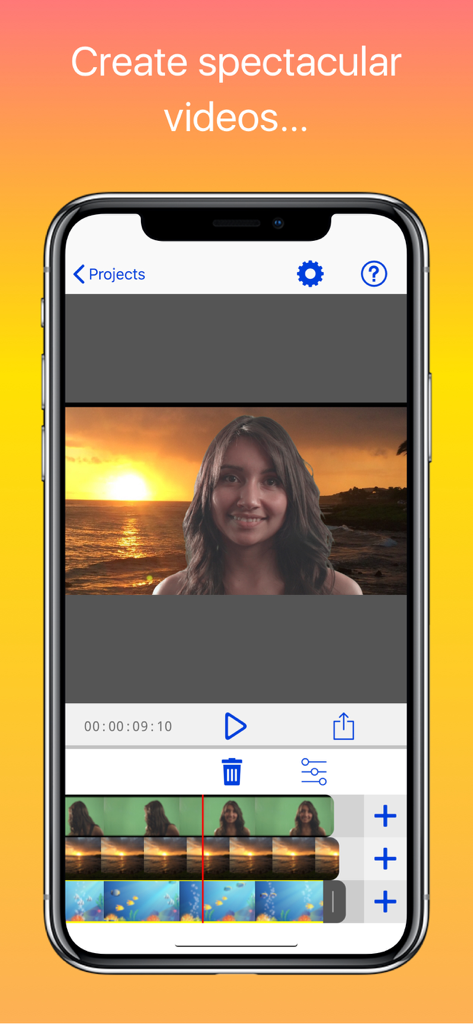
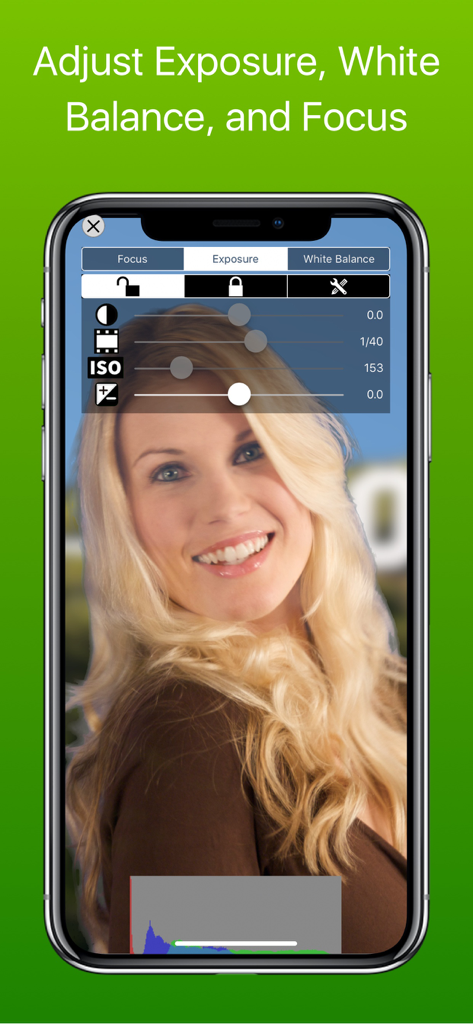
The tools that make this app stand out, trusted by 1M+ users.
Capture stunning green screen video at UHD 4K resolution or 12MP photos. Swap any solid background instantly with high-quality presets or your own library.
Edit like a pro on mobile. Stack up to six layers of video and photos with a precise timeline editor that allows for frame-by-frame trimming and complex storytelling.
Take the guesswork out of lighting. Our built-in assistant ensures your green screen is perfectly lit, guaranteeing a flawless, professional key every single time.
Everything you need to know about Veescope Live Green Screen App.
Description
Latest Version
7.4.8
Size
241.8 MB
First Released
Oct 23, 2012
Join over 4 million creators making 4K magic. Get pro-grade chroma keying, a 6-layer timeline, and our expert light guide right on your iPad or iPhone.
Everything you need to know about Veescope Live Green Screen App
The Veescope Live Green Screen App enables users to create and edit green screen photos and videos. It supports chroma keying for green, blue, or blank wall backgrounds, allowing creative visual compositions.
Yes, the Veescope Live Green Screen App supports video recording at UHD 4K resolution. It also allows users to export videos from the timeline at up to 4K resolution, ensuring high-quality output.
The Veescope Live Green Screen App allows users to create up to six layers of video or photos within its integrated timeline editor. This feature facilitates complex multi-element visual projects.
Users remove watermarks in Veescope Live Green Screen App by purchasing the in-app option. Alternatively, users can view opt-in advertisements to earn watermark-free video content for their projects.
The Veescope Live Green Screen App is compatible with Apple devices, including iPhone, iPad, and iPod touch. Specific advanced features, such as 4K video recording, require newer device models like the iPhone 6s and 6s+.
Yes, the Veescope Live Green Screen App includes new backgrounds specifically designed for creating weather forecasts. Users can generate a 5-day forecast for any location and create a weather map globally.
Yes, the Veescope Live Green Screen App provides controls for adjusting camera settings such as Exposure, White Balance, and Focus. These adjustments give users precise control over their visual output during recording.
Veescope Live Green Screen App offers customer support via email. Users access support by pressing the help button on the main screen, which directs them to send an email to veescope@dvdxdv.com.
Top-ranked apps in the same category

BYTEDANCE PTE. LTD.

Instagram, Inc.

Google LLC

Canva Pty Ltd

Snap, Inc.

Beijing Kwai Technology Co., Ltd.

Instagram, Inc.

Xiamen Meitu Technology Co., Ltd.

Google LLC
App information, icons, screenshots, and descriptions displayed on this page are sourced from the Apple App Store and are the property of their respective developers. Download estimates and rankings are based on MWM's proprietary models and may not reflect actual figures. This page is provided for informational and analytical purposes only.
Believe this page infringes your intellectual property? File a dispute