
This page is not an official page of the app or its developer, but an independent editorial publication created for informational and commentary purposes. Unless expressly stated otherwise, neither the app nor its developer is affiliated with, endorsed by, sponsored by, authorized by, or otherwise officially connected with MWM, Apple, Google Play, the app publisher, or the app's developer, and nothing on this page implies that the app was developed using MWM's services. Any trademarks, logos, screenshots, and other content remain the property of their respective owners.


VideoShow AI Video Editor
The content game demands speed. VideoShow AI arms users with instant, intelligent tools to generate, polish, and perfect video, transforming raw ideas into viral-ready media for any platform.
Downloads
12.5M+User Rating
Total Ratings
462.9KPublisher
Category
Photo & VideoLocales
27Latest Version
6.0.1.1Size
382.1 MBFirst Released
Dec 12, 2014VideoShow AI Video Editor: Key Feature Analysis
An evaluation of core functionalities for young content creators and social media enthusiasts.
AI Video Editing
The app provides one-tap AI-powered video editing, automatically adding effects, filters, transitions, and subtitles to craft cinematic videos.
Trending AI Effects
It allows users to explore viral templates like AI Anime and AI Dance, enabling the creation of unique and eye-catching videos for social media.
AI Video Generator
This tool instantly transforms photos or text into engaging, AI-powered video content.
AI Cutout Tools
The app features AI-powered cutout tools that instantly remove backgrounds from videos or images for professional-quality results.
AI Object Removal
It provides precision AI to accurately remove unwanted objects from videos or photos.
Creative Elements
The app offers a rich selection of creative elements, including filters, stickers, dynamic transitions, GIFs, and stylish text for enhanced visual appeal.
AI Music Generator
This tool allows users to transform text into unique musical tracks, generating original melodies for various video projects.
AI Voice Changer
It features an AI voice changer to modify voice tones to cute, robotic, or funny styles, adding personality and humor to videos.
Smart Video Editing
The app provides essential smart video editing functions such as merging, cropping, splitting, and speed adjustments for precise control.
Compress & Optimize
This tool enables users to reduce video file sizes without compromising quality and supports high-definition export options.
Frequently Asked Questions
Everything you need to know about VideoShow AI Video Editor
What is VideoShow AI Video Editor?
VideoShow AI Video Editor is an app that creates videos using photos, music, stickers, filters, and AI effects. It offers AI-powered video generation, editing, and enhancement features.
How does VideoShow AI Video Editor generate videos from text?
VideoShow AI Video Editor features an AI Video Generator that converts text into videos. Users input text, and the AI instantly creates corresponding video content.
Can VideoShow AI Video Editor automatically add effects to my videos?
Yes, VideoShow AI Video Editor's AI Video Editing feature automatically adds effects, filters, transitions, and subtitles to chosen content. It crafts cinematic videos in one tap.
What kind of AI effects are available in VideoShow AI Video Editor?
VideoShow AI Video Editor includes trending AI effects such as AI Anime and AI Dance. These viral templates help create unique, eye-catching videos for social media platforms.
Does VideoShow AI Video Editor offer tools to remove backgrounds from videos?
Yes, VideoShow AI Video Editor provides AI Cutout Tools. These tools instantly remove video or image backgrounds with precision, simplifying editing for professional results.
Can I change video speed using VideoShow AI Video Editor?
Yes, VideoShow AI Video Editor allows users to adjust video speed. It includes features for merging, cropping, splitting, reversing, copying, and rotating clips.
Is there a subscription service for VideoShow AI Video Editor?
Yes, VideoShow offers a VIP Membership Service. This unlocks all premium features. Payment charges to your iTunes account and renews automatically unless canceled.
How do I manage or cancel my VideoShow VIP Membership?
Users can manage or cancel their VideoShow VIP Membership anytime within their iTunes settings. The membership renews automatically unless canceled 24 hours before the period ends.
Where can I find the privacy policy for VideoShow AI Video Editor?
The privacy policy for VideoShow AI Video Editor is available at the following URL: https://d10nkoc3mu17gd.cloudfront.net/privacy/VideoShow_Privacy_Policy_ios_en.html.
Can VideoShow AI Video Editor generate original music?
Yes, VideoShow AI Video Editor features an AI Music Generator. This tool transforms text into unique music tracks, generating original melodies for various content like vlogs or short films.
Does VideoShow AI Video Editor enhance photo quality?
Yes, VideoShow AI Video Editor includes an AI Photo Enhancer. This feature brings photos to life with AI-powered upscaling and detail enhancement capabilities.
Can I remove unwanted objects from my videos or photos with VideoShow AI Video Editor?
Yes, VideoShow AI Video Editor offers an AI Object Removal feature. This tool perfects videos and photos by instantly removing unwanted objects with precision AI.
The following screenshots and description are sourced directly from the app's official store listing and are the property of the app developer.
App Store
Screenshots

AI Editing Made Easy
This tool simplifies complex editing, showcasing a "vaporwave style" video generation option and an intuitive video timeline for seamless clip arrangement.

Unleash Viral Creativity
Discover the app's "Trending AI Effects" that transform ordinary footage, and explore the "AI Creator" section offering innovative content generation from text to video.

Instant Video Generation
Witness the power of AI as this feature converts descriptive text into engaging videos, such as the "dogs stacking" example, directly from a user-provided "Text to Video" prompt.

Dynamic Scene Changes
Elevate video narratives with "Super Transitions" like the sleek "Linear" effect, offering a diverse array of options to blend clips seamlessly on the editing timeline.

Transformative AI Visuals
Explore a range of "AI-Enhanced Effects" that add dramatic flair to videos, exemplified by the fiery visual overlay and an accessible gallery of stylistic options.
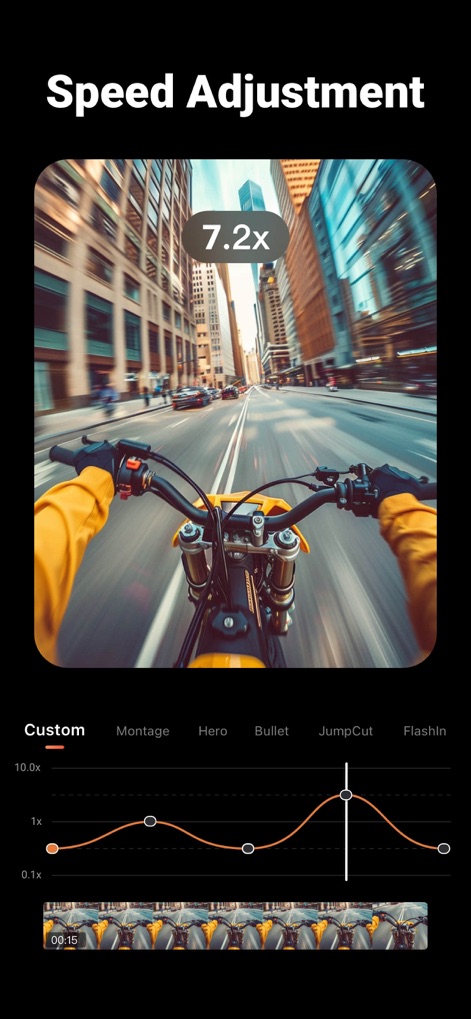
Precision Speed Control
Master video pacing with granular "Speed Adjustment" features, allowing users to fine-tune clip velocity with a numerical multiplier (e.g., 7.2x) and a visual custom speed curve.

Seamless Background Removal
Leverage the "AI Video Cutout" tool to precisely separate subjects from their backgrounds, as shown by the clean outline around the man and the resulting isolated clip on the timeline.
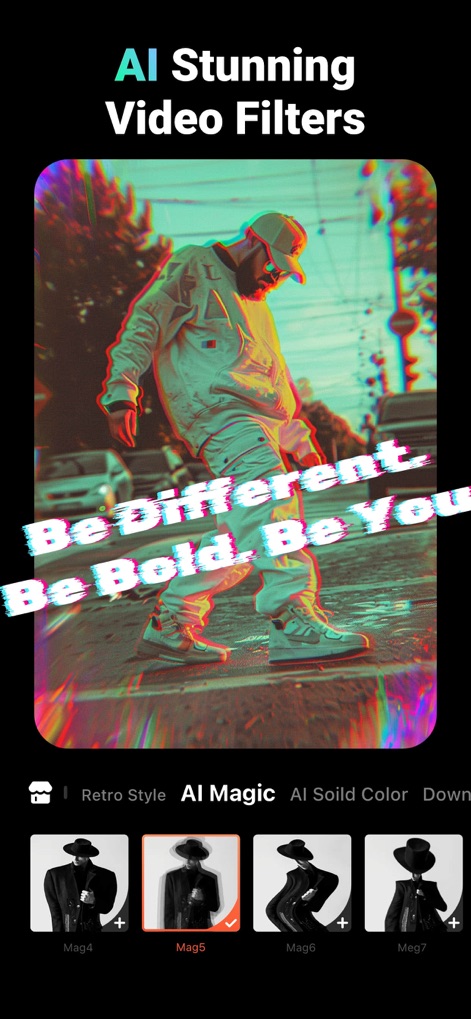
Artistic Filter Collection
Discover "AI Stunning Video Filters" that dramatically alter the visual mood, such as the glitch-inspired effect, categorized under options like "Retro Style" and "AI Magic" for easy selection.

Custom AI Music
Generate unique soundtracks effortlessly using "Make Music with AI," where a "Song Description" input guides the creation of original melodies and various genre inspiration options cater to diverse moods.

Expressive Overlays
Enhance visual storytelling with "Animation Sticker & Text" features, enabling the addition of dynamic elements like animated bubbles and fully customizable text overlays such as "Holiday."
Description
Download
More Like This
Apps with similar features and user experience

InShot - Video Editor
SHANTANU PTE. LTD.

快影
Beijing Kwai Technology Co., Ltd.

Leto: Font for Instagram Story
Leto.Fonts FZCO

Templify・ Photo & Video Editor
Templify Media, Inc.

Spring - Video Editor
KineMaster Corporation

Impresso - Video & Logo Maker
PIXERY BILGI TEKNOLOJILERI ANONIM SIRKETI

Movavi - Video Editor
Movavi Emea LLC

Zebra: Photo & Video Editor
Dmitriy Biserov

快剪辑-AI写真&视频大片一键制作
Wenzhou XunChi Digital Technology Co., Ltd.
This page is not an official page of the app or its developer, but an independent editorial publication created for informational and commentary purposes. Unless expressly stated otherwise, neither the app nor its developer is affiliated with, endorsed by, sponsored by, authorized by, or otherwise officially connected with MWM, Apple, Google Play, the app publisher, or the app's developer, and nothing on this page implies that the app was developed using MWM's services. Any trademarks, logos, screenshots, and other content remain the property of their respective owners.