
This page is not an official page of the app or its developer, but an independent editorial publication created for informational and commentary purposes. Unless expressly stated otherwise, neither the app nor its developer is affiliated with, endorsed by, sponsored by, authorized by, or otherwise officially connected with MWM, Apple, Google Play, the app publisher, or the app's developer, and nothing on this page implies that the app was developed using MWM's services. Any trademarks, logos, screenshots, and other content remain the property of their respective owners.


Weber® iGrill®
Never second-guess your grill again. This app delivers precision, turning every BBQ into a masterclass.
Downloads
1M+User Rating
Total Ratings
45.4KPublisher
Category
Food & DrinkLocales
23Latest Version
4.9.4Size
56.7 MBFirst Released
Nov 25, 2010An analytical overview of key features designed for precision and convenience in smart grilling.
Weber iGrill App: Enhancing the Grilling Experience
Comprehensive Temperature Presets
The app provides an extensive library of preset temperatures for various cuts of meat and fish, guiding users to perfectly cooked results.
Customizable Temperature Settings
It allows users to define and save custom temperature targets alongside preset options, catering to personal preferences and unique recipes.
Seamless Bluetooth Connectivity
It allows users to effortlessly connect their iGrill devices via Bluetooth, ensuring a quick start to their grilling session.
Multiple Simultaneous Timers
The app provides the ability to set up and track multiple timers concurrently, helping users manage different food items or cooking stages effectively.
Temperature Range Grilling
This tool features the ability to set and monitor grilling within specific temperature ranges, ensuring optimal cooking conditions.
Streamlined Grilling Setup
This tool features a simplified setup process directly from the home screen, making it easy to begin monitoring temperatures quickly.
Advanced Time and Temperature Graphing
It allows users to visualize cooking progress with updated time and temperature graphs, offering insights into their grilling sessions.
Personalized Device and Probe Management
It allows users to personalize device names and probe color indicators, simplifying the management of multiple iGrill units and probes.
Redesigned User Interface
The app provides an intuitive and visually updated interface for an enhanced user experience.
Integrated Support Resources
The app provides direct access to product manuals, quick start guides, and customer support, ensuring users can find assistance when needed.
Frequently Asked Questions
Everything you need to know about Weber® iGrill®
What is the Weber iGrill App?
The Weber iGrill App connects with Weber grilling devices via Bluetooth to monitor food temperatures and set timers, simplifying the grilling process. It provides precise control for perfect results.
Which Weber products are compatible with the Weber iGrill App?
The Weber iGrill App is compatible with iGrill Mini, iGrill 2, iGrill 3, Pulse 1000, Pulse 2000, Kitchen Thermometer, Kitchen Thermometer Mini, and iGrill Classic devices.
Does the Weber iGrill App monitor cooking temperatures?
Yes, the Weber iGrill App offers extensive temperature monitoring, including a preset library for various cuts of meat and fish. It also supports custom and temperature range settings.
Can I set multiple timers with the Weber iGrill App?
Yes, the Weber iGrill App allows users to set up multiple timers simultaneously. Users can track grilling sessions in minutes or hours for precise cooking management.
How does the Weber iGrill App connect to grilling devices?
The Weber iGrill App connects to compatible Weber grilling devices through easy in-app Bluetooth® pairing. This provides a seamless connection for monitoring and control.
Can the Weber iGrill App export grilling data?
Yes, the Weber iGrill App provides the ability to export temperature graph data. This feature allows users to review and analyze past grilling sessions.
Does the Weber iGrill App allow device customization?
Yes, the Weber iGrill App includes custom settings. Users can name their device and set the probe color indicator, simplifying tracking of multiple devices.
Does the Weber iGrill App provide access to product manuals?
Yes, the Weber iGrill App provides direct access to product manuals, quick start guides, and customer support. This ensures users have essential information readily available.
Has the Weber iGrill App's user interface been updated recently?
Yes, the Weber iGrill App features an all-new look and user interface. It also offers simplified grilling setup directly from the Home Screen.
Does the Weber iGrill App notify users when the target temperature is reached?
Yes, the Weber iGrill App sends notifications when a probe reaches its target temperature. This ensures users are alerted for perfect cooking results.
The following screenshots and description are sourced directly from the app's official store listing and are the property of the app developer.
App Store
Screenshots

The app welcomes users with a personalized greeting, 'Hi Griller!', and offers streamlined navigation through its intuitive bottom menu for quick access to essential features like Home and My iGrill.
Personalized Grilling Hub
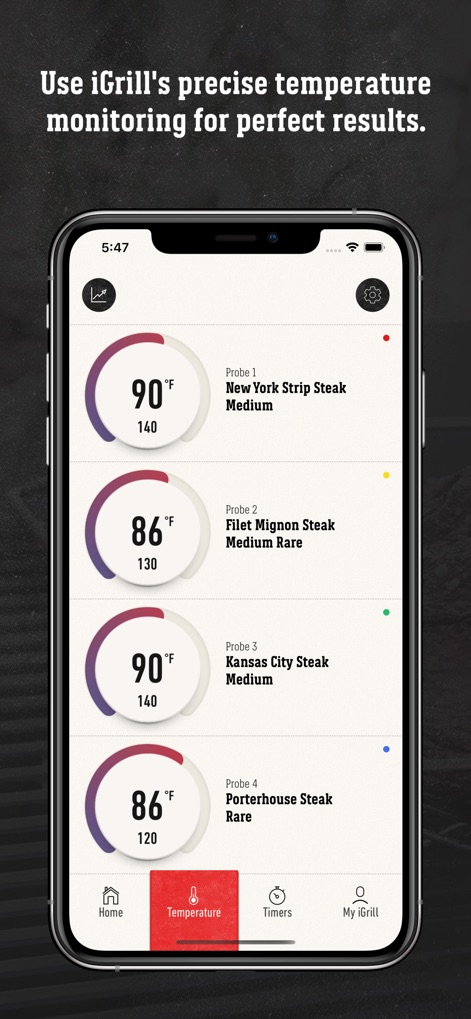
This tool provides precise temperature monitoring with individual probe readings for different meat cuts, clearly displaying both current and target temperatures along with doneness levels.
Precise Temperature Monitoring

Users receive clear 'Temperature reached' notifications when their food is perfectly cooked, ensuring precise results with the prominent target temperature display for each probe.
Perfect Doneness Alerts
Description
Download
More Like This
Apps with similar features and user experience

Traeger
Traeger Pellet Grills, LLC

Cookomix
Cooknet

ZauberTopf Rezepte
falkemedia digital GmbH
Thermomix® Cookidoo® App
Vorwerk, LLC
HomeID (Kitchen+)
Versuni Netherlands B.V

MEATER® Smart Meat Thermometer
Apption Labs Limited

CHEF iQ
RJ Brands, LLC

Starbucks-Inspired Secret Menu
Anthem Ventures LLC

Instant Connect ™
IB Appliances US Holdings, LLC
This page is not an official page of the app or its developer, but an independent editorial publication created for informational and commentary purposes. Unless expressly stated otherwise, neither the app nor its developer is affiliated with, endorsed by, sponsored by, authorized by, or otherwise officially connected with MWM, Apple, Google Play, the app publisher, or the app's developer, and nothing on this page implies that the app was developed using MWM's services. Any trademarks, logos, screenshots, and other content remain the property of their respective owners.