
This page is not an official page of the app or its developer, but an independent editorial publication created for informational and commentary purposes. Unless expressly stated otherwise, neither the app nor its developer is affiliated with, endorsed by, sponsored by, authorized by, or otherwise officially connected with MWM, Apple, Google Play, the app publisher, or the app's developer, and nothing on this page implies that the app was developed using MWM's services. Any trademarks, logos, screenshots, and other content remain the property of their respective owners.


WebLink Host
Your car's screen is now your phone's playground. The app gives users direct control over their favorite apps, right from the dashboard.
Downloads
1M+User Rating
Total Ratings
10.0KPublisher
Category
EntertainmentLocales
39Latest Version
3.6.4Size
112.0 MBFirst Released
Aug 18, 2017An evaluation for tech-savvy drivers seeking advanced in-car integration.
WebLink Host: In-Depth Feature Analysis
Seamless Smartphone App Integration
It allows users to safely and easily enjoy their favorite smartphone applications directly on the vehicle's display while on the road, enhancing convenience.
Enhanced Driving Safety & Reliability
The app is continuously tested and updated, aiming to improve the in-vehicle experience and help users keep their eyes on the road with confidence.
Modern Infotainment System Upgrade
This tool transforms a vehicle's screen into a modern, connected infotainment system, significantly enhancing the in-car experience.
Intuitive & Familiar User Interface
The app provides a beautifully designed in-vehicle interface, enabling users to interact seamlessly with their beloved smartphone applications.
Universal App Casting Capability
It allows users to project almost any smartphone application onto their vehicle screen using its Cast feature, expanding in-car functionality.
Comprehensive Media and Content Access
The app enables users to access most of their smartphone's media and content directly on the vehicle's display, offering extensive entertainment options.
Personalized In-Vehicle Experience
This tool offers a connected in-vehicle experience that is flexible and tailored to individual user preferences, no matter their location.
Integrated Audio Playback
It facilitates full audio playback through the in-vehicle speakers by connecting the smartphone via Bluetooth, ensuring a complete sound experience.
Frequently Asked Questions
Everything you need to know about WebLink Host
What is WebLink Host?
WebLink Host transforms your in-vehicle screen into a modern, connected infotainment system. It allows safe and easy access to your favorite smartphone apps directly on your car's display while on the go.
How does WebLink Host connect to a vehicle screen?
WebLink Host connects by installing the app, accepting permissions, then connecting your smartphone to a compatible WebLink vehicle screen using a certified USB cable for data and charging.
Can I watch YouTube videos using WebLink Host?
Yes, WebLink Host allows you to watch your favorite YouTube videos on many compatible vehicle screens. Some vehicle screen manufacturers may restrict the use of certain apps.
Which smartphone apps are compatible with WebLink Host?
WebLink Host allows you to use almost any smartphone app on your vehicle screen through its Cast feature. Examples include Music, YouTube, OpenWeather, Waze, Calendar, and Videos.
Is a specific USB cable required for WebLink Host connection?
Yes, a certified USB cable that supports both data communication and charging capabilities is required to connect your smartphone with the in-vehicle screen for WebLink Host.
How do I get audio playback from WebLink Host through car speakers?
To get full audio playback from WebLink Host through your car speakers, you must pair your smartphone to the in-vehicle screen using Bluetooth. Consult your screen's manual for connection details.
How can I check WebLink Host compatibility with my vehicle screen?
To check if your vehicle screen is compatible with WebLink Host, look for a WebLink logo on your product packaging or within your vehicle screen's manual. A compatible screen is necessary.
Does WebLink Host require app permissions during setup?
Yes, upon opening the WebLink Host app on your smartphone, you must accept the Terms & Conditions and all required permission prompts to successfully set up and use the service.
Can WebLink Host personalize the in-vehicle experience?
Yes, WebLink Host provides a connected in-vehicle experience that is tailored to you. It offers a beautifully designed interface to interact with your apps, music, and videos.
The following screenshots and description are sourced directly from the app's official store listing and are the property of the app developer.
App Store
Screenshots

This screen demonstrates the app's robust 'Sorting' feature for organizing applications and clearly displays key apps like 'Music' and 'YouTube' ready for in-car use.
Personalized App Control
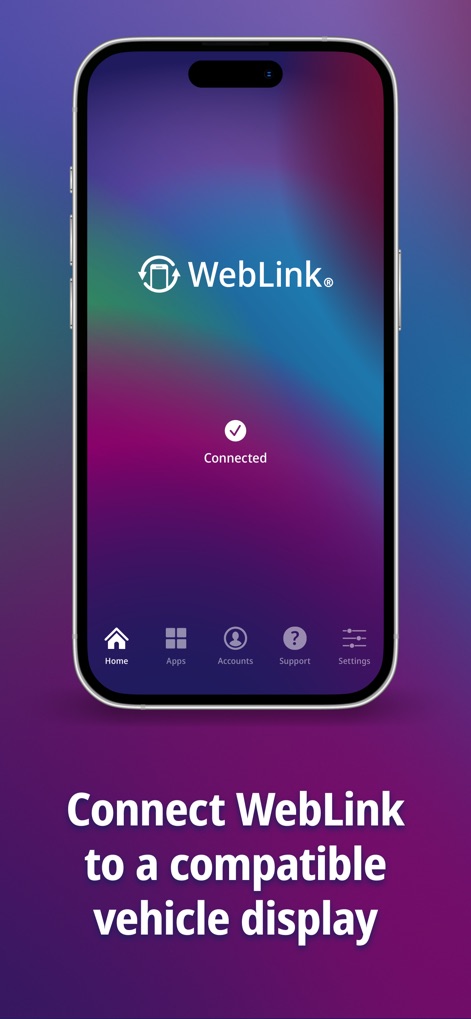
The app's user-friendly interface confirms a successful connection with a prominent 'Connected' status, ensuring the 'WebLink' host system is ready for use.
Effortless Device Pairing

Observe how the app seamlessly extends smartphone functionality to the vehicle's infotainment screen, showcasing simultaneous 'Music' playback and 'Weather' information for an enhanced journey.
Integrated In-Car Experience
Description
Download
More Like This
Apps with similar features and user experience

Car Play Connect: Sync My Auto
Liquid Apps Bilgi ve Operasyonel Teknolojileri Limited Sirketi

Car Play Connect: Auto Sync
Rostyslav Dudnyk

Car Play Connect - Auto Sync
Tapwise LLC

Car Widgets: Style Dashboard
SUPRAPPS SP Z O O
Car Play Connect Sync Autolink
Ahmet Mucahid Bozkurt

Car Play Connect Sync
Emrullah Bas

Car.Play Connect: Smart Sync
5SKay VietNam Technology JSC

CarOS · Smart Dashboard
Oh My Software FZCO

Hudway Go: Navigation with HUD
HUDWAY LLC.
This page is not an official page of the app or its developer, but an independent editorial publication created for informational and commentary purposes. Unless expressly stated otherwise, neither the app nor its developer is affiliated with, endorsed by, sponsored by, authorized by, or otherwise officially connected with MWM, Apple, Google Play, the app publisher, or the app's developer, and nothing on this page implies that the app was developed using MWM's services. Any trademarks, logos, screenshots, and other content remain the property of their respective owners.