
This page is not an official page of the app or its developer, but an independent editorial publication created for informational and commentary purposes. Unless expressly stated otherwise, neither the app nor its developer is affiliated with, endorsed by, sponsored by, authorized by, or otherwise officially connected with MWM, Apple, Google Play, the app publisher, or the app's developer, and nothing on this page implies that the app was developed using MWM's services. Any trademarks, logos, screenshots, and other content remain the property of their respective owners.


我嘞个豆-海量拼豆图纸与设计助手
This app hands users the power to transform pixels into tangible art, effortlessly.
Downloads
50k+User Rating
Total Ratings
60Publisher
Category
Graphics & DesignLocales
1Latest Version
1.6.0Size
74.4 MBFirst Released
Jan 24, 2026An Analytical Overview of its Features for Perler Bead and Pixel Art Enthusiasts
Core Capabilities of "我嘞个豆"
Unrestricted Free Access
The app provides all its powerful features completely free of charge, with no in-app purchases or hidden costs, ensuring creative tools are accessible to every enthusiast.
Smart Image-to-Pattern Conversion
This tool features one-click conversion of imported photos into perler bead patterns, allowing custom sizes, color quantity adjustments, and intelligent matching to mainstream bead color codes.
Immersive Crafting Assistant
It offers an immersive beading experience, including local pattern zooming, smart progress marking, and a screen-always-on function, streamlining the physical crafting process and preventing errors.
Advanced Pixel Art Editor
The app includes a powerful built-in pixel art editor with support for custom canvas sizes, empowering users to freely design unique creations or replicate existing pixel art.
Efficient Bead Inventory Management
It provides an intelligent inventory management function, allowing users to easily record and track bead colors via scanning or manual input, preventing duplicate purchases and ensuring color availability.
Collaborative Inspiration Hub
The app features an inspiration community where users can browse and discover other creators' works, save patterns for future projects, and share their own perler bead masterpieces with fellow enthusiasts.
Versatile Color Palette Management
This tool supports various mainstream bead brand color cards and custom color palettes, providing flexibility and precise color matching for diverse crafting needs.
High-Resolution Pattern Export
It allows users to export high-definition patterns, making them convenient for printing and sharing across different platforms or for physical use.
The following screenshots and description are sourced directly from the app's official store listing and are the property of the app developer.
App Store
Screenshots
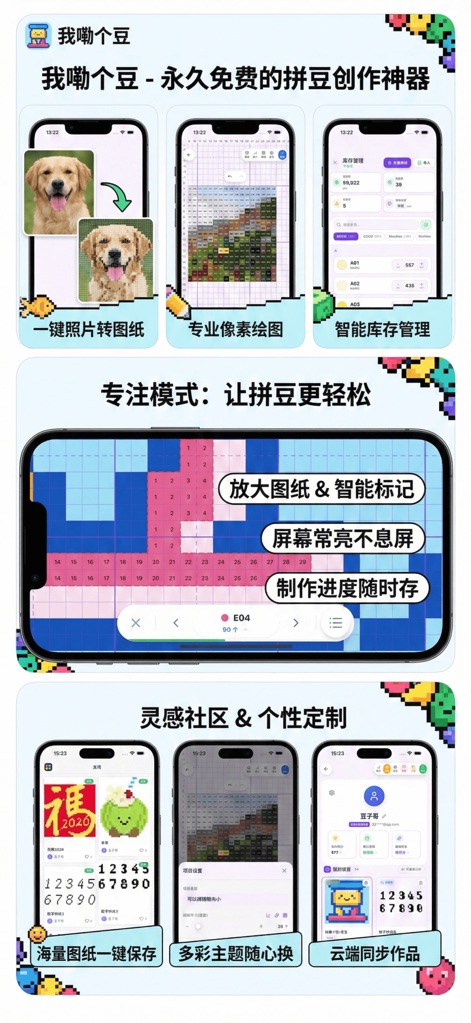
Explore the app's core functionalities, including one-click photo-to-pattern conversion and a professional pixel art grid for detailed design.
App Feature Highlights

Observe the precise numbered grid, which aids users in accurate placement, and the color-coded pixel cells indicating specific bead types and counts.
Detailed Pattern Grid

The app provides a clear overview of total bead quantities and categories, alongside a detailed list of individual color stock levels for efficient tracking.
Smart Inventory Management

Users can effortlessly import images to generate patterns or utilize an existing bead pattern, and also choose to create projects from an empty canvas.
Versatile Import Options

Discover a vibrant inspiration gallery featuring diverse pixel art designs and patterns, many of which are marked as "Free" for immediate use.
Inspiration Gallery & Community

Explore advanced design tools like "Layers" and "Statistics" for intricate adjustments, coupled with "Project Settings" for dynamic image resizing.
Advanced Design Tools

Gain valuable insights from the "Color Statistics" display, showing both the total number of colors and beads used, alongside a breakdown of each individual color's quantity.
Insightful Color Statistics

Users can personalize their workspace by selecting from various predefined color theme presets and further customize the grid styles to match their preferences.
Personalized Theme Settings
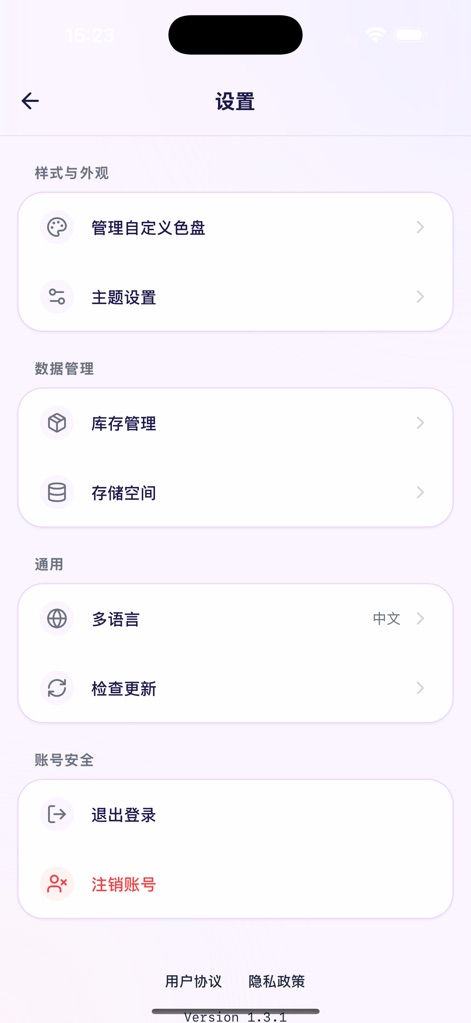
Access comprehensive app settings under "Style and Appearance" for managing custom color palettes and "Data Management" for overseeing inventory.
Comprehensive App Settings

View personal profile details including earned points and check-in status, and manage all "My Projects," distinguishing between published and private creations.
Personal Profile & Projects
Description
Download
More Like This
Top-ranked apps in the same category

iScreen - Widgets & Wallpaper
Xiamen ShenZhuo Information Technology Co., Ltd.

Kling AI: AI Image&Video Maker
LOHAS GAMES PTE. LTD.

Home AI - AI Interior Design
HUBX YAZILIM HIZMETLERI ANONIM SIRKETI

ibis Paint X
ibis inc.

AR Drawing: Sketch & Paint
Digital Solutions Technologies Limited
Adobe Express: Create Anything
Adobe Inc.
ThemeKit: Widget & Icon Themes
Woohoo Tech. Ltd.

Sketchbook®
Sketchbook, Inc.

Layout - Photo Collage Maker
Fitness Labs SRL
This page is not an official page of the app or its developer, but an independent editorial publication created for informational and commentary purposes. Unless expressly stated otherwise, neither the app nor its developer is affiliated with, endorsed by, sponsored by, authorized by, or otherwise officially connected with MWM, Apple, Google Play, the app publisher, or the app's developer, and nothing on this page implies that the app was developed using MWM's services. Any trademarks, logos, screenshots, and other content remain the property of their respective owners.