
This page is not an official page of the app or its developer, but an independent editorial publication created for informational and commentary purposes. Unless expressly stated otherwise, neither the app nor its developer is affiliated with, endorsed by, sponsored by, authorized by, or otherwise officially connected with MWM, Apple, Google Play, the app publisher, or the app's developer, and nothing on this page implies that the app was developed using MWM's services. Any trademarks, logos, screenshots, and other content remain the property of their respective owners.


Zoom Rooms
Complexity, demystified. It empowers users to command their meeting spaces with effortless precision.
Downloads
10M+User Rating
Total Ratings
1.2KPublisher
Category
BusinessLocales
17Latest Version
7.0.1Size
328.1 MBFirst Released
Jan 10, 2022An evaluation of key functionalities for modern workspace management and collaboration.
Zoom Rooms: Core Features Analysis
Native Smart Room Integration
This tool features native integration capabilities that allow for control over room elements such as lighting and projectors, creating an optimized and automated meeting environment.
One-Touch Meeting Initiation
The app provides a seamless one-touch experience to quickly start or join video conferences, significantly reducing setup time and friction for users.
Meeting Room Scheduling Display
It offers dedicated scheduling displays for meeting rooms, enabling users to view availability, upcoming meetings, and make ad-hoc reservations directly from outside the room, enhancing space utilization.
Multi-Device & Multi-Location Connectivity
The platform ensures broad accessibility by allowing participants to connect effortlessly from mobile devices, desktops, and other rooms across various geographic locations.
Comprehensive In-Room Control
The app provides intuitive controls within the meeting room, allowing users to easily manage audio, video, participant settings, and other conferencing functionalities.
Dedicated Room Controller
This tool allows for an iPad or iPhone to serve as a dedicated room controller, offering consistent and centralized management of the Zoom Room environment from a single device.
Flexible Hardware Deployment
The system supports both appliance and custom hardware deployments, providing high-quality video and audio solutions adaptable to diverse workspace types and organizational needs.
Interactive Touch Display Modes
It features various interactive touch display modes, including shared space, kiosk, and personal Zoom Rooms, enabling whiteboard sessions, virtual reception, and digital signage capabilities.
Workspace Desk Management
The platform includes functionality for managing workspace desks, allowing users to view desk status, make ad-hoc reservations, and check in via QR code for efficient hot-desking.
Reservation-Only Room Management
This feature allows the iPad to display the status of reservation-only rooms, facilitating ad-hoc bookings and check-ins via QR code for specific reserved spaces.
Frequently Asked Questions
Everything you need to know about Zoom Rooms
What is Zoom Rooms?
Zoom Rooms is a comprehensive video conferencing system designed for high-quality video, audio, and sharing across various workspaces. It connects participants on multiple devices and locations.
What are the key features of the Zoom Rooms app?
The Zoom Rooms app offers one-touch meeting join or start, intuitive room controls for audio/video/participants, and supports native room control integration for external devices like projectors.
Can an iPad function as a Zoom Rooms controller?
Yes, an iPad running the Zoom Rooms app can serve as a dedicated Zoom Rooms Controller. It connects to a Mac, PC, or Zoom Rooms Appliance to manage the room.
What operational modes are available on the Zoom Rooms app for iPad?
The Zoom Rooms app for iPad supports five modes: Controller, for Touch, scheduling display, workspace desk, and reservation only room. Each mode offers distinct functionalities.
How can users join a meeting using the Zoom Rooms app?
Users can join a meeting through the Zoom Rooms app by entering a specific Meeting ID. The app also provides an option to join using a Personal Link Name.
Does Zoom Rooms support inviting new participants to a meeting?
Yes, the Zoom Rooms app supports inviting new participants. Users can select contacts from email, phone, or SIP/H.323 through the in-app invite function.
The following screenshots and description are sourced directly from the app's official store listing and are the property of the app developer.
App Store
Screenshots
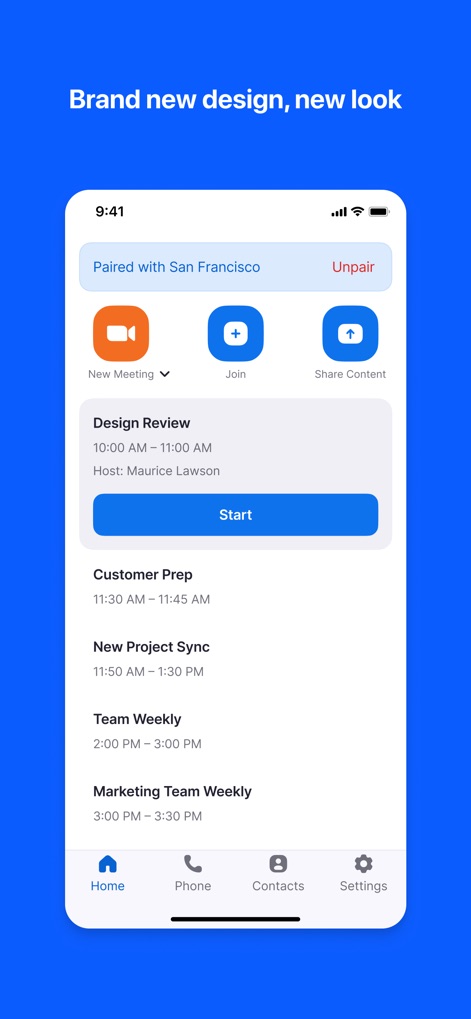
Observe how the app centralizes upcoming meetings and offers quick access to "New Meeting" and "Share Content" options.
Meeting Management Hub

Explore the clear, accessible interface for managing calls, featuring prominent "Mute" and "Start Video" buttons alongside a direct volume slider.
Intuitive Meeting Controls

This screen highlights the straightforward process for joining meetings, with a dedicated "Meeting ID" input field and an integrated numeric keypad for quick entry.
Seamless Meeting Access

Discover the comprehensive invitation options, enabling users to effortlessly add participants from their "Contacts" list or invite specific "Rooms" to a session.
Collaborative Invitation Suite
Description
Download
More Like This
Apps with similar features and user experience



This page is not an official page of the app or its developer, but an independent editorial publication created for informational and commentary purposes. Unless expressly stated otherwise, neither the app nor its developer is affiliated with, endorsed by, sponsored by, authorized by, or otherwise officially connected with MWM, Apple, Google Play, the app publisher, or the app's developer, and nothing on this page implies that the app was developed using MWM's services. Any trademarks, logos, screenshots, and other content remain the property of their respective owners.