
このページはアプリまたはその開発者の公式ページではなく、情報提供および論評を目的として作成された独立した編集出版物です。明示的に別段の記載がない限り、アプリおよびその開発者は、MWM、Apple、Google Play、アプリのパブリッシャー、またはアプリの開発者と提携、承認、後援、認可、またはその他の公式的な関係はなく、このページのいかなる内容も、アプリがMWMのサービスを使用して開発されたことを意味するものではありません。すべての商標、ロゴ、スクリーンショット、その他のコンテンツはそれぞれの所有者の財産です。


ダウンロード
2.5M+ユーザー評価
評価数
31.0K開発元
カテゴリ
Graphics & Design対応言語
18最新バージョン
1.10.7サイズ
107.3 MBリリース日
2022年7月6日モバイル3Dモデリングにおける主要機能とユーザーへの影響評価
「3D modeling: Design my model」アプリの機能分析
.objファイルのインポート・エクスポート
本アプリは、標準的な.objファイルのインポートおよびエクスポートに対応しており、他の3Dソフトウェアとの連携を円滑にします。
高速なワークフローとジェスチャー操作
アプリは、ジェスチャーによるオブジェクトとカメラの高速な操作、およびマルチ選択機能を通じて、効率的なモバイルワークフローを提供します。
直感的なスカルプティングツール
ユーザーは、移動、プッシュ、プル、スムーズなどのスカルプティングツールとブラシ調整機能を使い、有機的な形状やディテールを作成できます。
多彩なカラーリングとUV編集
本アプリは、テクスチャペイント、UVエディタによるテクスチャ配置調整、および頂点カラーペイントを提供し、モデルの視覚的表現力を高めます。
高度なエッジ編集機能
本ツールは、エッジの切断、ループ選択、押し出し、穴埋めなど、多様なエッジ操作機能を提供し、複雑なモデリングをサポートします。
便利な補助ツール群
このアプリは、オートセーブ、直交カメラ、精密な値設定、選択の隔離など、作業効率を高める補助ツールを多数搭載しています。
精密な頂点ツール
ユーザーは、頂点の結合、接続、および面作成ツールを活用して、メッシュを正確に編集できます。
基本的な面編集ツール
アプリは、面の押し出し、描画、分離、クローン作成など、基本的な面編集ツールを備えています。
各機能のビデオチュートリアル
各ツールにはビデオチュートリアルが用意されており、ユーザーは機能を効率的に習得し、活用できます。
包括的なオブジェクト操作
オブジェクトの結合、分離、クローン、ミラー、スムーズ化などの機能により、モデルの構成と表現を柔軟に管理できます。
よくある質問
について知っておくべきこと 3D modeling: Design my model
What is 3D modeling: Design my model?
3D modeling: Design my model is a 3D modeling application for iPhone and iPad. It allows users to design 3D content on the go using gestures, supporting various tools for vertex, edge, face, and object manipulation.
Does 3D modeling: Design my model support Apple Pencil?
Yes, 3D modeling: Design my model supports the Apple Pencil for design. Users can also utilize the app's features with gestures, so the Apple Pencil is optional for functionality.
Can I import and export 3D models in 3D modeling: Design my model?
Yes, the 3D modeling: Design my model app allows users to import and export .obj files. This feature facilitates external workflow integration for 3D content creation and sharing.
What types of tools are available in 3D modeling: Design my model?
3D modeling: Design my model offers vertex, edge, face, object, sculpting, coloring, and display tools. These include functions like extrude, merge, clone, paint textures, and adjust grid settings.
How do I manipulate objects in 3D modeling: Design my model?
You can manipulate objects in 3D modeling: Design my model using gestures to move, rotate, and scale them. The app also allows multi-selection of vertices, edges, faces, and objects via long tap or frame draw.
Does 3D modeling: Design my model provide tutorials for its tools?
Yes, 3D modeling: Design my model provides a video tutorial for every tool within the app. This helps users understand and utilize each feature effectively.
Can I apply materials to my 3D models in 3D modeling: Design my model?
Yes, 3D modeling: Design my model offers 20 materials that users can apply to their objects. The app also includes tools for painting textures and editing texture placement using a UV editor.
Does 3D modeling: Design my model have sculpting capabilities?
Yes, 3D modeling: Design my model includes sculpting tools such as Move, Screen, Push, Pull, and Smooth. Users can adjust the brush size and strength for these tools.
Can I combine or separate objects in the 3D modeling: Design my model app?
Yes, 3D modeling: Design my model provides object tools to combine and separate 3D objects. These tools also include options for cloning, mirroring, smoothing, and dividing objects.
What display options are available in 3D modeling: Design my model?
3D modeling: Design my model offers various display options. These include a settable grid, display info for triangles and edge length, and toggles for wireframe on shaded, shadows, and axis.
以下のスクリーンショットと説明は、アプリの公式ストアリスティングから直接取得されたものであり、アプリ開発者の所有物です。
アプリストア
スクリーンショット

このアプリは、ユーザーが建物の屋根に適用された鮮やかな緑色のエッジループを視覚化し、底部メニューから「Cut loop」や「Extrude」などの強力なエッジ編集機能を利用できることを示しています。
エッジ編集

この画像は、バイクモデルの前輪の一部が緑色にハイライトされている様子を捉え、底部にあるツールメニューの「Mirror」や「Smooth」といったオブジェクト調整機能の利用を可能にします。
オブジェクト操作
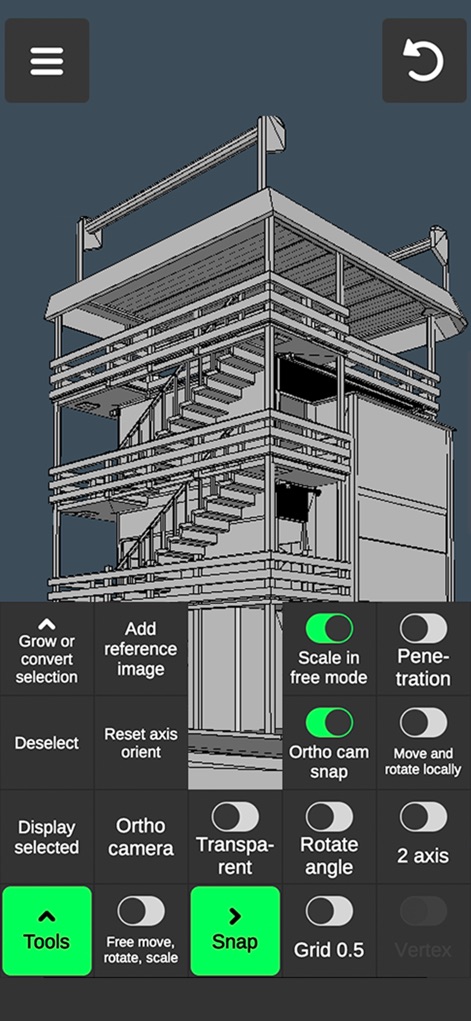
複雑な建造物のモデルが表示されており、ユーザーは「Scale in free mode」や「Ortho cam snap」のような詳細設定のほか、「Orthographic camera」や「Grid」表示オプションを柔軟に制御できます。
表示設定

このスクリーンショットでは、人間のモデルが鮮やかな緑色のワイヤーフレームで構造を強調されており、底部には多様なマテリアル選択肢が並び、即座に視覚的な質感を適用できることを示しています。
質感と構造

ユーザーが作成した緑色に着色されたローポリゴンの木のモデルを提示し、ボトムメニューの「Assign」や「Fill」機能を使用してオブジェクトに色を簡単に適用できることを示しています。
カラーリング

この画像は、戦車の3Dモデルに緑色の押し出し(Extrude)形状が適用されていることを示しており、ユーザーは「Extrude」や「Draw face」ツールを使って新しい形状を効率的に作成できます。
形状作成

このアプリは、猫の3Dモデルの複雑なメッシュ構造を表示し、底部にある「Merge」や「Target merge」のような頂点編集ツールを利用して詳細なジオメトリ調整を行えることを示しています。
頂点調整

戦車の3Dモデルにおいて、車体下部が鮮やかな緑色にハイライトされており、簡略化された底部メニューの選択ツールやモデリングツールアイコンを使って特定の要素を素早く操作できることを示しています。
要素選択
説明
Download





このページはアプリまたはその開発者の公式ページではなく、情報提供および論評を目的として作成された独立した編集出版物です。明示的に別段の記載がない限り、アプリおよびその開発者は、MWM、Apple、Google Play、アプリのパブリッシャー、またはアプリの開発者と提携、承認、後援、認可、またはその他の公式的な関係はなく、このページのいかなる内容も、アプリがMWMのサービスを使用して開発されたことを意味するものではありません。すべての商標、ロゴ、スクリーンショット、その他のコンテンツはそれぞれの所有者の財産です。