
このページはアプリまたはその開発者の公式ページではなく、情報提供および論評を目的として作成された独立した編集出版物です。明示的に別段の記載がない限り、アプリおよびその開発者は、MWM、Apple、Google Play、アプリのパブリッシャー、またはアプリの開発者と提携、承認、後援、認可、またはその他の公式的な関係はなく、このページのいかなる内容も、アプリがMWMのサービスを使用して開発されたことを意味するものではありません。すべての商標、ロゴ、スクリーンショット、その他のコンテンツはそれぞれの所有者の財産です。


Nomad Sculpt
モバイルの限界を打ち破り、どこへでもプロの3Dスタジオを持ち運ぶ能力を実感できる。粘土をこねるようにデジタル彫刻を操る、その自由度がもたらす創造の解放を見よ。
ダウンロード
1M+ユーザー評価
評価数
46.3K開発元
カテゴリ
Graphics & Design対応言語
23最新バージョン
2.8サイズ
189.4 MBリリース日
2020年8月4日ターゲットユーザーに向けた主要機能とビジネス価値の評価
Nomad Sculpt: モバイル3Dスカルプトのプロフェッショナル分析
高度な3Dスカルプトツール
粘土、平滑化、マスクなど多様なブラシに加え、トリムブーリアンなどのツールにより、複雑な形状を効率的に造形できます。
主要な3Dファイル形式の入出力
glTF、OBJ、STL、PLYといった汎用的な3Dファイル形式をサポートしており、他のプロフェッショナルソフトウェアとのシームレスな連携や作品の共有を可能にします。
マルチレゾリューションスカルプト
メッシュの複数解像度間を自在に行き来することで、大規模な変更から微細なディテール追加まで、柔軟かつ効率的な作業フローを実現します。
高精度なメッシュ管理機能
ボクセルリメッシュでメッシュの均一性を確保し、ダイナミックトポロジーでブラシ下のディテールを自動的に調整することで、常に最適なメッシュ構造を維持します。
PBRレンダリングとポストプロセス
PBR(物理ベースレンダリング)による高品質なリアルタイム表示と、深度の被写界深度、アンビエントオクルージョンなどの豊富なポストプロセス効果で、作品の視覚的魅力を最大限に引き出します。
非破壊的レイヤーシステム
スカルプトとペイントの操作を個別のレイヤーに記録することで、非破壊的な編集を可能にし、デザインの反復と修正を容易にします。
頂点ペイントとマテリアル管理
カラー、ラフネス、メタリックの頂点ペイント機能と、マテリアルプリセットの管理により、直感的にモデルの表面属性を設定し、表現力を高めることができます。
自動UV展開とベイク機能
自動UV展開はテクスチャリングプロセスを簡素化し、ベイク機能は頂点データや高精細なディテールをテクスチャに転送できるため、ゲームアセット作成やレンダリング効率化に貢献します。
よくある質問
について知っておくべきこと Nomad Sculpt
What sculpting tools are available in Nomad Sculpt?
Nomad Sculpt offers various sculpting tools including clay, flatten, smooth, mask, and trim boolean cutting with lasso and rectangle shapes. These tools are designed for detailed organic and hardsurface modeling tasks.
Does Nomad Sculpt support painting models?
Yes, Nomad Sculpt allows users to paint models using vertex painting. This feature includes options for color, roughness, and metalness, with easy management of material presets.
Does Nomad Sculpt include a layer system?
Yes, Nomad Sculpt features a layer system. It records both sculpting and painting operations in separate layers, enabling easier iteration and flexible modifications during the creative process.
What file formats can Nomad Sculpt import and export?
Nomad Sculpt supports importing and exporting models in glTF, OBJ, STL, and PLY file formats. This ensures compatibility with various other 3D software and platforms.
Does Nomad Sculpt have advanced rendering capabilities?
Yes, Nomad Sculpt offers beautiful PBR rendering by default, complete with lighting and shadows. It also includes post-processing options like Screen Space Reflection and Depth of Field.
Is the Quad Remesher tool free in Nomad Sculpt?
No, the Quad Remesher tool in Nomad Sculpt is not included with the base application. It is available as a separate in-app purchase, providing automatic quad-dominant mesh remeshing.
How does dynamic topology function in Nomad Sculpt?
Nomad Sculpt's dynamic topology refines the mesh locally under the brush, providing an automatic level of detail. This feature also automatically updates existing layers.
Is the Nomad Sculpt interface optimized for mobile devices?
Yes, the Nomad Sculpt interface is designed specifically for a mobile experience. It is easy-to-use and offers customization options to suit individual user preferences.
What is voxel remeshing used for in Nomad Sculpt?
Voxel remeshing in Nomad Sculpt quickly remeshes your mesh to achieve a uniform level of detail. It is particularly useful for sketching rough shapes at the beginning of the creation process.
Can brush strokes be customized in Nomad Sculpt?
Yes, Nomad Sculpt allows extensive customization of brush strokes. Users can adjust parameters such as falloff, alphas, tilings, and pencil pressure, and save or load their custom tool presets.
以下のスクリーンショットと説明は、アプリの公式ストアリスティングから直接取得されたものであり、アプリ開発者の所有物です。
アプリストア
スクリーンショット

このスクリーンショットは、Nomad Sculptで作成された詳細な男性キャラクターのバストアップモデルを披露しています。左側のツールバーに表示されている**スカルプトツール**と、キャラクターの豊かな**髭と装飾品**の細部が、本アプリの高い表現力を示しています。
精巧な3Dスカルプト

この画像では、Nomad Sculptを活用してデザインされた、複雑なポーズのドラゴンのキャラクターが特徴的です。ユーザーは、右側のメニューから利用できる**多様なプリミティブ形状**を基に、このクリーチャーの**細部まで表現された肌の質感と煙のエフェクト**を実現できます。
幻想的なクリーチャー創造

このスクリーンショットは、写実的な表現が可能な女性の顔と頭部を美しくスカルプトしています。クリーンなレンダリングで表現された**滑らかな肌の表現**と、頭に巻かれた**タオルのリアルなドレープ**が、Nomad Sculptの造形能力を際立たせています。
優雅な人物モデリング
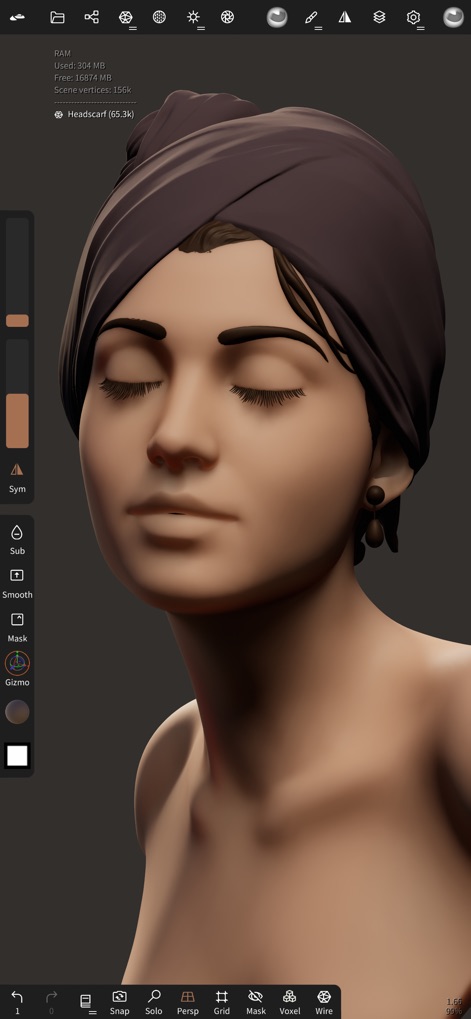
先のモデルに、彩色と質感を追加した表現を示しています。**肌の自然な色合い**と、頭に巻かれた**スカーフの深い色味と光沢**が、PBRレンダリングによるリアルな視覚効果を強調しており、本アプリのペイント機能の多様性を物語っています。
質感と色彩の追加

このスクリーンショットは、Nomad Sculptの高度なレンダリングと背景設定オプションを示しています。ユーザーは**HDR画像をインポート**してシーンの照明をカスタマイズでき、**露出と回転のスライダー**を調整して視覚的な構成を完璧に仕上げることが可能です。
環境設定とレンダリング
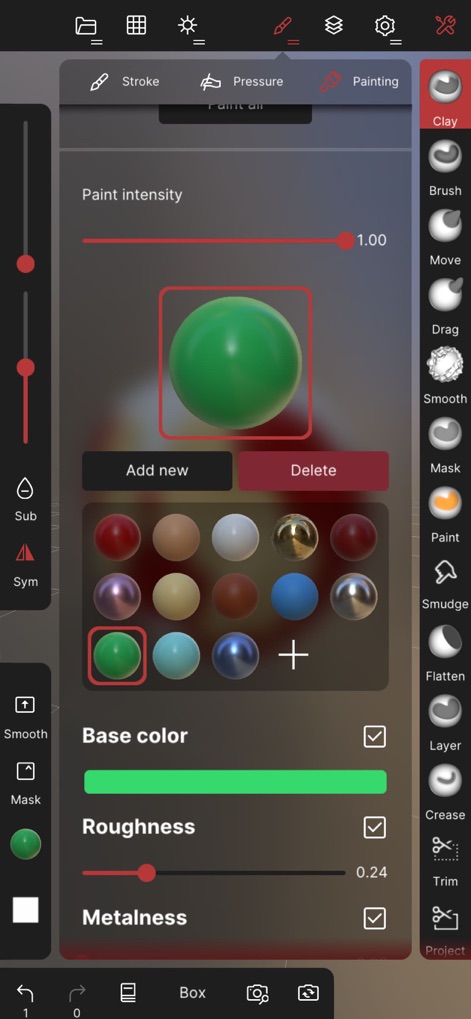
この画像は、Nomad Sculptの強力なPBR(物理ベースレンダリング)ペイント機能のインターフェースです。ユーザーは、**ベースカラー、ラフネス、メタルネス**といったパラメータを詳細に設定し、様々なマテリアルプリセットを適用して、モデルに**リアルな質感と色合い**を付与できます。
PBRペイント機能
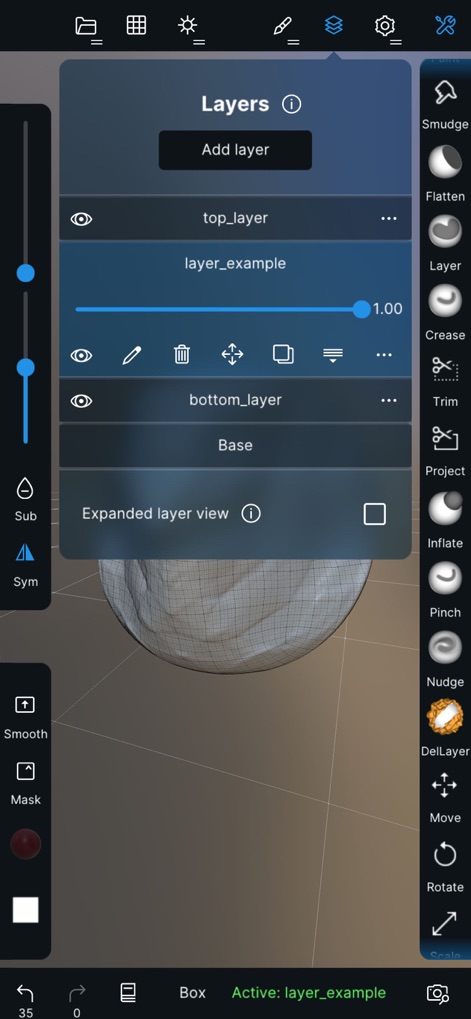
このスクリーンショットは、Nomad Sculptの非破壊ワークフローを可能にするレイヤーシステムを示しています。ユーザーは、**複数のレイヤーを作成**し、それぞれにスカルプトやペイントの変更を記録することで、**編集の柔軟性を高め**、複雑なモデルの制作プロセスを効率化できます。
レイヤー管理で柔軟に

Nomad Sculptにおけるブラシストロークの詳細なカスタマイズ機能がここに示されています。ユーザーは、**アルファテクスチャをインポート**してブラシの形状を制御し、**フォールオフカーブを調整**することで、多様な表現力を持つブラシストロークを作成できます。
ブラシストロークの調整
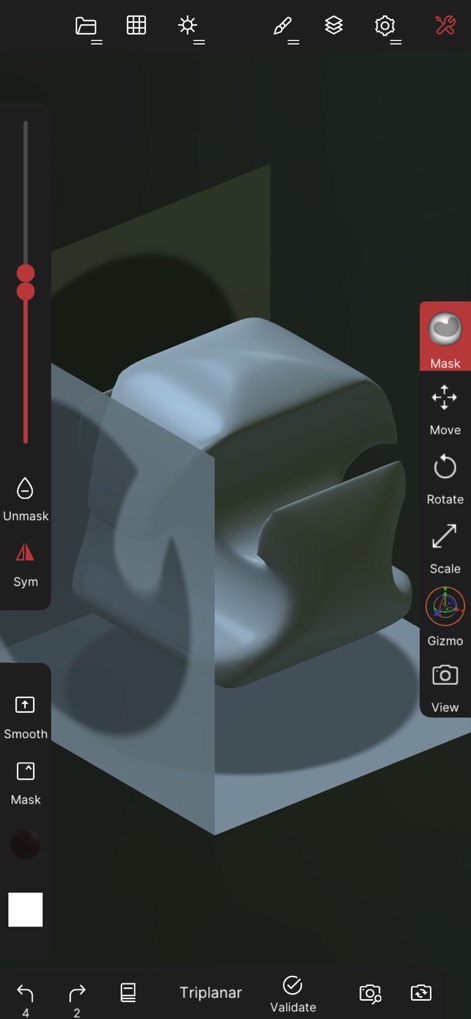
このスクリーンショットは、Nomad Sculptのマスキング機能を使用している様子です。ユーザーは、モデルの特定の部分を**マスキングすることで保護**し、残りの部分にのみスカルプトやペイントの操作を適用できます。これにより、**複雑な形状の細部**を精密に編集することが可能になります。
マスキング機能
説明
Download


このページはアプリまたはその開発者の公式ページではなく、情報提供および論評を目的として作成された独立した編集出版物です。明示的に別段の記載がない限り、アプリおよびその開発者は、MWM、Apple、Google Play、アプリのパブリッシャー、またはアプリの開発者と提携、承認、後援、認可、またはその他の公式的な関係はなく、このページのいかなる内容も、アプリがMWMのサービスを使用して開発されたことを意味するものではありません。すべての商標、ロゴ、スクリーンショット、その他のコンテンツはそれぞれの所有者の財産です。