
このページはアプリまたはその開発者の公式ページではなく、情報提供および論評を目的として作成された独立した編集出版物です。明示的に別段の記載がない限り、アプリおよびその開発者は、MWM、Apple、Google Play、アプリのパブリッシャー、またはアプリの開発者と提携、承認、後援、認可、またはその他の公式的な関係はなく、このページのいかなる内容も、アプリがMWMのサービスを使用して開発されたことを意味するものではありません。すべての商標、ロゴ、スクリーンショット、その他のコンテンツはそれぞれの所有者の財産です。


ダウンロード
1M+ユーザー評価
評価数
16.5K開発元
カテゴリ
Graphics & Design対応言語
3最新バージョン
5.2.9サイズ
384.5 MBリリース日
2017年12月13日プロフェッショナルなデジタルクリエイターのための包括的ツール
Artstudio Pro: 多機能性とパフォーマンス分析
強力な描画エンジンと広範なキャンバスサポート
GPUアクセラレーションを活用したArtEngineは、最大64Mpixの広大なキャンバスサイズ、無制限のレイヤー、および複数のドキュメントの同時作業を可能にし、プロフェッショナルなデジタルアート制作に求められる極めてスムーズなワークフローを実現します。
高度なカスタマイズが可能なブラシエンジン
Apple Pencilに最適化されたラグのないメカニズムは、4000x4000までのブラシサイズ、100以上の詳細設定が可能なブラシエディター、そして150以上の多様な内蔵ブラシを通じて、プロフェッショナルが求めるリアルで表現豊かなストロークの生成を可能にします。
柔軟性と非破壊編集に優れたレイヤーシステム
グループ化、マスク、クリッピングマスク、9種類の非破壊レイヤーエフェクト、および調整レイヤーを含む革新的なレイヤーシステムは、複雑な作品の構造化と柔軟な編集を可能にし、プロのワークフローを強力にサポートします。
包括的なプロフェッショナル写真編集機能
15種類の非破壊調整、4つの自動調整、変形ツール、リアルタイムプレビュー付きの豊富なフィルター、およびレタッチツールは、写真の高度な加工と精密な補正を可能にし、イラストレーションやグラフィックデザインにおける写真統合の可能性を広げます。
幅広いファイル形式のインポート/エクスポート対応
PNG、JPEG、PSD、TIFFなどの主要な画像形式に加え、ABR/TPLブラシ、ASE/ACOカラースウォッチ、TTF/OTFフォントなど、プロフェッショナルなワークフローで一般的に使用される多様なファイル形式のインポートおよびエクスポートをサポートし、他のソフトウェアやプラットフォームとのシームレスな連携を実現します。
レイヤーベースのアニメーション制作
レイヤーやグループからアニメーションを作成し、MP4、HEVC、アニメーションGIF/PNG形式でエクスポートできる機能は、オニオンスキンやカスタマイズ可能なフレーム期間のサポートにより、動的なコンテンツ制作への道を拓きます。
高度にカスタマイズ可能なユーザーインターフェース
カラー、レイヤー、ブラシなどのフローティングパネル、カスタマイズ可能なクイックメニューとショートカットにより、ユーザーは自身の作業スタイルに合わせてインターフェースを最適化でき、生産性と操作の快適性を向上させます。
正確な描画を支援する補助機能
ガイドラインへのスナップ、ダイナミックガイドライン、グリッド、およびパースペクティブグリッドアシストといった機能は、精密な線画、構図の計画、および複雑な遠近法の描画において、ユーザーを支援し、作品の品質を高めます。
よくある質問
について知っておくべきこと Artstudio Pro: Draw, Paint
What is Artstudio Pro?
Artstudio Pro is a powerful painting and photo editing application available for iOS and macOS. It serves as the successor to the original ArtStudio app, leveraging advanced technologies for an optimized and smooth workflow experience.
What features does Artstudio Pro offer?
Artstudio Pro offers a GPU-accelerated engine, a flexible layer system, an advanced brush engine, professional photo editing tools, and animation capabilities. It also includes comprehensive import/export options and iCloud integration.
Can Artstudio Pro create animations?
Yes, Artstudio Pro allows users to create animations from layers or groups. It features onion skin, customizable frame duration, and options to export animations to MP4, HEVC, Animated GIF, or PNG formats.
What file formats does Artstudio Pro support for import and export?
Artstudio Pro imports PNG, JPEG, PSD, HEIC, TIFF, GIF, PDF, and most raw image formats. It also supports importing ABR/TPL brushes. Export options include PNG, JPEG, PSD, TIFF, and PDF images.
Does Artstudio Pro support Apple Pencil?
Yes, Artstudio Pro fully supports Apple Pencil. The app's advanced brush engine is optimized to leverage Apple Pencil's capabilities, enabling smooth and realistic-looking strokes during painting and drawing.
What are the limitations of the free version of Artstudio Pro?
The free version of Artstudio Pro has several limitations. These include locked saving, canvas size restricted to the device screen, a maximum of 3 layers, export only to JPG format, and locked animation export functionality.
What are the system requirements for Artstudio Pro on iOS?
Artstudio Pro for iOS requires an iPhone or iPad running iOS 15.0 or above. This ensures the app's powerful features and performance optimizations function correctly on compatible devices.
How many layers can Artstudio Pro handle?
Artstudio Pro supports an unlimited number of layers, allowing for complex and detailed compositions. It also handles large canvas sizes, up to 64 Megapixels, optimized for smooth performance.
Does Artstudio Pro include photo editing tools like Curves?
Yes, Artstudio Pro includes professional photo editing tools, such as Curves. It offers 15 non-destructive adjustments, including Levels, Exposure/Gamma, and Curves, which are visible within the application's UI.
What brush types are available in Artstudio Pro?
Artstudio Pro offers over 150 built-in brushes organized into various categories. These include Pens, Pencils, Oil Painting, Inking, Charcoals, Airbrushes, and Watercolor, as demonstrated in the brushes menu interface.
Does Artstudio Pro support iCloud integration?
Yes, Artstudio Pro features full iCloud integration. This capability allows users to seamlessly save and access their creative projects and files across all their iCloud Drive-enabled devices.
Can Artstudio Pro perform advanced transformations like Warp?
Yes, Artstudio Pro provides advanced transformation options within its professional photo editor. These tools enable basic, perspective, and warp transformations to precisely manipulate images.
Does Artstudio Pro offer non-destructive layer effects?
Yes, Artstudio Pro features a flexible layer system that supports non-destructive layer effects. It also includes layer grouping, masks, clipping masks, and various adjustment layers for advanced editing workflows.
以下のスクリーンショットと説明は、アプリの公式ストアリスティングから直接取得されたものであり、アプリ開発者の所有物です。
アプリストア
スクリーンショット
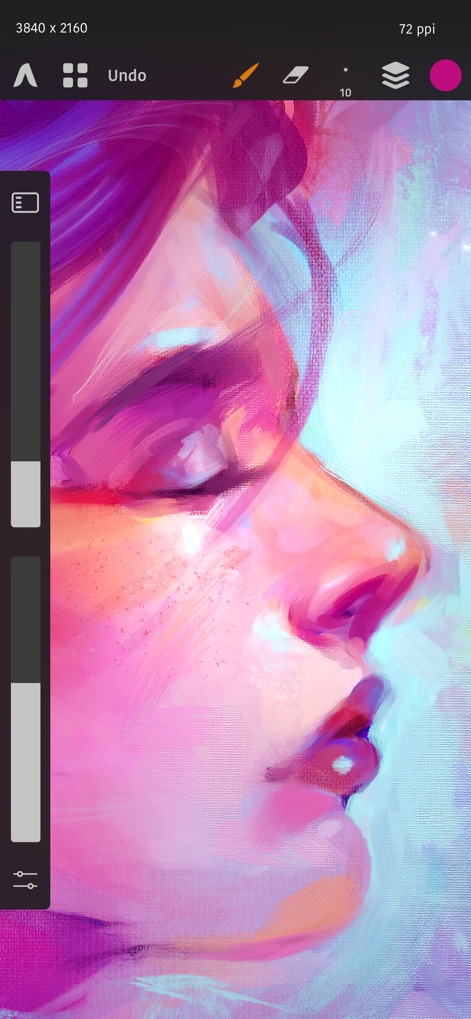
このアプリは、ユーザーが鮮やかな色彩と繊細な筆致で表現されたデジタルアートを作成できます。直感的なサイドツールバーと上部メニューにより、描画ツールの選択と調整がスムーズに行えます。
鮮やかなデジタルアート
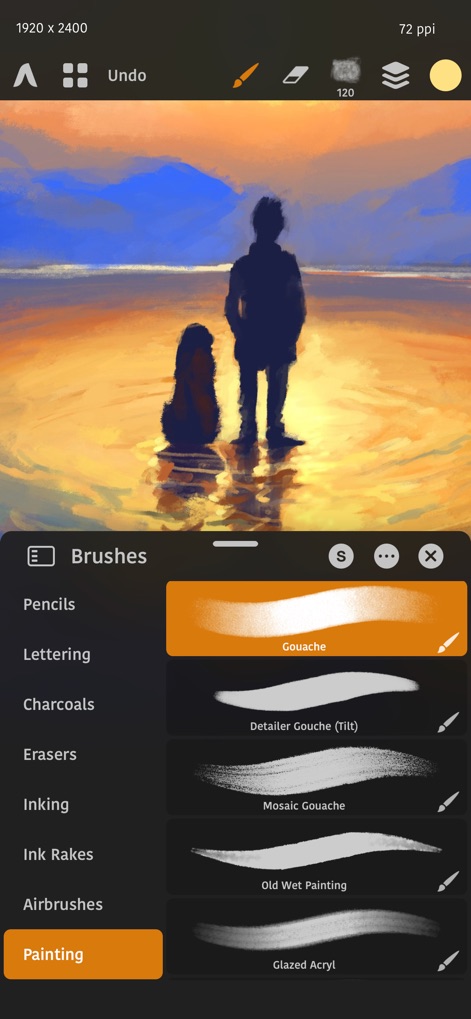
ユーザーは、絵画を豊かにする広範なブラシライブラリから選択できます。特に、ガッシュやウェットペインティングなど、多種多様なブラシがカテゴリ別に整理されたパネルから直感的に選べます。
多彩なブラシ体験
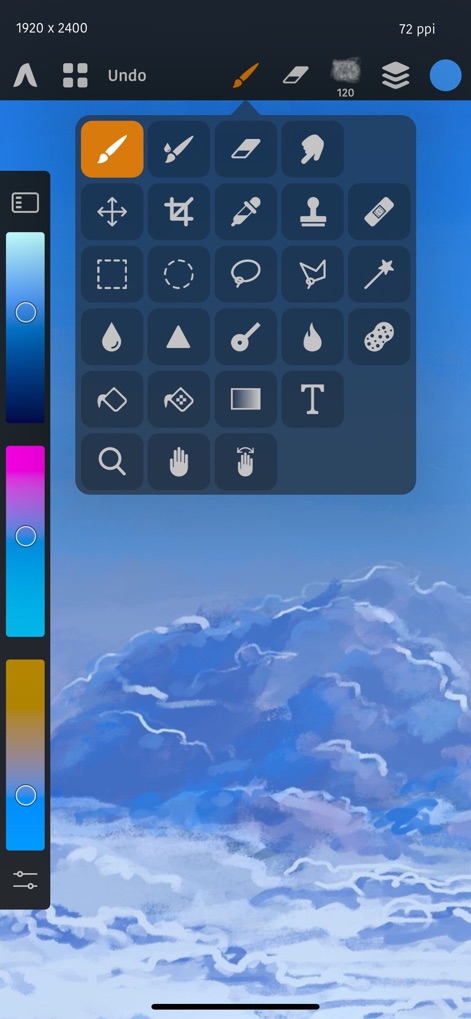
このツールは、移動、選択、ペイントから、修復や複製まで、プロフェッショナルな描画および編集ツール群を提供します。ユーザーは、クラウドの背景に表示されるように、これらのツールをオーバーレイパネルから素早く選択できます。
プロの編集ツール

本アプリは、ユーザーが作品の色彩を自在にコントロールできる高度なカラーパネルを搭載しています。特に、詳細な色選択を可能にするカラーホイールと、カスタマイズ可能なカラーサンプルが特徴です。
色彩の無限の可能性

ユーザーは、高度なカーブ調整機能を用いて、作品の色調とコントラストを詳細にコントロールできます。マスターチャンネルだけでなく、赤、緑、青、アルファといった個別のチャンネルでの調整も可能です。
高度な色調補正
説明
Download
類似アプリ
似た機能とユーザー体験を持つアプリ

Sketchbook®
Sketchbook, Inc.

Mental Canvas Draw
Mental Canvas, Inc.

ibis Paint
ibis inc.

ibis Paint X
ibis inc.

Paper: Sketch, Draw & Create
Evernote Corporation

Adobe Fresco: Draw & Paint App
Adobe Inc.

Art Set 4
Lofopi Ltd

MediBang Paint – Drawing & Art
MediBang inc.

Tayasui Sketches
SKETCHES SRL
このページはアプリまたはその開発者の公式ページではなく、情報提供および論評を目的として作成された独立した編集出版物です。明示的に別段の記載がない限り、アプリおよびその開発者は、MWM、Apple、Google Play、アプリのパブリッシャー、またはアプリの開発者と提携、承認、後援、認可、またはその他の公式的な関係はなく、このページのいかなる内容も、アプリがMWMのサービスを使用して開発されたことを意味するものではありません。すべての商標、ロゴ、スクリーンショット、その他のコンテンツはそれぞれの所有者の財産です。