
このページはアプリまたはその開発者の公式ページではなく、情報提供および論評を目的として作成された独立した編集出版物です。明示的に別段の記載がない限り、アプリおよびその開発者は、MWM、Apple、Google Play、アプリのパブリッシャー、またはアプリの開発者と提携、承認、後援、認可、またはその他の公式的な関係はなく、このページのいかなる内容も、アプリがMWMのサービスを使用して開発されたことを意味するものではありません。すべての商標、ロゴ、スクリーンショット、その他のコンテンツはそれぞれの所有者の財産です。


Audio Editor - AI Music Editor
AIが音の壁を打ち破り、ユーザーの創造性を解き放つ。このアプリは、無秩序な音源からボーカルと楽器を瞬時に引き剥がす能力を、デバイス上で完結させる。外部サーバーへの依存を排し、編集の常識を覆す。
ダウンロード
250k+ユーザー評価
評価数
1.0K開発元
カテゴリ
Music対応言語
9最新バージョン
1.4.9サイズ
126.5 MBリリース日
2024年2月23日テックアナリストによる主要機能とその影響度評価
「Audio Editor - AI Music Editor」機能詳細分析
ビデオへの音楽追加と編集
ユーザーは、無制限の写真やビデオをプロジェクトに追加し、複数のBGMトラック、音楽、音声をビデオに組み込むことが可能です。ビデオのトリミングや編集に加え、ウォーターマークなし、無圧縮でのエクスポート、そしてTikTok、Instagramなどの主要なソーシャルメディアプラットフォームへの共有機能を提供します。
高度なオーディオ編集機能
本アプリは、オーディオミキシング、フェードイン/フェードアウト、音量調整、トーンとテンポの変更、オーディオスピードの変更、カスタムイコライザーなど、プロフェッショナルレベルのオーディオ編集機能を提供します。無制限の元に戻す/やり直す機能、およびR-CHとL-CHのバランス設定をサポートします。
AIボーカルセパレーター
このツールは、機械学習を利用してボーカルとインストゥルメンタルを分離します。ファイルのアップロードや待機は不要で、すべてのAI処理はデバイス上でローカルに実行されるため、迅速かつ効率的なステム分離が可能です。
プロジェクトのクロスプラットフォーム同期
本アプリは、iPhone、iPad、デスクトップを含むすべてのデバイスでプロジェクトの自動バックグラウンド同期をサポートします。Google DriveやiCloudなどの主要なクラウドプラットフォームとも連携し、ユーザーはデバイスの容量を節約するためにプロジェクトを削除できます。
共同作業可能なプレイリストとプロジェクト管理
ユーザーは、トラックをプロジェクトやフォルダーに整理し、iPhoneとウェブ間でデバイスをまたいで同期させることが可能です。友人への音楽リンクの共有、リスナーの確認、プロジェクトへのアクセス管理、そしてインスピレーションが湧いた際の録音機能を提供します。
多彩なボイスチェンジャー
ユーザーは、ボイスチェンジ機能を通じて無限の創造的な可能性を探求できます。声のトーン、ピッチ、音色を変換し、ユニークなキャラクターを作成したり、ボーカルパフォーマンスを強化したりすることが可能です。
豊富なサウンドエフェクト
このアプリは、ピッチ(ロリータ声やおじさん声などへの変化)、リバーブ(部屋、リビング、教会などのシナリオ切り替え)、ディストーション(電子、エコー、メタルなど)、ディレイ(最大2秒の特殊効果)など、多様なサウンドエフェクトを提供します。10セクションのカスタムイコライザーも備えています。
強力なインポートおよびエクスポート機能
Wi-Fi経由でのインポートおよびエクスポート、他のアプリケーションからの直接インポート、アルバムのビデオやモバイル音楽ライブラリの直接利用など、ユーザーは多様な方法でファイルを効率的に管理できます。
よくある質問
について知っておくべきこと Audio Editor - AI Music Editor
What is "Audio Editor - AI Music Editor"?
"Audio Editor - AI Music Editor" is a powerful audio editor for listening, sharing, and organizing music. It features AI for vocal separation, sound effects, voice changing, and video integration.
What audio editing features does Audio Editor offer?
Audio Editor offers mixing, fade in/out, volume changes, tone/tempo/speed adjustments, custom equalization, balance settings (R-CH and L-CH), and unlimited undo/redo.
Can Audio Editor handle multi-track audio?
Yes, Audio Editor supports multitrack audio editing. Users can manage multiple audio tracks, as shown in the editing interface, and record new tracks directly within the project.
Does Audio Editor support unlimited undo and redo?
Yes, Audio Editor supports unlimited times of undo and redo. This feature is available to revert or reapply changes during the editing process.
How does Audio Editor help organize music projects?
Audio Editor organizes tracks into projects and folders. These are synced across iPhone and web. Users can also drag and drop files from their desktop into the web app.
Can users collaborate on projects with Audio Editor?
Yes, Audio Editor allows collaboration on projects. Users can share links to their music and manage access, including granting permission for others to edit and download tracks.
Is music shared through Audio Editor secure?
Yes, Audio Editor states its encryption is on par with Dropbox and SoundCloud. It aims to be a secure place for unreleased music, protecting users' content.
What is the AI Vocal Separator feature in Audio Editor?
The AI Vocal Separator in Audio Editor employs machine learning to isolate vocal and instrumental stems from audio tracks. It extracts vocals and instruments separately.
Does the AI Vocal Separator process files locally?
Yes, the AI Vocal Separator processes all AI tasks locally on your device. This means there is no need to upload files or wait in line for processing.
What sound effects are available in Audio Editor?
Audio Editor provides pitch effects (rising/falling, voice changes), reverb (room, living room, church), distortion (electronic, echo, metal), and delay effects up to 2 seconds.
Can I change my voice with Audio Editor?
Yes, Audio Editor includes a Voice Changer feature. It allows users to alter their voice by transforming tone, pitch, and timbre to create unique characters or enhance vocal performances.
Does Audio Editor include an equalizer?
Yes, Audio Editor includes a custom equalizer with 10 sections of frequency. It also offers presets like bass boost and human voice resonance for clear and rhythmic audio.
Can I add music to videos using Audio Editor?
Yes, Audio Editor allows users to add unlimited photos and videos to projects. It supports adding multiple background audio tracks, music, and voice to videos.
Does Audio Editor add watermarks to exported videos?
No, Audio Editor states that videos are exported without compression and without watermarks. This ensures high-quality output for sharing on social networks.
How can I import audio files into Audio Editor?
Audio Editor supports Wi-Fi import and export. It also allows direct import from other applications, and direct use of the album's video and mobile music library.
Can Audio Editor create ringtones?
Yes, Audio Editor functions as an amazing ringtone cutter. Users can trim music and cut any part of their favorite songs to create custom ringtones.
Does Audio Editor support project synchronization across devices?
Yes, Audio Editor offers background sync that automatically updates projects. Users can access and use their projects on iPhone, iPad, and desktop devices.
Which platforms does Audio Editor sync projects with?
Audio Editor supports syncing projects across major platforms. This includes Google Drive, iCloud, and others, allowing users to access their work from multiple cloud services.
What are the subscription options for Audio Editor Pro?
Audio Editor Pro Unlimited subscription is billed either weekly or annually. The rate corresponds to the specific plan selected by the user.
Does Audio Editor Pro auto-renew subscriptions?
Yes, Audio Editor Pro subscriptions automatically renew. Auto-renewal turns off if not canceled at least 24 hours before the current period ends, and accounts are charged for renewal.
以下のスクリーンショットと説明は、アプリの公式ストアリスティングから直接取得されたものであり、アプリ開発者の所有物です。
アプリストア
スクリーンショット

このアプリは、詳細なマルチトラック編集機能と直感的な波形表示を提供し、ユーザーは複雑なオーディオプロジェクトを簡単に作成できます。
プロフェッショナル編集
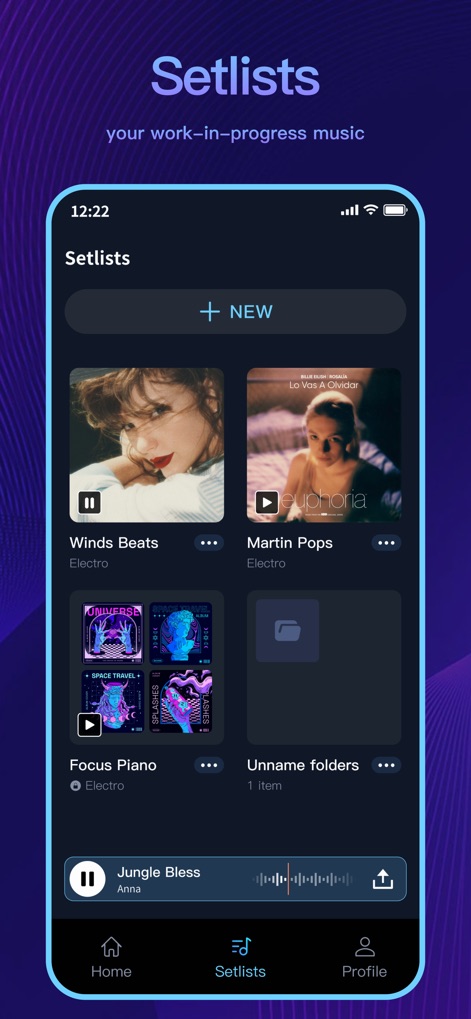
ユーザーは、プロジェクトとフォルダ機能を利用して進行中の音楽を効果的に整理し、すべてのトラックの管理とアクセスを容易に行えます。
プロジェクト管理
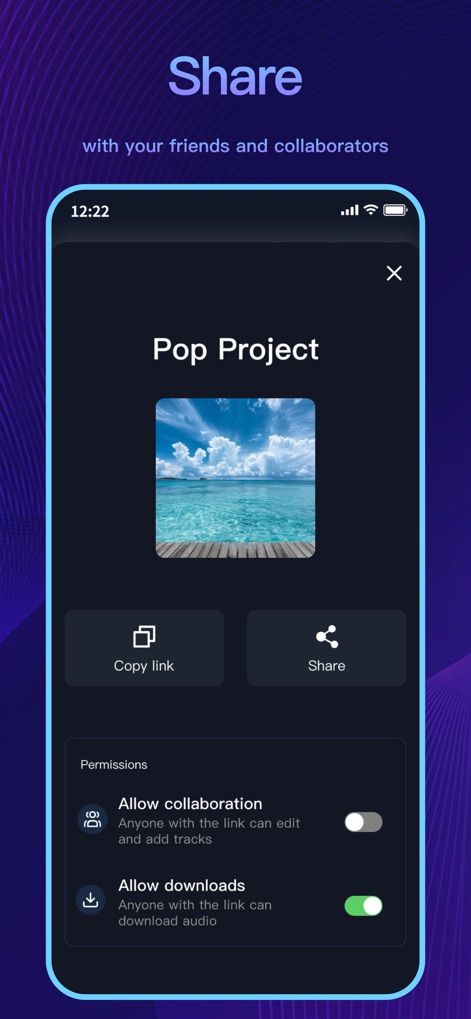
リンク共有機能により、ユーザーは作品を友人と簡単に共有でき、共同作業やダウンロードの許可設定も柔軟に行えます。
共有とコラボ
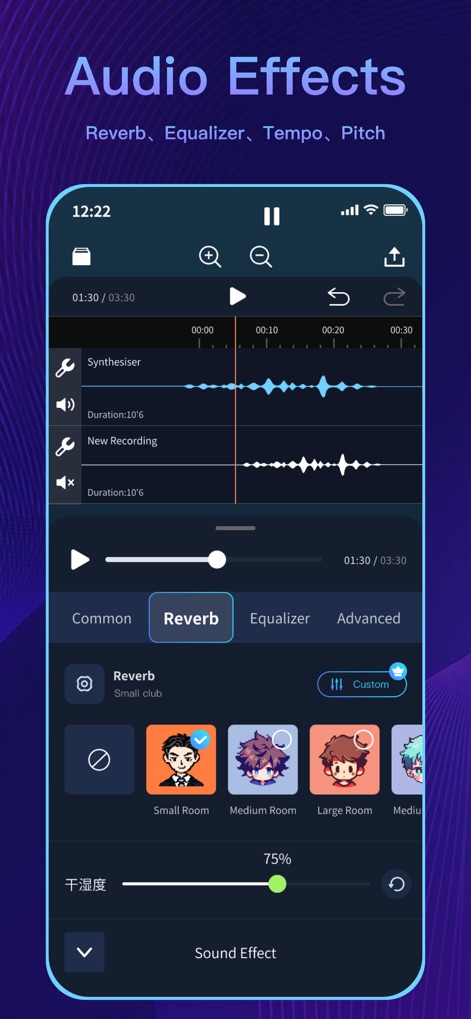
本ツールは、多彩なリバーブタイプとカスタマイズ可能なイコライザーを搭載し、ユーザーは音源に深みと個性を加えることができます。
オーディオエフェクト
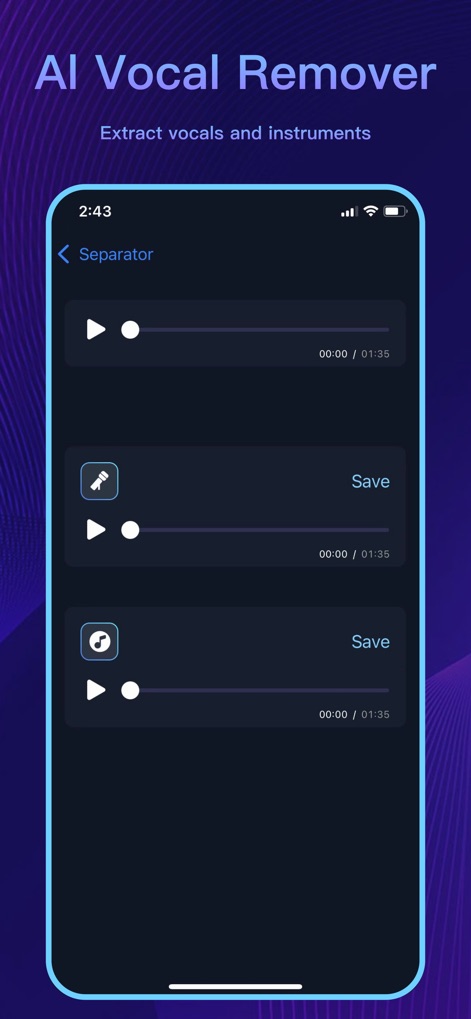
最先端のAIボーカル分離機能により、ユーザーはボーカルとインストゥルメンタルのステムを瞬時に抽出し、それぞれを個別に編集できます。
AIボーカル分離
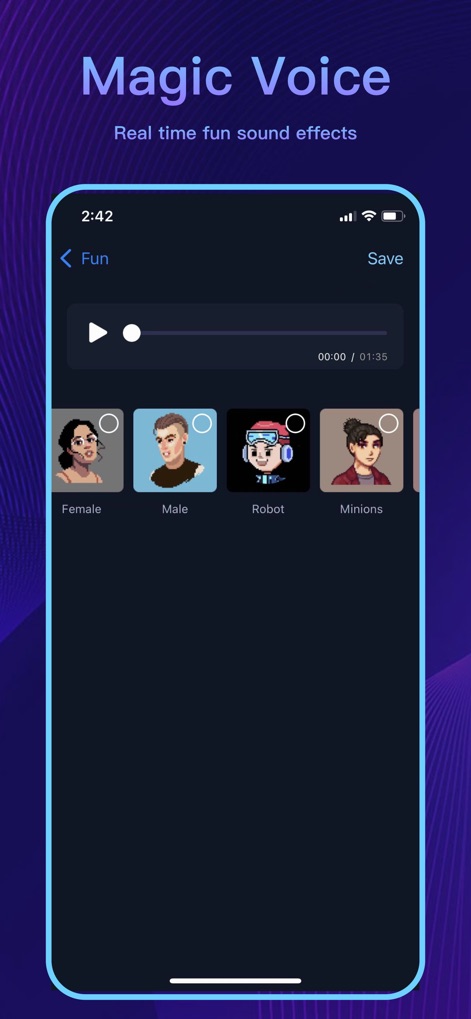
音声変換機能により、ユーザーはピッチと音色を自在に変更し、ロボットやミニオンズのようなユニークなキャラクターボイスを作成できます。
マジックボイス
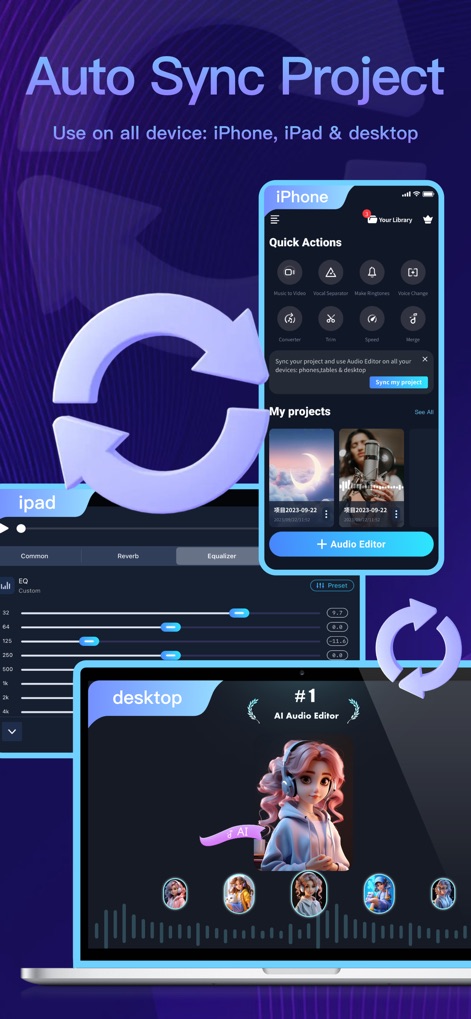
プロジェクトはiPhone、iPad、デスクトップ間で自動的に同期され、ユーザーはどこからでも作業を継続し、主要なクラウドサービスと連携できます。
デバイス間同期
説明
Download
類似アプリ
似た機能とユーザー体験を持つアプリ

WavePad音频和音乐编辑器
NCH Software

Audio Editor - Music editor
苏娟 陈

SoundLab - Audio Editor
孛 刘

Microphone Live-Voice Recorder
Arpenik Katikyan

Ferrite Recording Studio
Wooji Juice Ltd

WavePad Music and Audio Editor
NCH Software

Audio Editor - AudioLab, Mixer
Innovation Software Development 360 LLC

au editor - audio cutter
龙刚 李

Audio Editor: Video to Audio
文 夏
このページはアプリまたはその開発者の公式ページではなく、情報提供および論評を目的として作成された独立した編集出版物です。明示的に別段の記載がない限り、アプリおよびその開発者は、MWM、Apple、Google Play、アプリのパブリッシャー、またはアプリの開発者と提携、承認、後援、認可、またはその他の公式的な関係はなく、このページのいかなる内容も、アプリがMWMのサービスを使用して開発されたことを意味するものではありません。すべての商標、ロゴ、スクリーンショット、その他のコンテンツはそれぞれの所有者の財産です。