
このページはアプリまたはその開発者の公式ページではなく、情報提供および論評を目的として作成された独立した編集出版物です。明示的に別段の記載がない限り、アプリおよびその開発者は、MWM、Apple、Google Play、アプリのパブリッシャー、またはアプリの開発者と提携、承認、後援、認可、またはその他の公式的な関係はなく、このページのいかなる内容も、アプリがMWMのサービスを使用して開発されたことを意味するものではありません。すべての商標、ロゴ、スクリーンショット、その他のコンテンツはそれぞれの所有者の財産です。


ダウンロード
1M+ユーザー評価
評価数
4.0K開発元
カテゴリ
Music対応言語
12最新バージョン
1.8.6サイズ
97.5 MBリリース日
2023年3月16日強力なモバイルオーディオ編集ツールの核心機能に迫る
Audio Editor : Audiolab アプリ機能分析
AIボーカルリムーバー&抽出
本アプリは、AI技術を用いて任意のオーディオファイルからボーカルや楽器を分離・抽出する機能を提供します。
マルチトラック編集&ミキシング
本ツールは、プロフェッショナルなジッター量子化とアンチ干渉フィルターを備えたマルチトラックオーディオ編集およびミキシング機能を提供し、ミキサー出力の音質とカットされた音の境界のスムーズさを保証します。
高度なオーディオエフェクト
本アプリは、リバーブ、コーラス、ゲイン、テンポ、ピッチ、10バンドイコライザー、ノイズ除去などの豊富なオーディオエフェクトを提供し、音質の向上や創造的な加工を可能にします。
非線形編集とアンドゥ/リドゥ
ユーザーは、コピー、カット、ペースト、削除、置換、移動などの非線形編集を、完全なアンドゥ/リドゥ機能を使って実行できます。
高精度ボイス編集
ユーザーは、高精度ズームをサポートするボイスエディター機能を利用して、オーディオのクリッピング、カット、およびいつでも元に戻す/やり直す操作を行えます。
音楽レコーダーとミキシング
本アプリは、背景音楽や効果音を追加できる音楽レコーダー機能を提供し、独自のオーディオファイルをアップロードしてミックスすることも可能です。
多形式対応オーディオ変換
本ツールは、ビデオファイルからロスレスMP3や他の形式のオーディオを抽出したり、MP3、WAV、AIFFなどの様々なオーディオ形式を相互に変換したりする機能を提供します。
ビデオへのオーディオ合成
本アプリは、ビデオにオーディオをダビングするシンプルな機能を提供し、ダビングとオリジナルサウンドの音量を調整することが可能です。
よくある質問
について知っておくべきこと Audio Editor : Audiolab
What is Audio Editor : Audiolab?
Audio Editor : Audiolab is a powerful audio editing tool that mixes music, creates ringtones, and provides features like vocal removal, audio enhancement, multi-track editing, and format conversion.
Can Audio Editor : Audiolab remove vocals from a song?
Yes, Audio Editor : Audiolab extracts vocals, accompaniment, and various instruments from any audio using its AI-powered vocal remover. It supports splitting tracks into 2, 4, or 5 stems for precise control.
Does Audio Editor : Audiolab support multi-track audio editing?
Yes, Audio Editor : Audiolab supports multitrack audio editing and mixing, allowing an unlimited number of tracks. Users can perform non-linear editing actions including splicing, cutting, copying, pasting, and moving segments.
What audio effects are available in Audio Editor : Audiolab?
Audio Editor : Audiolab offers Pitch, Tempo, Reverb with various scenarios, Distortion, Delay, and a 10-section Equalizer with presets. It also includes a Denoise feature for clear audio.
Can I record audio directly within Audio Editor : Audiolab?
Yes, Audio Editor : Audiolab includes a voice recorder for one-tap recording. It supports AirPods and other Bluetooth headsets. Users can also monitor live audio with in-ear monitoring while recording or overdubbing.
What audio formats does Audio Editor : Audiolab support for import and export?
Audio Editor : Audiolab supports importing and exporting M4A, MP3, WAV, and AAC media files. It also offers format conversion for MP3, WAV, and AIFF to meet various user needs.
How do I get Audio Editor : Audiolab Pro features?
Audio Editor : Audiolab Pro features are obtained via a subscription. Users can access a free trial, after which monthly or annual charges apply through iTunes, unless the subscription is canceled beforehand.
Does Audio Editor : Audiolab allow setting edited audio as a ringtone?
Yes, Audio Editor : Audiolab allows users to set their edited audio as a phone ringtone directly within the application. This feature is accessible after completing audio modifications.
Can Audio Editor : Audiolab extract audio from video files?
Yes, Audio Editor : Audiolab extracts lossless MP3 or other audio formats from videos. It includes a built-in audio extractor that automatically separates audio tracks when importing from video files.
Does Audio Editor : Audiolab provide denoise functionality?
Yes, Audio Editor : Audiolab includes a Denoise feature. It utilizes Recurrent Neural Network Noise Reduction to enhance audio clarity by effectively reducing unwanted background noise from recordings.
以下のスクリーンショットと説明は、アプリの公式ストアリスティングから直接取得されたものであり、アプリ開発者の所有物です。
アプリストア
スクリーンショット

本アプリは無制限のトラック編集に対応し、ユーザーは複数のオーディオを同期させて詳細なミキシングや、フェードイン・フェードアウトなどの効果を精密に適用できます。
高度な編集機能

ユーザーはピッチとテンポを調整してオーディオの特性を変更したり、ルーム、リビングルーム、教会など多様なリバーブ効果を適用して空間感を演出したりできます。
豊富なサウンドエフェクト

本ツールは、オーディオに深度を加えるためのディレイ効果を詳細に設定できる他、ポップやロックなどのプリセットを備えた10バンドイコライザーで特定の周波数を微調整し、音質を最適化します。
プロ級エフェクト調整

高度なAIアルゴリズムにより、楽曲からボーカルとインストゥルメンタルを分離したり、さらにボーカル、ベース、ドラム、ピアノ、その他の楽器など最大5つのステムに分割したりできます。
AIで音源分離

ユーザーはボーカル、ベース、ドラム、ピアノ、その他の楽器など、各トラックのボリュームを個別に調整する直感的なフェーダーコントロールを用いて、独自のミックスを簡単に作成できます。
直感的ミキシング
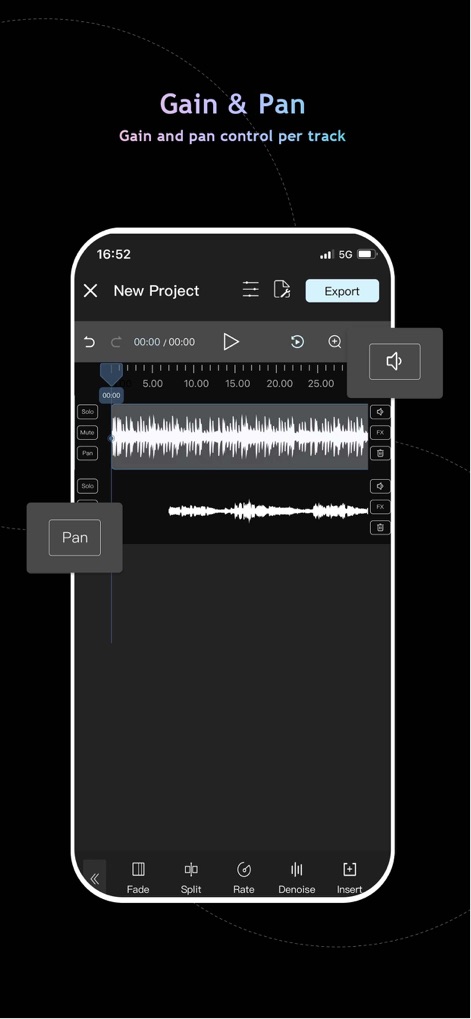
この画面では、トラックごとにゲインを調整して音量を最適化できる他、パンコントロール機能を使用してオーディオのステレオ定位を精密に設定し、豊かなサウンドフィールドを構築できます。
精密な音量調整

ユーザーはリアルタイムモニタリング機能を活用して高品質な音声録音やオーバーダビングを行える他、BGMのインポートと設定を通じて、完璧なサウンドトラックを簡単に作成できます。
高品質レコーディング

本アプリはMP3、WAV、FLAC、AACなど複数のオーディオフォーマットに対応しており、ユーザーは録音したオーディオファイルをスマートフォンの着信音として設定したり、簡単に共有したりできます。
多彩なファイル管理
説明
Download
類似アプリ
似た機能とユーザー体験を持つアプリ

WavePad音频和音乐编辑器
NCH Software

Audio Editor - Music editor
苏娟 陈

SoundLab - Audio Editor
孛 刘

Microphone Live-Voice Recorder
Arpenik Katikyan

Ferrite Recording Studio
Wooji Juice Ltd

WavePad Music and Audio Editor
NCH Software

Audio Editor - AudioLab, Mixer
Innovation Software Development 360 LLC

au editor - audio cutter
龙刚 李

Audio Editor: Video to Audio
文 夏
このページはアプリまたはその開発者の公式ページではなく、情報提供および論評を目的として作成された独立した編集出版物です。明示的に別段の記載がない限り、アプリおよびその開発者は、MWM、Apple、Google Play、アプリのパブリッシャー、またはアプリの開発者と提携、承認、後援、認可、またはその他の公式的な関係はなく、このページのいかなる内容も、アプリがMWMのサービスを使用して開発されたことを意味するものではありません。すべての商標、ロゴ、スクリーンショット、その他のコンテンツはそれぞれの所有者の財産です。