
このページはアプリまたはその開発者の公式ページではなく、情報提供および論評を目的として作成された独立した編集出版物です。明示的に別段の記載がない限り、アプリおよびその開発者は、MWM、Apple、Google Play、アプリのパブリッシャー、またはアプリの開発者と提携、承認、後援、認可、またはその他の公式的な関係はなく、このページのいかなる内容も、アプリがMWMのサービスを使用して開発されたことを意味するものではありません。すべての商標、ロゴ、スクリーンショット、その他のコンテンツはそれぞれの所有者の財産です。


ダウンロード
5M+ユーザー評価
評価数
70.8K開発元
カテゴリ
Utilities対応言語
32最新バージョン
3.12サイズ
37.2 MBリリース日
2017年10月20日建築、不動産、インテリアデザインのプロフェッショナルおよびDIY愛好家向けに最適化された拡張現実測定ツールの評価。
CamToPlan - ARテープメジャー' 機能分析
ARによる仮想計測
このアプリは、拡張現実技術を利用して、スマートフォンやタブレットのカメラを通して、水平および垂直方向の長さ、距離、表面積など、あらゆるものを仮想的に測定することを可能にします。これにより、物理的な測定ツールが不要になります。
間取り図の作成とエクスポート
ユーザーは、測定したデータに基づいて間取り図を作成し、PDF、PNG、またはDXF形式でエクスポートできます。これにより、設計図や顧客との共有が容易になります。
水平・垂直方向の測定
本アプリは、地面上での水平距離だけでなく、壁の高さや窓の寸法など、垂直方向の測定にも対応しています。これにより、幅広い測定ニーズに対応します。
物理的な測定ツールの代替
このツールは、従来の巻尺やレーザー距離計などの物理的な測定ツールを不要にします。これにより、測定作業の効率化と利便性の向上が図られます。
広範な専門分野での利用
不動産、建設、インテリアデザイン、DIY愛好家など、多様な専門分野のプロフェッショナルおよび個人ユーザーが、それぞれの業務やプロジェクトに活用できます。
複数単位系への対応
ユーザーは、メートル法(メートル、センチメートル)とヤード・ポンド法(フィート、インチ)の両方で測定値を取得できます。これにより、国際的なプロジェクトや異なる地域の要件に対応可能です。
家具を移動せずに測定可能
部屋の家具を移動させることなく、床とターゲットの交差点をアプリが自動で識別し、測定を実行します。これにより、準備の手間を省き、迅速な測定が可能になります。
リアルタイム環境スキャン
このアプリは、機械学習アルゴリズムとデバイスセンサーを活用し、カメラ映像をリアルタイムで分析することで、周囲の環境をスキャンし、デバイスの位置と回転角を検出します。これにより、正確なAR計測をサポートします。
プレミアム機能(広告なし、エキスパートモードなど)
プレミアム版に登録すると、広告表示なし、垂直モード、エキスパートモード、編集・エクスポート機能のロック解除、すべての描画へのアクセスなど、高度な機能が利用可能になります。
測定中の移動による精度向上
ユーザーは測定中に移動してターゲットポイントに近づくことができ、これにより最大限の精度で測定を行うことが可能です。視認できない場合でも、推定に基づいて計算されます。
よくある質問
について知っておくべきこと CamToPlan - AR tape measure
What is CamToPlan?
CamToPlan is an augmented reality (AR) app that functions as a virtual ruler and tape measure. It enables users to measure lengths, distances, and areas horizontally and vertically using a device's camera.
How does CamToPlan perform measurements?
CamToPlan utilizes ARKit by Apple, combining device sensor data with odometry. It analyzes real-time camera video and visual details to scan the environment, determining the device's position and rotation for measurement.
Can CamToPlan measure both horizontal and vertical distances?
Yes, CamToPlan measures distances horizontally (on the ground) and vertically. This feature allows users to obtain comprehensive measurements of various objects and spaces.
Which export formats does CamToPlan support for plans?
CamToPlan supports exporting measured plans in PDF, PNG, and DXF formats. This functionality allows users to share and utilize their measurement data in different applications.
What features are included in CamToPlan Premium?
CamToPlan Premium includes no ads, Vertical mode, Expert mode, unlocked Edit & Export functions, and access to all saved drawings. It provides enhanced measurement and management capabilities.
Is a free trial available for CamToPlan Premium?
Yes, CamToPlan Premium offers a free trial period. Users can cancel the free trial or subscription anytime by accessing their account settings on the App Store to avoid automatic renewal.
Can CamToPlan be used to measure an entire house?
Yes, CamToPlan measures an entire house in seconds. It also measures floors, wall dimensions, windows, and doors efficiently using its Virtual Reality (VR) capabilities.
Is the accuracy of CamToPlan measurements guaranteed?
No, the accuracy of measurements performed with CamToPlan is not guaranteed. The application explicitly states this limitation for users.
Can users edit their measurement drawings in CamToPlan?
Yes, users can edit their measurement drawings in CamToPlan. The "Unlock Edit & Export" feature is available as part of the CamToPlan Premium subscription.
Does CamToPlan function in outdoor environments?
Yes, CamToPlan functions in outdoor environments. It assists professionals like gardeners, landscapers, and swimming pool builders with their exterior measurement requirements.
以下のスクリーンショットと説明は、アプリの公式ストアリスティングから直接取得されたものであり、アプリ開発者の所有物です。
アプリストア
スクリーンショット
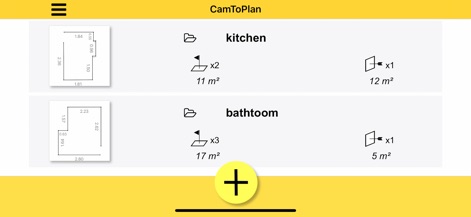
この画面では、作成されたフロアプランの概要を一目で確認できます。プロジェクト名と関連する測定面積(例:11 m²)が明確に表示され、ユーザーは過去の作業を効率的に管理できます。
測定を効率的に管理

本アプリは、AR技術を活用して物理空間を直接測定します。画面上には、測定ポイントを示す赤旗と、リアルタイムで表示される距離(例:0.32 m)が重ねて表示され、ユーザーは視覚的に測定プロセスを追跡できます。
ARで空間を計測
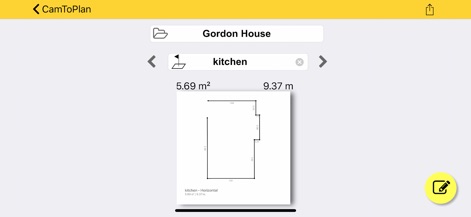
この画面では、測定によって生成された詳細なフロアプラン図が表示されます。フロアプランの合計面積(例:5.69 m²)と周囲長(例:9.37 m)が明確に示され、ユーザーは必要に応じて編集機能を使用して調整できます。
詳細な計画図面
説明
Download
類似アプリ
似た機能とユーザー体験を持つアプリ

Pocket Bubble Level XXL
ExaMobile S.A.

Measuring Tape +ㅤ
Rocket Apps GmbH

CamToPlan - 3D Scanner & LiDAR
Tasmanic Editions

Tape Measure: AR Ruler
Veysel OTI

Home Planner - AI Room Design
Room Planner Ltd

Polycam 3D Scanner, LiDAR, 360
Polycam Inc.

Measuring Tape+ Measure AR app
MEASURE TECH SOCIEDAD LIMITADA

Tape Measure®
AI Photo Editor Lab SRL

Bubble Level for iPhone
Lemondo Apps LLC
このページはアプリまたはその開発者の公式ページではなく、情報提供および論評を目的として作成された独立した編集出版物です。明示的に別段の記載がない限り、アプリおよびその開発者は、MWM、Apple、Google Play、アプリのパブリッシャー、またはアプリの開発者と提携、承認、後援、認可、またはその他の公式的な関係はなく、このページのいかなる内容も、アプリがMWMのサービスを使用して開発されたことを意味するものではありません。すべての商標、ロゴ、スクリーンショット、その他のコンテンツはそれぞれの所有者の財産です。