
このページはアプリまたはその開発者の公式ページではなく、情報提供および論評を目的として作成された独立した編集出版物です。明示的に別段の記載がない限り、アプリおよびその開発者は、MWM、Apple、Google Play、アプリのパブリッシャー、またはアプリの開発者と提携、承認、後援、認可、またはその他の公式的な関係はなく、このページのいかなる内容も、アプリがMWMのサービスを使用して開発されたことを意味するものではありません。すべての商標、ロゴ、スクリーンショット、その他のコンテンツはそれぞれの所有者の財産です。


ダウンロード
2.5M+ユーザー評価
評価数
770開発元
カテゴリ
Business対応言語
12最新バージョン
8.3.3サイズ
23.8 MBリリース日
2012年11月26日モバイル効率性とオフィス統合を強化する主要機能の評価
Canon PRINT Business アプリの機能分析
モバイルからのドキュメント印刷
ユーザーは、スマートフォンやタブレットから、スキャンデータ、画像、文書、カメラロールの写真、ウェブページを直接印刷できます。これにより、柔軟な作業環境が実現されます。
複合機からのコピー・FAX・メール送信
ユーザーはアプリを通じて、複合機からのコピー、FAX送信、またはスキャンデータをメールで送信する操作を行うことができます。これにより、複合機の多様な機能をモバイルから制御できます。
リモート操作機能
この機能により、ユーザーは複合機やプリンターのコントロールパネルをモバイル端末上に表示し、遠隔から操作することが可能です。これにより、デバイスの物理的な場所に縛られずに作業を進められます。
ローカル・クラウドストレージ連携
ユーザーは、モバイル端末のローカルストレージまたは主要なクラウドストレージサービスに保存されているファイルを直接操作できます。これにより、ドキュメントへのアクセスと管理が向上します。
スキャンデータの読み取りと活用
本アプリは、複合機でスキャンされたデータをモバイル端末で直接読み取り、確認することを可能にします。これにより、スキャン後のドキュメント処理が迅速化されます。
リモートUIによるデバイス状態確認
本アプリは、複合機やプリンターの詳細な状態(デバイスステータスなど)をリモートUI経由で確認する機能を提供します。これにより、IT管理者は遠隔からデバイスの状態を把握し、問題を迅速に特定できます。
Bluetooth連携による簡単ログイン
Bluetoothが搭載されたデバイスでは、モバイル端末をタッチするだけで複合機やプリンターにログインできます。これにより、認証プロセスが迅速化され、セキュリティと利便性が向上します。
プリンターの自動検出と手動設定
このツールは、ネットワーク上の複合機やプリンターを自動的に検出するか、IPアドレスやDNS指定による手動検索をサポートします。これにより、デバイスの接続設定が簡素化されます。
QRコードによるデバイス登録
ユーザーはQRコードを使用して複合機やプリンターを簡単に登録できます。これにより、初期設定の手間が省け、迅速な導入が可能になります。
モバイル端末のアドレス帳連携
ユーザーは、複合機に登録されたアドレス帳の代わりに、モバイル端末のアドレス帳を使用できます。これにより、連絡先管理の一貫性が保たれ、操作が効率化されます。
よくある質問
について知っておくべきこと Canon PRINT Business
What is Canon PRINT Business?
Canon PRINT Business is a free application for iPhone and iPad. It enables printing, scanning, and uploading data to cloud storage from Canon laser multi-function devices or laser printers.
Is Canon PRINT Business a free application?
Yes, Canon PRINT Business is a free application. It allows users to print, scan, and manage documents from compatible Canon laser devices using an iPhone or iPad.
What are the main features of Canon PRINT Business?
Canon PRINT Business allows printing, scanning data, capturing images, and working with local or cloud storage files. It also supports device detection, remote operation, copying, faxing, and emailing.
How do I connect a printer to Canon PRINT Business?
Canon PRINT Business can automatically detect devices on a network or manually search via IP address/DNS. Users can also connect using Bluetooth or register devices with a QR code.
Which devices are supported by Canon PRINT Business?
Canon PRINT Business supports imageRUNNER ADVANCE, Color imageRUNNER, imageRUNNER, Color imageCLASS, imageCLASS, i-SENSYS, imagePRESS, LBP, Satera, Laser Shot, and Business Inkjet series.
Can I print photos with Canon PRINT Business?
Yes, Canon PRINT Business allows users to print photographs, documents, camera roll photos, and web pages from an iPhone or iPad to compatible Canon laser devices.
What settings can be adjusted when printing with Canon PRINT Business?
Print settings in Canon PRINT Business include output method, Department ID Management, User Authentication, output size, copies, print range, paper source, color, 2-sided, staple, and image quality.
What settings can be adjusted when scanning with Canon PRINT Business?
Scan settings in Canon PRINT Business include color, resolution, original size, file format, 2-sided, original type, density, and original placement.
Can I scan and send documents via email using Canon PRINT Business?
Yes, Canon PRINT Business allows users to scan and send documents by e-mail directly from a multi-function device or printer using the app.
Is Canon PRINT Business being replaced?
Yes, Canon PRINT Business has been merged with Canon PRINT. Users are advised to use Canon PRINT in the future for their printing and scanning needs.
Does Canon PRINT Business support Bluetooth connectivity for devices?
Yes, Canon PRINT Business can search for multi-function devices and/or printers using Bluetooth. It also supports logging in by touching the mobile terminal to a Bluetooth-installed machine.
以下のスクリーンショットと説明は、アプリの公式ストアリスティングから直接取得されたものであり、アプリ開発者の所有物です。
アプリストア
スクリーンショット
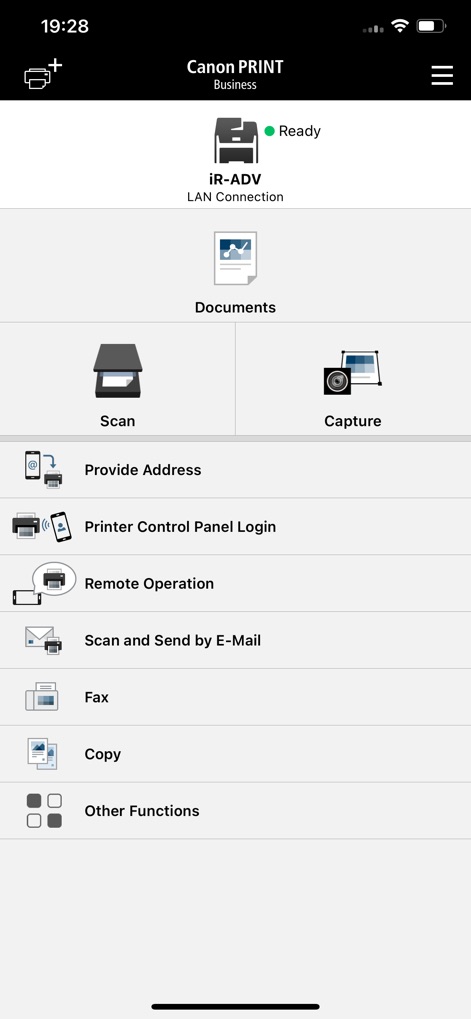
本アプリのホーム画面では、スキャン、キャプチャ、ドキュメント機能といった主要機能へ素早くアクセス可能であり、接続中のデバイス『iR-ADV』のステータスが『Ready』と表示され、機器の状態を即座に把握できます。
主要機能へアクセス

印刷プレビュー画面では、出力されるドキュメントのレイアウトと内容を視覚的に確認でき、同時にプリンター名や印刷部数などの詳細な印刷設定も一目で把握することが可能です。
印刷イメージ確認

スキャン設定画面では、『Select Color』や『Resolution』といった多様なパラメーターを細かく調整でき、画面下部の『Scan』ボタンをタップすることで設定に基づいたスキャン操作を実行できます。
スキャン設定調整

本画面では、Wi-Fiによる自動検索やQRコードでの登録といった複数の方法でプリンターを検出可能であり、現在接続されている『iR-ADV』プリンターのIPアドレス情報も確認できます。
プリンターを検索
説明
Download
類似アプリ
似た機能とユーザー体験を持つアプリ

DJI Mimo
SZ DJI TECHNOLOGY CO., LTD

DJI Ronin
SZ DJI TECHNOLOGY CO., LTD

Roku TV Remote Control & Cast
Aleh Piashkou

Remote for Hisense TV.
Duscov Stepan

Alpha Linker - Camera Transfer
恒茂 刘

MyCentsys Pro
Centurion Systems (Pty) Ltd

Roku TV Remote Control・
Artur Belov

Luminair
Synthe FX, LLC

FUJIFILM XApp
FUJIFILM Corporation
このページはアプリまたはその開発者の公式ページではなく、情報提供および論評を目的として作成された独立した編集出版物です。明示的に別段の記載がない限り、アプリおよびその開発者は、MWM、Apple、Google Play、アプリのパブリッシャー、またはアプリの開発者と提携、承認、後援、認可、またはその他の公式的な関係はなく、このページのいかなる内容も、アプリがMWMのサービスを使用して開発されたことを意味するものではありません。すべての商標、ロゴ、スクリーンショット、その他のコンテンツはそれぞれの所有者の財産です。