
このページはアプリまたはその開発者の公式ページではなく、情報提供および論評を目的として作成された独立した編集出版物です。明示的に別段の記載がない限り、アプリおよびその開発者は、MWM、Apple、Google Play、アプリのパブリッシャー、またはアプリの開発者と提携、承認、後援、認可、またはその他の公式的な関係はなく、このページのいかなる内容も、アプリがMWMのサービスを使用して開発されたことを意味するものではありません。すべての商標、ロゴ、スクリーンショット、その他のコンテンツはそれぞれの所有者の財産です。


ダウンロード
5M+ユーザー評価
評価数
204.1K開発元
カテゴリ
Graphics & Design対応言語
1最新バージョン
13.8サイズ
252.8 MBリリース日
2016年10月29日多様なユーザーの創造性を刺激する主要機能の評価
Drawing Pad - アプリの機能分析
写真編集機能
本アプリは、マジックブラシストローク効果で写真に命を吹き込み、魅力的なスタンプ、ステッカー、鮮やかなフレーム、クロップツールで画像を美しく装飾することを可能にします。ユーザーはFacebookやInstagramなどから写真をインポートし、作品を物理的な製品にエクスポートすることも可能です。
カラーリングブック
ユーザーは、才能あるイラストレーターによる10以上のカテゴリのユニークな塗り絵ページを楽しむことができ、頻繁なコレクション更新により常に新しいコンテンツを見つけることができます。カスタムパレットを作成し、自分だけの芸術作品を制作できます。
落書き作成機能
このアプリは、3Dブラシ、ステッカー、スタンプなど多様なツールを使用して、ユーザーが素晴らしい落書きを作成する機会を提供します。スムーズな消去、元に戻す、やり直し機能、および特定のブラシにより、完璧な仕上がりを追求できます。
スケッチ作成機能
ユーザーは、ペン、鉛筆、蛍光ペンなど様々なブラシツールを使って美しいスケッチを作成できます。クイックカラーツールからお気に入りの色を選択し、元に戻す、やり直し、柔軟な消しゴムオプションで完璧なスケッチを実現します。
よくある質問
について知っておくべきこと Drawing Pad -
What is Drawing Pad -?
Drawing Pad - is a doodling app for drawing, sketching, and coloring. It offers features like Kids Doodle, Doodle Desk, Sketch Desk, Photo Desk, and a Coloring Book for creative expression and photo editing.
Does Drawing Pad - support Apple Pencil?
Yes, Drawing Pad - supports Apple Pencil. Users can enjoy an easy and intuitive process of coloring and drawing on the crisp screen of iPad Pro with Apple Pencil.
Can I record my drawings in Drawing Pad -?
Yes, Drawing Pad - allows users to record their drawing on canvas as a video. This video can then be shared with friends.
What are the main features of the Doodle Desk in Drawing Pad -?
The Doodle Desk in Drawing Pad - offers tools like 3D brushes, stickers, and stamps. It includes smooth erasing, undo, redo functions, and specific brushes for creating and refining doodles.
What kind of brushes are available for sketching in Drawing Pad -?
Drawing Pad - provides various brush tools for sketching, including a pen, pencil, and highlighter. Users can create beautiful sketches with these diverse options.
Can Drawing Pad - be used to edit photos?
Yes, Drawing Pad - includes a Photo Desk for creative photo editing. It offers Magic brush stroke effects, attractive stamps, stickers, vibrant frames, and a cropping tool.
Where can I import photos from into Drawing Pad -?
Drawing Pad - allows users to import photos from various platforms including Facebook, Instagram, Flickr, and other networks into the Photo Desk for editing.
Can I share my artwork created in Drawing Pad - on social media?
Yes, users can share their doodling skills and artwork created in Drawing Pad - on social media platforms like Facebook or Instagram.
What is the price of Drawing Premium subscription for Drawing Pad -?
The Drawing Premium subscription for Drawing Pad - costs $8.99 per month after a 3-day free trial. This is an auto-renewed monthly subscription.
Is there a free trial for Drawing Pad - Premium?
Yes, Drawing Pad - Premium offers an introductory 3-day free trial. After the trial period, the subscription automatically renews at $8.99 per month.
How do I cancel my Drawing Pad - subscription?
Users can manage their Drawing Pad - subscription and turn off auto-renewal by going to their Account Settings after purchase, either in iTunes or on their device.
Does Drawing Pad - offer coloring pages?
Yes, Drawing Pad - includes a Creative coloring book feature. It offers over 10 categories of unique coloring pages from talented illustrators, with frequent collection updates.
Can I export my artwork from Drawing Pad - to physical products?
Yes, Drawing Pad - allows users to export their sketches, drawings, and doodles to other physical products. These include phone cases, posters, cushions, and frames.
以下のスクリーンショットと説明は、アプリの公式ストアリスティングから直接取得されたものであり、アプリ開発者の所有物です。
アプリストア
スクリーンショット
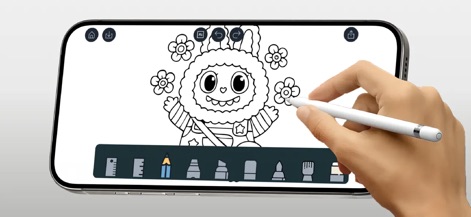
このアプリは、Apple Pencilに対応し、iPad Proの鮮明な画面で直感的な描画プロセスを提供します。ユーザーは、多様な描画ツールから選択して、細部にわたる表現力豊かな作品を作成できます。
直感的ドゥードゥル体験
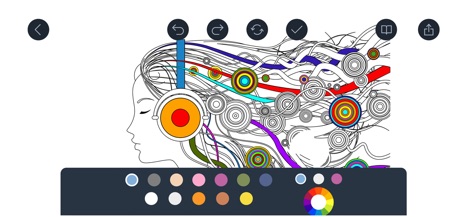
本アプリは、複雑なデザインの塗り絵ページを提供し、ユーザーは豊富なプリセットカラーパレットから色を選択できます。直感的な操作で、繊細な色合いから鮮やかな色まで自由な配色を楽しめます。
色彩豊かな塗り絵

このツールは、描画中に変更可能な10種類以上のユニークなキャンバス背景を提供し、ユーザーは多彩なブラシツールでスケッチを作成できます。これにより、創造性を刺激する視覚効果を作品に加えることが可能です。
背景で描画を彩る
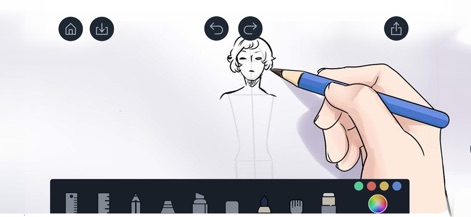
本アプリのスケッチ機能では、ユーザーは鉛筆ツールを使用して人物の構図を詳細に描画できます。また、柔軟な消しゴム機能により、描画の修正や完璧な仕上げが容易に行えます。
精密なスケッチ作成

このアプリは、ユーザーが洗練された肖像画を作成できるよう、多様なブラシツールを提供します。背景には、魔法のようなブラシストローク効果を適用し、作品に生命力と芸術的な深みを加えることが可能です。
洗練された肖像画
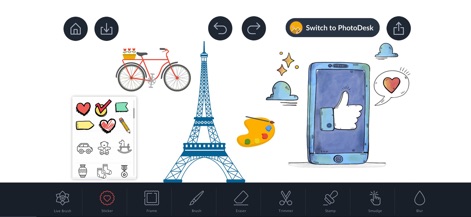
本ツールは、豊富なステッカーとスタンプのコレクションを提供し、ユーザーは作品に個性的な装飾を追加できます。また、「PhotoDeskに切り替え」機能により、写真編集機能への迅速なアクセスが可能です。
創造性を高める装飾
説明
Download
類似アプリ
似た機能とユーザー体験を持つアプリ

Sketchbook®
Sketchbook, Inc.

Mental Canvas Draw
Mental Canvas, Inc.

ibis Paint
ibis inc.

ibis Paint X
ibis inc.

Paper: Sketch, Draw & Create
Evernote Corporation

Adobe Fresco: Draw & Paint App
Adobe Inc.

Art Set 4
Lofopi Ltd

MediBang Paint – Drawing & Art
MediBang inc.

Tayasui Sketches
SKETCHES SRL
このページはアプリまたはその開発者の公式ページではなく、情報提供および論評を目的として作成された独立した編集出版物です。明示的に別段の記載がない限り、アプリおよびその開発者は、MWM、Apple、Google Play、アプリのパブリッシャー、またはアプリの開発者と提携、承認、後援、認可、またはその他の公式的な関係はなく、このページのいかなる内容も、アプリがMWMのサービスを使用して開発されたことを意味するものではありません。すべての商標、ロゴ、スクリーンショット、その他のコンテンツはそれぞれの所有者の財産です。