
このページはアプリまたはその開発者の公式ページではなく、情報提供および論評を目的として作成された独立した編集出版物です。明示的に別段の記載がない限り、アプリおよびその開発者は、MWM、Apple、Google Play、アプリのパブリッシャー、またはアプリの開発者と提携、承認、後援、認可、またはその他の公式的な関係はなく、このページのいかなる内容も、アプリがMWMのサービスを使用して開発されたことを意味するものではありません。すべての商標、ロゴ、スクリーンショット、その他のコンテンツはそれぞれの所有者の財産です。


Drawing ▫
指先でクリエイティブな独裁を振るう。このアプリは、あなたのデバイスを芸術の武器に変える。
ダウンロード
2.5M+ユーザー評価
評価数
17.2K開発元
カテゴリ
Productivity対応言語
1最新バージョン
4.13.1サイズ
177.8 MBリリース日
2019年11月29日多様なユーザー層に対応する革新的な描画プラットフォーム
Drawing ▫️アプリの主要機能分析
多彩な描画ツール
ユーザーは40種類以上の手作りブラシと多様な描画ツールを利用して、リアルな筆致や様々なアートスタイルを表現することができます。
無限のカラーオプションとカスタマイズ
本アプリは数百万色のカラーオプションを提供し、ユーザーは既存の40種類以上のプリセットパレットやカスタムパレットを使って、独自の色彩表現を追求することが可能です。
精密な編集と操作性
本ツールは、ズーム機能で細部を描画したり、ブラシのサイズや不透明度を調整したり、元に戻す・やり直す機能を使って、作品を正確かつスムーズに編集することを可能にします。
画像のインポートと加工
ユーザーはギャラリーから写真を取り込んだり、その場で撮影した写真に描画したり、自由に回転・拡大縮小して、オリジナルのアート作品を作成できます。
塗り絵とマンダラの作成
このアプリは、ユニークな塗り絵ページや、自分だけのマンダラをデザイン・着色できるモードを提供し、リラックスしながら創造性を発揮する機会をユーザーに与えます。
子供向けクリエイティブ機能
小さなユーザー向けに、10種類以上の楽しい描画ツール、マジカルパターンブラシ、教育的な塗り絵ページが用意されており、子供たちは遊びながら創造性を育むことができます。
作品の共有と記録
ユーザーは完成したアート作品をギャラリーに保存し、各種ソーシャルネットワークで共有できるほか、描画プロセスを記録して共有することも可能です。
Apple Pencilと感圧タッチ対応
iPad ProユーザーはApple Pencilを、iPhoneユーザーは3D Touchの感圧機能を活用して、水彩、鉛筆、ペンツールなどで角度や筆圧に応じた繊細な表現を行うことができます。
よくある質問
について知っておくべきこと Drawing ▫
What is DrawingApp?
DrawingApp is a mobile application for iPhone and iPad designed for creating drawing art. It offers tools for sketching, typing, painting, and drawing, enabling users to bring creative ideas to life.
Which devices does DrawingApp support?
DrawingApp supports both iPhone and iPad devices. It also offers support for Apple Pencil on iPad Pro and 3D Touch sensitivity for iPhones.
Can I use Apple Pencil with DrawingApp?
Yes, DrawingApp supports Apple Pencil for iPad Pro. It provides angle and pressure sensitivity with tools like Water Color, Pencil, and Pen.
How many brushes are available in DrawingApp's Sketch Desk?
DrawingApp's Sketch Desk offers over 40 handcrafted style paintbrushes and various tools like a ruler and eraser. It also provides millions of colors.
Can I import photos into DrawingApp?
Yes, DrawingApp allows users to import pictures and photos to enhance their drawings in the Sketch Desk and to draw on photos in the Doodle Desk.
What features does DrawingApp's Doodle Desk include?
DrawingApp's Doodle Desk allows users to draw, sketch, paint, customize colors, import and rotate photos, adjust brush size/opacity, and utilize undo/redo options. Users can also record and share artwork.
Does DrawingApp offer custom color options?
Yes, DrawingApp provides extensive color customization. In Doodle Desk, users can customize colors, and in Coloring Desk, they can create custom palettes by combining any colors.
Can I create custom mandalas in DrawingApp?
Yes, DrawingApp features a Coloring Desk with a specific mandala creation mode. This allows users to bring their unique designs to life as custom mandalas.
How many coloring pages are in DrawingApp's Kids Desk?
DrawingApp's Kids Desk includes over 50 educational coloring pages. It also provides more than 10 drawing tools, shapes, and magical pattern brushes for children.
What are the subscription options for DrawingApp Premium?
DrawingApp Premium offers a weekly subscription at $4.99 USD (with a 3-day free trial), a monthly subscription for $7.99 USD, or a yearly subscription for $29.99 USD. A one-time lifetime purchase is $35.99.
Does DrawingApp Premium include a free trial?
Yes, DrawingApp Premium offers a 3-day free trial with its weekly subscription option. Subscription payments begin after the trial unless canceled at least 24-hours prior.
What benefits does DrawingApp Premium provide?
Upgrading to DrawingApp Premium grants unlimited access to Sketch Desk, Coloring Desk, Kids Desk, and Doodle Desk. Premium also removes all ads and watermarks from the app.
Can I adjust brush opacity in DrawingApp?
Yes, DrawingApp allows users to change brush opacity settings. This feature is available in the Doodle Desk, and visually confirmed by an opacity slider.
Where can I find DrawingApp's Privacy Policy?
DrawingApp's Privacy Policy is available at the link provided in the app description: http://drawingapp.me/privacy-policy.html.
Can I share my artwork created with DrawingApp?
Yes, DrawingApp enables users to save artworks to their gallery and share them instantly to any social network. The Doodle Desk also includes a record and share artwork option.
以下のスクリーンショットと説明は、アプリの公式ストアリスティングから直接取得されたものであり、アプリ開発者の所有物です。
アプリストア
スクリーンショット
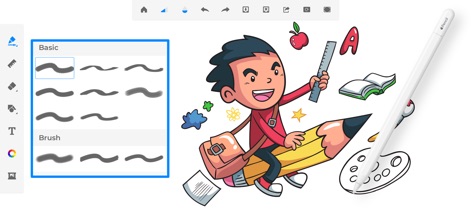
多彩な40種類以上のブラシが利用でき、Apple Pencilによる筆圧感知でより自然な描画体験を提供します。
ブラシ選択とApple Pencil

直感的なカラーホイールで無限の色から選択可能で、RGBやHSBモードを切り替えて理想のカラーを正確に設定できます。
鮮やかな色彩設定
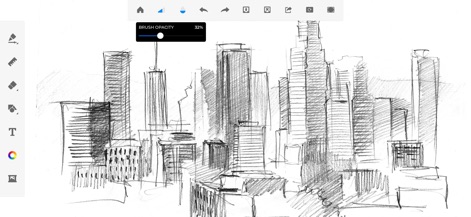
ブラシの不透明度を調整することで、スケッチに深みとグラデーションをもたらし、より表現豊かなアートワークを作成できます。
繊細な表現、不透明度

テクスチャブラシで独特の背景や効果を加えたり、様々な形状ブラシを使って創造的なデザインを手軽に表現できます。
ユニークな質感、形状

子供向けの楽しいキャンバスで、カラフルな塗りつぶしツールや教育的な塗り絵ページを利用して、創造性を育むことができます。
キッズデスク、楽しい学習

ドゥードルデスクでは、多様なマーカーやペンツールを使い、心ゆくまで創造的な落書きやイラストを楽しむことができます。
ドゥードルデスク、自由な発想

多様なカテゴリの塗り絵ページから選択し、豊富なカラーパレットやカスタムパレットを利用して、自分だけの美しいアートを完成させることができます。
カラーリングブック、癒し

アプリ内で写真をインポートし、その上に直接描画することで、可愛らしいスタンプや手書きの装飾を追加してパーソナルな作品を作成できます。
写真に描く、パーソナルアート

フォトパッド機能で写真に様々なステッカーを配置したり、マジックダストやバーコリなどの多様なパターンを適用して、魅力的な画像を生成できます。
フォトパッド、魅力的な加工
説明
Download
類似アプリ
似た機能とユーザー体験を持つアプリ

Sketchbook®
Sketchbook, Inc.

Mental Canvas Draw
Mental Canvas, Inc.

ibis Paint
ibis inc.

ibis Paint X
ibis inc.

Paper: Sketch, Draw & Create
Evernote Corporation

Adobe Fresco: Draw & Paint App
Adobe Inc.

Art Set 4
Lofopi Ltd

MediBang Paint – Drawing & Art
MediBang inc.

Tayasui Sketches
SKETCHES SRL
このページはアプリまたはその開発者の公式ページではなく、情報提供および論評を目的として作成された独立した編集出版物です。明示的に別段の記載がない限り、アプリおよびその開発者は、MWM、Apple、Google Play、アプリのパブリッシャー、またはアプリの開発者と提携、承認、後援、認可、またはその他の公式的な関係はなく、このページのいかなる内容も、アプリがMWMのサービスを使用して開発されたことを意味するものではありません。すべての商標、ロゴ、スクリーンショット、その他のコンテンツはそれぞれの所有者の財産です。