
このページはアプリまたはその開発者の公式ページではなく、情報提供および論評を目的として作成された独立した編集出版物です。明示的に別段の記載がない限り、アプリおよびその開発者は、MWM、Apple、Google Play、アプリのパブリッシャー、またはアプリの開発者と提携、承認、後援、認可、またはその他の公式的な関係はなく、このページのいかなる内容も、アプリがMWMのサービスを使用して開発されたことを意味するものではありません。すべての商標、ロゴ、スクリーンショット、その他のコンテンツはそれぞれの所有者の財産です。


Freenotes®: AI Notes Taking
退屈な記憶力に引導を渡し、AIが学習と生産性を支配する時代へ
ダウンロード
7.5M+ユーザー評価
評価数
640.7K開発元
カテゴリ
Productivity対応言語
27最新バージョン
3.29.1サイズ
565.5 MBリリース日
2023年9月5日テックアナリストによる詳細評価とインパクトスコア
Freenotes®: AIノートテイキングアプリの主要機能分析
AIによるPDFチャット
ユーザーはインポートしたファイルに直接質問し、即座に回答を得ることができます。
AI要約機能
ユーザーは長い録音や文書から主要なポイントとアクションアイテムを迅速に見つけることができます。
Apple Pencil Pro対応
ユーザーは実際の紙のような感覚で低遅延の書き込みを体験することができます。
AI学習コンパニオン
ユーザーは概念を明確にし、用語を定義し、手書きのメモの正確性を確認することで、受動的な復習を能動的な想起に変えることができます。
シームレスなビデオ学習
ユーザーはオンライン動画(YouTube、講義録画)を視聴しながらPicture-in-Picture機能でメモを取り、関連するスクリーンショットを直接メモに瞬時に取り込むことが可能です。
OCRによる高速検索
本ツールは正確なテキスト認識を使用して、ユーザーが手書きのスクリプトを簡単に検索することを可能にします。
アクティブリコールテープ
ユーザーは特定のメモの一部を非表示にすることで、記憶をテストし、より効果的に学習することができます。
PDFアノテーション
ユーザーはカスタムペンツールを用いて文書をハイライト表示、下線、コメント追加が可能です。
メモの整理
このアプリは、プロジェクト、コース、またはトピック別にメモを分類および整理し、メモライブラリの整理を自動化します。
無限キャンバス
ユーザーは作業に合わせて拡張するホワイトボード上でアイデアをスケッチしたり、マインドマップを作成したりできます。
よくある質問
について知っておくべきこと Freenotes®: AI Notes Taking
What is Freenotes®: AI Notes Taking?
Freenotes®: AI Notes Taking is a digital note-taking solution combining realistic handwriting with AI features for study and work. It offers PDF annotation, organization, and efficient learning tools across devices.
Can Freenotes AI summarize notes?
Yes, Freenotes AI provides instant summaries of content. Users can take a screenshot or upload documents like PDFs or photos to receive AI-generated summaries and answers to questions.
Does Freenotes convert handwritten notes to searchable text?
Yes, Freenotes converts handwritten notes into searchable text. Its advanced handwriting OCR (Optical Character Recognition) allows users to quickly find specific notes or keywords within their handwritten content.
Can I annotate PDFs in Freenotes?
Yes, Freenotes supports annotating PDF files. Users can annotate, mark up, and highlight large PDF files, and select text for translation or word look-up directly within the app.
Can I take notes while watching videos with Freenotes?
Yes, Freenotes allows users to take notes while watching videos. It utilizes Picture-in-Picture (PiP) for online videos like YouTube, enabling users to capture relevant screenshots directly into their notes.
Does Freenotes have a Dark Mode?
Yes, Freenotes offers a Dark Mode feature. This mode provides visual comfort for users by optimizing the interface for low-light environments.
How does Freenotes help with active recall?
Freenotes assists with active recall using its tape tool. This tool allows users to mark key information for memorization and then test themselves by toggling the visibility of the marked content.
以下のスクリーンショットと説明は、アプリの公式ストアリスティングから直接取得されたものであり、アプリ開発者の所有物です。
アプリストア
スクリーンショット

このアプリは、詳細な手書きの解剖図や重要な情報を強調表示する機能を提供し、美しく整理された学習体験を実現します。
美しいノート作成
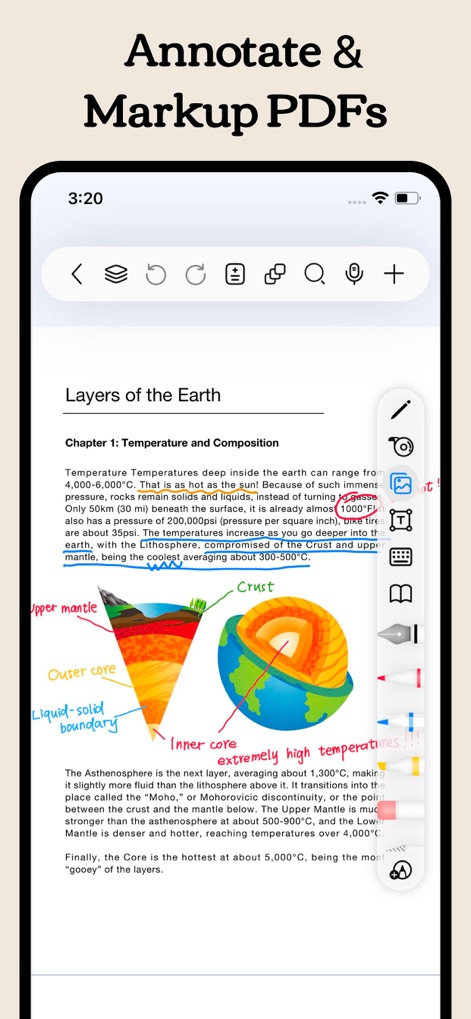
ユーザーは、PDFドキュメントに直接ハイライトや手書きの描画を追加することで、視覚的な理解を深め、学習内容を効率的にマークアップできます。
PDFを自由に編集

様々な学習や計画のニーズに対応するため、月間プランナーやテーマ別ノートブックといった多様なテンプレートが用意されており、ユーザーは目的に合わせてダウンロードまたは作成が可能です。
豊富なテンプレート
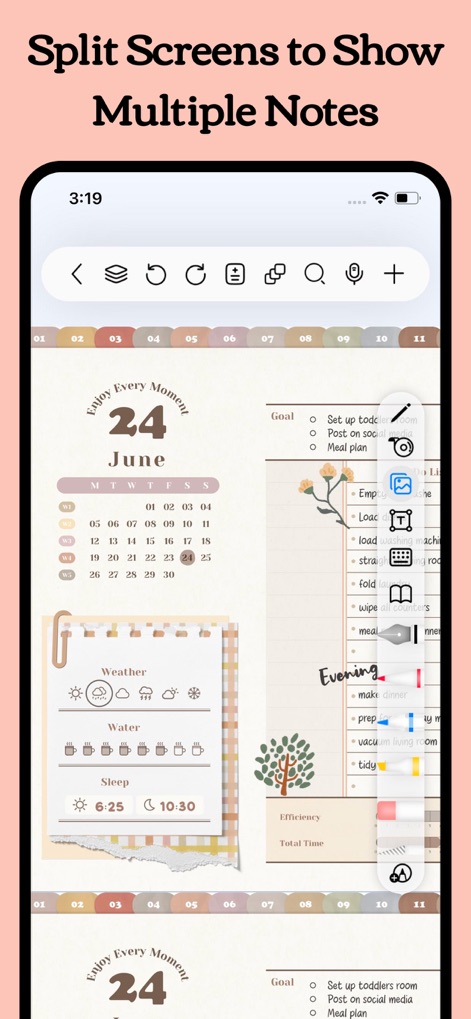
この機能は、デジタルプランナーを横に表示しながら別のノートを編集するなど、複数のノートを同時に表示することで、ユーザーのマルチタスクと生産性を大幅に向上させます。
効率的な分割画面

ダークモードは、目の疲れを軽減しながら、色彩豊かな解剖学的図解を鮮明に表示し、長時間の学習や夜間の作業でも快適な視覚体験を提供します。
快適なダークモード
説明
Download
類似アプリ
似た機能とユーザー体験を持つアプリ

Notion: Notes, Tasks, AI
Notion Labs, Incorporated

Structured - Daily Planner
unorderly GmbH

Google Tasks: Get Things Done
Google LLC

TickTick:To-Do List & Calendar
Appest Limited

Noteful: Notes & PDF Markup
Noteful Technologies Ltd

Todoist: To Do List & Calendar
Doist Inc.

To do list MinimaList & Widget
Inner Grow Limited

monday.com - Work Platform
monday.com Ltd.

Prodrafts - Infinite Notes
EMMO Corp.
このページはアプリまたはその開発者の公式ページではなく、情報提供および論評を目的として作成された独立した編集出版物です。明示的に別段の記載がない限り、アプリおよびその開発者は、MWM、Apple、Google Play、アプリのパブリッシャー、またはアプリの開発者と提携、承認、後援、認可、またはその他の公式的な関係はなく、このページのいかなる内容も、アプリがMWMのサービスを使用して開発されたことを意味するものではありません。すべての商標、ロゴ、スクリーンショット、その他のコンテンツはそれぞれの所有者の財産です。