iCalendar

iCalendar

ダウンロード: App Store
ロゴ: iCalendar

iCalendar:忙しいあなたのための高性能コマンドセンター

究極の生産性ツールで、時間を完全にコントロールしましょう。Google、Outlook、iCloudをシームレスに同期しながら、高効率プロフェッショナル向けに設計された強力なインターフェースでタスクを管理します。

開発元

Symfonies, Inc.

カテゴリ

Productivity

ダウンロード

405K+

ユーザー評価

4.5/5

評価数

10K+

対応言語

5

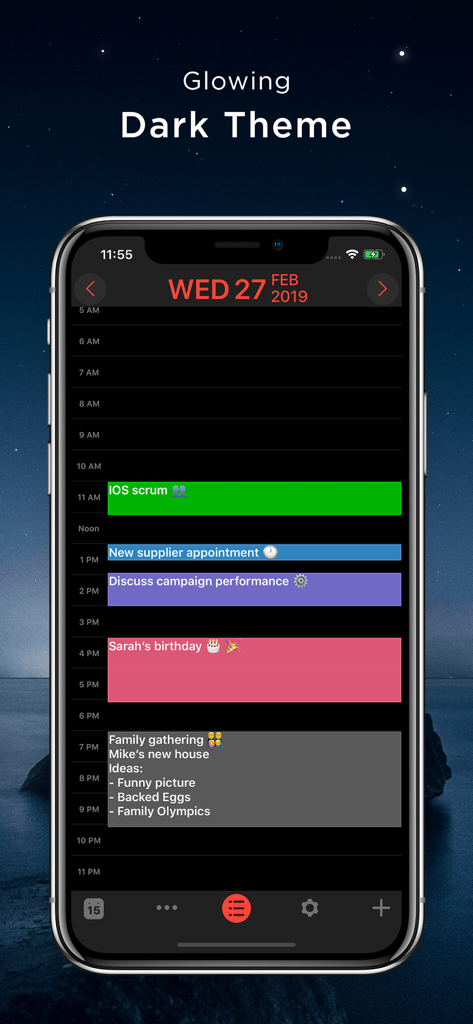
視覚化された生産性

このインターフェースを利用する 405K+ 人のユーザー.

iCalendarアプリのスクリーンショット(iPhone、鮮やかなダークテーマ)で、カラーコーディングされた毎日のスケジュールとイベントが表示されています

iCalendarアプリのスクリーンショット(iPhone、鮮やかなダークテーマ)で、カラーコーディングされた毎日のスケジュールとイベントが表示されています

あなたの今日のための究極のコマンドセンター

このアプリを際立たせるツール、 405K+ 人のユーザーが選択.

🔄

一つのアプリ、すべてのアカウント

iCloud、Google、Exchange、Outlookをシームレスに同期し、単一の統合ダッシュボードからあなたのプロフェッショナルおよびプライベートな生活全体を管理します。

統合されたタスク管理

アプリの切り替えをやめましょう。iOSリマインダーをカレンダー内で直接管理し、予定と並んでToDoリストを視覚化します。

プロフェッショナルのスピードのために構築

ドラッグ&ドロップでの再スケジュール、ワンタッチでの会議ダイヤルイン、ノイズをフィルタリングするカスタマイズ可能なビューで時間を節約します。

アプリについて

について知っておくべきこと iCalendar.

説明

** A MUST-HAVE CALENDAR APP FOR EVERY IPHONE, IPAD, AND IPOD **   iCalendar is the ultimate calendar for your iPhone, iPad and iPod Touch focusing on your productivity. It’s seamless, highly usable interface allows you to enter events quickly and helps you keep track of your busy schedule. It integrates with your iCloud, Google, Exchange, Outlook, or Yahoo! account to provide you with the most convenient calendaring experience.    EASILY TRACK YOUR SCHEDULE - View your daily, weekly, monthly, and yearly schedule. - Custom color-code your events. Use predefined colors, or make up your own colors. - iCalendar implements quickest way on the market to navigate between dates  - Fast and powerful search: Search events by title, location, and notes.    NEW IN VERSION 4.0 - Task Manager: Manage your tasks within your calendar in a fun and easy manner and sync with iOS Reminders. Available as in-app purchase for USD 0.99.   FULL OF PRODUCTIVITY TOOLS - Drag and drop an event to update its timing.  - Copy and paste events. - Create custom repeating events (e.g. repeat on the third Friday every month, and many more).  - Add custom alerts/reminders for events and snooze alerts - Access your event details quickly by tapping on the event.  - Customize the visible time period (e.g. from 9:00 AM – 5:00 PM) to help you focus on most important events.    EVEN MORE - Time Zone Support: View and create your events in your preferred time zone and never get confused when you travel.  - Complete print functionality. Print daily, weekly, monthly, and yearly views.  - Export any view (day, week, month, year) as a PDF file.  - Use built-in maps to set the location of your events.  - Dial into a conference call with one touch right from iCalendar. Add phone numbers from your contacts to events with the ability to use pause and wait, which is ideal for conference calls.  - Set location of an event as the address or phone number of one of your contacts.  - Access all your events directly from the Month view - no need to go to each individual day to review full list of events.  - Use the app icon badge to indicate either the number of upcoming events or the day of the month.  - Google Calendar sync: sync all of your calendars, create and edit Google Calendar events, and use Google Calendar custom reminders (SMS, email and/or alert). - Add, edit and delete calendars right from iCalendar.  - Support of portrait and landscape to match your orientation preference.  - iCalendar is a universal app. Download once and use across all your devices.  - For more details: http://www.symfonies.com/icalendar/   iCalendar offers access to interesting calendars from Calendar Store as an optional in-app purchase.  You may subscribe to your holidays calendar (national/religious) or subscribe to interesting calendars (e.g. local/global sports events, stocks, weather, and many others).   With an optional in-app purchase yearly subscription, you get full and ongoing access to the Calendar Store including (live) updates in your calendar. A subscription always starts with a one-month free trial, so you can try before you buy. One year subscriptions for the Calendar Store costs $1.99. Payment will be charged to your iTunes Account at confirmation of purchase and after the 1 month free trial. Subscriptions automatically renew unless auto-renew is turned off at least 24-hours before the end of the current period. Your account will be charged for renewal within 24-hours prior to the end of the current 1 year period. You can turn off auto-renew at any time from your iTunes account settings. Cancellation of the current active subscription period is not allowed.   Our terms of service and privacy policy are found at http://www.symfonies.com/terms-of-service/ and http://www.symfonies.com/privacy-policy/ respectively.   If you have a question, need help or would like to request a feature, please do not hesitate to contact us. We respond to EVERY email we receive: support@symfonies.com

最新バージョン

5.5.4

サイズ

36.8 MB

リリース日

2012年1月6日

あなたのスケジュールを完全に管理する

基本的なツールでは満足できない40万人以上の高効率プロフェッショナルに加わりましょう。今すぐiCalendarをダウンロードして、複雑な一日を完璧に構成されたフローに変えましょう。

ダウンロード: App Store

App information, icons, screenshots, and descriptions displayed on this page are sourced from the Apple App Store and are the property of their respective developers. Download estimates and rankings are based on MWM's proprietary models and may not reflect actual figures. This page is provided for informational and analytical purposes only.

Believe this page infringes your intellectual property? File a dispute