
Iriun Webcam for PC and Mac


ぼやけたノートパソコンのカメラに我慢するのはもうやめましょう。iPhoneを数秒でZoom、Teams、ストリーミング用のプロ仕様ワイヤレス4Kウェブカメラに変えましょう。
開発元
カテゴリ
Photo & Videoダウンロード
4M+ユーザー評価
評価数
1K+対応言語
1このインターフェースを利用する 4M+ 人のユーザー.
このアプリを際立たせるツール、 4M+ 人のユーザーが選択.
iPhoneの優れたカメラ技術を活用して、会議、クラス、ストリームにプロ仕様のビデオ品質を提供します。
Wi-Fi経由で即座に接続し、デスク周りをすっきりさせましょう。製品、スケッチ、またはさまざまな角度を自由に見せるために携帯電話を動かせます。
複雑なセットアップは不要です。ドライバーをインストールし、アプリを起動するだけで、Zoom、Teams、OBS、Discordで利用できます。
について知っておくべきこと Iriun Webcam for PC and Mac.
説明
最新バージョン
2.9.1
サイズ
1.4 MB
リリース日
2018年12月14日
新しいウェブカメラにお金を無駄にしないでください。400万人以上の resourceful なプロフェッショナルやクリエイターのように、Iriun を使用してiPhoneを数秒で高解像度4Kカメラに変えましょう。
について知っておくべきこと Iriun Webcam for PC and Mac
Iriun Webcamは、iPhoneのカメラをPCやMacコンピューター用のワイヤレスウェブカメラに変換します。さまざまなビデオアプリケーションで使用するために、iPhoneの鮮明な画像を提供します。
はい、Iriun WebcamはPCとMacの両方のオペレーティングシステムをサポートしています。ユーザーは、iPhoneカメラをウェブカメラとして利用するために、コンピューターに必要なドライバーをインストールします。
Iriun Webcamは、WiFiネットワークを使用してiPhoneをコンピューターにワイヤレスで接続します。両方のデバイスでアプリとサーバーを起動すると、電話は自動的に接続されます。
https://iriun.comからソフトウェアをダウンロードして、コンピューター(PC/Mac)用のIriun Webcamドライバーをインストールする必要があります。次に、インストーラーを実行し、画面の指示に従います。
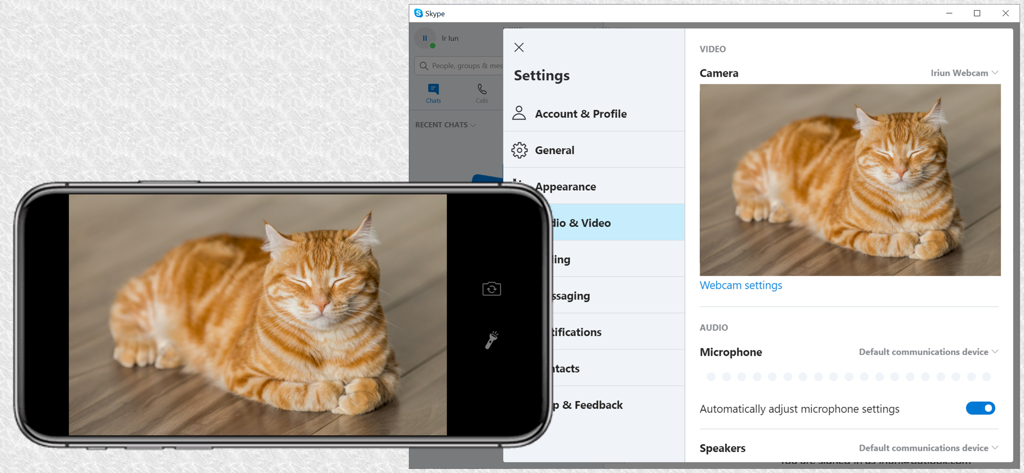
はい、SkypeなどのPC/Macアプリケーションを設定して、Iriun Webcamをビデオソースとして使用できます。提供されているスクリーンショットは、Skypeのビデオ設定内での統合を示しています。
似た機能とユーザー体験を持つアプリ

Remote Sunrise LTD

Reincubate Ltd

DEV47 APPS LTD.

datronicsoft Technology GmbH

俊红 柴

耀 阮

Touchbits Inc.

Human Things, Inc

Astro HQ LLC
App information, icons, screenshots, and descriptions displayed on this page are sourced from the Apple App Store and are the property of their respective developers. Download estimates and rankings are based on MWM's proprietary models and may not reflect actual figures. This page is provided for informational and analytical purposes only.
Believe this page infringes your intellectual property? File a dispute