
このページはアプリまたはその開発者の公式ページではなく、情報提供および論評を目的として作成された独立した編集出版物です。明示的に別段の記載がない限り、アプリおよびその開発者は、MWM、Apple、Google Play、アプリのパブリッシャー、またはアプリの開発者と提携、承認、後援、認可、またはその他の公式的な関係はなく、このページのいかなる内容も、アプリがMWMのサービスを使用して開発されたことを意味するものではありません。すべての商標、ロゴ、スクリーンショット、その他のコンテンツはそれぞれの所有者の財産です。


Linearity Curve Graphic Design
iPadとiPhoneでプロのベクターアートを、どこまでも自由に操る。もうデスクトップに縛られない。
ダウンロード
5M+ユーザー評価
評価数
41.1K開発元
カテゴリ
Graphics & Design対応言語
13最新バージョン
6.9.1サイズ
682.4 MBリリース日
2017年5月24日iPadとiPhoneでのベクターグラフィックデザインを革新する主要ツール
Linearity Curve Graphic Design: プロフェッショナル向け機能分析
Apple Pencil対応と最適化されたタッチインターフェース
本ツールはApple Pencilと完全に統合されており、自然で筆圧感知に対応したベクター描画を可能にします。また、タッチ操作に最適化されたインターフェースとジェスチャーベースのナビゲーションにより、iPadおよびiPhone上での流動的なキャンバスコントロールと効率的な作業を実現します。
AI搭載オートトレースと画像処理
このアプリはAIを搭載したオートトレース機能を提供し、スケッチ、写真、イラストを数秒で編集可能なベクターパスに瞬時に変換します。さらに、ワンタップで背景を削除する機能や、様々な画像ファイルをクリーンなSVGベクターファイルに変換する機能も備わっています。
高精度ベクター描画ツール
ユーザーは、精密なベジェ曲線ツール、ノードツール、シェイプビルダー、ブール演算を活用し、あらゆるスケールで滑らかで編集可能なベクターアートを作成できます。スマートガイドとカスタマイズ可能なグリッドにより、ピクセルパーフェクトな配置が可能です。
プロフェッショナルなレイヤーシステムとカラー管理
本ツールは、ブレンドモード、不透明度、マスキング機能を備えた包括的なレイヤーシステムを提供し、複雑なグラフィックの構成を可能にします。スポイトツールと保存されたカラーパレット、RGBおよびCMYKのフルカラーサポートにより、ブランドの一貫性とプロフェッショナルな出力品質を保証します。
幅広いファイル形式の入出力対応
このアプリは、SVG, AI, PDF, PNG, JPG, TIFFといった業界標準のフォーマットをインポートおよびエクスポートすることが可能です。これにより、他の主要なベクターおよび画像エディタとのシームレスな連携、およびアプリ、ウェブ、ソーシャルプラットフォーム、印刷物への柔軟な出力が実現します。
クラウド同期とオフライン作業
ユーザーはクラウド同期機能を利用して、iPad、iPhone、Mac間でプロジェクトを常に最新の状態に保つことができます。また、ローカルストレージによりインターネット接続がない場所でも作業を継続でき、再接続時に自動的に同期されるため、場所を選ばずにクリエイティブな活動が可能です。
豊富なテンプレートとアセットライブラリ
本ツールは、ロゴ、ソーシャル投稿、プレゼンテーションなどに使える数千ものプロフェッショナルデザインテンプレートを提供します。Unsplashからのストックフォト、アイコンパック、カスタマイズ可能なシェイプが内蔵されており、デザインワークフローを迅速化します。
チームコラボレーション機能
このアプリは、チームメンバーが変更を即座に確認できる共有ワークスペースを提供し、iPad、iPhone、Mac間でのシームレスなプロジェクトの引き渡しを可能にします。これにより、チームでの効率的な共同作業が促進されます。
よくある質問
について知っておくべきこと Linearity Curve Graphic Design
What is Linearity Curve Graphic Design software?
Linearity Curve is a professional vector drawing app for iPad and iPhone. It provides tools for creating vector art, illustrations, logos, and graphic designs, optimized for desktop creativity and precision Bezier tools.
Can I use Linearity Curve on my iPhone, iPad, and Mac?
Yes, Linearity Curve Graphic Design is designed for use across multiple Apple devices. It is available on iPad, iPhone, and Mac, with cloud sync to keep projects updated across all platforms.
Does Linearity Curve offer automatic image vectorization?
Yes, Linearity Curve features an 'Auto Trace' tool. It instantly vectorizes sketches, photos, illustrations, or scanned artwork into editable paths, converting any image into clean, organized SVG files using AI.
What file formats does Linearity Curve Graphic Design support for import and export?
Linearity Curve supports importing and exporting industry formats such as .ai, SVG, PDF, PNG, JPG, and TIFF. It also opens projects directly from Illustrator, Figma, and Sketch.
Does Linearity Curve provide a background removal tool?
Yes, Linearity Curve includes AI-powered 'Background Removal' functionality. This feature isolates subjects in one click, simplifying image editing and allowing for quick adjustments to your designs.
Is Linearity Curve Graphic Design optimized for macOS performance?
Yes, Linearity Curve is built for macOS. It offers native Apple Silicon performance with hardware acceleration, full keyboard shortcut support, trackpad gestures, and a Liquid Glass interface for Mac users.
Can teams collaborate in real-time using Linearity Curve?
Yes, Linearity Curve supports real-time collaboration. It provides shared workspaces where teams can see changes instantly and seamlessly hand off projects between members on Mac, iPad, and iPhone.
Does Linearity Curve allow for custom vector brushes?
Yes, Linearity Curve allows users to create custom vector brushes. This feature helps artists develop a unique and consistent style for their digital art, offering flexibility in design.
Who is Linearity Curve Graphic Design intended for?
Linearity Curve is built for logo designers, illustrators, digital art creators, marketing teams, UX/UI designers working on icons and design systems, and print designers preparing various materials.
What can I create with Linearity Curve Graphic Design?
Linearity Curve is a professional vector art and graphic design software. It allows users to create stunning vector art, design complex illustrations, vectorize photos, and develop logos and brand systems.
以下のスクリーンショットと説明は、アプリの公式ストアリスティングから直接取得されたものであり、アプリ開発者の所有物です。
アプリストア
スクリーンショット
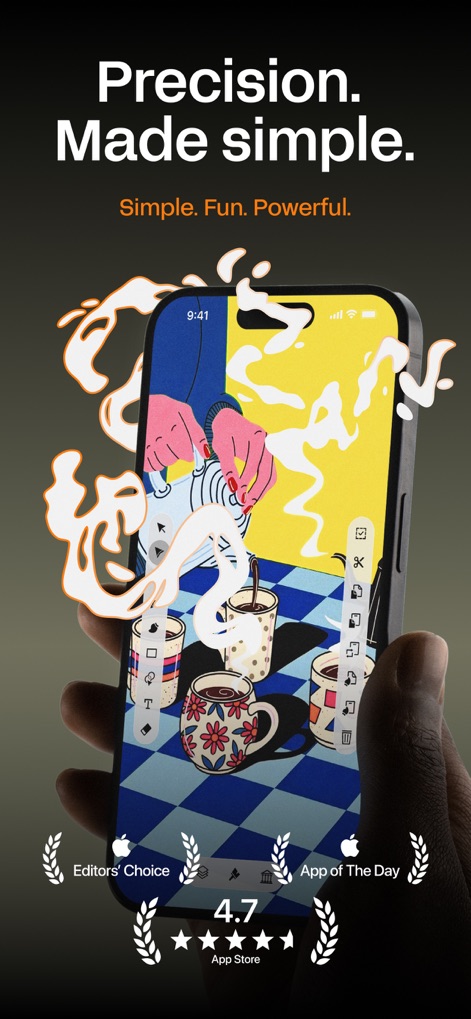
洗練されたベクター描画ツールを駆使し、直感的なインターフェース上で魅力的なイラストを制作できます。
精密な創造
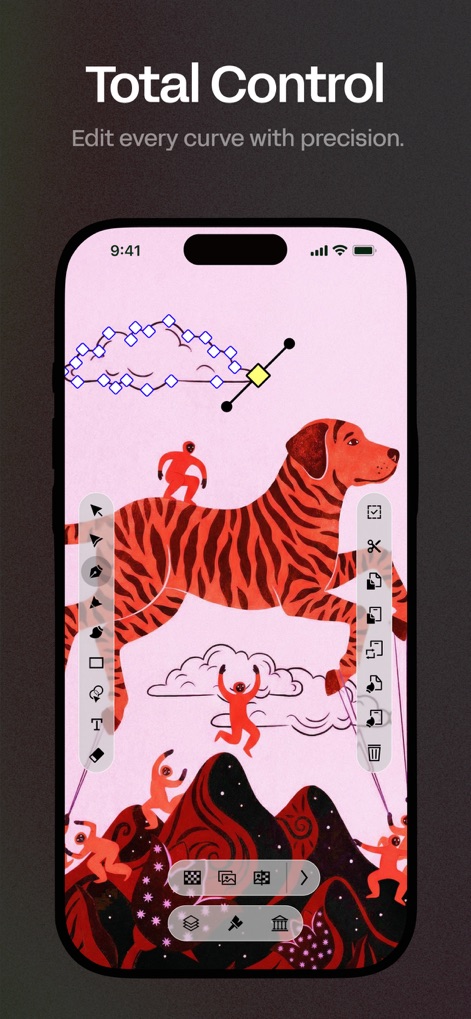
ベジェ曲線ノードを精密に操作し、左側の編集ツールを活用して、デザインのあらゆるカーブを詳細に調整可能です。
究極の制御
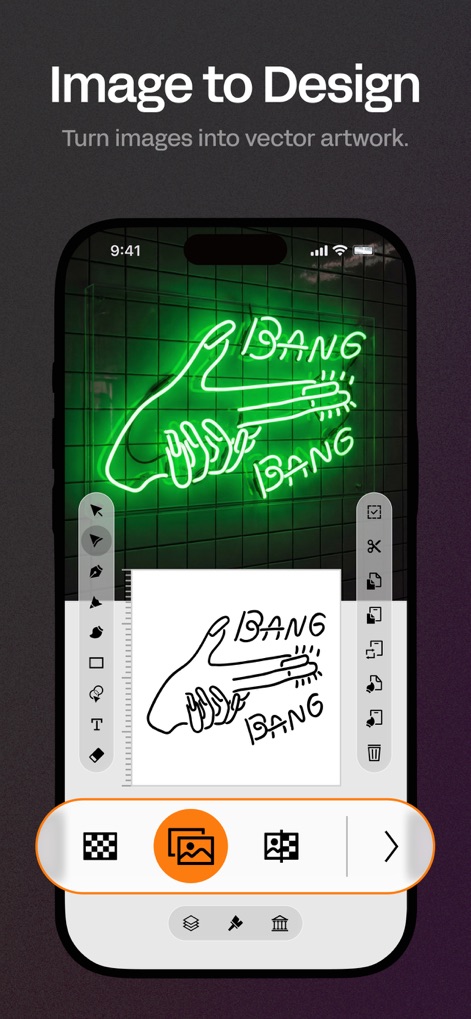
下部の画像選択アイコンから写真を取り込み、AIによる自動トレースで瞬時にベクター化された線画へと変換できます。
画像からデザインへ
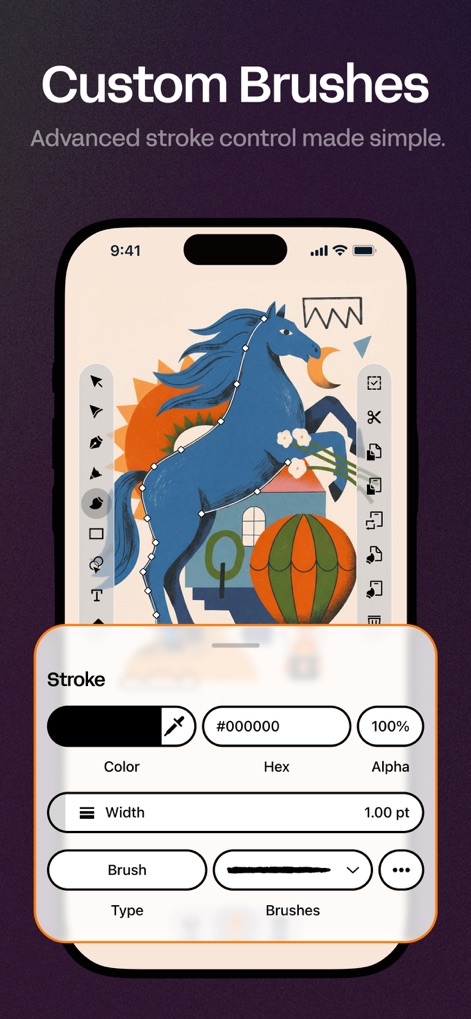
ストローク設定パネルで詳細な調整を行い、カスタムブラシ選択により、表現力豊かな独自のベクターストロークを生成できます。
独自ブラシ
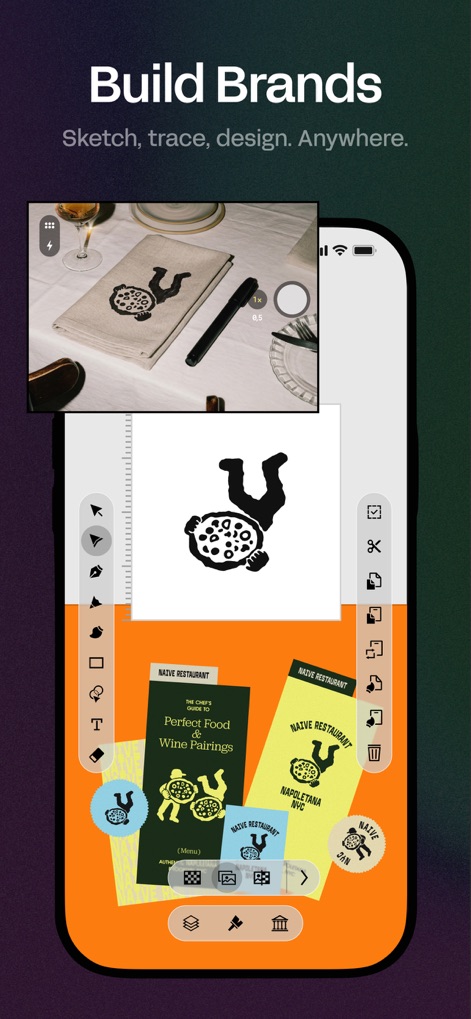
取り込んだ写真画像を元にロゴをデザインし、複数の完成デザインとして出力することで、包括的なブランドシステムを構築できます。
ブランド構築
説明
Download
類似アプリ
似た機能とユーザー体験を持つアプリ

Sketchbook®
Sketchbook, Inc.

Mental Canvas Draw
Mental Canvas, Inc.

ibis Paint
ibis inc.

ibis Paint X
ibis inc.

Paper: Sketch, Draw & Create
Evernote Corporation

Adobe Fresco: Draw & Paint App
Adobe Inc.

Art Set 4
Lofopi Ltd

MediBang Paint – Drawing & Art
MediBang inc.

Tayasui Sketches
SKETCHES SRL
このページはアプリまたはその開発者の公式ページではなく、情報提供および論評を目的として作成された独立した編集出版物です。明示的に別段の記載がない限り、アプリおよびその開発者は、MWM、Apple、Google Play、アプリのパブリッシャー、またはアプリの開発者と提携、承認、後援、認可、またはその他の公式的な関係はなく、このページのいかなる内容も、アプリがMWMのサービスを使用して開発されたことを意味するものではありません。すべての商標、ロゴ、スクリーンショット、その他のコンテンツはそれぞれの所有者の財産です。