LiquidText

LiquidText

ダウンロード: App Store
ロゴ: LiquidText

LiquidText:ディープリサーチと分析のためのインテリジェントワークスペース

従来のPDFを超えましょう。プロフェッショナル向けに設計された流動的で非線形のインターフェースで、アイデアをシームレスに接続し、離れたページを並べて比較し、複数のドキュメントを横断して複雑な情報を統合します。

ダウンロード: App Store

開発元

LiquidText, Inc.

カテゴリ

Productivity

ダウンロード

3M+

ユーザー評価

4.6/5

評価数

14K+

対応言語

1

ディープワーク、視覚化

このインターフェースを利用する 3M+ 人のユーザー.

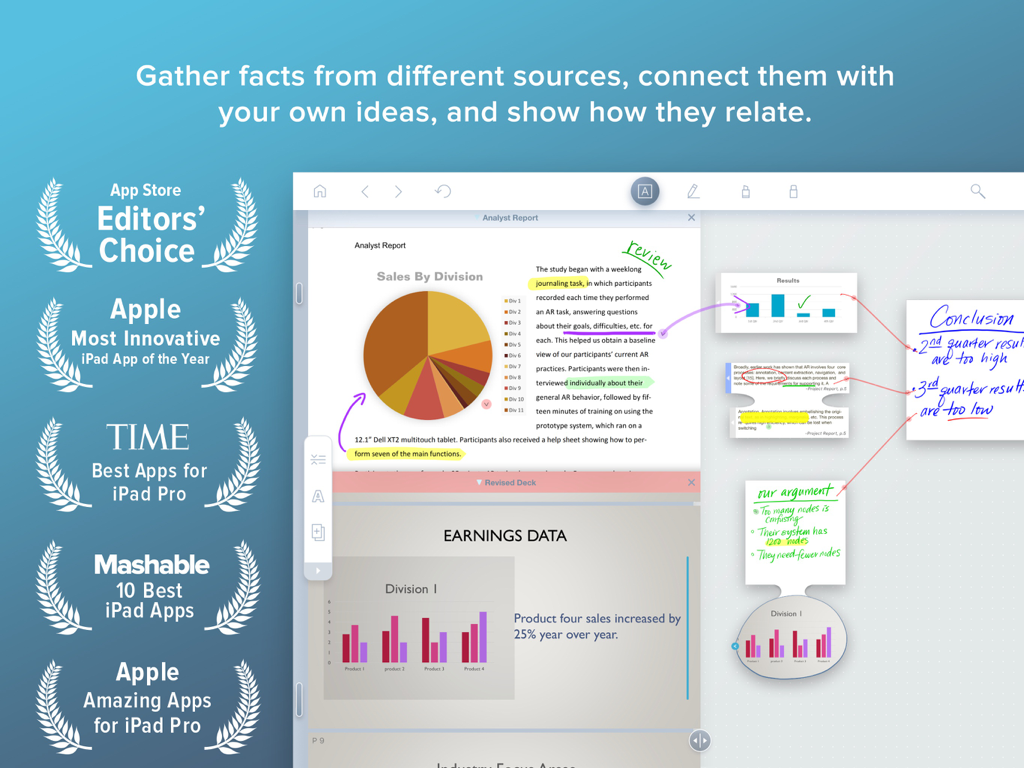
LiquidTextアプリがiPadで、視覚的なリンクで接続されたドキュメント分析と手書きのメモをワークスペースに表示しています
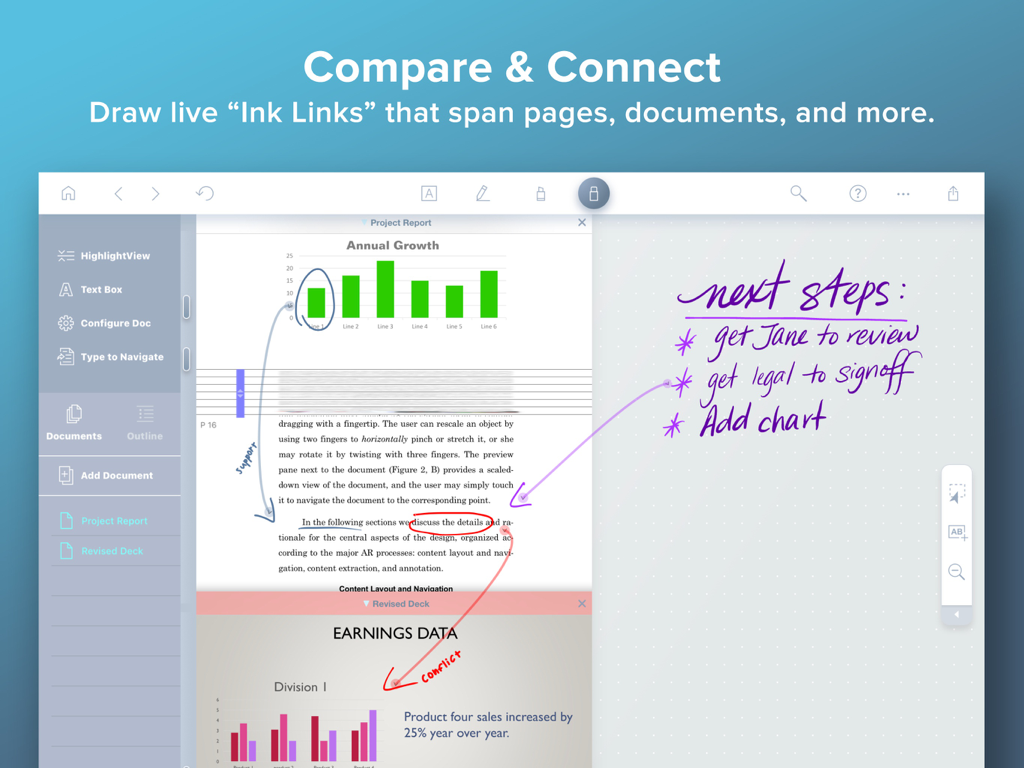
LiquidTextアプリがiPadで、視覚的なリンクで接続されたドキュメント分析と手書きのメモをワークスペースに表示しています

LiquidTextアプリのインターフェースに、PDF内のチャートを手書きのプロジェクトノートに接続するライブインクリンクが表示されています。
LiquidTextアプリのインターフェースに、PDF内のチャートを手書きのプロジェクトノートに接続するライブインクリンクが表示されています。

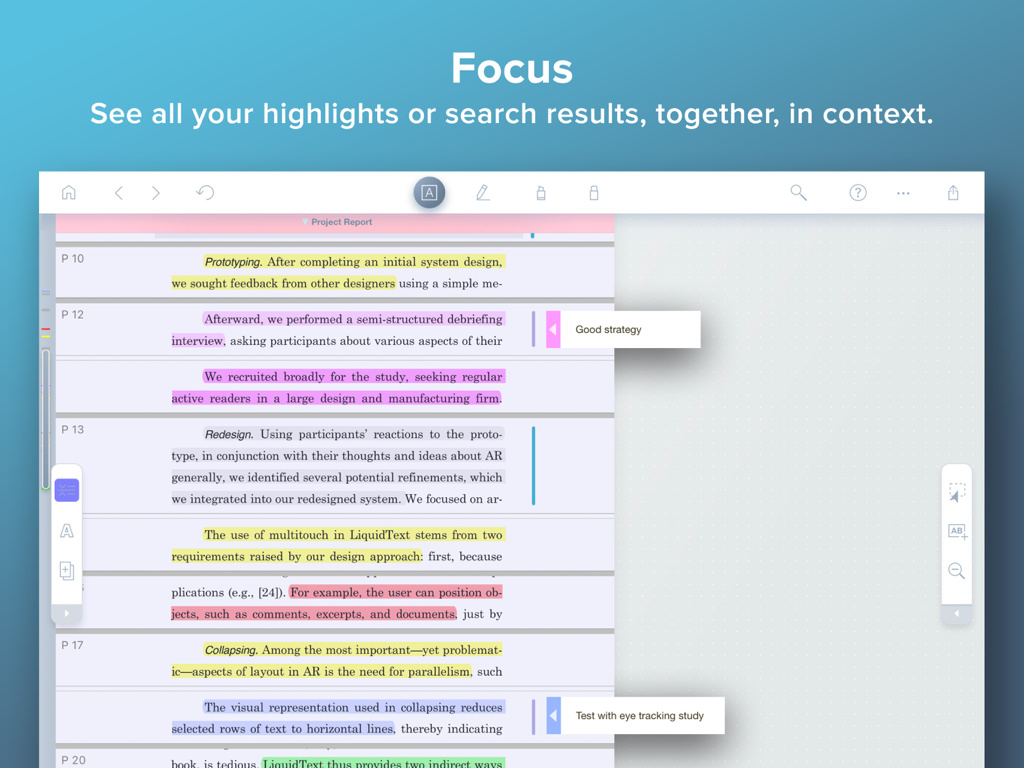
LiquidTextフォーカスモードは、複数のハイライトされたドキュメントセクションとマージンノートが一緒に圧縮されている様子を示しています。
LiquidTextフォーカスモードは、複数のハイライトされたドキュメントセクションとマージンノートが一緒に圧縮されている様子を示しています。

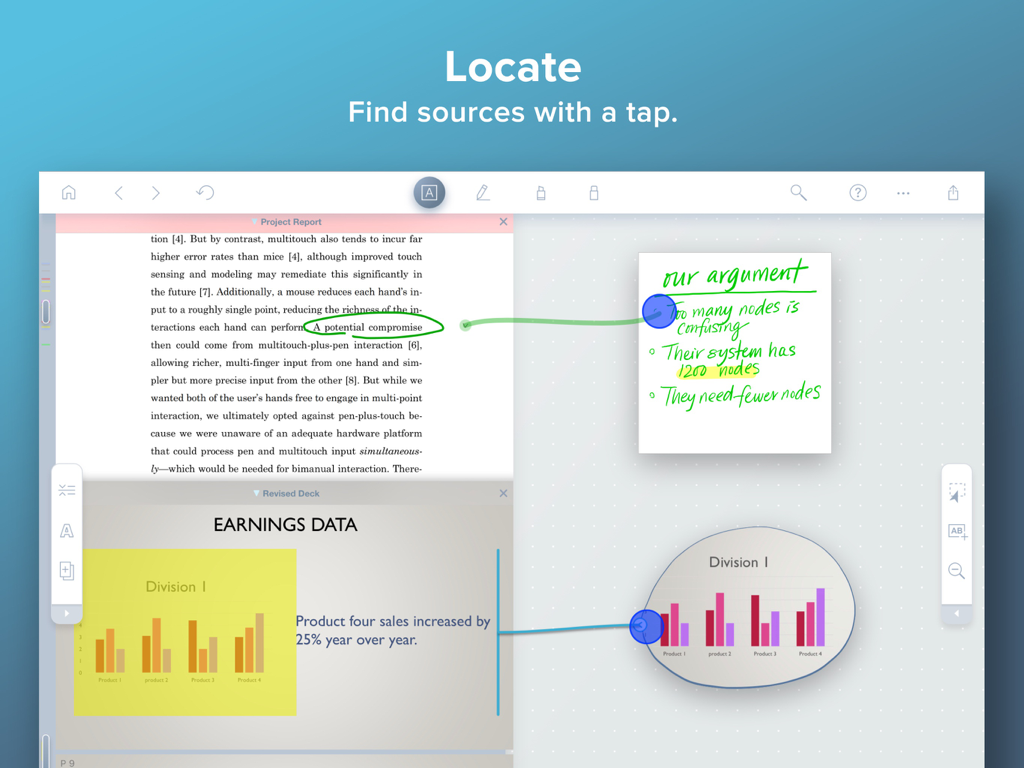
LiquidText iPadアプリのインターフェースには、ノートをドキュメントソースに接続するインクリンクが表示されています
LiquidText iPadアプリのインターフェースには、ノートをドキュメントソースに接続するインクリンクが表示されています

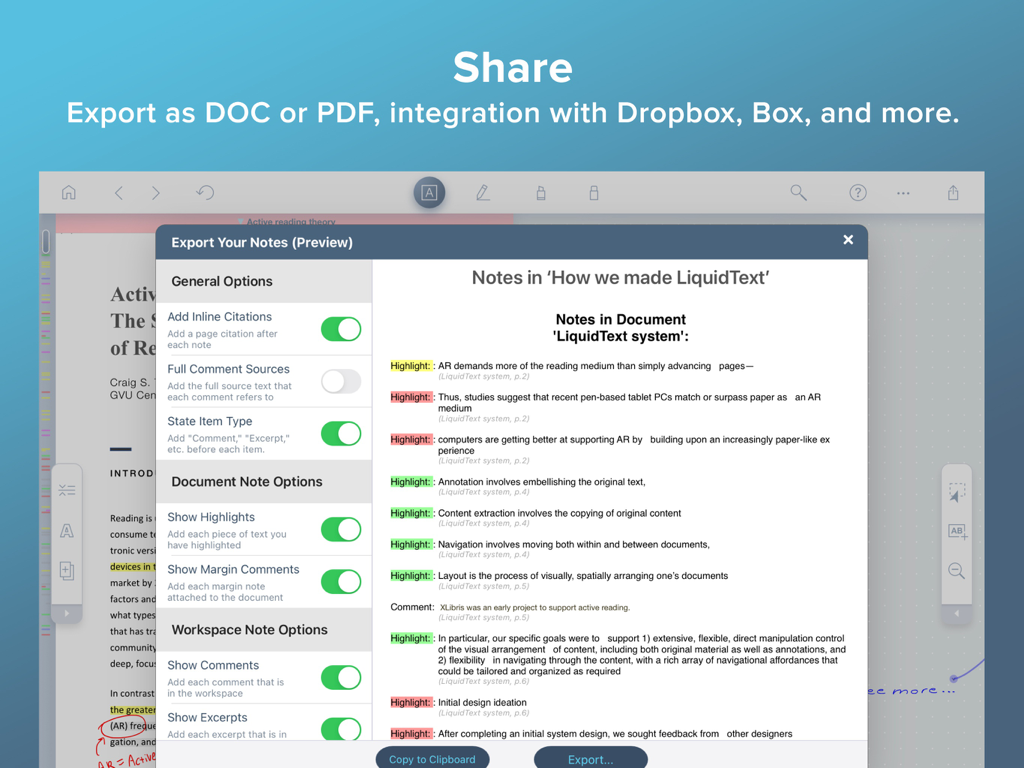
LiquidTextアプリのインターフェースに、iPadでのノートエクスポートオプションとドキュメントプレビューが表示されています
LiquidTextアプリのインターフェースに、iPadでのノートエクスポートオプションとドキュメントプレビューが表示されています

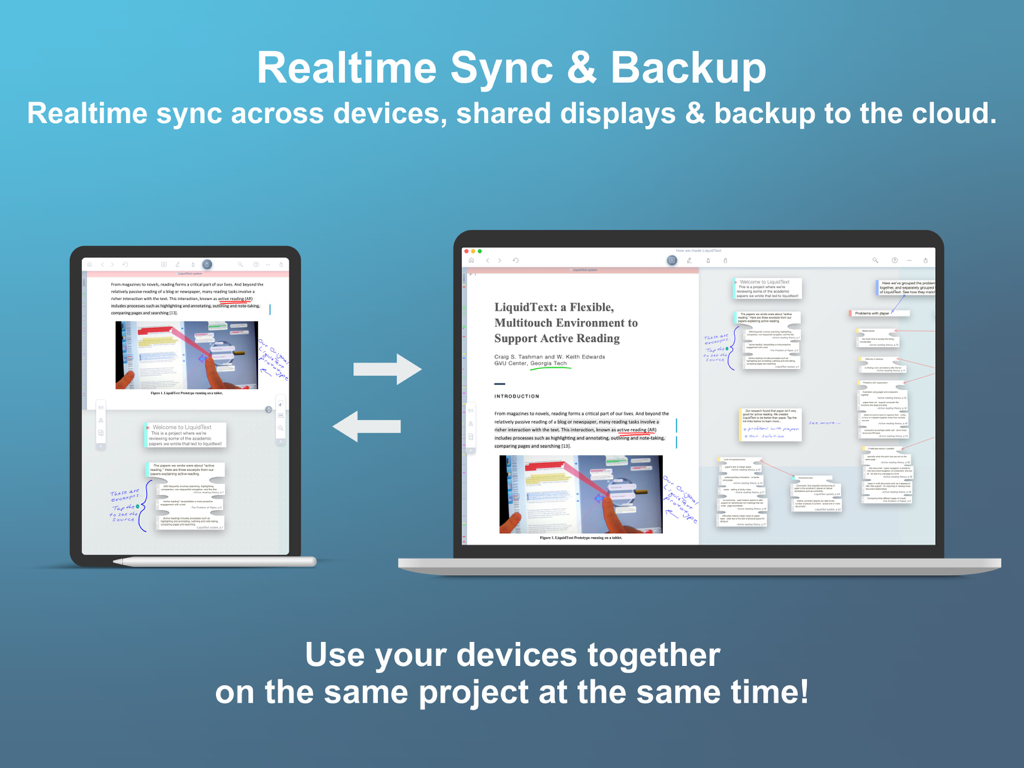
LiquidTextアプリは、iPadとMacラップトップ間のリアルタイム同期とクラウドバックアップを示しています
LiquidTextアプリは、iPadとMacラップトップ間のリアルタイム同期とクラウドバックアップを示しています

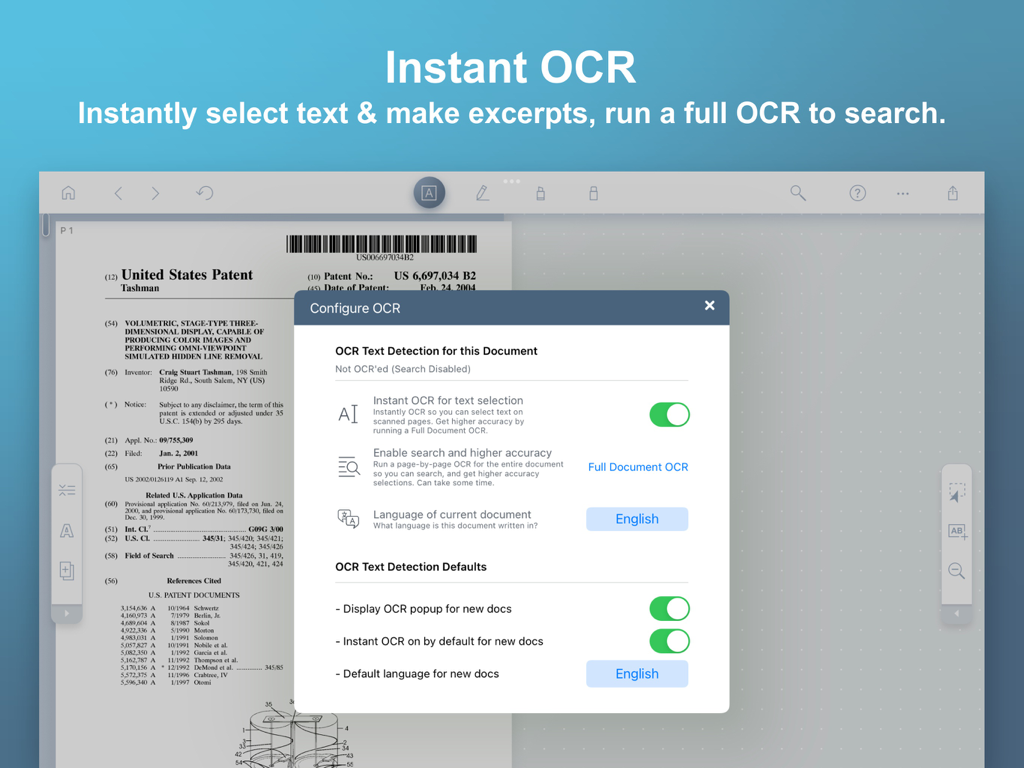
LiquidTextアプリのインターフェースに、特許文書のインスタントOCRおよびテキスト検出設定が表示されています
LiquidTextアプリのインターフェースに、特許文書のインスタントOCRおよびテキスト検出設定が表示されています

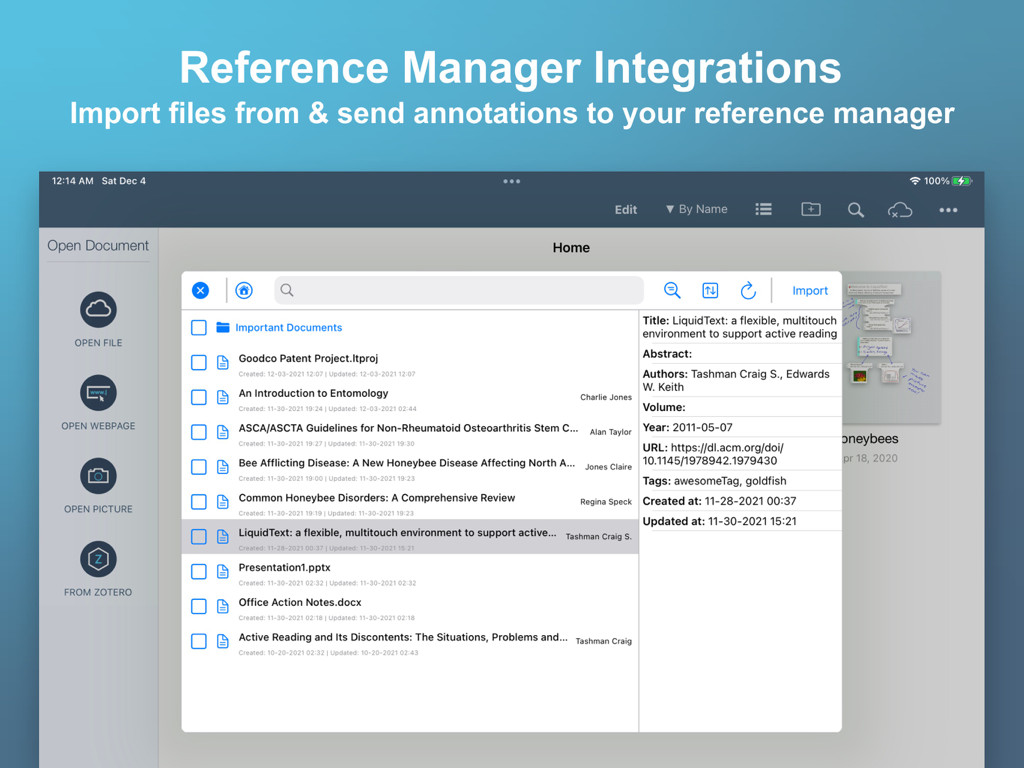
LiquidTextアプリのインターフェースに、リサーチドキュメントのリファレンスマネージャー統合が表示されています

LiquidTextアプリのインターフェースに、リサーチドキュメントのリファレンスマネージャー統合が表示されています

分析力を解き放つ

このアプリを際立たせるツール、 3M+ 人のユーザーが選択.

🧩

動的な情報抽出

元のソースへのリンクを失うことなく、主要な抜粋や画像を直接柔軟なワークスペースに引き込み、発見を整理します。

↕️

インテリジェントドキュメント圧縮

ピンチして数百ページを圧縮し、離れたセクションを並べて比較することで、集中的なレビュー中のスクロール疲れを解消します。

🔗

ライブマルチドキュメントリンク

異なるファイルやメモ間に視覚的な「インクリンク」を作成して、複雑な関係をマッピングし、鉄壁の議論を構築します。

レビュー分析

ユーザーレビューの分析.

感情スコア

31%
ネガティブ

概要

The app is highly valued by users for its robust features in research and academic work, particularly its ability to facilitate annotation, visual organization, and mind mapping of complex documents. Users praise its effectiveness in handling large volumes of medical literature and academic texts, with some finding it a "game-changer" for productivity and integration with tools like Zotero. However, feedback is strongly negative regarding the app's "egregious" pricing model, which often involves multiple paywalls and expensive subscriptions for basic functionalities, alienating students and long-term users. Frequent bugs, crashes, freezing, and data loss are significant frustrations, compounded by unresponsive customer support and a desire for crucial missing features such as dark mode, multi-image upload, and reliable cross-device synchronization.

主なテーマ

Pricing & Subscription Model(23)
Missing Features & UI/UX(17)
Bugs & Stability(16)
Research & Academic Use(10)
Annotation & Organization(9)
Customer Support(7)
Sync & Cross-Platform(7)

アプリについて

について知っておくべきこと LiquidText.

説明

*** Named “Most Innovative iPad App of the Year” by Apple App Store *** LiquidText offers a fast, natural way to review, gather, and organize information across all your documents and webpages—then apply the results to writing reports, meeting prep, or simply studying. Pull out key facts and connect them together, squeeze a document to compare sections, draw a line to connect ideas in different documents, comment on multiple pages at once, build upon your thoughts, and much more. ► WHAT PEOPLE ARE SAYING: * "If you want to experience the power of going beyond paper, you can download LiquidText" – Cult of Mac * One of Macworld’s Top 24 Apps for iPad Pro * One of Time Magazine's Ten Best apps for iPad Pro * * "There's a better way to organize your research, and the app is it." – iMore, Serenity Caldwell * “All you need for deep research projects.” – Macworld, Jackie Dove * "The world changed with...LiquidText" – Law360, Paul Kiesel * "LiquidText may just be *the* app for reviewing and annotating PDFs using Apple's tablet and stylus." – CIO Magazine, James Martin * “One of the most powerful, original iPad apps I've tried in years” – Federico Viticci, MacStories.net ► LIQUIDTEXT’S COMPLETE FEATURE SET INCLUDES: (Features with * require a paid upgrade.) Import • Create a workspace and import all the documents and web pages you need • Compatible with PDF, Word, and PowerPoint document types • Import from Dropbox, iCloud Drive, Box, email, and more • Import content from webpage or send to LiquidText directly from Safari • Instant OCR to select text in scanned documents; do a full document-OCR to search as well!* • Import documents & metadata directly from reference managers (supports Zotero and Mendeley)* Interact • Pull excerpts from all the documents in your project into the Workspace area • Add your own notes (typed or written) to the Workspace area • Freely draw on your notes, or on the workspace itself* • Organize excerpts and notes into groups • Connect anything - draw live “ink links” that span pages, documents, notes, and more* • Create mind-maps by drawing “ink links” connecting your excerpts/notes to one another * • Get context - tap notes and excerpts to find original source Compare • Pinch a document to compare different distant pages side by side • Collapse text to see annotated parts side-by-side • Collapse text to view search results(s) side-by-side • Import unlimited number of documents into a project, view up to 3 at once* Annotate • Freely draw* or highlight on your document, notes, or the workspace itself • Add margin notes/comments to text, images, notes, and excerpts • Comment on two or more selections simultaneously • Replace document with a newer version (and annotations are brought to new doc)* Search • Search for keywords across all your LiquidText documents • Find keywords in title or text of your documents* • Bulk highlight, tag, or link to your search results* Realtime Collaboration • Invite colleagues into your shared projects and work together in near realtime* • Leave comments and notifications for your collaborators* • Privacy controls: set whether each workspace & document in your project is shared or private* Easy Export • Export your project as a PDF (includes your Workspace and documents) • Export your project as a Word file (converts your notes/excerpts into a linear document) • Send a full LiquidText file for those with the app. • Send files by email or to Dropbox, iCloud Drive, Zotero, and more* Sync & Backup* • Real-time, cross-platform sync • Continuous cloud backup • Multi-device display: • Use your desktop or tablet as additional display for your other device • Use your tablet for freehand inking while viewing and keyboarding on your desktop See our terms of use at https://www.liquidtext.net/terms-of-use Learn more at LiquidText.net | Better Than Paper

最新バージョン

7.1.10

サイズ

303.9 MB

リリース日

2015年9月3日

ディープリサーチの未来を体験

300万人以上のプロフェッショナル、弁護士、研究者が紙を捨てた仲間入りをしましょう。今すぐLiquidTextをダウンロードし、複雑なドキュメントを実用的な洞察に変えましょう。

ダウンロード: App Store
FAQ

よくある質問

について知っておくべきこと LiquidText

LiquidTextはどのような目的で設計されていますか?

LiquidTextは、ユーザーがドキュメントやウェブページから情報をレビュー、収集、整理できるiPadアプリです。事実の抽出、アイデアの接続、注釈付け、研究または学習資料の準備を容易にします。

LiquidTextはどのドキュメント形式のインポートをサポートしていますか?

LiquidTextは、PDF、Word、PowerPointのドキュメントタイプのインポートをサポートしています。また、ウェブページやSafariから直接コンテンツをインポートすることもでき、ユーザーのドキュメントへのアクセス性を向上させます。

LiquidTextにはOCR機能が含まれていますか?

はい、LiquidTextはスキャンされたドキュメントのテキストを選択するためのインスタントOCRと、ドキュメント全体で検索を可能にするフルドキュメントOCRを提供します。フルドキュメントOCRには有料アップグレードが必要です。

LiquidTextで他の人とプロジェクトを共同作業できますか?

はい、LiquidTextはリアルタイムの共同作業を提供します。ユーザーは同僚を共有プロジェクトに招待し、同期して共同作業し、コメント機能を利用できます。このリアルタイム共同作業には有料アップグレードが必要です。

LiquidTextでサポートされているエクスポート形式は何ですか?

LiquidTextは、ワークスペースや元のドキュメントを含むプロジェクトをPDFファイルとしてエクスポートすることをサポートしています。また、メモや抜粋を線形化されたWordドキュメントに変換します。ユーザーは完全なLiquidTextファイルを送信できます。

LiquidTextはマルチデバイス同期を提供しますか?

はい、LiquidTextはリアルタイムのクロスプラットフォーム同期と継続的なクラウドバックアップを提供します。マルチデバイス表示をサポートしており、ユーザーは異なるデバイスを一緒に使用できます。この機能には有料アップグレードが必要です。

LiquidTextは学術参考文献マネージャーと統合されていますか?

はい、LiquidTextはZoteroやMendeleyなどの参考文献マネージャーと統合されています。ユーザーはこれらのマネージャーから直接ドキュメントやメタデータをインポートし、注釈を戻すことができます。この機能には有料アップグレードが必要です。

LiquidTextではフリーハンド描画が利用できますか?

はい、LiquidTextではメモ、ワークスペース、ドキュメントに直接フリーハンド描画が可能です。アイデアを接続するためのライブ「インクリンク」を描画するなどの機能は、通常有料アップグレードが必要です。

LiquidText内でドキュメントまたはセクションを比較するにはどうすればよいですか?

LiquidTextでは、ドキュメントをピンチして異なるページを並べて比較できます。また、テキストを折りたたんで、注釈付きの部分や検索結果を一緒に表示することもできます。有料アップグレードでは、最大3つのドキュメントを同時に表示できます。

LiquidTextは共同プロジェクトにプライバシー設定を提供しますか?

はい、LiquidTextは共有プロジェクトにプライバシーコントロールを提供します。ユーザーは、プロジェクト内の個々のワークスペースとドキュメントを共有するか、プライベートに保つかを決定します。このコントロールは有料機能の一部です。

LiquidTextのすべての機能は無料ですか、それとも有料アップグレードがありますか?

LiquidTextはコア機能を提供しますが、多くの高度な機能には有料アップグレードが必要です。これらには、OCR、リアルタイム共同作業、同期とバックアップ、参考文献マネージャー統合が含まれ、機能リストにはアスタリスクが付いています。

App information, icons, screenshots, and descriptions displayed on this page are sourced from the Apple App Store and are the property of their respective developers. Download estimates and rankings are based on MWM's proprietary models and may not reflect actual figures. This page is provided for informational and analytical purposes only.

Believe this page infringes your intellectual property? File a dispute