
このページはアプリまたはその開発者の公式ページではなく、情報提供および論評を目的として作成された独立した編集出版物です。明示的に別段の記載がない限り、アプリおよびその開発者は、MWM、Apple、Google Play、アプリのパブリッシャー、またはアプリの開発者と提携、承認、後援、認可、またはその他の公式的な関係はなく、このページのいかなる内容も、アプリがMWMのサービスを使用して開発されたことを意味するものではありません。すべての商標、ロゴ、スクリーンショット、その他のコンテンツはそれぞれの所有者の財産です。


ダウンロード
7.5M+ユーザー評価
評価数
190.0K開発元
カテゴリ
Music対応言語
11最新バージョン
3.6.4サイズ
65.4 MBリリース日
2018年10月9日テックアナリストによる主要機能とユーザーエクスペリエンスへの影響評価
Marshall Bluetoothアプリの機能分析
高度なオーディオカスタマイズ
本アプリは、イコライザー設定やノイズキャンセリング機能など、詳細なオーディオ調整を提供し、ユーザーが個人の好みに合わせて完璧なサウンド体験を創造することを可能にします。
幅広いデバイス互換性
このアプリは、多数のMarshallオーディオ製品に対応しており、ユーザーが自身の複数のデバイスを一つの統合されたプラットフォームから管理する能力を提供します。
リモートコントロール機能
本ツールは、ユーザーがMarshallオーディオデバイスの音量調整や再生コントロールを遠隔から行える利便性を提供し、シームレスなリスニング体験を実現します。
簡単なデバイス接続
このアプリは、Marshallオーディオデバイスとのシンプルかつ迅速なペアリングプロセスを保証し、ユーザーがすぐに音楽再生を開始できるようにします。
よくある質問
について知っておくべきこと Marshall Bluetooth
What is the Marshall Bluetooth app?
The Marshall Bluetooth app manages Marshall audio devices remotely. It controls volume, customizes sound with equalizers, manages noise cancellation, and ensures device connectivity for a personalized listening experience.
Can I adjust volume with the Marshall Bluetooth app?
Yes, the Marshall Bluetooth app provides remote volume control for connected Marshall devices. Users adjust audio levels from their mobile device, ensuring convenient management of their sound environment.
Does the Marshall Bluetooth app offer an equalizer feature?
Yes, the Marshall Bluetooth app includes a customizable equalizer. Users select preset sound profiles or create their own, adjusting frequency bands like 160 Hz, 400 Hz, 1 kHz, 2.5 kHz, and 6.25 kHz.
What noise control settings are available in the Marshall Bluetooth app?
The Marshall Bluetooth app provides noise control options including Active Noise Cancellation (ANC), Off, and Transparency (TRA) modes. Users adjust the ANC level directly within the app for their headphones.
Which Marshall products are compatible with the Marshall Bluetooth app?
The Marshall Bluetooth app supports products like Bromley 750, Middleton II, Kilburn III, Monitor III A.N.C., Emberton III, Willen II, Motif II A.N.C., and many other listed Marshall audio devices.
Is the Marshall Bluetooth app required to use Marshall products?
Yes, Marshall products function independently without the Marshall Bluetooth app. The app offers advanced controls and customization, but it is not essential for basic operation of the devices.
How do I connect my Marshall device to the Marshall Bluetooth app?
To connect a device, launch the Marshall Bluetooth app and ensure your Marshall device is powered on and nearby. The app automatically searches for and lists available devices for pairing.
Can I personalize device settings using the Marshall Bluetooth app?
Yes, the Marshall Bluetooth app allows users to personalize various settings, including media playback controls for actions like play/pause and skipping tracks, as well as call management options.
Does the Marshall Bluetooth app offer product information or tips?
Yes, the Marshall Bluetooth app provides access to product information, such as guidance on fitting earbuds for optimal comfort and sound, and details regarding device firmware.
Can I update my Marshall device's firmware via the Marshall Bluetooth app?
Yes, the Marshall Bluetooth app manages firmware updates for compatible devices. It displays the current firmware version and confirms if the device's firmware is already up to date.
以下のスクリーンショットと説明は、アプリの公式ストアリスティングから直接取得されたものであり、アプリ開発者の所有物です。
アプリストア
スクリーンショット
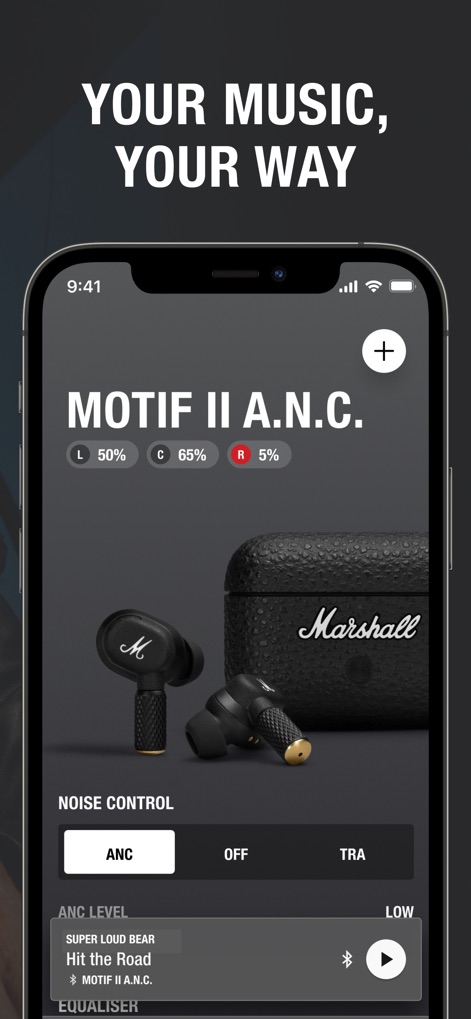
このアプリでは、詳細な左右のバッテリー残量表示と、アクティブノイズキャンセリング(ANC)やトランスペアレンシー(TRA)モードの切り替えにより、ユーザーはリスニング体験を完全にコントロールできます。
高度なノイズ制御
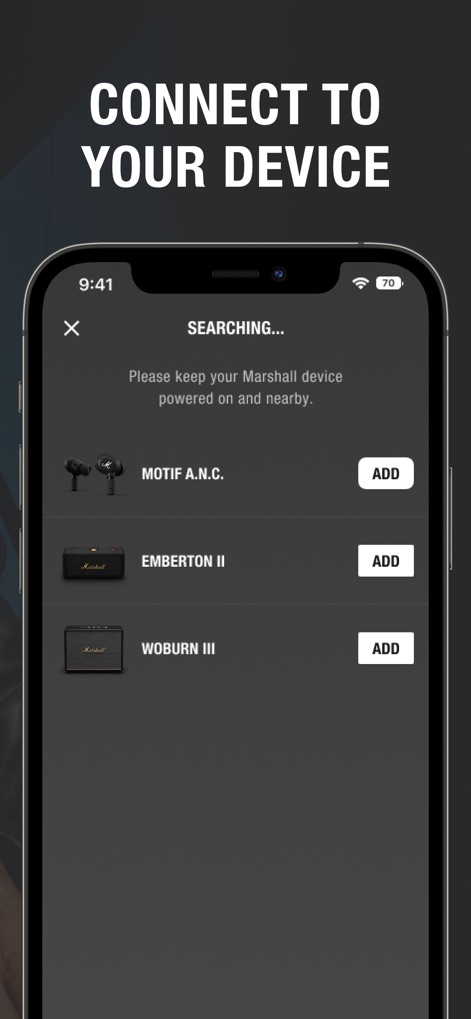
本アプリは、ユーザーが近くのMarshallデバイスを自動的に検出し、MOTIF A.N.C.やWOBURN IIIなどの製品をワンタップで簡単に追加接続できる機能を提供します。
デバイスに接続
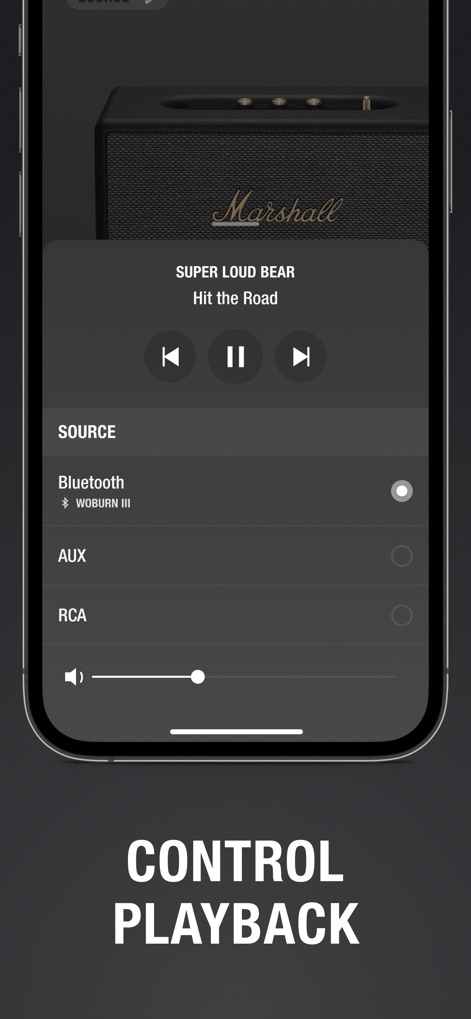
ユーザーは、現在のトラック情報(例: Super Loud Bear - Hit the Road)と再生コントロール(再生/一時停止、スキップ)を表示し、Bluetooth、AUX、RCAなどの様々な音源を切り替えて音楽を管理できます。
音楽を再生
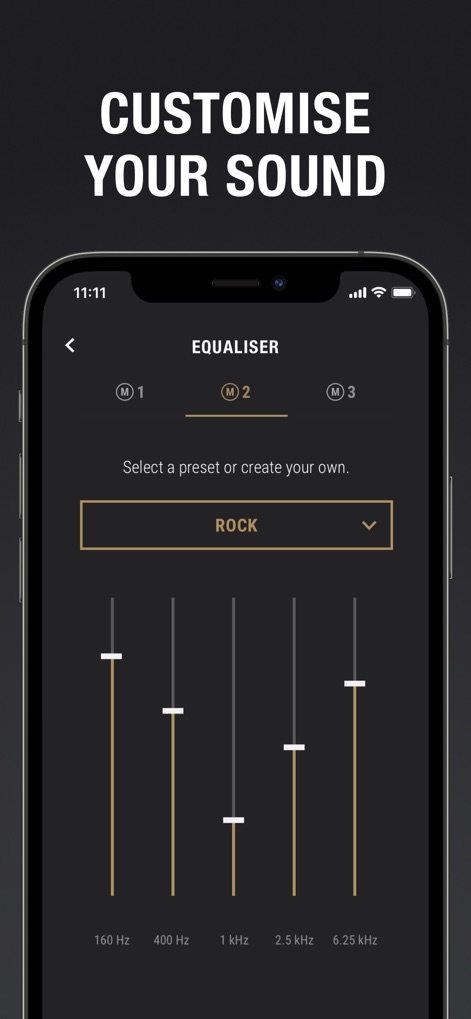
この機能を使用すると、ユーザーはプリセット(例: ROCK)を選択したり、160Hzから6.25kHzまでの複数の周波数帯別スライダーを調整して、サウンドプロファイルをカスタマイズできます。
サウンドを調整
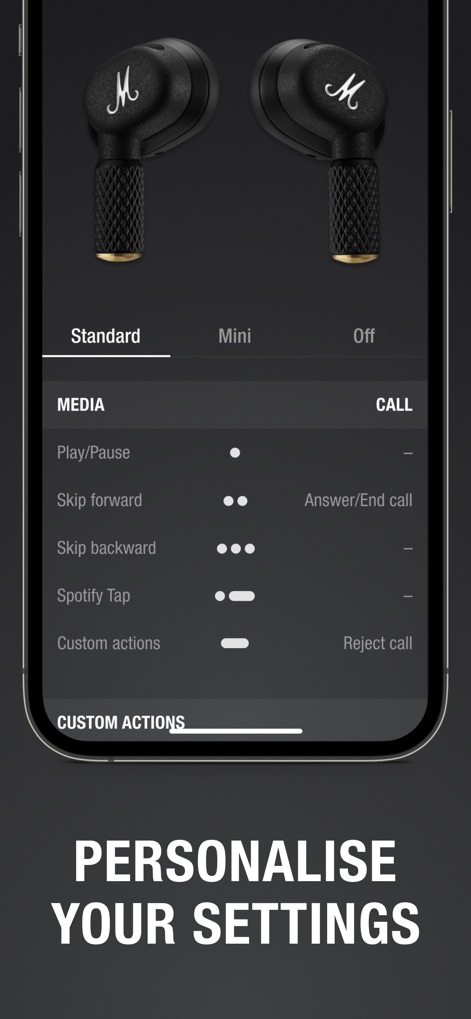
ユーザーは、メディア操作(再生/一時停止、スキップ)や通話機能(応答/終了、拒否)など、イヤホンの物理的なコントロールに割り当てるカスタムアクションを設定して、デバイスをパーソナライズできます。
設定をカスタマイズ
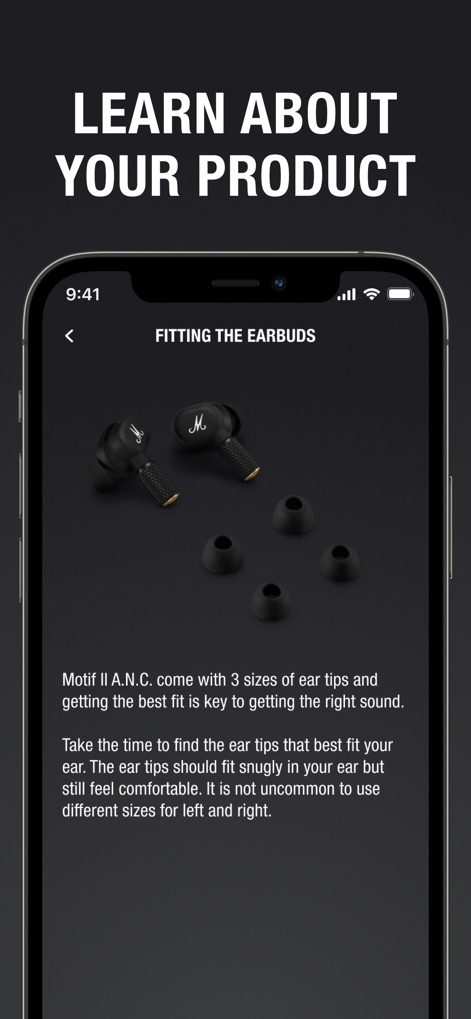
本アプリは、Motif II A.N.C.の最適な装着方法に関する詳細情報と、3種類の付属イヤーチップの選択肢についてユーザーに案内します。
製品を理解する
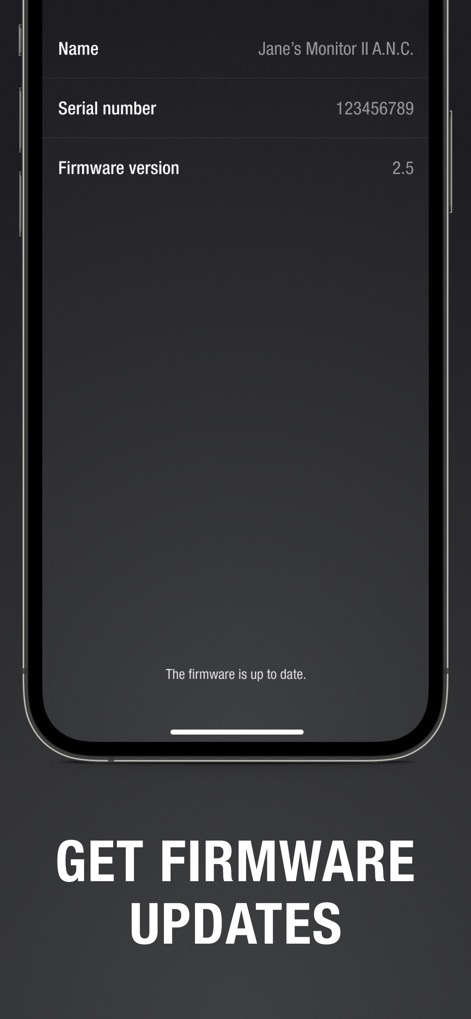
ユーザーは、Marshallデバイスの現在のファームウェアバージョン(例: 2.5)と、利用可能な更新の状況をアプリから直接確認できます。
最新のファームウェア
説明
Download
類似アプリ
似た機能とユーザー体験を持つアプリ

Bose
Bose Corporation

JBL PartyBox
Harman International Industries

Bose Connect
Bose Corporation

Bose QC Earbuds
Bose Corporation

JBL Headphones
Harman International Industries

soundcore
Power Mobile Life LLC

JBL Portable
Harman International Industries

Xiaomi Earbuds
Beijing Xiaomi Co., Ltd

Shokz
Shenzhen Shokz Co., Ltd.
このページはアプリまたはその開発者の公式ページではなく、情報提供および論評を目的として作成された独立した編集出版物です。明示的に別段の記載がない限り、アプリおよびその開発者は、MWM、Apple、Google Play、アプリのパブリッシャー、またはアプリの開発者と提携、承認、後援、認可、またはその他の公式的な関係はなく、このページのいかなる内容も、アプリがMWMのサービスを使用して開発されたことを意味するものではありません。すべての商標、ロゴ、スクリーンショット、その他のコンテンツはそれぞれの所有者の財産です。