
このページはアプリまたはその開発者の公式ページではなく、情報提供および論評を目的として作成された独立した編集出版物です。明示的に別段の記載がない限り、アプリおよびその開発者は、MWM、Apple、Google Play、アプリのパブリッシャー、またはアプリの開発者と提携、承認、後援、認可、またはその他の公式的な関係はなく、このページのいかなる内容も、アプリがMWMのサービスを使用して開発されたことを意味するものではありません。すべての商標、ロゴ、スクリーンショット、その他のコンテンツはそれぞれの所有者の財産です。

Microsoft OneNote
一瞬のひらめきから複雑なプロジェクトまで、その全てをデジタル化し、あらゆる場所で再構築する。OneNoteは、ユーザーに情報の絶対的な支配力を提供する。
ダウンロード
50M+ユーザー評価
評価数
4.5M開発元
カテゴリ
Productivity対応言語
33最新バージョン
16.107.3サイズ
350.1 MBリリース日
2011年1月18日Microsoft OneNote 主要機能分析
広範なユーザー層に対応する多機能デジタルノートソリューション
クラウド同期とマルチデバイス対応
本ツールは、OneDriveを介してノートを同期し、ユーザーがあらゆるデバイスからいつでもどこでも情報にアクセスできる環境を提供します。
強力な整理機能と効率的な検索
このアプリは、ユーザーが自身のニーズに合わせてノートを整理するための強力なツールを提供し、最近のノートを素早く見つけたり、頻繁に使用するページを固定したりすることが可能です。
柔軟な手書き入力と描画
本ツールは、ユーザーがiPadなどのデバイスで多様なペン設定を用いて手書きのノートや描画を作成することを可能にします。「図形に変換」モードにより、手書きの図形を完璧な形状に自動変換します。
シームレスな共同作業と情報共有
このアプリは、共有されたノートブック内での共同作業を可能にし、チームやグループがアイデアや情報を効率的に共有し、連携して作業を進めることを支援します。
多様な形式での情報キャプチャ
本ツールは、思考、発見、アイデアの記録に加えて、Office Lensを活用してホワイトボードの画像、写真、印刷された文書などをノートに直接取り込む機能を提供します。
パスワードと生体認証によるセキュリティ
このアプリは、パスワード設定やTouch IDを利用したノートへの迅速なアクセスを提供し、ユーザーの重要な情報を保護するためのセキュリティを強化します。
よくある質問
について知っておくべきこと Microsoft OneNote
Is Microsoft OneNote available for free?
Yes, Microsoft OneNote is free on iPhone and many other devices. Users can get started by downloading the app and signing in with a Microsoft or work/school account.
How does Microsoft OneNote allow me to access notes across devices?
Microsoft OneNote syncs your notes via OneDrive, allowing access to them anytime, anywhere, and across all your devices. This ensures your notes are always available whether at home or on the go.
Can I secure my notes in Microsoft OneNote with a password?
Yes, Microsoft OneNote allows users to secure their notes with a password. Additionally, it supports using Touch ID for quick and secure access to protected notes.
What organizational features does Microsoft OneNote offer for my notes?
Microsoft OneNote provides powerful organizational tools, allowing users to quickly arrange notes in a personalized way. It also helps find recent notes fast and pin frequently used pages.
Does Microsoft OneNote support drawing and handwriting?
Yes, Microsoft OneNote supports drawing and handwriting, particularly on iPad. It offers various pen colors and settings, and a 'Convert to Shapes' mode for automatically perfecting hand-drawn shapes.
Can I use sticky notes with Microsoft OneNote?
Yes, Microsoft OneNote allows users to quickly save thoughts and ideas using colorful sticky notes. These sticky notes sync across devices, providing access from anywhere, anytime.
How can I collaborate with others using Microsoft OneNote?
Microsoft OneNote facilitates collaboration by allowing users to work together in a shared notepad. Notes are saved to the cloud (OneDrive, SharePoint) and can be accessed and shared on any device.
Does Microsoft OneNote allow capturing images from documents or whiteboards?
Yes, Microsoft OneNote integrates with Office Lens. This feature enables users to save pictures of whiteboards, photos, or printed documents directly into their notes, with automatic cropping.
Are there subscriptions available within the Microsoft OneNote app?
Yes, monthly Microsoft 365 subscriptions are available for purchase within the Microsoft OneNote app. These are charged to your App Store account and renew automatically.
What is the data privacy policy for Microsoft OneNote?
Microsoft OneNote is subject to a separate privacy statement and terms. Data used with the app may be accessible to Microsoft or third-party publishers, and processed in the United States or other countries.
以下のスクリーンショットと説明は、アプリの公式ストアリスティングから直接取得されたものであり、アプリ開発者の所有物です。
アプリストア
スクリーンショット
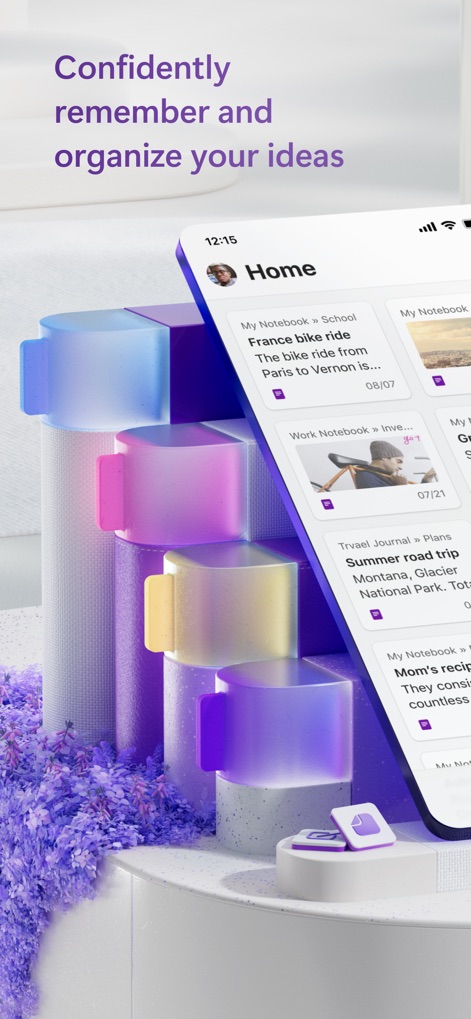
アイデアを視覚化
ホーム画面では、ユーザーアバターとノートブックの一覧表示により、整理された情報へ素早くアクセスできる視覚的な機能が提供されます。

手軽にメモ作成
画面下部には、新規ノート作成のための「+」ボタンと、直感的な底部ナビゲーション(ホーム、検索、ノートブック)が配置されており、ユーザーは効率的に操作できます。

瞬時に情報にアクセス
このホーム画面では、カード形式のノート一覧表示と、それぞれのノートに紐付く日付情報により、必要なメモを素早く見つけることができます。

デバイスを超えて連携
デスクトップとモバイルの両方で同じノートを編集できる同期機能は、テキスト編集と自転車の画像表示を通じて、シームレスな作業環境を提供します。

思考を構造化
「Work Notebook」の画面では、色分けされたセクションリストとノートブックの階層構造により、複雑な情報を体系的に整理することが可能です。

記録で体験を保存
詳細な旅行プランのノートでは、背景画像として使われた美しい景色と、その下の詳細なテキスト記述により、ユーザーは思い出を豊かに記録できます。

目標達成を可視化
「Yearly health goals」の画面では、チェックリスト機能と、目標の進捗を示すスターアイコンの活用により、ユーザーは日々の目標管理を効果的に行えます。

旅の計画を完璧に
「France bike ride」のノートでは、手書きのマップ注釈と詳細なチェックリストが提供され、ユーザーは旅の計画を視覚的かつ具体的に管理できます。
説明
Download
類似アプリ
似た機能とユーザー体験を持つアプリ

Notion: Notes, Tasks, AI
Notion Labs, Incorporated

Freenotes®: AI Notes Taking
Hangzhou Free Notes Technology Co., Ltd

Structured - Daily Planner
unorderly GmbH

Google Tasks: Get Things Done
Google LLC

TickTick:To-Do List & Calendar
Appest Limited

Noteful: Notes & PDF Markup
Noteful Technologies Ltd

Todoist: To Do List & Calendar
Doist Inc.

To do list MinimaList & Widget
Inner Grow Limited

monday.com - Work Platform
monday.com Ltd.
このページはアプリまたはその開発者の公式ページではなく、情報提供および論評を目的として作成された独立した編集出版物です。明示的に別段の記載がない限り、アプリおよびその開発者は、MWM、Apple、Google Play、アプリのパブリッシャー、またはアプリの開発者と提携、承認、後援、認可、またはその他の公式的な関係はなく、このページのいかなる内容も、アプリがMWMのサービスを使用して開発されたことを意味するものではありません。すべての商標、ロゴ、スクリーンショット、その他のコンテンツはそれぞれの所有者の財産です。