
このページはアプリまたはその開発者の公式ページではなく、情報提供および論評を目的として作成された独立した編集出版物です。明示的に別段の記載がない限り、アプリおよびその開発者は、MWM、Apple、Google Play、アプリのパブリッシャー、またはアプリの開発者と提携、承認、後援、認可、またはその他の公式的な関係はなく、このページのいかなる内容も、アプリがMWMのサービスを使用して開発されたことを意味するものではありません。すべての商標、ロゴ、スクリーンショット、その他のコンテンツはそれぞれの所有者の財産です。


ダウンロード
10M+ユーザー評価
評価数
134.7K開発元
カテゴリ
Business対応言語
17最新バージョン
13.3サイズ
229.4 MBリリース日
2014年10月25日幅広いユーザー層をターゲットとする多機能モバイルオフィススイートの主要機能評価
MobiOffice:モバイル生産性の詳細分析
主要Office形式互換性
本アプリは、Microsoft Office(Word、Excel、PowerPoint)、Googleドキュメント、Googleスプレッドシート、Googleスライド、Adobe PDFなど、主要なOffice形式と高い互換性を提供します。
総合的な文書作成・編集機能
ユーザーは、リッチテキストと段落の書式設定、表、画像、図形、記号の挿入、ノート、ヘッダー、フッターの管理など、Word文書の高度な作成と編集が可能です。
高度な表計算とデータ管理
本ツールは、250以上の関数や数式の使用、高度なグラフの作成と編集、データのフィルタリング、並べ替え、検証など、Excelファイル向けの強力な機能を提供します。
プレゼンテーションの作成・発表モード
このアプリは、PowerPointファイルの作成、テーマやレイアウトの変更、図の挿入、さらには魅力的なプレゼンテーションを行うための発表者モードを備えています。
高機能PDF管理
ユーザーは、PDFファイルの閲覧、注釈の追加、コンテンツ目次の表示に加え、手書き署名(Quick Sign)による電子署名も可能です。
複数のクラウドストレージサービス連携
本アプリは、Google Drive、OneDrive、Box、Dropboxなどの主要なクラウドストレージアカウントと連携し、ファイルの保存とアクセスを容易にします。
高度なPDF変換とセキュリティ強化
プレミアム版では、PDFファイルをWord、Excel、ePub形式に変換する機能や、ドキュメントにパスワードを設定してセキュリティを強化する機能が利用可能です。
カメラによる紙文書スキャン機能
このアプリは、スマートフォンのカメラを使用して紙の文書をデジタルファイルにスキャンし、効率的に管理する機能を提供します。
よくある質問
について知っておくべきこと MobiOffice・Word Docs・Excel・PDF
What is MobiOffice?
MobiOffice is an office productivity suite designed to create, edit, comment, format, convert, and protect documents, spreadsheets, and presentations. It also allows viewing and signing of PDF files.
Is MobiOffice compatible with Microsoft Office files?
Yes, MobiOffice is compatible with Microsoft Office formats including Word (.doc, .docx, .docm), Excel (.XLS, .XLSX, .XLSM), and PowerPoint (.PPT, .PPTX, .PPS, .PPSX, .PPTM, .PPSM).
Does MobiOffice provide cloud storage?
Yes, MobiOffice offers 5GB of free cloud space in MobiDrive upon sign-in. Premium users receive an extended 50GB of cloud storage.
What cloud services can MobiOffice link to?
MobiOffice allows users to link their Google Drive, OneDrive, Box, or Dropbox accounts. It also supports WebDAV and FTP connections.
Can MobiOffice scan paper documents?
Yes, MobiOffice includes a feature to scan paper documents to digital ones using the device's camera.
What word processing features does MobiDocs offer?
MobiDocs offers rich text and paragraph formatting, insertion of tables, pictures, text boxes, shapes, bookmarks, and symbols. It also creates and edits notes, headers/footers, and page numbers.
Can I edit formulas in spreadsheets using MobiOffice?
Yes, MobiOffice's MobiSheets application allows users to use over 250 functions and edit formulas. It also supports creating, previewing, and editing advanced charts.
Does MobiOffice offer a free trial?
Yes, MobiOffice offers a free trial. It automatically renews to a paid subscription unless auto-renew is turned off at least 24 hours prior to the trial period's end.
How much does a MobiOffice subscription cost?
A MobiOffice subscription costs $39.99 per year. This is an auto-renewable yearly subscription according to the pricing information.
How do I cancel a MobiOffice subscription?
Users can cancel a subscription anytime by turning off auto-renewal through their iTunes account settings at least 24 hours before the current subscription period ends.
Can MobiOffice convert PDF files?
Yes, the Premium MobiOffice PDF feature allows conversion of PDFs to Word, Excel, and ePub formats.
Does MobiOffice allow handwritten signatures on PDFs?
Yes, Premium MobiOffice PDF includes Quick Sign functionality, enabling handwritten signatures on fillable PDF forms.
Does MobiOffice support spell checking?
Yes, MobiOffice includes a spell check feature with options for language and learned words, as shown in its writing interface.
What file types can MobiOffice work with beyond Office documents and PDFs?
MobiOffice works with .zip, .png, .jpg, .tiff, .mp3, .mov, .mp4, .m4a, and OpenDocument formats, in addition to standard office documents and PDFs.
以下のスクリーンショットと説明は、アプリの公式ストアリスティングから直接取得されたものであり、アプリ開発者の所有物です。
アプリストア
スクリーンショット

このアプリは、直感的なインターフェースと、世界中で2億5千万人以上のユーザーからの信頼を獲得した実績を視覚的に示しています。
信頼のオフィススイート

さまざまなファイル形式に対応する多様なツールアイコンが視覚的に集約され、ドキュメント、スプレッドシート、PDFの編集機能が統合されていることを示しています。
必要なツールを網羅

MobiDocsの編集画面では、豊富な書式設定オプションと、正確な文章作成をサポートするスペルチェック機能が視覚的に強調されています。
ドキュメント作成を強化

MobiSheetsの画面では、複雑なデータを整理するためのスプレッドシートの表示と、セルの書式設定を細かく調整できるオプションが視覚的に提示されています。
データ分析を効率化

MobiSlidesのインターフェースは、視覚的に魅力的なスライドを作成するための「画像挿入」オプションと、スライドのサムネイル表示を通じて、プレゼンテーション作成機能を紹介しています。
魅力的なプレゼンを

この画面では、PDF文書への「電子署名」機能と、支払計画合意書のようなビジネスドキュメントを直接アプリ内で扱うプロセスが視覚的に示されています。
PDFをレビュー

カメラで紙の文書をデジタル化する機能が視覚的に示されており、パーソナル予算のスプレッドシートがスキャンされ、デジタルドキュメントへの変換プロセスを紹介しています。
ドキュメントをスキャン

このアプリは、.docxや.pdfなど多様なファイル形式に対応していることを視覚的に表示し、最近使用したファイル一覧を通じて、シームレスなファイル管理機能を示しています。
幅広いファイル互換性
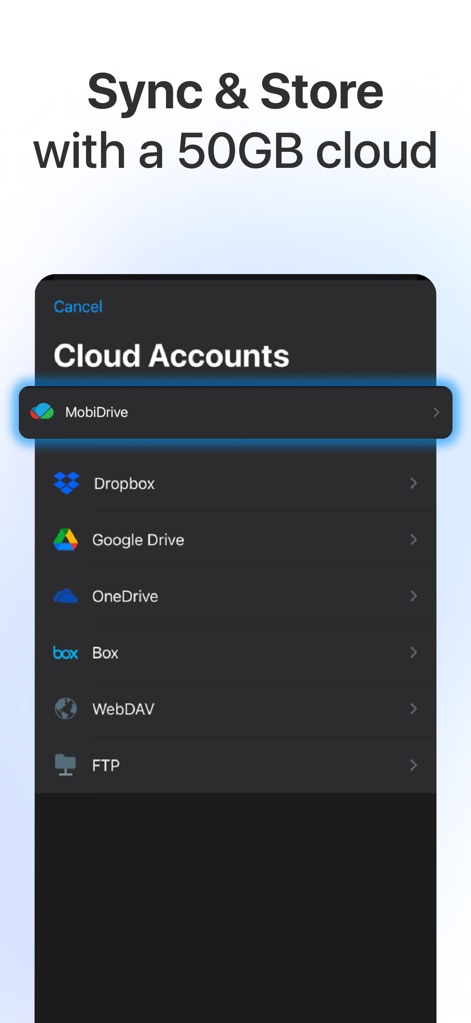
この画面では、MobiDriveを含む複数のクラウドサービスへの接続オプションが視覚的に一覧表示されており、ユーザーがファイルを安全に同期・保存できる機能を紹介しています。
クラウドで簡単保存
説明
Download
類似アプリ
似た機能とユーザー体験を持つアプリ

PDF PRO Scan Image & Documents
Balzo srl

The PDF Scanner, PDF editor HQ
NEXT K.U.M. LTD

CamScanner - PDF Scanner App
INTSIG Information Co., Ltd

Adobe Scan: PDF & OCR Scanner
Adobe Inc.

WPS Office: PDF, Docs, Sheets
KINGSOFT OFFICE SOFTWARE CORPORATION LIMITED

iLovePDF - PDF Editor & Scan
ILOVEPDF S.L.

Scanner App: Genius Scan
The Grizzly Labs

Microsoft Lens: PDF Scanner
Microsoft Corporation

Clear Scan: Doc Scanner App
INDY MOBILE APP COMPANY LIMITED
このページはアプリまたはその開発者の公式ページではなく、情報提供および論評を目的として作成された独立した編集出版物です。明示的に別段の記載がない限り、アプリおよびその開発者は、MWM、Apple、Google Play、アプリのパブリッシャー、またはアプリの開発者と提携、承認、後援、認可、またはその他の公式的な関係はなく、このページのいかなる内容も、アプリがMWMのサービスを使用して開発されたことを意味するものではありません。すべての商標、ロゴ、スクリーンショット、その他のコンテンツはそれぞれの所有者の財産です。