Notebloc Scanner - Scan to PDF
ダウンロード: App Store

このページはアプリまたはその開発者の公式ページではなく、情報提供および論評を目的として作成された独立した編集出版物です。明示的に別段の記載がない限り、アプリおよびその開発者は、MWM、Apple、Google Play、アプリのパブリッシャー、またはアプリの開発者と提携、承認、後援、認可、またはその他の公式的な関係はなく、このページのいかなる内容も、アプリがMWMのサービスを使用して開発されたことを意味するものではありません。すべての商標、ロゴ、スクリーンショット、その他のコンテンツはそれぞれの所有者の財産です。

ロゴ: Notebloc Scanner - Scan to PDF
ダウンロード: App Store

Notebloc Scanner - Scan to PDF

数百万人の学生や専門家と一緒に、ノート、領収書、スケッチをデジタル化しましょう。透かしなし、ページ制限なし、無料のOCR。高価なサブスクリプションは一切不要です。

主要数値

ダウンロード

1M+

ユーザー評価

4.8/5

評価数

10K+

開発元

Notebloc Scanner SCP

カテゴリ

Productivity

対応言語

3

最新バージョン

3.11

サイズ

99.5 MB

リリース日

2016年2月28日
機能

より賢く、簡単にスキャン

学生やフリーランサー向けに設計されたプロ仕様のスキャンツールで、数秒でドキュメントをデジタル化、整理、共有できます。

無制限の無料スキャン

透かし、サブスクリプション料金、制限的なページ制限なしで高品質のPDFを作成できます。

完璧なパース補正

スキャンを自動的に整列させ、照明を調整して、手書きのメモや領収書をプロのように見せます。

FAQ

よくある質問

について知っておくべきこと Notebloc Scanner - Scan to PDF

Notebloc Scannerは無料で使えますか?

はい、Notebloc Scannerは、iPhoneやiPadでドキュメントをデジタル化および編集できる、無制限に利用できる無料のドキュメントスキャナーアプリです。

Notebloc Scannerの主な機能は何ですか?

Notebloc Scannerの機能には、ドキュメントのスキャンからPDFへの変換、バッチスキャン、16言語でのテキスト抽出のためのOCR、画像編集、スキャンされたファイルの整理が含まれます。また、自動的にパースペクティブを補正します。

Notebloc ScannerにはOCR機能が含まれていますか?

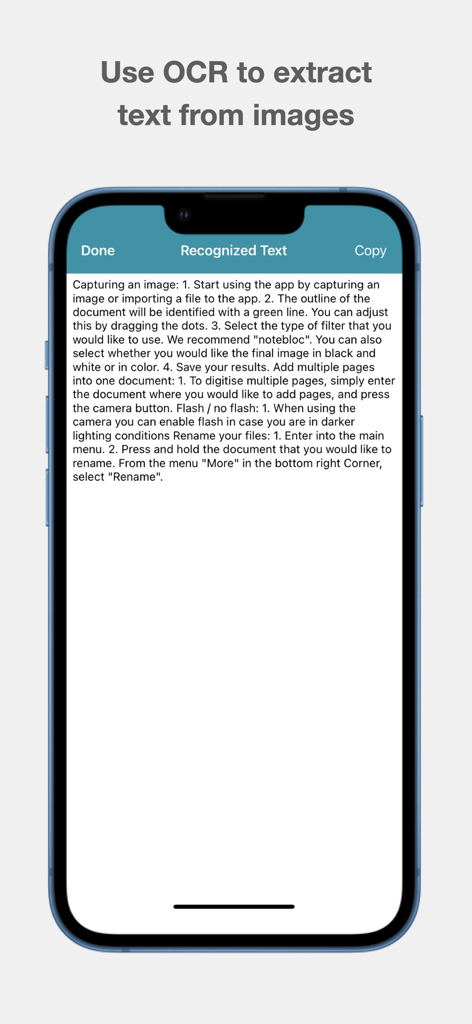
はい、Notebloc Scannerには、英語およびその他の15言語で画像からテキストを抽出するための光学文字認識(OCR)が含まれています。ユーザーは抽出されたテキストをコピー、編集、または共有できます。

以下のスクリーンショットと説明は、アプリの公式ストアリスティングから直接取得されたものであり、アプリ開発者の所有物です。

アプリストア

スクリーンショット
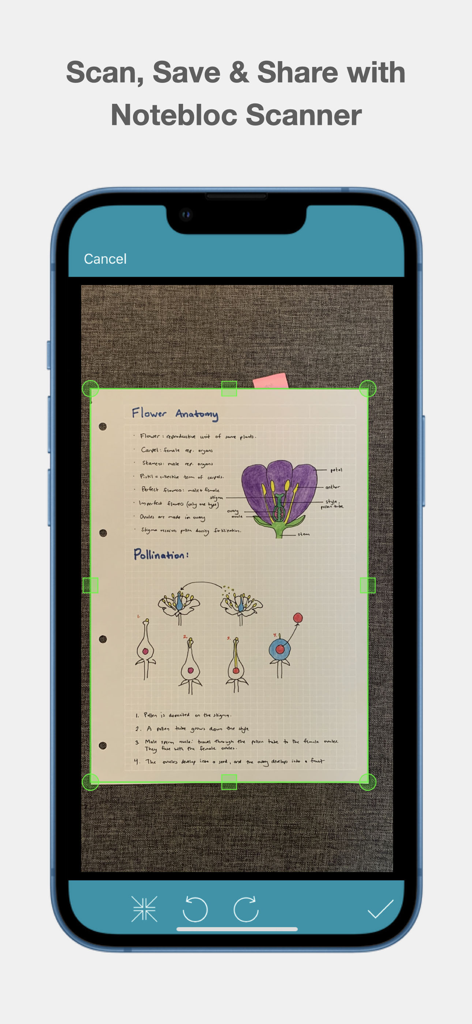
Notebloc Scanner - Scan to PDF - 緑のクロップマーカーを使用して手書きの生物学ノートをデジタル化するNotebloc Scannerを使用中のスマートフォン画面
緑のクロップマーカーを使用して手書きの生物学ノートをデジタル化するNotebloc Scannerを使用中のスマートフォン画面

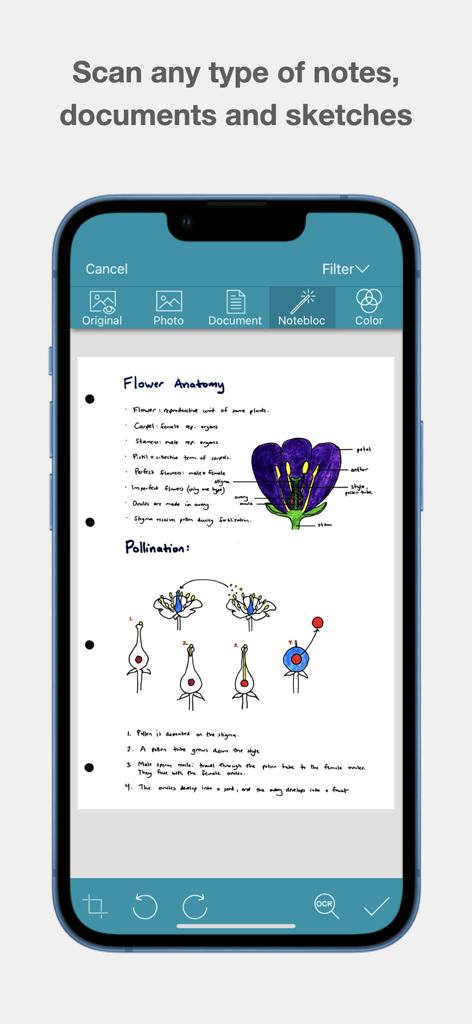
Notebloc Scanner - Scan to PDF - 生物学のノートと花の解剖図のスケッチのスキャンされたドキュメントが表示されたNotebloc Scannerアプリのインターフェース
生物学のノートと花の解剖図のスケッチのスキャンされたドキュメントが表示されたNotebloc Scannerアプリのインターフェース

Notebloc Scanner - Scan to PDF - スキャンされたドキュメントからテキストを抽出するOCR機能を表示しているNotebloc Scannerアプリのスクリーンショット
スキャンされたドキュメントからテキストを抽出するOCR機能を表示しているNotebloc Scannerアプリのスクリーンショット

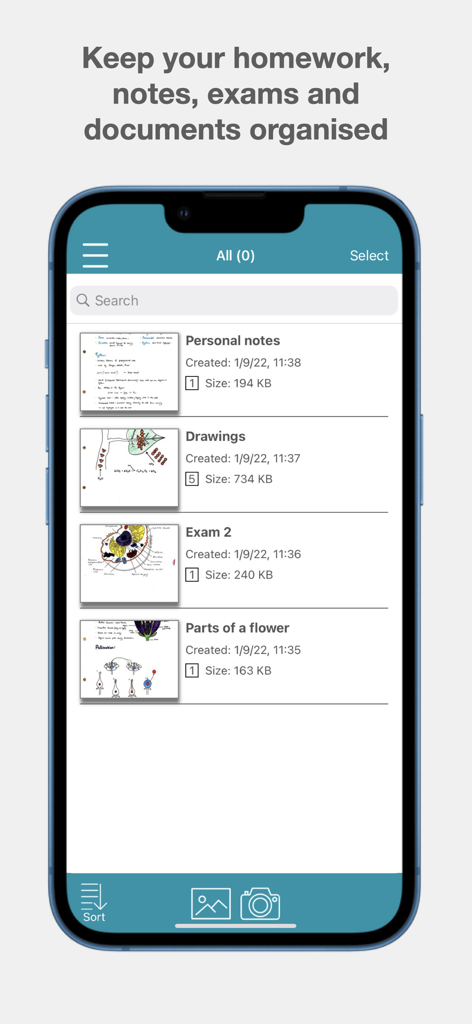
Notebloc Scanner - Scan to PDF - ノート、図面、試験用に整理されたフォルダを表示するNotebloc Scannerアプリのインターフェース

ノート、図面、試験用に整理されたフォルダを表示するNotebloc Scannerアプリのインターフェース

説明

Scan documents for free with Notebloc Scanner, the best free document scanner on App Store. It is fast and safe. Use it to scan documents and turn them into PDF, as well as to save and share notes, drawings or any other type of document. It is the preferred scanner app among the educational community and widely used by professionals from all fields. Use it to scan documents to PDF, as well as to save and share notes. Notebloc Scanner App is one of the best and most recommended free scanner apps for your iPhone or iPad. It is the only free scanner offering unlimited usage. Notebloc Scanner App offers 100% free digitalization and editing tools for documents that are not included in the free version in the other scanner apps. For example: unlimited document creation, multiple pages scan (batch scanning), text extraction (extract text from image using our OCR), share and copy documents. These are the main functionalities of the best free scanner in the App Store: - Scan free documents such as drawings, sketches, images, photos, receipts or invoices. It is very useful for scanning notes since they will become legible and clear: Notebloc: PDF scanner automatically corrects perspective and light conditions in your scanned documents. - This free scanner will allow you to scan several pages consecutively (Batch Scanning). - You can scan documents without watermarks. - With Notebloc Scanner App you can cut and edit images to save them and convert them to PDF. - Add pages to a document is another of the features that you can perform with this intuitive scanning app. - Convert PDF from scanned images and modify the size of the PDFs. -Import images from your devide and convert them to PDF will be very easy and fast with Notebloc PDF scanner. -Notebloc PDF scanner also allows you to extract of text from image, through OCR in English and 15 other languages. Use the feature to extract text from an image and copy, edit or share it. In addition to scanning free documents, Notebloc Free Document Scanner offers you very useful tools for you to have your notes well organized and structured. The document scanner Notebloc will be useful: - Students: With the free scanner, scan your notes and also notes from your teachers. Organize them according to your subjects, and so you will have them organized to study for your exams and be able to review your notes from where you are. - Teachers: Notebloc PDF scanner is a very useful tool to create PDF from notes or photocopies that you want to share with your students. You can use this free scanner to send PDFs for your students. - Professionals: Notebloc Scanner helps you to keep your invoices safe, together with other important documents relative to your activity. Scan to PDF and easily arrange all your documents. Share them with your manager or peers by email directly from your PDF scanner. - Artists: The Notebloc free scanner is your perfect ally if you want to digitize your art and share it online or keep it in your portfolio. You can scan your drawings to edit them. Scanning documents for free has never been so fast and easy! About Notebloc Scanner App: Notebloc is a technology and innovation company from Spain. In order to unite the analog and digital world, in 2016 we developed Notebloc Scanner. Download the best free document scanner. Converting documents to PDF had never been so simple! Terms of service: https://www.apple.com/legal/internet-services/itunes/dev/stdeula/

Download

ダウンロード: App Store

このページはアプリまたはその開発者の公式ページではなく、情報提供および論評を目的として作成された独立した編集出版物です。明示的に別段の記載がない限り、アプリおよびその開発者は、MWM、Apple、Google Play、アプリのパブリッシャー、またはアプリの開発者と提携、承認、後援、認可、またはその他の公式的な関係はなく、このページのいかなる内容も、アプリがMWMのサービスを使用して開発されたことを意味するものではありません。すべての商標、ロゴ、スクリーンショット、その他のコンテンツはそれぞれの所有者の財産です。








