
このページはアプリまたはその開発者の公式ページではなく、情報提供および論評を目的として作成された独立した編集出版物です。明示的に別段の記載がない限り、アプリおよびその開発者は、MWM、Apple、Google Play、アプリのパブリッシャー、またはアプリの開発者と提携、承認、後援、認可、またはその他の公式的な関係はなく、このページのいかなる内容も、アプリがMWMのサービスを使用して開発されたことを意味するものではありません。すべての商標、ロゴ、スクリーンショット、その他のコンテンツはそれぞれの所有者の財産です。

Noteshelf 3: AI Digital Notes
Noteshelf 3は、AIで思考を増幅させ、紙の束縛から解放する。デジタルノートの未来を体現している。
ダウンロード
1M+ユーザー評価
評価数
13.7K開発元
カテゴリ
Productivity対応言語
9最新バージョン
6.11サイズ
400.9 MBリリース日
2023年8月18日この分析は、'Noteshelf 3: AI Digital Notes' が提供する主要機能を詳細に評価し、そのターゲットユーザーへの影響度を技術アナリストの視点から考察します。
Noteshelf 3: AI Digital Notesの技術分析
Noteshelf AIによるデジタルアシスタンス
高度なAI機能により、ノート作成の効率化、内容の要約、翻訳、複雑な概念の解説を可能にし、学習や業務の生産性を大幅に向上させます。
高度な手書き認識とテキスト変換
リアルな手書き体験を提供しつつ、65言語に対応した手書き文字のテキスト変換と検索機能により、アナログとデジタルの融合を実現し、情報の管理と検索を劇的に効率化します。
包括的なノート整理システム
フォルダ、タグ、ブックマーク、スマートフォルダ、ノート間リンクなどの多機能な整理ツールを提供し、ユーザーは膨大な情報の中から必要なノートやページを迅速に見つけ出し、効率的に管理できます。
マルチデバイス同期と堅牢なセキュリティ
iCloudを介したAppleデバイス間でのシームレスな同期と、主要なクラウドサービスへの自動バックアップ、およびパスワードや生体認証によるセキュリティ機能により、ノートのアクセス性と安全性を保証します。
カスタマイズ可能なノート作成環境
多様なペン、紙のテンプレート、カスタム表紙、柔軟なツールバー、200以上のデザインテンプレートにより、ユーザーは自身の学習スタイルや好みに合わせてノート作成体験を自由にパーソナライズできます。
音声録音とメディア統合
ノート作成中の音声録音機能に加え、UNSPLASHやPIXABAYからの画像挿入、高度な画像編集、絵文字やステッカーの利用を通じて、視覚的・聴覚的に豊かなマルチメディアノートを作成できます。
プロフェッショナルなドキュメント注釈とスキャン
PDF、DOC、PPTなどの既存ドキュメントへの高精度な注釈付け、内蔵ドキュメントスキャナーによる物理文書のデジタル化、およびノートの多様な形式でのエクスポート機能により、ビジネスや学術用途での効率的な文書管理と共有をサポートします。
マルチタスクとプレゼンテーション機能
複数のノートブックを同時に開けるマルチウィンドウ機能と、外部ディスプレイへの投影やレーザーポインターを含むプレゼンテーションモードにより、効率的な情報比較、共有、教育活動を支援します。
よくある質問
について知っておくべきこと Noteshelf 3: AI Digital Notes
What is Noteshelf 3?
Noteshelf 3 is a digital note-taking app that allows users to create handwritten notes, annotate PDFs, record audio, and utilize AI features for an enhanced note-taking experience.
Does Noteshelf 3 support AI features?
Yes, Noteshelf 3 incorporates Noteshelf AI to enhance note-taking, summarizing, translating, and explaining complex terms.
Can users personalize handwriting tools in Noteshelf 3?
Yes, Noteshelf 3 offers a range of lifelike pens and highlighters, including a fountain pen, to customize handwriting and enhance the aesthetic of digital notes.
Does Noteshelf 3 offer different paper types for notes?
Yes, Noteshelf 3 provides options for lined, dotted, or grid papers, allowing users to customize color and line spacing for their notes.
Can Noteshelf 3 users customize notebook covers?
Yes, Noteshelf 3 allows users to personalize digital notebooks with multiple cover options, including classic designs or custom images and artwork.
Is the toolbar in Noteshelf 3 customizable?
Yes, Noteshelf 3 features a fully customizable toolbar where users can add, remove, or rearrange tools to match their unique workflow preferences.
Does Noteshelf 3 provide note-taking templates?
Yes, Noteshelf 3 offers a vast library of over 200 exclusive templates for various purposes, such as study planners, class notes, and bullet journals.
Does Noteshelf 3 include digital diaries and journals?
Yes, Noteshelf 3 allows users to plan and organize daily tasks with configurable digital diaries and journals.
Can Noteshelf 3 automatically convert strokes into shapes?
Yes, Noteshelf 3 can transform handwritten strokes into flawless shapes and allows users to choose geometric shapes for creating flowcharts and diagrams.
What typing and formatting options are available in Noteshelf 3?
Noteshelf 3 offers various typing styles, formatting options, bulleted/numbered lists, and checklists to enhance text-based note-taking.
Does Noteshelf 3 allow audio recording during note-taking?
Yes, Noteshelf 3 enables users to record audio simultaneously while taking notes, which is beneficial for lectures and meetings.
Does Noteshelf 3 support handwriting recognition?
Yes, Noteshelf 3 converts handwriting into text and allows searching of handwritten notes using recognition technology across 65 supported languages.
How can users organize notes in Noteshelf 3?
Noteshelf 3 allows users to organize notebooks into folders and subfolders, and sort them in their preferred order for efficient paperless management.
Does Noteshelf 3 support multi-tasking with multiple notebooks?
Yes, Noteshelf 3 supports multi-tasking, allowing users to work on two notebooks simultaneously with its multiple windows feature.
What file types can Noteshelf 3 annotate?
Noteshelf 3 allows users to import and precisely highlight, underline, or annotate PDFs, DOCs, PPTs, and images.
Does Noteshelf 3 include a document scanner?
Yes, Noteshelf 3 features a built-in document scanner to quickly digitize physical documents.
How can users export notes from Noteshelf 3?
Users can export and share their notes from Noteshelf 3 as images and PDFs.
Can Noteshelf AI generate handwritten notes?
Yes, Noteshelf AI can effortlessly generate handwritten notes on any given topic.
What capabilities does Noteshelf AI offer?
Noteshelf AI can summarize pages, translate text into various languages, and explain complex terms, among other features.
How does Noteshelf 3 secure user notes?
Noteshelf 3 secures notes using passwords, Face ID, or Touch ID to protect user information.
Does Noteshelf 3 sync notes across devices?
Yes, Noteshelf 3 syncs notes across iPad, iPhone, and Mac devices using iCloud, ensuring accessibility from anywhere.
Can Noteshelf 3 automatically back up notes to cloud storage?
Yes, Noteshelf 3 supports auto-backup of notes to popular cloud storage services including Google Drive, OneDrive, Dropbox, and WebDAV.
Does Noteshelf 3 integrate with Evernote?
Yes, Noteshelf 3 can auto-publish notes to Evernote, allowing users to access them from any location.
Does Noteshelf 3 have a presentation mode?
Yes, Noteshelf 3 includes a presentation mode that allows users to project notes and slides via an external display, utilizing a laser pointer and markers.
Is Noteshelf 3 a free app?
Yes, Noteshelf 3 is free to use with some limits. A premium subscription unlocks features like unlimited notebooks, handwriting recognition, and advanced backup options.
What features are included with Noteshelf 3 Premium?
Noteshelf 3 Premium provides unlimited notebooks, handwriting recognition and search, auto-backup to cloud services, access to templates and digital diaries, and 100 monthly AI credits.
Can Noteshelf 3 help organize daily tasks?
Yes, Noteshelf 3 allows users to create priority lists, to-do lists with checkboxes, and notes for organizing daily tasks, as shown in the interface.
Does Noteshelf 3 support checklists in notes?
Yes, Noteshelf 3 supports checklists within notes, as indicated by the "To Do" section with selectable checkboxes visible in the interface.
Can Noteshelf AI explain complex topics?
Yes, Noteshelf AI can explain complex topics, as demonstrated by its ability to generate text explaining "The Form and Function of Comets" in response to a user prompt.
How many templates are available in Noteshelf 3?
Noteshelf 3 offers over 1000 templates, planners, and diaries, categorized into sections like Goal Planners, Mind Maps, Trackers, and Lists, for diverse note-taking needs.
Are tools on the Noteshelf 3 toolbar adjustable?
Yes, the toolbar in Noteshelf 3 is fully customizable, allowing users to add, remove, or re-arrange tools to suit their workflow, as shown by the various visible icons.
Can users highlight text within PDFs in Noteshelf 3?
Yes, Noteshelf 3 allows users to highlight text within imported PDFs, as indicated by the "Highlight" option in the context menu when interacting with a document.
Does Noteshelf 3 record audio?
Yes, Noteshelf 3 supports seamless audio recordings directly within notes, as evidenced by the visible recording interface showing "REC 00:05" in the screenshot.
Is Noteshelf 3 compatible with multiple Apple devices?
Yes, Noteshelf 3 syncs across multiple Apple devices, including iPad, iPhone, and Apple Watch, as visually confirmed by the app running on all three.
以下のスクリーンショットと説明は、アプリの公式ストアリスティングから直接取得されたものであり、アプリ開発者の所有物です。
アプリストア
スクリーンショット
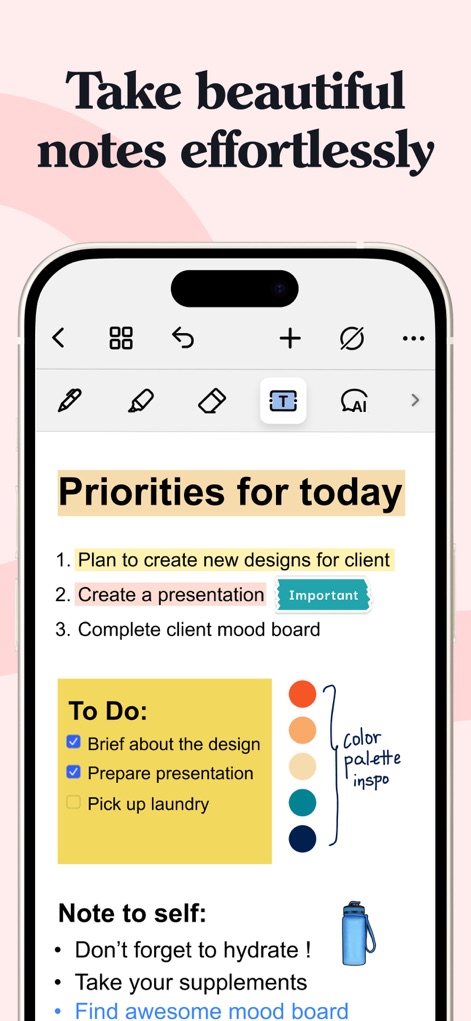
このアプリでは、ユーザーは手書きのメモとチェックリストを自由に作成し、カスタマイズされた色パレットと画像を組み合わせて視覚的に魅力的なノートをデザインできます。
美しいメモを簡単に
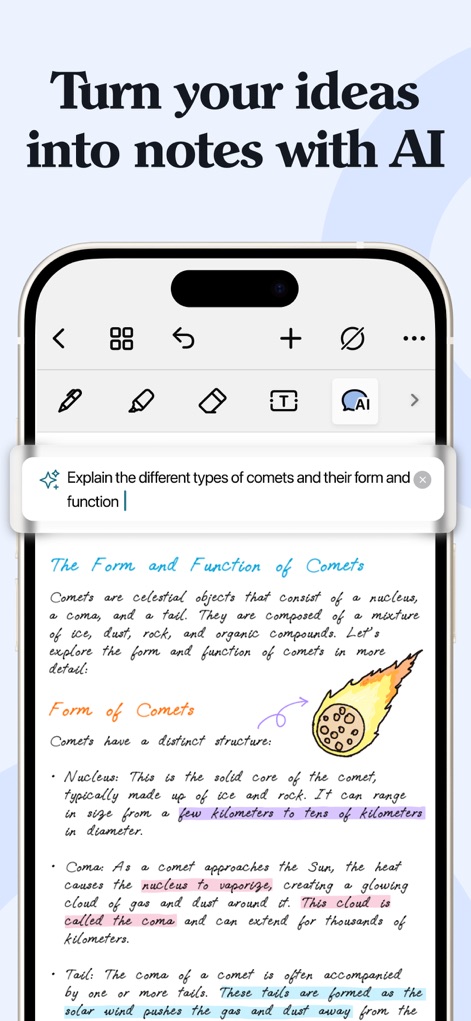
ユーザーはAIによる質問応答機能を活用して、手書きのイラストとテキストで複雑な情報を瞬時に理解し、ノートにまとめることができます。
AIでアイデアを形に
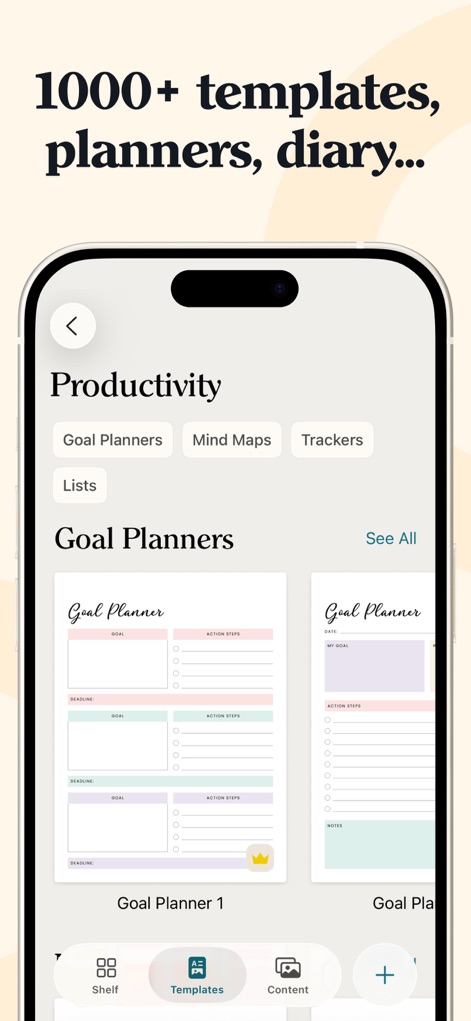
本ツールは、ユーザーの生産性を高めるための豊富なテンプレートライブラリを提供し、目標プランナーのプレビュー機能で最適なノート形式を簡単に選択できます。
豊富なテンプレート
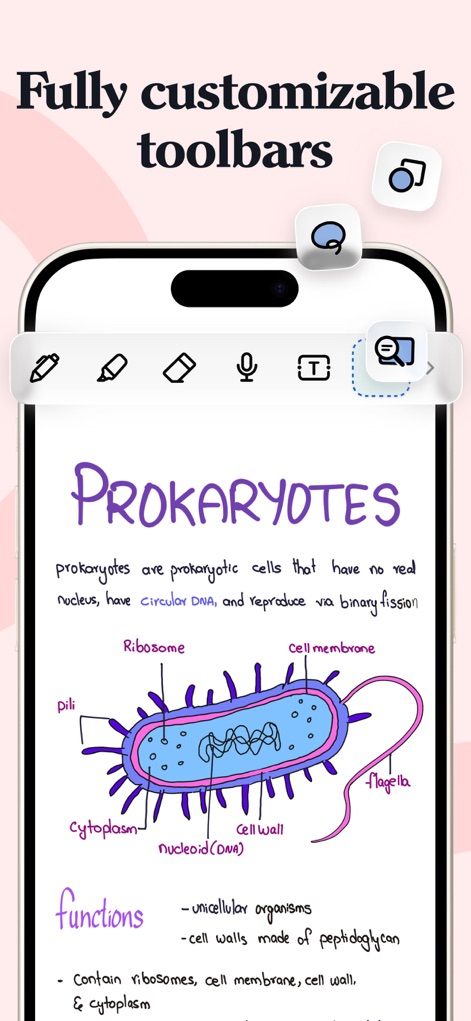
このアプリは、完全にカスタマイズ可能なツールバーを搭載しており、ユーザーは生物学の図解と手書きの説明を組み合わせることで、学習と創造性を促進します。
自由なツールバー
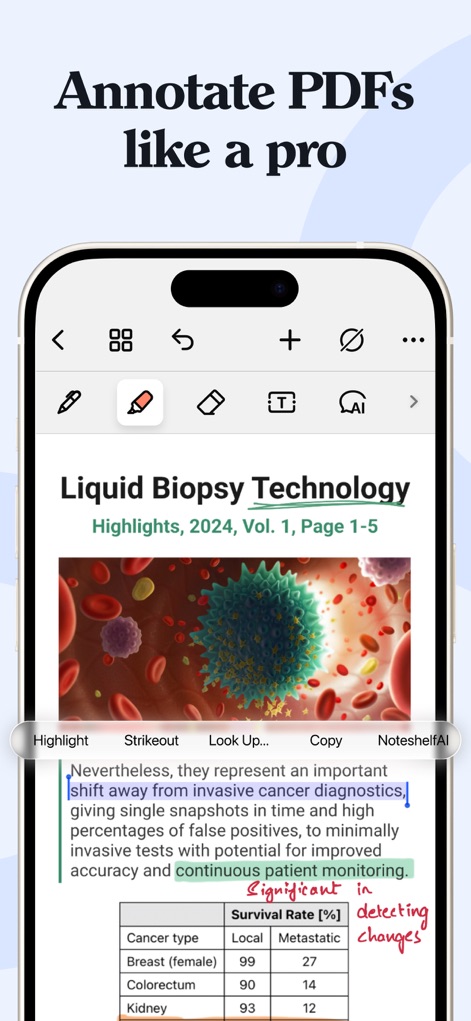
ユーザーはPDFへの高精度なハイライト機能を使用し、テキスト選択時のNoteshelf AI連携を通じて、ドキュメントの理解と分析を深めることができます。
プロのPDF注釈
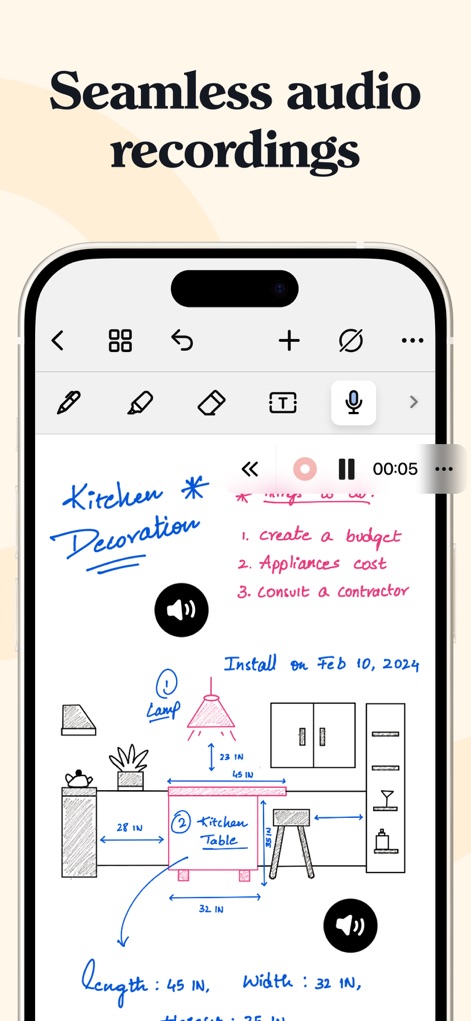
本アプリは、ノート内でのシームレスな音声録音機能を提供し、手書きのスケッチとタスクリストと同期させることで、会議や講義の重要な情報を逃しません。
シームレスな録音
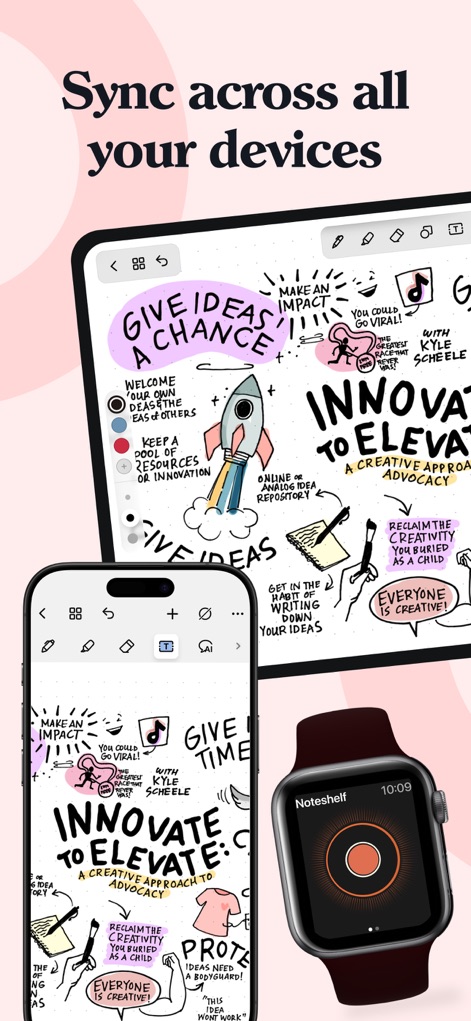
このツールは、複数のAppleデバイス間での同期に対応しており、ユーザーは手書きと描画を含むノートをiPad、iPhone、Apple Watchでいつでもどこでもアクセスできます。
全デバイスで同期
説明
Download
類似アプリ
似た機能とユーザー体験を持つアプリ

Notion: Notes, Tasks, AI
Notion Labs, Incorporated

Freenotes®: AI Notes Taking
Hangzhou Free Notes Technology Co., Ltd

Structured - Daily Planner
unorderly GmbH

Google Tasks: Get Things Done
Google LLC

TickTick:To-Do List & Calendar
Appest Limited

Noteful: Notes & PDF Markup
Noteful Technologies Ltd

Todoist: To Do List & Calendar
Doist Inc.

To do list MinimaList & Widget
Inner Grow Limited

monday.com - Work Platform
monday.com Ltd.
このページはアプリまたはその開発者の公式ページではなく、情報提供および論評を目的として作成された独立した編集出版物です。明示的に別段の記載がない限り、アプリおよびその開発者は、MWM、Apple、Google Play、アプリのパブリッシャー、またはアプリの開発者と提携、承認、後援、認可、またはその他の公式的な関係はなく、このページのいかなる内容も、アプリがMWMのサービスを使用して開発されたことを意味するものではありません。すべての商標、ロゴ、スクリーンショット、その他のコンテンツはそれぞれの所有者の財産です。