
このページはアプリまたはその開発者の公式ページではなく、情報提供および論評を目的として作成された独立した編集出版物です。明示的に別段の記載がない限り、アプリおよびその開発者は、MWM、Apple、Google Play、アプリのパブリッシャー、またはアプリの開発者と提携、承認、後援、認可、またはその他の公式的な関係はなく、このページのいかなる内容も、アプリがMWMのサービスを使用して開発されたことを意味するものではありません。すべての商標、ロゴ、スクリーンショット、その他のコンテンツはそれぞれの所有者の財産です。


Oticon Companion
Oticon Companionは、補聴器を単なる補助具から、ユーザーの意のままに操れる高度なパーソナルデバイスへと変貌させる。騒がしい世界を制御し、会話の細部を掴み、聴覚体験を自在にカスタマイズする力を手にする。
ダウンロード
1M+ユーザー評価
評価数
87.7K開発元
カテゴリ
Medical対応言語
31最新バージョン
1.7.0サイズ
480.7 MBリリース日
2023年2月9日先進的聴覚体験のためのモバイルコントロールを徹底評価
Oticon Companionアプリの機能分析
聴覚ケア専門家とのオンライン訪問
予約制で聴覚ケア専門家とオンラインで面談できるため、ユーザーは自宅にいながら専門的なサポートを受けることができ、利便性が向上します。
聴覚補助器の音量調整
各聴覚補助器の音量を個別に、またはまとめて調整できるため、ユーザーは周囲の環境に合わせて聴覚体験を最適化できます。
オーディオストリーミング
通話、音楽、ポッドキャストなどを聴覚補助器に直接ストリーミングすることで、ユーザーは高品質な音声体験を享受し、ハンズフリーでデバイスを利用できます。
スピーチブースター
バックグラウンドノイズを低減し、会話を強調することで、ユーザーは騒がしい環境でもよりクリアに音声を聞き取ることができます。
サウンドイコライザー
周囲の音をイコライザーで調整できるため、ユーザーは環境音を細かく制御し、より快適な聴覚環境を作り出すことができます。
周囲のミュート機能
周囲の音をミュートすることで、ユーザーは集中力を高め、特定の会話やタスクに専念できます。
プログラム切り替え
聴覚ケア専門家によって設定されたプログラム間を簡単に切り替えることで、ユーザーは異なるリスニング環境に迅速に適応できます。
ストリーミングイコライザー
ストリーミングされる音声をイコライザーで調整できるため、ユーザーは個々の好みに合わせて音質を最適化できます。
バッテリー残量確認
聴覚補助器のバッテリー残量をアプリで確認できるため、ユーザーは充電のタイミングを把握し、予期せぬ電源切れを防ぐことができます。
HearingFitness™機能
聴覚使用状況の進捗を追跡できるため、ユーザーは自身の聴覚習慣を理解し、より効果的なデバイス利用を促進できます。
よくある質問
について知っておくべきこと Oticon Companion
What is the Oticon Companion app?
The Oticon Companion app allows users to control their Oticon hearing aids directly from their mobile device. It enables discreet adjustments and access to various features.
Can I adjust the volume of my hearing aids with the Oticon Companion app?
Yes, the Oticon Companion app allows you to adjust the sound volume for each hearing aid together or separately. It also includes an option to mute surroundings.
How do I check my Oticon hearing aid battery levels using the Oticon Companion app?
Yes, the Oticon Companion app allows you to check the current battery levels of your hearing aids. It displays the percentage and estimated remaining time for both the left and right units.
Can the Oticon Companion app help me find lost hearing aids?
Yes, the Oticon Companion app can help you find your lost hearing aids. This feature requires location services to be continuously enabled on your mobile device.
Does the Oticon Companion app include a SpeechBooster feature?
Yes, the Oticon Companion app includes SpeechBooster. This feature reduces background noise and enhances speech, though it is not available for Oticon Opn™ hearing aid models.
Can I have an online appointment with my hearing care professional using the Oticon Companion app?
Yes, the Oticon Companion app allows you to meet your hearing care professional for an online visit by appointment. This enables remote counseling and hearing aid adjustments.
What are the compatibility requirements for the Oticon Companion app?
The Oticon Companion app is compatible with most hearing aid models. Devices from 2016-2018 may require a hearing aid update. An iOS version of 15.2 or later is recommended.
Does the Oticon Companion app track hearing aid usage?
Yes, the Oticon Companion app includes the HearingFitness™ feature. It tracks your progress and wearing time, but is only available for Oticon Intent™ and Oticon Real™ models.
Does the Oticon Companion app offer a sound equalizer?
Yes, the Oticon Companion app offers a sound equalizer to adjust sounds around you. This feature is available for Oticon Intent™ and Oticon Real™ models.
Can I control my Oticon hearing aids with Apple Watch?
Yes, the Oticon Companion app includes an app for Apple Watch. This allows you to discreetly change programs and adjust volume when within Bluetooth range.
以下のスクリーンショットと説明は、アプリの公式ストアリスティングから直接取得されたものであり、アプリ開発者の所有物です。
アプリストア
スクリーンショット
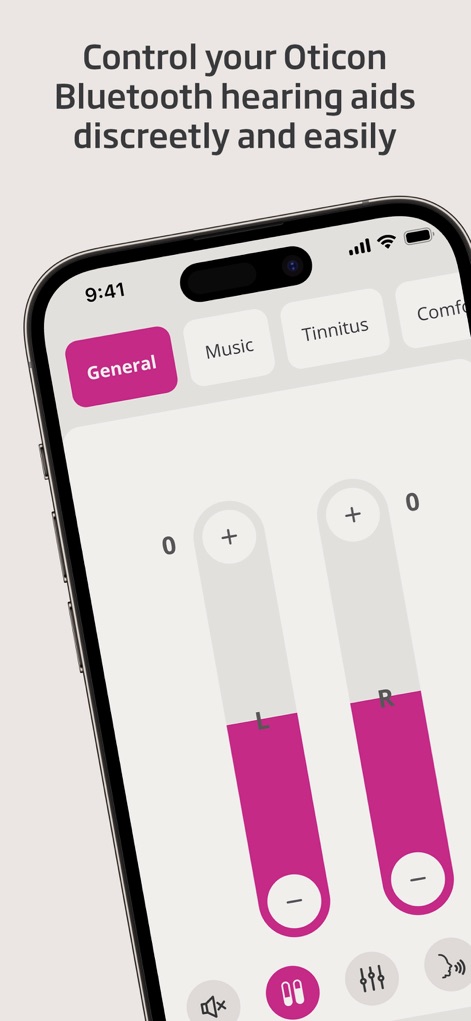
ユーザーは、左右の補聴器の音量を個別に調整できるスライダーと、異なるリスニング環境に対応するプログラム選択タブ(General, Musicなど)を使用して、補聴器を直感的に操作できます。
簡単な音量調整
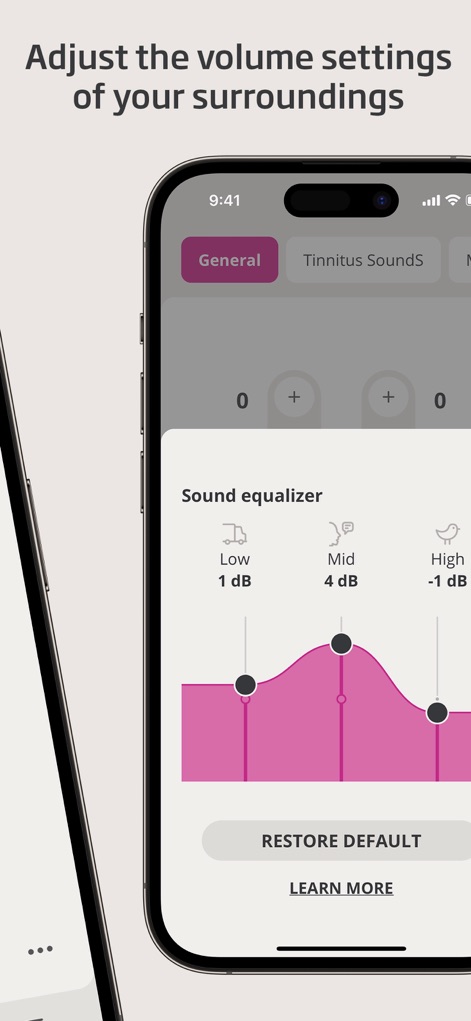
ユーザーは、低音域(Low)、中音域(Mid)、高音域(High)の周波数帯を詳細に調整できるサウンドイコライザーインターフェースを通じて、周囲の環境音をパーソナライズできます。
環境音を最適化
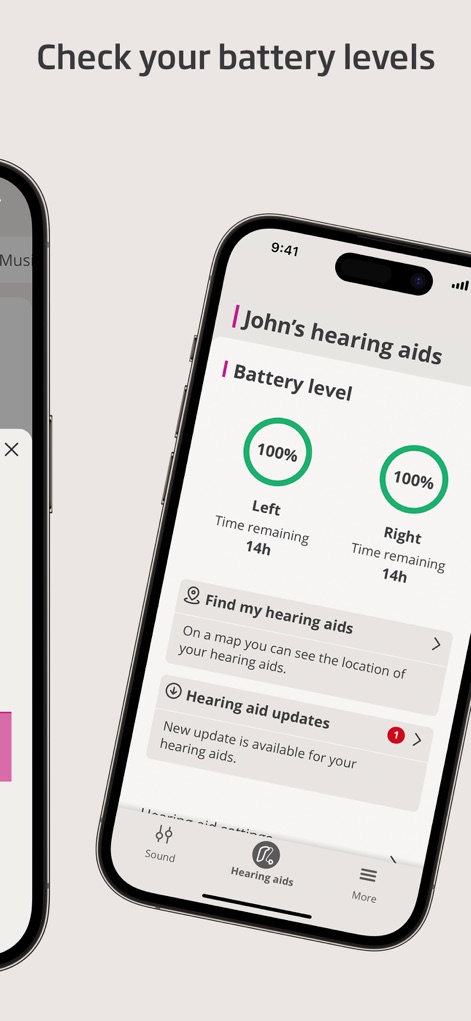
ユーザーは、左右の補聴器の正確なバッテリー残量(例:100%)と残り使用時間(例:14時間)を表示するバッテリーレベルインジケーターと、補聴器のソフトウェア更新を知らせる通知セクションを確認できます。
バッテリー残量確認
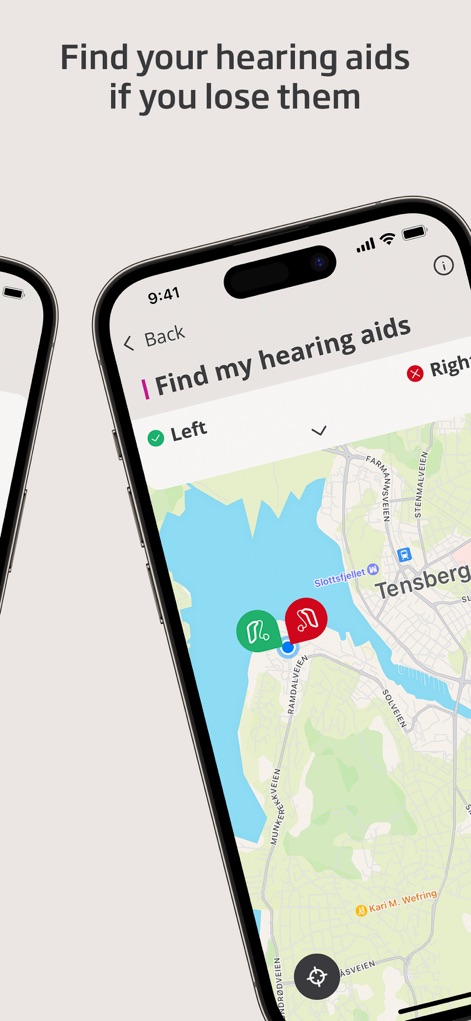
ユーザーは、地図上に補聴器の現在位置を示すピンアイコンと、左右それぞれの補聴器を特定するためのリスト表示を利用して、紛失した補聴器を容易に見つけられます。
補聴器を探す
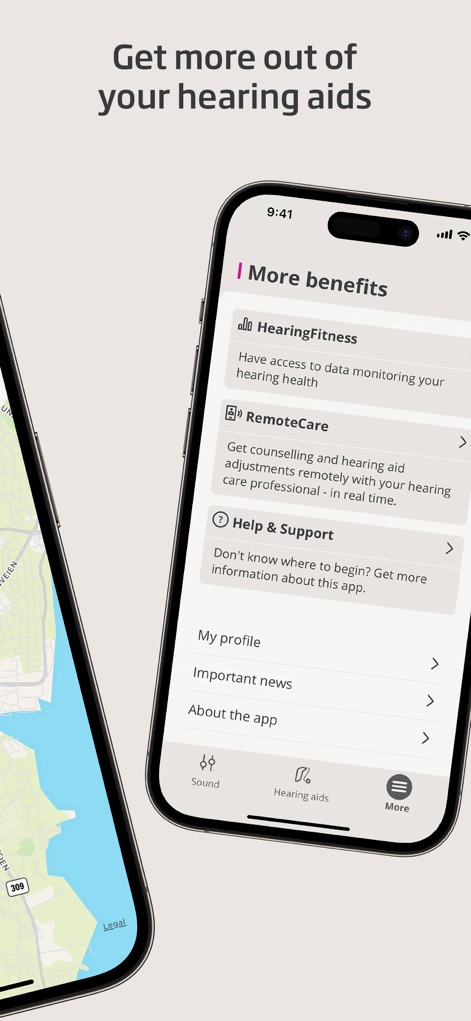
ユーザーは、聴覚健康データのモニタリングを可能にするHearingFitness機能と、専門家との遠隔サポートを提供するRemoteCare機能を含む多様なオプションにアクセスし、補聴器の可能性を最大限に引き出せます。
さらなる機能活用
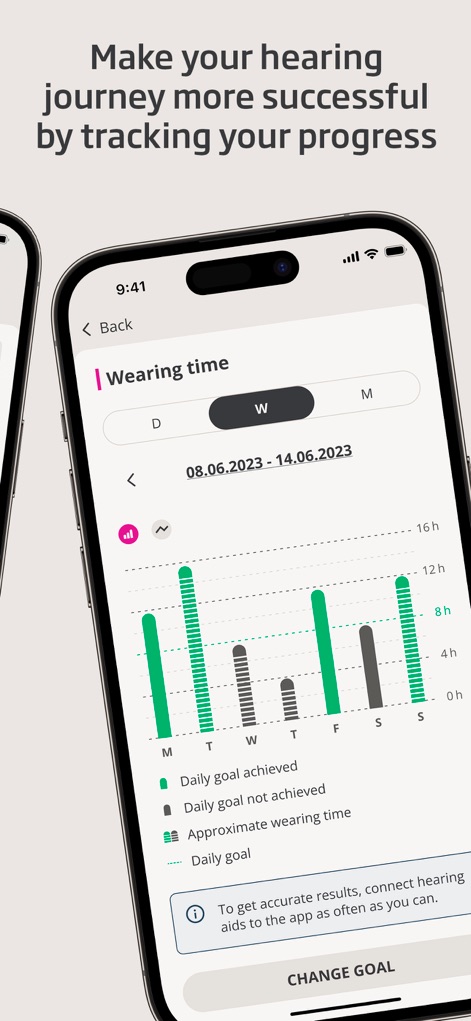
ユーザーは、日別、週別、月別に補聴器の装着時間をグラフで示すWearing timeチャートと、日々の目標達成状況を示すバーグラフにより、聴覚の旅の進捗を視覚的に把握できます。
進捗を視覚化
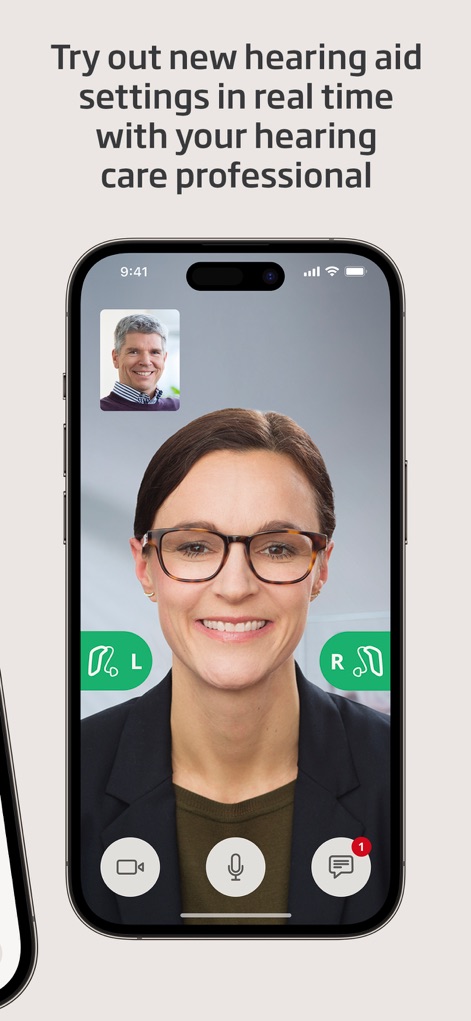
ユーザーは、聴覚ケア専門家とのビデオ通話インターフェースを通じてリアルタイムで相談し、左右の補聴器の状態を示すインジケーターと、チャットメッセージの送受信が可能なコミュニケーションツールを使い、設定調整をサポートしてもらえます。
専門家と遠隔調整
説明
Download
類似アプリ
似た機能とユーザー体験を持つアプリ

ReSound Smart 3D
GN Resound A/S

Braun IPL app
P&G Productions
Philips HearLink 2
SBO Hearing AS

BeMore – for your hearing aids
GN Hearing Care Corporation
Jabra Enhance Pro
GN Hearing Care Corporation

Miracle-Ear App
Miracle-Ear, Inc.

myPhonak
Sonova AG

Amplifon App
Amplifon S.p.A.

Hearing Remote
Sonova AG
このページはアプリまたはその開発者の公式ページではなく、情報提供および論評を目的として作成された独立した編集出版物です。明示的に別段の記載がない限り、アプリおよびその開発者は、MWM、Apple、Google Play、アプリのパブリッシャー、またはアプリの開発者と提携、承認、後援、認可、またはその他の公式的な関係はなく、このページのいかなる内容も、アプリがMWMのサービスを使用して開発されたことを意味するものではありません。すべての商標、ロゴ、スクリーンショット、その他のコンテンツはそれぞれの所有者の財産です。