
このページはアプリまたはその開発者の公式ページではなく、情報提供および論評を目的として作成された独立した編集出版物です。明示的に別段の記載がない限り、アプリおよびその開発者は、MWM、Apple、Google Play、アプリのパブリッシャー、またはアプリの開発者と提携、承認、後援、認可、またはその他の公式的な関係はなく、このページのいかなる内容も、アプリがMWMのサービスを使用して開発されたことを意味するものではありません。すべての商標、ロゴ、スクリーンショット、その他のコンテンツはそれぞれの所有者の財産です。


Painter Eye: AR Drawing App
指先一つで現実を捻じ曲げ、世界を自身のキャンバスに変える。このアプリは、誰もが持つ「創造する本能」を解き放つ力を提供する。
ダウンロード
1M+ユーザー評価
評価数
25.1K開発元
カテゴリ
Graphics & Design対応言語
16最新バージョン
4.2.1サイズ
121.1 MBリリース日
2021年3月1日テックアナリストが評価する主要機能とユーザーインパクト
Painter Eye: AR Drawing App 機能分析
AR(拡張現実)トレース機能
ユーザーは、スマートフォンの画面を通して現実世界を視覚化し、その上に仮想の画像やオブジェクトを重ねてトレースすることで、描画スキルを向上させたり、正確な下書きを作成したりできます。
写真からのステンシル作成
ユーザーは、自身の写真や画像をアプリ内でステンシルとして利用し、キャンバスに配置して、複雑な要素を簡単に描画したり、パーソナルなアート作品を制作したりできます。
直感的な画像調整機能
ユーザーは、選択した画像の回転、サイズ、透明度をスライダーで簡単に調整でき、描画の精度を高めたり、視覚的な快適さを確保したりできます。
多様なブラシとキャンバス
幅広いブラシとキャンバスが提供されており、ユーザーは様々な描画スタイルを試したり、創造的な表現の可能性を広げたりすることができます。
豊富な描画スタイルと色、モノクロ変換
ユーザーは、多様な色とスタイルで作品をカスタマイズしたり、ワンタップで魅力的なモノクロアートに変えたりして、表現の幅を広げることができます。
デバイスメモリからの画像読み込み
ユーザーは、スマートフォンのギャラリーから任意の画像を読み込み、描画の基盤として使用することで、個人的な写真や参照画像をアート作品に統合できます。
よくある質問
について知っておくべきこと Painter Eye: AR Drawing App
What is the main function of Painter Eye: AR Drawing App?
Painter Eye is an iOS app that converts your iPhone into a powerful canvas. It primarily allows users to create sketches and trace real-world images using augmented reality (AR) technology directly on the phone's screen.
How can I trace images using augmented reality with Painter Eye?
Painter Eye utilizes augmented reality (AR) technology to enable real-world image tracing. Users simply position their iPhone, and the app overlays the image on the screen, allowing for direct tracing onto physical paper.
Does Painter Eye offer pre-made drawing templates?
Yes, Painter Eye provides a selection of basic stencils and over 500+ built-in templates. These templates include various categories like animals, transport, and holiday themes to assist users in their creative process.
Can Painter Eye transform existing photos into sketches?
Yes, Painter Eye can transform any photo into a sketch. Users load images from their device, apply them as stencils, and adjust parameters like contrast or brightness using sliders to create stylized monochrome or colored drawings.
Does Painter Eye include AI for generating drawings from text?
Yes, Painter Eye integrates AI capabilities for text-to-drawing generation. Users type desired text, and the AI instantly creates corresponding images, with options to produce sketches, animations, or illustrations based on the input.
Where can I find the Terms of Use for Painter Eye?
The Terms of Use for Painter Eye are provided via Apple's standard EULA. The link is specified in the app description: https://www.apple.com/legal/internet-services/itunes/dev/stdeula/.
Is there a privacy policy for the Painter Eye app?
Yes, Painter Eye has a privacy policy. It is accessible at https://www.appodeal.com/home/privacy-policy/, as clearly stated in the application's description on the App Store.
以下のスクリーンショットと説明は、アプリの公式ストアリスティングから直接取得されたものであり、アプリ開発者の所有物です。
アプリストア
スクリーンショット

このアプリはAR技術を使用して現実世界に画像を重ねて表示することで、ユーザーが実物を見ながら猫のようなスケッチを描けるようにします。また、カメラまたは既存の画像から描画を開始できます。
ARで描画

ユーザーは現実の表面に画像を重ねてなぞり描きすることで、子象のような複雑なスケッチを簡単に作成できます。フィルターや消しゴムなどの編集ツールも利用可能です。
なぞり描き支援

ユーザーは500以上の内蔵テンプレートから選択でき、猫や車、休日のモチーフなど、幅広いカテゴリーで利用可能なスケッチをインスピレーションとして利用できます。
豊富なテンプレート

このアプリは入力されたテキストを瞬時に描画に変換し、ユーザーは「LOVE」のような任意の単語を魅力的な書体で芸術的な表現として作成できます。
テキストから描画へ

ユーザーは何百万もの画像に即座にアクセスでき、特定のテーマ(例:「猫」)で検索して、様々なスタイルや構図のイメージをスケッチの素材として見つけることができます。
無限の画像素材

ユーザーは任意の写真を魅力的なスケッチに変換でき、コントラストや透明度などのパラメータをスライダーで調整して、独自の芸術的な効果を生み出すことができます。
写真をスケッチ化
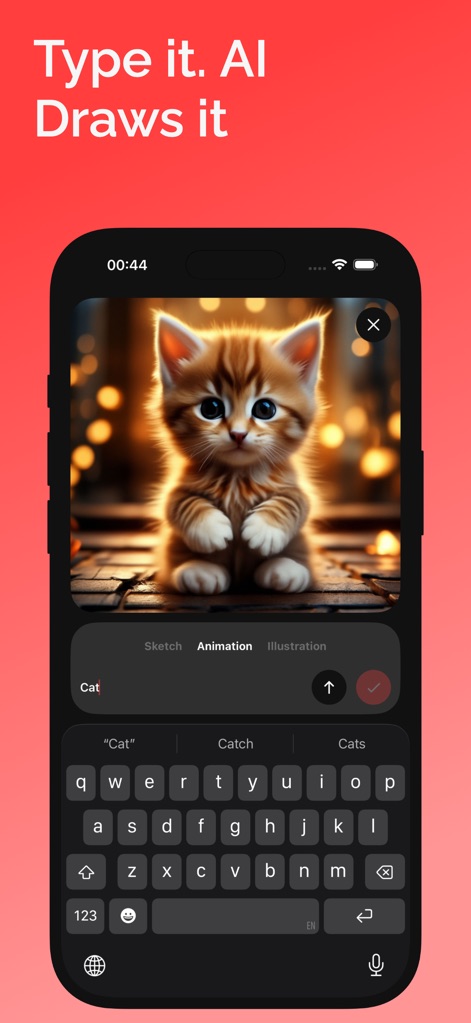
ユーザーはテキストプロンプト(例:「Cat」)を入力するだけで、このアプリのAI機能が瞬時にキュートな子猫のような画像を生成し、創造的なアイデアを視覚化できます。
AIが自動描画
説明
Download
類似アプリ
似た機能とユーザー体験を持つアプリ

AR Drawing Paint Sketch Trace
DROIDFUN LIMITED

Camera Lucida™: AR Drawing
Big Idea Design LLC

AR Drawing Sketch App: ArtEasy
SMDA GROUP SP Z O O SP KOMANDYTOWA

PicTrace: AR Drawing & Sketch
ANDROID VIETNAM TECHNOLOGY CORPORATION

AR Draw: Sketching & Painting
EIGEN SOFTWARE LIMITED

AR Drawing How to Draw Sketch
Magomed Dzhamalov

Da Vinci Eye: AR Trace & Draw
Da Vinci Eye LLC

AR Drawing - AR Sketch
Ketanbhai Khokhani

HEY CLAY®
HEY CLAY LTD
このページはアプリまたはその開発者の公式ページではなく、情報提供および論評を目的として作成された独立した編集出版物です。明示的に別段の記載がない限り、アプリおよびその開発者は、MWM、Apple、Google Play、アプリのパブリッシャー、またはアプリの開発者と提携、承認、後援、認可、またはその他の公式的な関係はなく、このページのいかなる内容も、アプリがMWMのサービスを使用して開発されたことを意味するものではありません。すべての商標、ロゴ、スクリーンショット、その他のコンテンツはそれぞれの所有者の財産です。