PDF Scanner App: Scanner+ Docs
ダウンロード: App Store

このページはアプリまたはその開発者の公式ページではなく、情報提供および論評を目的として作成された独立した編集出版物です。明示的に別段の記載がない限り、アプリおよびその開発者は、MWM、Apple、Google Play、アプリのパブリッシャー、またはアプリの開発者と提携、承認、後援、認可、またはその他の公式的な関係はなく、このページのいかなる内容も、アプリがMWMのサービスを使用して開発されたことを意味するものではありません。すべての商標、ロゴ、スクリーンショット、その他のコンテンツはそれぞれの所有者の財産です。


ロゴ: PDF Scanner App: Scanner+ Docs
ダウンロード: App Store

PDF Scanner App: Scanner+ Docs

iPhoneを高速度ポータブルオフィスに変えましょう。書類を即座にPDFに変換し、外出先で契約に署名し、AI搭載の写真復元で古い思い出に命を吹き込みましょう。

主要数値

ダウンロード

2M+

ユーザー評価

4.6/5

評価数

27K+

開発元

Codeway Dijital Hizmetler Anonim Sirketi

カテゴリ

Business

対応言語

8

最新バージョン

3.7.2

サイズ

200.9 MB

リリース日

2020年5月26日
機能

ペーパーレスライフスタイルのためのスマート機能

iPhoneを高機能モバイルオフィスに変えましょう。法的契約への署名からビンテージ家族写真の復元まで、すべてを簡単かつ完全にプライベートに処理できます。

プロフェッショナルなインスタントスキャン

複数ページの書類を自動でトリミング、強化します。数回のタップで契約に署名し、PDFまたはDOCXにエクスポートできます。

スマートOCR&検索

物理的なテキストを編集可能なデジタルデータに変換します。AI搭載OCRを使用して、検索可能な書類で必要なものを正確に見つけます。

以下のスクリーンショットと説明は、アプリの公式ストアリスティングから直接取得されたものであり、アプリ開発者の所有物です。

アプリストア

スクリーンショット

PDF Scanner App: Scanner+ Docs - PDFファイルを作成するためにビジネス文書をスキャンしているスマートフォンのインターフェース

PDFファイルを作成するためにビジネス文書をスキャンしているスマートフォンのインターフェース

PDF Scanner App: Scanner+ Docs - スキャナーアプリのインターフェースで、カラー化および復元された古い家族写真のビフォーアフター比較を表示

スキャナーアプリのインターフェースで、カラー化および復元された古い家族写真のビフォーアフター比較を表示

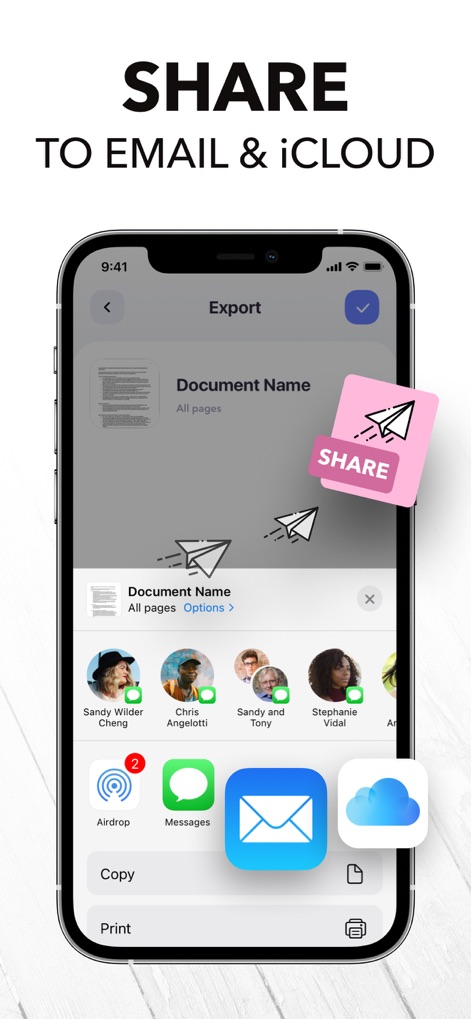
PDF Scanner App: Scanner+ Docs - スキャンされた書類を電子メールやiCloud経由で共有するオプションを表示しているスマートフォンの画面

スキャンされた書類を電子メールやiCloud経由で共有するオプションを表示しているスマートフォンの画面

PDF Scanner App: Scanner+ Docs - スキャンされた登録フォームを表示し、PDF、TXT、JPGとして保存するオプションが表示されているScanner+アプリのスマートフォンのインターフェース

スキャンされた登録フォームを表示し、PDF、TXT、JPGとして保存するオプションが表示されているScanner+アプリのスマートフォンのインターフェース

PDF Scanner App: Scanner+ Docs - モバイル電話でデジタル署名機能を表示しているPDFスキャナーアプリのインターフェース

モバイル電話でデジタル署名機能を表示しているPDFスキャナーアプリのインターフェース

PDF Scanner App: Scanner+ Docs - スキャンされた画像を編集可能なテキストに変換するOCR機能を実演しているスマートフォンの画面

スキャンされた画像を編集可能なテキストに変換するOCR機能を実演しているスマートフォンの画面

PDF Scanner App: Scanner+ Docs - ドキュメント上でテキストを非表示およびハイライトするオプションを含むPDFスキャナーアプリの編集メニューを表示しているスマートフォンの画面

ドキュメント上でテキストを非表示およびハイライトするオプションを含むPDFスキャナーアプリの編集メニューを表示しているスマートフォンの画面

PDF Scanner App: Scanner+ Docs - iPhone画面で、自動エッジ検出を使用してビジネス文書をスキャンしているPDFスキャナーアプリを表示

iPhone画面で、自動エッジ検出を使用してビジネス文書をスキャンしているPDFスキャナーアプリを表示

PDF Scanner App: Scanner+ Docs - PDF、TXT、JPEG形式に変換するドキュメントを表示しているiPhone上のスキャナーアプリのインターフェース

PDF、TXT、JPEG形式に変換するドキュメントを表示しているiPhone上のスキャナーアプリのインターフェース

PDF Scanner App: Scanner+ Docs - Scanner plusアプリでドキュメントの整理とフォルダー管理インターフェースを表示しているiPhone画面

Scanner plusアプリでドキュメントの整理とフォルダー管理インターフェースを表示しているiPhone画面

説明

Want to keep both your money & your scanner in your pocket? Get Scanner+ for free NOW & instantly start to SCAN, SIGN, and SHARE any document in PDF, JPG, or TXT formats. Scan any paper with your iPhone's camera: the Scanner+ app will automatically recognize the edges of your document, enhance it, and give you a perfectly scanned copy that's ready to share on your favorite platform! Scanner+ offers you 12 AMAZING FEATURES that other scanners won't: SCAN DOCUMENTS Scan multiple pages into one PDF document. Enjoy the Turbo Scan mode! Why waste hours on your computer when you can quickly do it with a tiny scanner in your pocket? SCAN & RESTORE PHOTOS Photo scan is the latest feature of Scanner+ that lets you scan and save your favorite printed photos using your phone’s camera. Don’t just take a picture of a picture. Create enhanced digital scans; the photo scanner auto-detects picture boundaries, crops, restores colors and saves them into a digital album. ENHANCE & COLORIZE PHOTOS Bring your scans to life with colorize & enhance features. Enhance old photos & fix blurs and turn them into high resolution digital versions. Colorize black & white old photos to bring back memories and share them with your loved ones. CREATE ALBUMS Scan an entire photo album in minutes. Back up your scans to keep them safe, searchable, and organized. CONVERT TO PDF Scanner+ is also a PDF Converter that turns photos & images into searchable digital documents! This way you can also ""CTRL+F"" across your documents! EXPORT & SHARE Export your scans as .PDF .DOCX or .TXT and share with iMessage, Adobe PDF, Email - Gmail - Outlook - Spark, Wi-Fi Printer, Box, Whatsapp, iCloud Drive, Facebook Messenger, Dropbox, Evernote, Google Drive, OneDrive, OneNote and any other app/platform! SIGN DOCUMENTS Sign PDF documents in less than a second. Transfer your signature across documents! SMART CROP (YOU'LL LOVE THIS!) Your docs will be automatically cropped from its edges right after you scan it. Don't waste your valuable time trying to crop every single document! RECOVER RUINED DOCUMENTS Spilled coffee to your doc? Your dog took a bite from your homework? Recover it with our scanner app using the Genius Scan mode and become a scan guru! HIGHLIGHT TEXTS Highlight important parts of your documents with Scanner+ doc scanner! Very useful while studying from your scanned textbook! EDIT DOCUMENTS HIDE and BLUR unwanted parts with Scanner+ document editor! This is a great feature for hiding confidential parts of your documents. Time to become a scanmaster! ADJUST THE BRIGHTNESS Need to scan documents in a dark room? No problem at all! TRANSLATE TEXTS TO 100+ LANGUAGES Not that you'll need to translate texts to Latin or Cambodian every other day, but in case you need it, Scanner+ got you covered! RECOGNIZE TEXTS WITH OCR Recognize texts from any scannable object with the OCR text scanner mode. And yes, you can even edit handwritten texts with Scanner+! KEEP YOUR DOCS ORGANIZED Scanner+ offers more than a powerful cam scanner, it also has a drag & drop file manager with smart tags. Never lose an important document again! == PRIVACY & SECURITY == All documents are stored locally on your iPhone, so ONLY YOU will be able to access your documents! Neither we nor any third parties will have access. == PRICING & LEGAL == Scanner+ is free to use, and it will always stay free. Should you choose to, you can subscribe to Scanner+ Premium to access more features. You can start a yearly subscription with a 3-day free trial. Subscriptions automatically renew unless auto-renew is turned off no later than 24 hours before the end of the current period. Manage subscriptions, disable auto-renewal in the iTunes account settings. Privacy Policy: http://scannerplus.com/privacy-policy Terms & Condition - EULA : http://scannerplus.com/terms-conditions For any questions or inquiries about our mobile pdf scanner, reach out to us at scanner@codeway.co

Download

ダウンロード: App Store

このページはアプリまたはその開発者の公式ページではなく、情報提供および論評を目的として作成された独立した編集出版物です。明示的に別段の記載がない限り、アプリおよびその開発者は、MWM、Apple、Google Play、アプリのパブリッシャー、またはアプリの開発者と提携、承認、後援、認可、またはその他の公式的な関係はなく、このページのいかなる内容も、アプリがMWMのサービスを使用して開発されたことを意味するものではありません。すべての商標、ロゴ、スクリーンショット、その他のコンテンツはそれぞれの所有者の財産です。