Photo to PDF Convert Scanner +
ダウンロード: App Store

このページはアプリまたはその開発者の公式ページではなく、情報提供および論評を目的として作成された独立した編集出版物です。明示的に別段の記載がない限り、アプリおよびその開発者は、MWM、Apple、Google Play、アプリのパブリッシャー、またはアプリの開発者と提携、承認、後援、認可、またはその他の公式的な関係はなく、このページのいかなる内容も、アプリがMWMのサービスを使用して開発されたことを意味するものではありません。すべての商標、ロゴ、スクリーンショット、その他のコンテンツはそれぞれの所有者の財産です。


ロゴ: Photo to PDF Convert Scanner +
ダウンロード: App Store

Photo to PDF Convert Scanner +

紙の束縛を断ち切り、スマホを究極のデータ兵器に変える。

主要数値

ダウンロード

5M+

ユーザー評価

4.6/5

評価数

26.4K

開発元

JatApp LLC

カテゴリ

Business

対応言語

14

最新バージョン

3.8.0

サイズ

113.3 MB

リリース日

2020年2月4日
機能

多忙なプロフェッショナル向けドキュメント管理機能の評価

Photo to PDF Convert Scanner + アプリケーション分析

高度なセキュリティ機能

本アプリは、電子署名、透かし、Face ID、PINなどの追加機能を通じて、ユーザーの文書のセキュリティを最大限に高めます。機密性の高い情報を扱う専門家にとって、データ保護は極めて重要です。

高度なOCR(文字認識)とテキスト編集

本ツールは、画像からテキストを瞬時に抽出し、フォント、色、サイズなどの設定で編集することを可能にします。これにより、手作業でのテキスト入力や情報再利用の手間を大幅に削減し、生産性を向上させます。

高度なファイル管理システム

本アプリは、フォルダ、タグ、複数の表示モードを備えた高度なファイル管理システムを提供し、ユーザーがスキャンした文書を効率的に整理し、素早く検索できるようにします。

以下のスクリーンショットと説明は、アプリの公式ストアリスティングから直接取得されたものであり、アプリ開発者の所有物です。

アプリストア

スクリーンショット

Photo to PDF Convert Scanner + - 会議の議題などの様々なドキュメントを高速でスキャンし、PDF、JPG、TXT形式に変換できます。

会議の議題などの様々なドキュメントを高速でスキャンし、PDF、JPG、TXT形式に変換できます。

ドキュメントをスキャン

Photo to PDF Convert Scanner + - 請求書や領収書などの紙媒体をスキャンし、ペンツールや消しゴムツールで編集してデジタル化できます。

請求書や領収書などの紙媒体をスキャンし、ペンツールや消しゴムツールで編集してデジタル化できます。

あらゆる書類を変換

Photo to PDF Convert Scanner + - 製品のバーコードを素早くスキャンし、商品情報や他店との価格比較を即座に確認できます。

製品のバーコードを素早くスキャンし、商品情報や他店との価格比較を即座に確認できます。

バーコードを瞬時にスキャン

Photo to PDF Convert Scanner + - 医療文書などのPDFファイルに電子署名を追加し、OCR機能を使用してテキストを抽出し、容易に編集できます。

医療文書などのPDFファイルに電子署名を追加し、OCR機能を使用してテキストを抽出し、容易に編集できます。

PDFを編集・署名

Photo to PDF Convert Scanner + - 紙の文書から任意のテキストをOCR機能で抽出し、キーボードで抽出したテキストを直接編集し、効率的なデータ入力が可能です。

紙の文書から任意のテキストをOCR機能で抽出し、キーボードで抽出したテキストを直接編集し、効率的なデータ入力が可能です。

テキストを抽出・編集
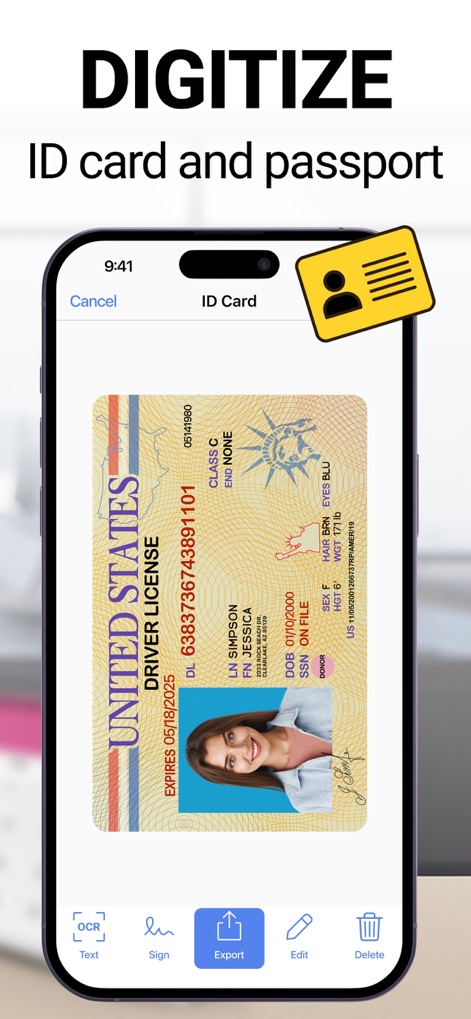
Photo to PDF Convert Scanner + - 運転免許証などの身分証明書を高品質でスキャンし、デジタルデータとして安全に保存することで、必要な時に素早くアクセスできます。

運転免許証などの身分証明書を高品質でスキャンし、デジタルデータとして安全に保存することで、必要な時に素早くアクセスできます。

身分証明書をデジタル化

Photo to PDF Convert Scanner + - スキャンした請求書を複数の連絡先やクラウドサービス(Google Disk、Gmail)を通じて簡単に共有し、効率的な情報連携を実現します。

スキャンした請求書を複数の連絡先やクラウドサービス(Google Disk、Gmail)を通じて簡単に共有し、効率的な情報連携を実現します。

ドキュメントを簡単共有

Photo to PDF Convert Scanner + - リアルタイムでオブジェクトの長さと面積をAR機能で測定し、画面上の90cmや140cmのような正確な寸法を把握できます。

リアルタイムでオブジェクトの長さと面積をAR機能で測定し、画面上の90cmや140cmのような正確な寸法を把握できます。

長さ・面積を測定

説明

Want to boost your productivity thanks to using your phone at hand? Use a quick and effective scan app to process and save all documents you find necessary. Making your phone a small office is a possible thing with our document scanner app. Anytime and anywhere you may get quality images using your mobile scanner device only. ● Quick scanning You may easily scan any document and convert that to the most popular formats, like TXT, PDF, and JPEG. Do you have IDs, passports, bills, receipts, and other documents to scan? It is an easy thing to scan any document you have and get an instant result shortly. Quality scanning is ensured along with the quick processing mode also. The highest quality images will be available after scanning quickly. Color and perspective correction will be ensured also with powerful scanner. Make it convenient to scan quality multiple pages and join those in a single document using our PDF scanner app. ● Effective text conversion and recognition It will be nearly effortless to convert any text into an image in a couple of seconds only. Forget about wasting time rewriting a text. This scanner app will help you with picking any single part of an image with text and converting it into a textual format easily. Using OCR will enable quick and effective extraction of any piece of text from your scanned material. Edit the extracted text sample using your preferred settings, like fonts, colors, sizes, and other features. ● Good object ruler and counter Using your camera to count similar objects will become easier with our tool. What about measuring, calculating the total room area and measuring the length of any object? ● Effective file management We have an advanced file management system with the available folders, tags, and many other features. You may easily navigate between different view models. Choosing and changing file names is also effortless using our scan app. ● Quick document sharing Share any scanned file you have processed or obtained using our scanner app for iPhone. Print your scanned docs using Wi-Fi printers. Send all materials via email swiftly. ● Storage ensured Our best scanner app for iPhone is free and enables quick access to all exported or scanned documents. Any third party will not access your directory and the probable loss of the Internet connection will not have any impact on your access to this directory with scanned content also. Everything will be available to you anytime you may need that. ● Maximal safety Our PDF scanner is distinct from all other scan apps for iPhone. Make your docs more secure using extra features, like e-signature, watermarks, FACE ID, and PIN. Download scanner app and take the maximum of it. Scan, recognize, convert, edit, store, secure, and enjoy your pocket scanner. The subscription price is 6.99$ per week. The exact cost may vary depending on your location. - Subscription to scanner app automatically renews unless auto-renew is turned off at least 24-hours before the end of the current period. - Subscriptions may be managed by the user and auto-renewal may be turned off by going to the user's Account Settings after purchase. - Payment will be charged to iTunes Account at confirmation of purchase. - Account will be charged for renewal within 24 hours prior to the end of the current period. The cost depends on the selected plan. - Should the user choose to renew prior to the end of a free trial, any remaining time will be forfeited and replaced by the purchased subscription period. - During the active subscription period, cancellation of the current subscription will not be possible. – Subscriptions may be managed by the user and auto-renewal may be turned off by going to the user’s Account Settings after purchase Links to our Terms of Service and Privacy Policy can be found below: https://myscannerapp.net/privacy/ https://myscannerapp.net/terms_of_use/

Download

ダウンロード: App Store

このページはアプリまたはその開発者の公式ページではなく、情報提供および論評を目的として作成された独立した編集出版物です。明示的に別段の記載がない限り、アプリおよびその開発者は、MWM、Apple、Google Play、アプリのパブリッシャー、またはアプリの開発者と提携、承認、後援、認可、またはその他の公式的な関係はなく、このページのいかなる内容も、アプリがMWMのサービスを使用して開発されたことを意味するものではありません。すべての商標、ロゴ、スクリーンショット、その他のコンテンツはそれぞれの所有者の財産です。








