
このページはアプリまたはその開発者の公式ページではなく、情報提供および論評を目的として作成された独立した編集出版物です。明示的に別段の記載がない限り、アプリおよびその開発者は、MWM、Apple、Google Play、アプリのパブリッシャー、またはアプリの開発者と提携、承認、後援、認可、またはその他の公式的な関係はなく、このページのいかなる内容も、アプリがMWMのサービスを使用して開発されたことを意味するものではありません。すべての商標、ロゴ、スクリーンショット、その他のコンテンツはそれぞれの所有者の財産です。


Pixel Studio for pixel art
指先一つでドット絵の世界を支配し、創造の限界を打ち破るツールを、このアプリは提供している。
ダウンロード
1M+ユーザー評価
評価数
6.0K開発元
カテゴリ
Graphics & Design対応言語
26最新バージョン
5.42サイズ
125.0 MBリリース日
2018年7月30日テックアナリストによる、クリエイター向けピクセルアートツールの詳細評価
Pixel Studio for pixel art: 主要機能の徹底分析
高度なレイヤーとフレームアニメーション
ユーザーは複数のレイヤーを駆使して複雑なピクセルアートを作成し、フレームごとの精密なアニメーションを制作できます。
高度なアニメーション補助(オニオンスキン)
このアプリはオニオンスキン機能を提供し、ユーザーは前後のフレームを視覚的に参照しながら、より滑らかで自然な動きのアニメーションを効率的に制作できます。
クラウド同期とマルチデバイス対応
本ツールはGoogle Driveを通じて異なるデバイス間でプロジェクトをシームレスに同期し、ユーザーは場所を選ばずに制作活動を継続できます。
多彩なエクスポート形式
このアプリはGIF、MP4ビデオ、スプライトシートなど、幅広い出力形式に対応しており、ユーザーは作品を様々なプラットフォームや用途に合わせて容易に共有・利用できます。
Pixel Networkコミュニティ連携
ユーザーは作品を内蔵コミュニティ「Pixel Network™」で共有し、他のアーティストと交流することで、インスピレーションを得て自身のスキルを向上させることが可能です。
広範なファイル形式互換性
本ツールはPNG、JPG、PSD、Aseprite(インポートのみ)など、多様な人気画像およびプロジェクト形式をサポートし、ユーザーは既存の資産を活用し、他のソフトウェアとの連携を円滑に行えます。
高機能な描画・編集ツール
このアプリは対称描画、グラデーションツール、カスタムブラシ、ドットペンなど、多岐にわたる専門的な描画・編集ツールを提供し、ユーザーはより高度な表現と効率的な制作が可能です。
高度なカラー管理機能
本ツールはカスタムパレットの作成、組み込みパレットの利用、RGBA/HSVモードを備えた高度なカラーピッカーを提供し、ユーザーは精密な色選択と管理を通じて作品の品質を高められます。
ピクセルアート特化型変換ツール
このアプリはScale2x/3xなどのピクセルアートスケーラーや、Fast RotSpriteアルゴリズムによる回転機能を提供し、ユーザーはピクセルアート特有のディテールを保持したまま画像を変換できます。
自動保存とバックアップシステム
本ツールは自動保存およびバックアップ機能により、ユーザーの作業内容が偶発的な中断やエラーによって失われるリスクを最小限に抑え、安心して創作に集中できる環境を提供します。
よくある質問
について知っておくべきこと Pixel Studio for pixel art
What is Pixel Studio?
Pixel Studio is a pixel art editor for artists and game developers, designed to create pixel art and animations. It offers simplicity, speed, and portability for users of all skill levels.
Can I create animations with Pixel Studio?
Yes, Pixel Studio supports creating frame-by-frame animations. Users can export these animations to GIF, sprite sheets, or MP4 videos, and also add music to them.
Does Pixel Studio support cloud synchronization?
Yes, Pixel Studio offers Google Drive sync. This feature allows users to synchronize their work across various mobile and desktop devices, ensuring access from anywhere.
Is there a community platform for Pixel Studio users?
Yes, Pixel Studio integrates with Pixel Network™, a dedicated community for pixel art enthusiasts. Users can join to share their creations and connect with other artists.
What file formats does Pixel Studio support?
Pixel Studio supports a wide array of formats including PNG, JPG, GIF, BMP, TGA, PSP, PSD, and EXR. It also supports JASC Palette (PAL) format and Aseprite file import.
Is Pixel Studio PRO a one-time purchase?
Yes, Pixel Studio PRO is a one-time purchase. It removes ads, enables Dark Theme, unlocks 256-color palettes, extends project size, and adds extra format support among other benefits.
Does Pixel Studio support Apple Pencil?
Yes, Pixel Studio officially supports Apple Pencil. This provides enhanced precision and control for users creating pixel art on compatible Apple devices.
What are the system requirements for Pixel Studio?
The minimum system requirements for Pixel Studio include 2GB or more RAM for large projects and animations. A powerful CPU with an AnTuTu score of 100,000+ is also necessary.
Where can I find the Privacy Policy for Pixel Studio?
The Privacy Policy for Pixel Studio is available on GitHub. Users can find the complete policy document at https://github.com/hippogamesunity/PixelStudioHub/wiki/Privacy-Policy.
以下のスクリーンショットと説明は、アプリの公式ストアリスティングから直接取得されたものであり、アプリ開発者の所有物です。
アプリストア
スクリーンショット

このアプリは、モバイルフレンドリーなインターフェースと豊富なカラーパレットを提供し、外出先でも本格的なピクセルアート制作を可能にします。
モバイルでピクセルアート
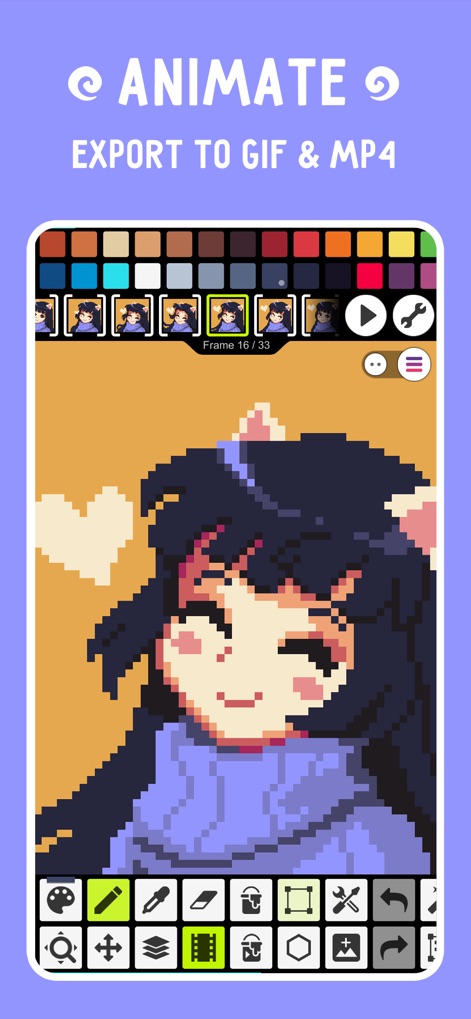
ユーザーはフレームごとのアニメーションを編集でき、制作した作品はGIFやMP4形式で簡単にエクスポートし、共有することが可能です。
動くピクセルを創造

このアプリのPixel Network™では、ユーザーは自身のピクセルアート作品を共有し、他のクリエイターの作品を閲覧したり、コミュニティ交流機能を通じてインスピレーションを得ることができます。
広がるアートの世界

高度なレイヤー機能により、ユーザーは複雑なピクセルアートを構成し、影やハイライトを駆使した詳細表現で作品に奥行きを加えることができます。
重ねて深まる表現

ユーザーはアニメーションに音楽トラックを追加することができ、完成した作品をビデオエクスポート機能を通じて友人やソーシャルメディアで共有できます。
動きと音の融合

高機能なカラーピッカーは、RGBAおよびHSVモードをサポートしており、ユーザーはカスタムパレットの管理を通じて、色彩表現を自在にコントロールできます。
色彩を自在に操る

このツールは、直感的な操作ツールと、自由に拡大縮小・移動・キャンバスサイズ調整機能を提供し、ユーザーはスムーズにピクセルアートを制作できます。
簡単操作で描画
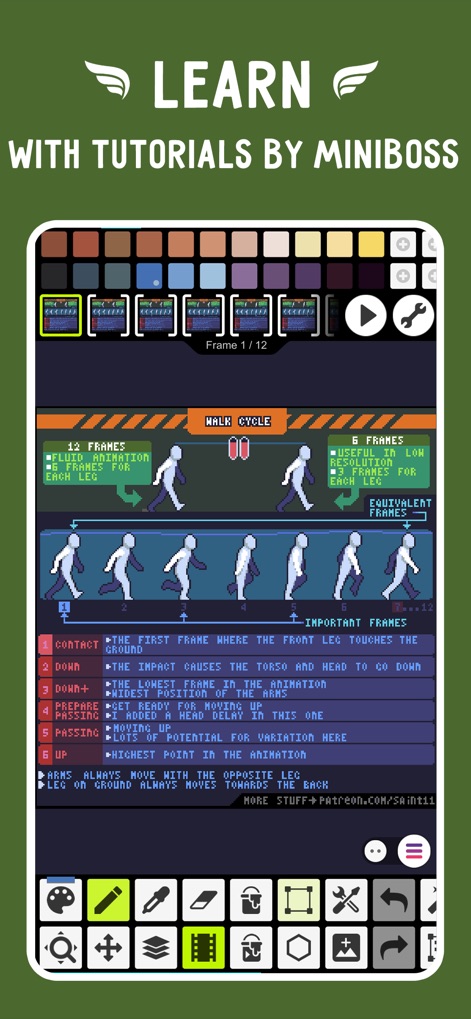
本アプリには、Minibossによるアニメーションチュートリアルが搭載されており、ユーザーはウォークサイクルのような複雑な動きを段階的な学習ガイドでマスターできます。
専門知識を習得
説明
Download

このページはアプリまたはその開発者の公式ページではなく、情報提供および論評を目的として作成された独立した編集出版物です。明示的に別段の記載がない限り、アプリおよびその開発者は、MWM、Apple、Google Play、アプリのパブリッシャー、またはアプリの開発者と提携、承認、後援、認可、またはその他の公式的な関係はなく、このページのいかなる内容も、アプリがMWMのサービスを使用して開発されたことを意味するものではありません。すべての商標、ロゴ、スクリーンショット、その他のコンテンツはそれぞれの所有者の財産です。