
このページはアプリまたはその開発者の公式ページではなく、情報提供および論評を目的として作成された独立した編集出版物です。明示的に別段の記載がない限り、アプリおよびその開発者は、MWM、Apple、Google Play、アプリのパブリッシャー、またはアプリの開発者と提携、承認、後援、認可、またはその他の公式的な関係はなく、このページのいかなる内容も、アプリがMWMのサービスを使用して開発されたことを意味するものではありません。すべての商標、ロゴ、スクリーンショット、その他のコンテンツはそれぞれの所有者の財産です。


Polaris Office - PDF & Docs
膨大な書類を瞬時に操り、思考を現実に変えるモバイルオフィス。
ダウンロード
10M+ユーザー評価
評価数
94.1K開発元
カテゴリ
Productivity対応言語
17最新バージョン
9.8.24サイズ
329.1 MBリリース日
2013年12月14日総合的なモバイルオフィススイートの戦略的評価
「Polaris Office - PDF & Docs」主要機能分析
広範なファイル互換性と編集機能
ユーザーは、Word、Excel、PowerPoint、PDFを含む多様なドキュメント形式を作成、編集、保存、共有できます。PDFをOfficeドキュメントに変換して編集することも可能です。
複数デバイス間でのシームレスな同期とクラウド連携
デスクトップ、iPhone、iPadなど、あらゆるデバイス間でドキュメントを常に最新の状態に保ちます。Polaris Drive、iCloud、Google Drive、Dropboxなどの主要なクラウドサービスとの連携をサポートしています。
包括的なPDF管理と変換
iPhoneやiPadから直接PDFを閲覧できるだけでなく、PDFをOfficeドキュメントに変換し、アプリ内で編集できるため、PDFコンテンツの活用範囲が広がります。
効率的なコラボレーションとドキュメント共有
ドキュメントのリンクをSMS、メール、Facebookなどのチャネルを通じて簡単に共有し、他のユーザーを招待して共同で編集または閲覧することが可能です。
国際的なセキュリティ認証(ISO 27001)の取得
国際的なクラウドプライバシー基準であるISO 27001認証を取得しており、ユーザーのデータセキュリティとプライバシー保護へのコミットメントを示しています。
高度な作成支援機能
33種類のテンプレート、20種類の2D/3Dグラフ、37種類のスライド切り替え効果、173種類の図形、スプレッドシート向けの300種類の数式が利用でき、プロフェッショナルなドキュメント作成を強力に支援します。
強力な検索機能とテンプレート管理
ファイル名だけでなく、拡張された検索語句によって迅速にドキュメントを検索でき、頻繁に使用するテンプレートを「マイテンプレート」フォルダに保存して再利用することで、作業効率を向上させます。
多言語対応
英語、フランス語、簡体字中国語、日本語など、18のグローバル言語をサポートしており、世界中のユーザーが自国語でアプリを利用できます。
よくある質問
について知っておくべきこと Polaris Office - PDF & Docs
Is Polaris Office compatible with Microsoft Office formats?
Yes, Polaris Office is compatible with Word, Excel, and PowerPoint documents. It supports editing and saving files in DOC, DOCX, XLS, XLSX, PPT, and PPTX formats.
What document types can Polaris Office edit?
Polaris Office edits various document types including Word, Excel, PowerPoint, and Google Docs. It also supports editing DOC, DOCX, XLS, XLSX, PPT, PPTX, TXT, HWP, HWPX, ODT, PDF, and CSV formats.
Does Polaris Office support PDF editing and viewing?
Yes, Polaris Office supports viewing PDFs directly from your iPhone and iPad. It also allows converting PDFs into editable Office documents. PDF annotation is available.
Can I use templates in Polaris Office?
Yes, Polaris Office provides 33 free templates. Users can save frequent templates in the 'My Template' folder and create their own custom templates anytime.
What cloud storage services does Polaris Office integrate with?
Polaris Office integrates with Polaris Drive as the default cloud service. It also supports iCloud, Google Drive, Dropbox, OneDrive, Box, WebDAV, and FTP for document syncing.
Can Polaris Office open compressed zip files?
Yes, Polaris Office allows users to easily open and read all types of documents from zip files without extracting them on iPhone and iPad.
What languages does Polaris Office support?
Polaris Office supports 18 global languages. These include English, French, Simplified Chinese, Japanese, Russian, German, Italian, Spanish, Polish, Portuguese (Europe, Brazil), among others.
Can users share documents using Polaris Office?
Yes, Polaris Office users can quickly and easily share documents. Sharing is possible by sending a link via SMS, email, Facebook, and other channels.
Is Polaris Office a free app?
Yes, Polaris Office is a free all-in-one office suite. However, some features may be limited based on cloud usage or chosen subscription options.
What is the size of the Polaris Office app?
The Polaris Office app is under 100 MB in size. It functions as a single application sufficient for managing various document types on iOS devices.
Does Polaris Office offer document synchronization across devices?
Yes, Polaris Office keeps all documents up-to-date and synced across devices like Desktop, iPhone, and iPad. This sync occurs via Polaris Drive, iCloud, and other cloud services.
How do I manage sharing permissions for Polaris Office?
To manage sharing options, go to Settings > Privacy > Allow additional permissions within your device. Select the category and then revoke access to Polaris Office.
What are the subscription plans for Polaris Office?
Polaris Office offers several plans: Smart Plan ($3.99/month, $39.99/year), Pro Plan ($5.99/month, $59.99/year), AI Plan ($12.99/month, $129.99/year), and AI-Plus Plan ($20.99/month, $209.99/year).
How much does the Polaris Office Smart Plan cost?
The Polaris Office Smart Plan costs $3.99 per month or $39.99 per year. These recurring payments are charged to your Apple Store account.
How do I stop auto-renewal for my Polaris Office subscription?
To turn off auto-renewal for your Polaris Office subscription, go to your user’s Account Settings within the App Store. Auto-renewal must be turned off at least 24 hours before the current period ends.
Is Polaris Office compliant with cloud privacy standards?
Yes, Polaris Office has earned ISO 27001 certification. This certification confirms compliance with the International Cloud Privacy Standard, ensuring robust data privacy measures.
以下のスクリーンショットと説明は、アプリの公式ストアリスティングから直接取得されたものであり、アプリ開発者の所有物です。
アプリストア
スクリーンショット

このアプリは、Word、Excel、PowerPoint、PDFを含む主要なオフィスドキュメントに対応し、ユーザーはPolaris Driveでのファイル管理とテンプレート活用が可能です。
総合オフィススイート

ユーザーはWord、Excel、PowerPointドキュメントをモバイルデバイスで効率的に編集でき、同時に複数のファイルを開いて作業するスプリットビュー機能も利用できます。
モバイルドキュメント編集
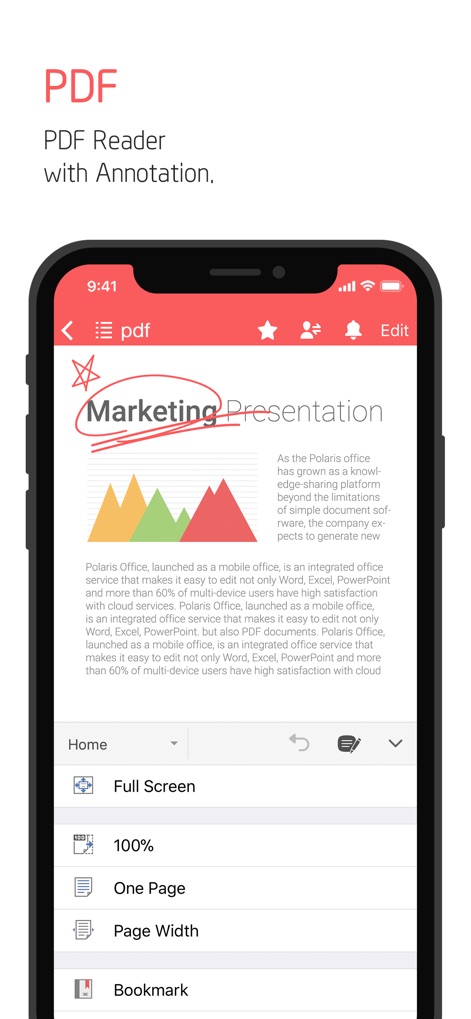
本アプリは、PDF文書の閲覧と直接的な注釈付けを可能にし、ユーザーは全画面表示やブックマーク機能を利用してドキュメントを詳細に確認できます。
高機能PDFビューア
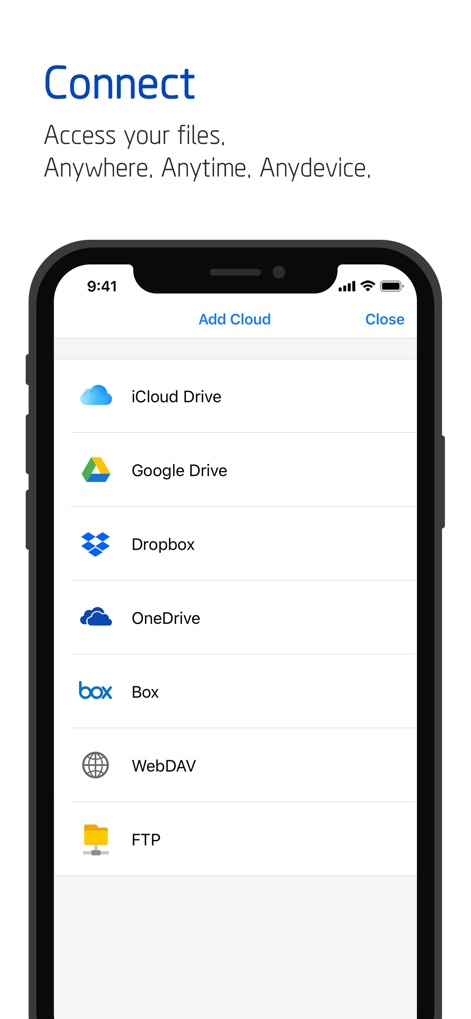
ユーザーはiCloud Drive、Google Drive、Dropboxなどの複数のクラウドサービスに接続し、どこからでもファイルにアクセスできる幅広い連携機能を提供します。
シームレスなクラウド連携

このアプリは、ドキュメントのリンク共有や他のユーザーを招待して共同編集する機能を提供し、効率的なチーム作業を実現するための共有オプションを充実させています。
簡単ドキュメント共有

ユーザーは「マイテンプレート」フォルダを活用して、頻繁に使用する文書のひな形を保存・管理でき、新しいドキュメント作成時に時間を節約できます。
パーソナルテンプレート
説明
Download
類似アプリ
似た機能とユーザー体験を持つアプリ

PDF PRO Scan Image & Documents
Balzo srl

The PDF Scanner, PDF editor HQ
NEXT K.U.M. LTD

CamScanner - PDF Scanner App
INTSIG Information Co., Ltd

Adobe Scan: PDF & OCR Scanner
Adobe Inc.

WPS Office: PDF, Docs, Sheets
KINGSOFT OFFICE SOFTWARE CORPORATION LIMITED

iLovePDF - PDF Editor & Scan
ILOVEPDF S.L.

Scanner App: Genius Scan
The Grizzly Labs

Microsoft Lens: PDF Scanner
Microsoft Corporation

Clear Scan: Doc Scanner App
INDY MOBILE APP COMPANY LIMITED
このページはアプリまたはその開発者の公式ページではなく、情報提供および論評を目的として作成された独立した編集出版物です。明示的に別段の記載がない限り、アプリおよびその開発者は、MWM、Apple、Google Play、アプリのパブリッシャー、またはアプリの開発者と提携、承認、後援、認可、またはその他の公式的な関係はなく、このページのいかなる内容も、アプリがMWMのサービスを使用して開発されたことを意味するものではありません。すべての商標、ロゴ、スクリーンショット、その他のコンテンツはそれぞれの所有者の財産です。