PRO SCANNER- PDF Document Scan

PRO SCANNER- PDF Document Scan

ダウンロード: App Store
ロゴ: PRO SCANNER- PDF Document Scan

PRO SCANNER:シームレスなドキュメント管理のためのプロフェッショナルなポケットオフィス

iPhoneを高機能スキャナーに変身させましょう。高度なOCR、デジタル署名、最新の起業家向けに設計された生体認証保護により、ドキュメントを簡単にスキャン、署名、保護できます。

ダウンロード: App Store

開発元

Zafar Ullah

カテゴリ

Business

ダウンロード

213K+

ユーザー評価

4.2/5

評価数

4K+

対応言語

11

あなたのポケットオフィス

このインターフェースを利用する 213K+ 人のユーザー.

PRO SCANNERモバイルアプリのインターフェースが、デジタルスキャン用にドキュメントをキャプチャしているiPhoneに表示されています
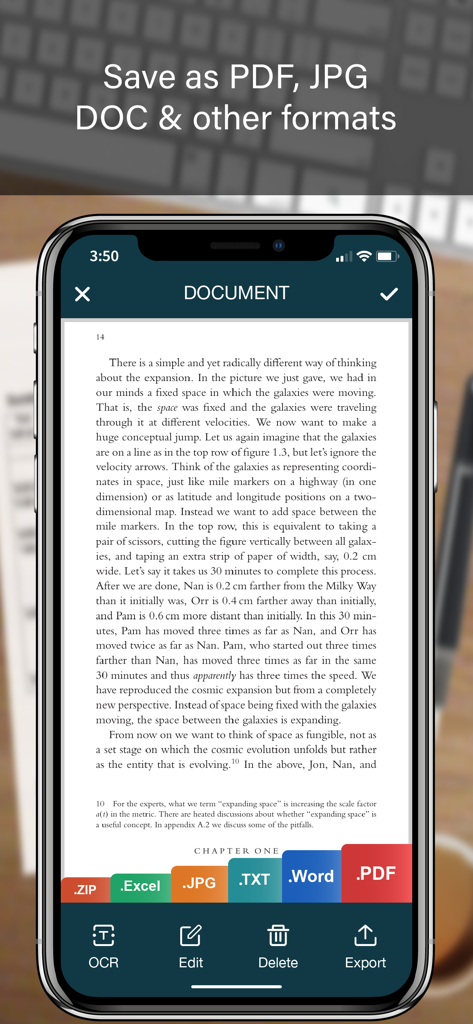
PRO SCANNERモバイルアプリのインターフェースが、デジタルスキャン用にドキュメントをキャプチャしているiPhoneに表示されています

PDF、Word、Excelなどのさまざまなファイルエクスポートオプションを備えたスキャン済みドキュメントを表示するiPhone画面
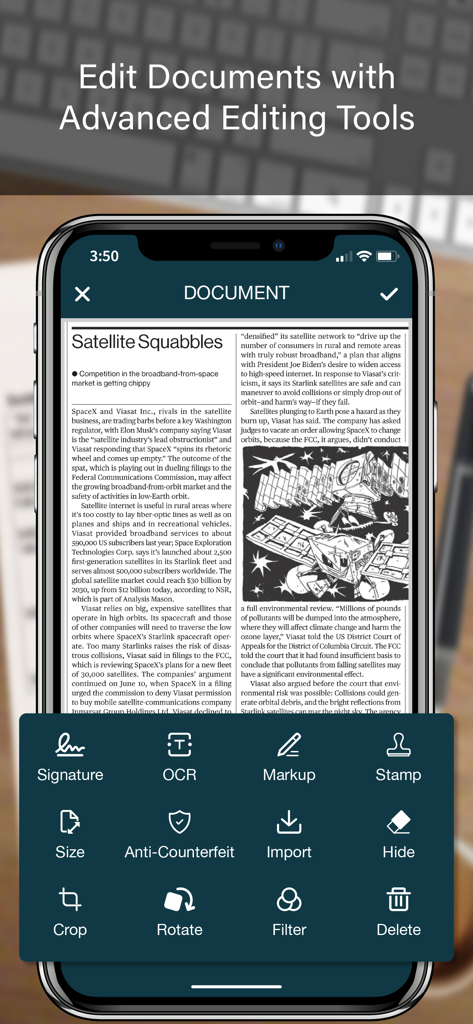
PDF、Word、Excelなどのさまざまなファイルエクスポートオプションを備えたスキャン済みドキュメントを表示するiPhone画面

署名、OCR、マークアップなどのツールを備えたiPhone上のPRO SCANNERアプリの高度なドキュメント編集インターフェース
署名、OCR、マークアップなどのツールを備えたiPhone上のPRO SCANNERアプリの高度なドキュメント編集インターフェース

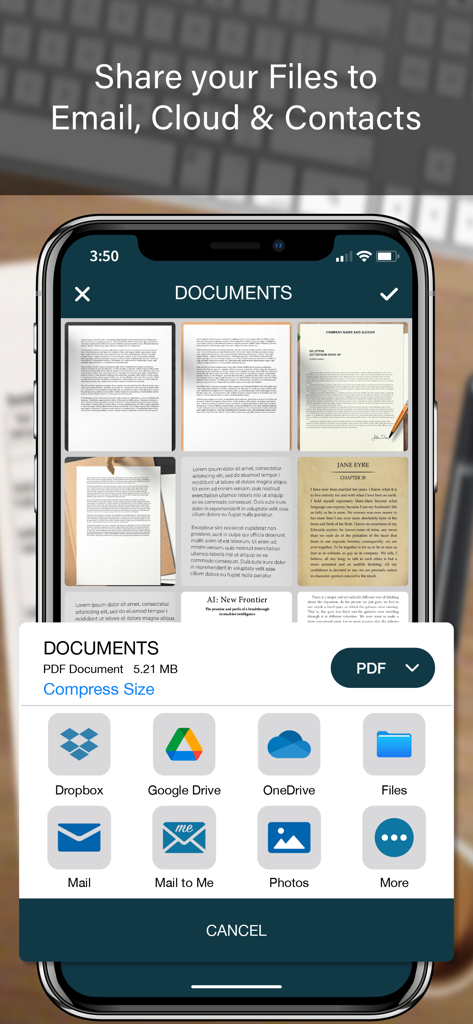
クラウドストレージとメールオプションを備えたPRO SCANNERモバイルアプリの共有画面
クラウドストレージとメールオプションを備えたPRO SCANNERモバイルアプリの共有画面

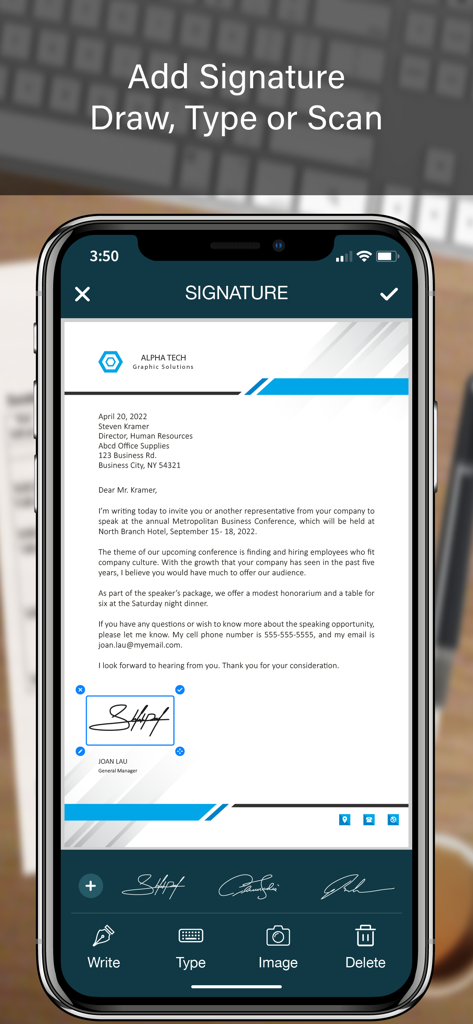
PDFドキュメントにデジタル署名を追加するPRO SCANNERアプリの機能を示すiPhone画面
PDFドキュメントにデジタル署名を追加するPRO SCANNERアプリの機能を示すiPhone画面

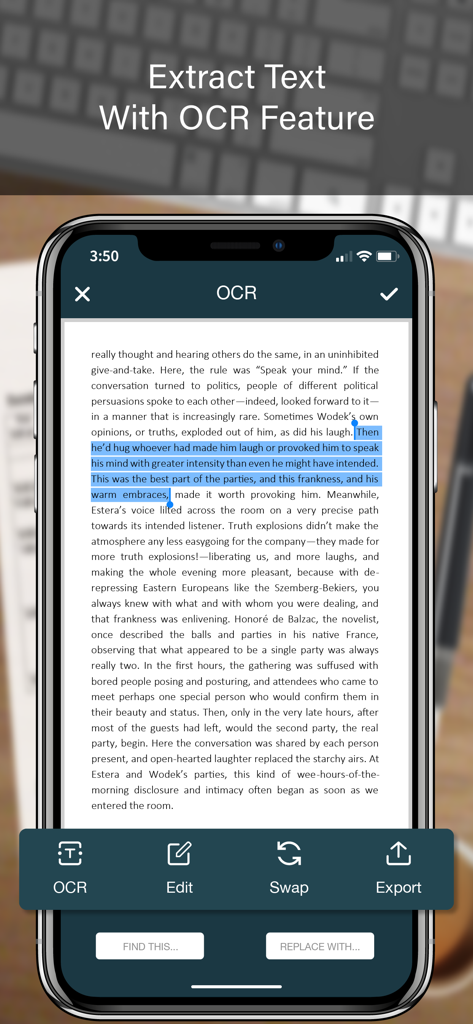
Pro ScannerアプリのOCR機能がドキュメントからテキストを抽出していることを示すスマートフォン画面
Pro ScannerアプリのOCR機能がドキュメントからテキストを抽出していることを示すスマートフォン画面

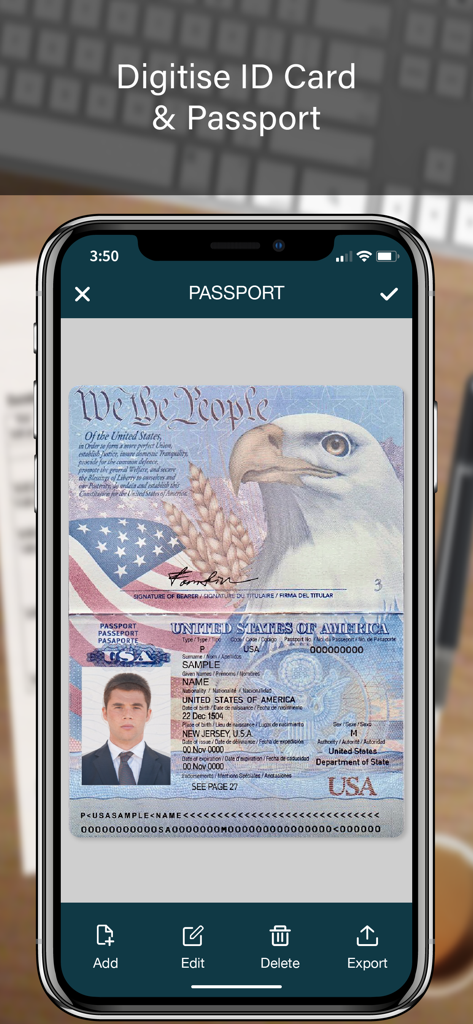
PRO SCANNERモバイルアプリを使用して米国パスポートをデジタル化しています
PRO SCANNERモバイルアプリを使用して米国パスポートをデジタル化しています

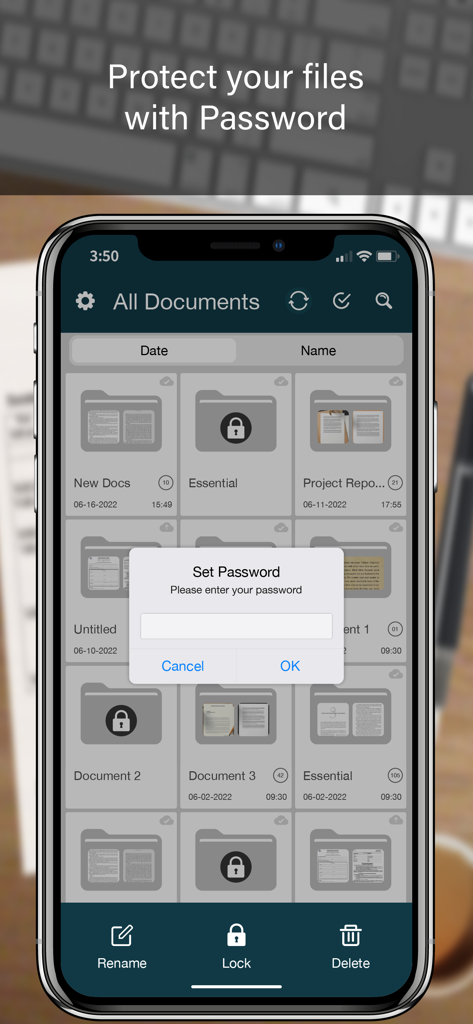
ドキュメント保護のために設定されたパスワードプロンプトを表示するPRO SCANNERアプリのモバイルインターフェース
ドキュメント保護のために設定されたパスワードプロンプトを表示するPRO SCANNERアプリのモバイルインターフェース

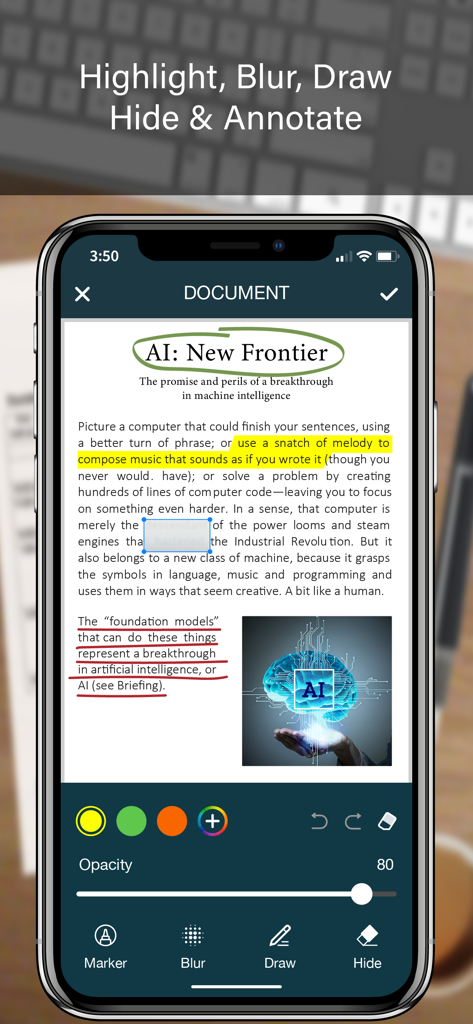
PDFドキュメントにハイライト、ぼかし、描画などのドキュメント注釈ツールを使用するPRO SCANNERアプリのインターフェースを示すiPhone
PDFドキュメントにハイライト、ぼかし、描画などのドキュメント注釈ツールを使用するPRO SCANNERアプリのインターフェースを示すiPhone

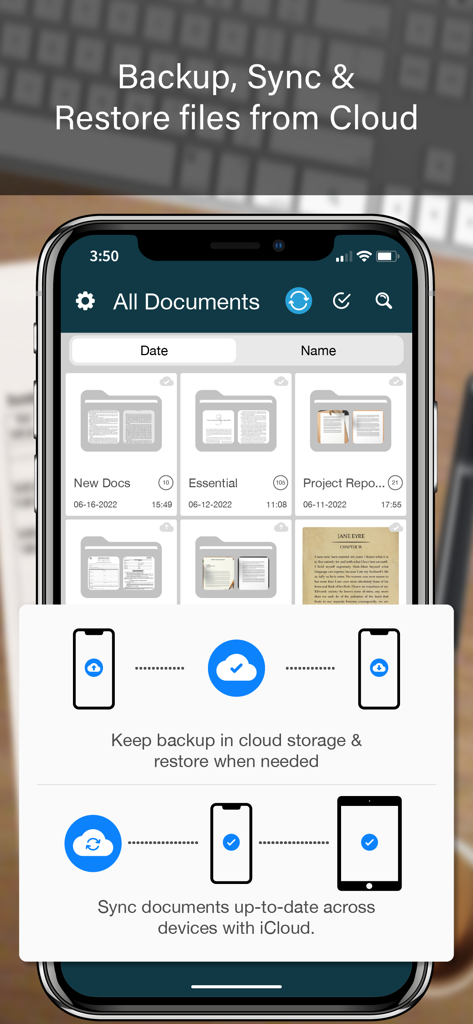
クラウドバックアップとドキュメント同期機能を示すPro Scannerアプリのインターフェース

クラウドバックアップとドキュメント同期機能を示すPro Scannerアプリのインターフェース

あなたのプロフェッショナルオフィスをポケットに

このアプリを際立たせるツール、 213K+ 人のユーザーが選択.

📄

高精細スキャン&OCR

AI搭載エッジ検出とプログレードのテキスト抽出により、物理的なドキュメントを検索可能なPDFまたは編集可能なテキストに変換します。

✍️

ドキュメントに即座に電子署名

iPhoneから直接安全なデジタル署名または公式印鑑を追加することで、数秒で取引を成立させ、契約を締結します。

🔒

セキュアバンカー&生体認証ロック

Face ID、Touch ID、またはカスタムフォルダロックを使用して、機密性の高いビジネスデータと機密ファイルを保護し、究極のプライバシーを実現します。

レビュー分析

ユーザーレビューの分析.

感情スコア

33%
ネガティブ

概要

This app receives largely negative feedback, with a significant number of users reporting severe issues such as frequent crashes, freezing, and loss of scanned documents, often occurring after app updates. Many express frustration with the Pro version, citing that it offers little improvement, is overpriced, or even introduces more bugs, leading to accusations of the app being a "scam." Key functionalities like exporting, sharing, and document restoration are frequently problematic, with users often unable to access or manage their files effectively. While some users appreciate its basic scanning capabilities and ease of use, the overwhelming sentiment points to critical issues with app stability, data integrity, and the value proposition of the paid version, further exacerbated by a lack of responsive customer support.

主なテーマ

Pro Version Value / Pricing(19)
App Stability(12)
Data Loss / Document Management(9)
Export & Sharing Functionality(9)
Ease of Use(5)
OCR / Text Recognition(5)
Customer Support(3)
Scanning Quality / Features(3)

アプリについて

について知っておくべきこと PRO SCANNER- PDF Document Scan.

説明

PRO SCANNER is the easiest & simple app to use, which will turn your iPhone into a portable mobile scanner. Use PRO SCANNER to scan receipts, notes, invoices, whiteboard discussions, business cards, certificates, photo & just anything you want. Easily scan, save and share any document in PDF, DOC, EXCEL, TEXT, ZIP & JPEG format. ** Key Feature ** ============== ADVANCED & HIGHLY OPTIMIZED SCANNER : - Scan to create high quality PDF, DOC, EXCEL, TEXT, ZIP & JPEG file. - Auto edge detection for easy, fast and accurate scanning. - Batch Scan feature to scan multiple documents simultaneously. - Control flash and capture mode very easily. - Turn camera grid on/off based on needs. - Auto enhancement make the graphics & text look more clear & sharper. - Automatic noise removing, color correction & perspective correction. EXTRACT TEXT FROM IMAGE (OCR) : - Extract text from image & Turn your images into text file. - Best OCR performance to get most accurate text output from the image. - Search & replace specific text or phrase in OCR. BACKUP & SYNC: - Create backup of documents and restore it when needed. - Sync data with iCloud to keep it up-to-date. - Sync data across multiple devices. ADD DIGITAL SIGNATURE : - Sign in your documents just right in the app. - Add signature by drawing and typing. - Extract signature from image by scanning. - Adjust the size, color & rotation of your signature easily. CONVERTER : - Convert your files into PDF, DOC, EXCEL, TEXT, ZIP & JPEG format. - Compress and control file size very easily. FOLDER LOCK : - Keep you documents safe with folder lock. - Use Pin Code, Face ID & Touch ID to lock and unlock folder. FILE MANAGER : - Full featured file manager with custom folder creation. - Organize documents by copying and moving from one folder to another. - Edit, Sort, Rename & Delete your folder. DOCUMENT EDITOR : - Smart polygonal cropping with auto edge detection feature. - Professional filters to turn image into document. - Draw, mark and annotate document with markup. - Change document dimension into different paper sizes (Such as: A3, A4, A5, Letter, Legal). - Import image from camera and gallery to add on documents. - Hide unwanted/confidential parts of the document with color and blur effects. - Use stamp & seal to make official document. - Add anti-counterfeit watermark. - File rotation feature. SHARING : - 3rd Party Cloud Storage Service : Dropbox, OneDrive, Google Drive & Email. - Airdrop sharing to share your files to any cloud or social media you want. - Easily Print out your files with any WiFi printer. - Save scans to camera roll.

最新バージョン

2.4

サイズ

65.9 MB

リリース日

2017年2月8日

プロフェッショナルな生活を簡素化する準備はできていますか?

PRO SCANNERを信頼して外出先でドキュメントをスキャン、署名、保護している213,000人以上の起業家やプロフェッショナルに加わりましょう。今日、あなたのポケットオフィスをダウンロードしてください。

ダウンロード: App Store

App information, icons, screenshots, and descriptions displayed on this page are sourced from the Apple App Store and are the property of their respective developers. Download estimates and rankings are based on MWM's proprietary models and may not reflect actual figures. This page is provided for informational and analytical purposes only.

Believe this page infringes your intellectual property? File a dispute