
このページはアプリまたはその開発者の公式ページではなく、情報提供および論評を目的として作成された独立した編集出版物です。明示的に別段の記載がない限り、アプリおよびその開発者は、MWM、Apple、Google Play、アプリのパブリッシャー、またはアプリの開発者と提携、承認、後援、認可、またはその他の公式的な関係はなく、このページのいかなる内容も、アプリがMWMのサービスを使用して開発されたことを意味するものではありません。すべての商標、ロゴ、スクリーンショット、その他のコンテンツはそれぞれの所有者の財産です。


Procreate
iPadとApple Pencilを手にすれば、Procreateがあなたの思考をそのままビジュアルに変える。もはやソフトウェアが創造の限界ではない。
ダウンロード
10M+ユーザー評価
評価数
155.7K開発元
カテゴリ
Graphics & Design対応言語
18最新バージョン
5.4.10サイズ
1.1 GBリリース日
2011年3月16日デジタルアーティストのための包括的なクリエイティブプラットフォーム
Procreateの主要機能分析
ハンドメイドブラシとブラシスタジオ
多彩なブラシとカスタマイズ機能により、ユーザーは無限の表現力を得て、独自のスタイルを確立できます。
Valkyrieグラフィックエンジンと高解像度キャンバス
高解像度キャンバスと高速描画エンジンにより、ユーザーは細部まで表現豊かな作品をスムーズに制作できます。
直感的なインターフェースとApple Pencil統合
iPadとApple Pencilに最適化された直感的なインターフェースにより、ユーザーは自然で応答性の高い描画体験を享受できます。
高度なレイヤーシステム
高度なレイヤーシステムにより、ユーザーは詳細なコントロールと非破壊編集が可能となり、複雑な構成の作品も効率的に管理できます。
アニメーションとページアシスト
アニメーション機能とページアシストにより、ユーザーはフレームごとのアニメーションやストーリーボード、PDFの編集まで、幅広いクリエイティブなプロジェクトに取り組めます。
カラー管理とツール
多彩なカラーツールとプロファイルインポート機能により、ユーザーは正確で表現力豊かな色使いを実現し、作品の視覚的品質を高められます。
精密デザインツール
QuickShape、描画アシスト、ガイドなどの精密ツールにより、ユーザーは完璧な図形や安定した線を描き、作品の完成度を向上させることができます。
タイムラプス再生と共有
タイムラプス再生機能により、ユーザーは制作過程を振り返り、4K解像度でエクスポートしてソーシャルメディアで共有することで、自身のクリエイティブな旅を視覚的に表現できます。
ファイルインポート/エクスポートと互換性
Adobe Photoshop PSDを含む多様なファイル形式でのインポートおよびエクスポート機能により、ユーザーは既存のワークフローにスムーズに統合し、共同作業を円滑に進めることができます。
ドラマチックな仕上げエフェクト
多彩な画像調整と仕上げエフェクトにより、ユーザーは作品に奥行き、動き、そして独自の視覚的魅力を加え、創造的な表現を豊かにできます。
よくある質問
について知っておくべきこと Procreate
What is Procreate?
Procreate is a leading creative application designed for iPad, offering tools for expressive sketches, rich paintings, gorgeous illustrations, and beautiful animations. It functions as a complete art studio on the go.
Does Procreate include brushes?
Yes, Procreate is packed with hundreds of beautifully crafted brushes. Users can organize them into sets and libraries, and customize them using Brush Studio, which offers over 100 settings.
Can users create their own brushes in Procreate?
Yes, users can create and customize their own brushes in Procreate. The app features Brush Studio, which provides over 100 customizable settings for brush creation, and allows importing/exporting custom Procreate brushes.
Does Procreate support layers for artwork?
Yes, Procreate features a full-featured layering system. Users can layer art for precise control, create Layer Masks and Clipping Masks, organize layers into Groups, and access over 25 layer blend modes.
Can Procreate paint on 3D models?
Yes, Procreate includes 3D Painting capabilities with Lighting Studio. Users can paint on 3D models and export them as models, images, or animations, expanding their creative possibilities.
Is Procreate a subscription-based app?
No, Procreate does not operate on a subscription model. The app features no ads and no subscriptions, offering a one-time purchase for full access to its features and ongoing updates.
Does Procreate offer animation features?
Yes, Procreate includes animation features like easy frame-by-frame animation with customizable onion skinning. Users can create storyboards, GIFs, animatics, and simple animations directly within the app.
Can Procreate import Adobe Photoshop brushes?
Yes, Procreate allows users to import Adobe® Photoshop® brushes. It runs these brushes faster than Photoshop® itself, enhancing the creative workflow and brush versatility within the app.
What file formats can Procreate export?
Procreate can export working files in layered .procreate or PSD formats. It also supports exporting art as TIFF, transparent PNG, multi-page PDF, web-ready JPEG, OBJ, USDZ, and animated GIFs, PNGs, and MP4s.
Does Procreate have color adjustment features?
Yes, Procreate offers powerful image adjustments including Color Balance, Curves, HSB, and Gradient Map. It also provides various color panels like Disc, Classic, Harmony, Value, and Palette for precise color control.
Can Procreate assist with drawing perfect shapes and strokes?
Yes, Procreate includes features like Revolutionary QuickShape for perfect shapes and Drawing Assist, which perfects strokes in real time. StreamLine and stabilization also smooth strokes for calligraphy and expert inking.
Does Procreate have accessibility features?
Yes, Procreate includes advanced stroke stabilization, Dynamic Type, VoiceOver, and Feedback Sounds. It also allows assignable single-touch gestures and color naming for enhanced accessibility.
Can Procreate record time-lapse videos of artwork?
Yes, Procreate offers a Time-lapse Replay feature to record the creative journey. Users can export these recordings in 4K for high-quality video production or a shorter 30-second version for social sharing.
Does Procreate offer filters and effects for artwork?
Yes, Procreate allows users to brush in image adjustments and effects with Apple Pencil. It includes effects like Glitch, Chromatic Aberration, Bloom, Noise, Halftone, and various blur filters to add new dimensions.
以下のスクリーンショットと説明は、アプリの公式ストアリスティングから直接取得されたものであり、アプリ開発者の所有物です。
アプリストア
スクリーンショット
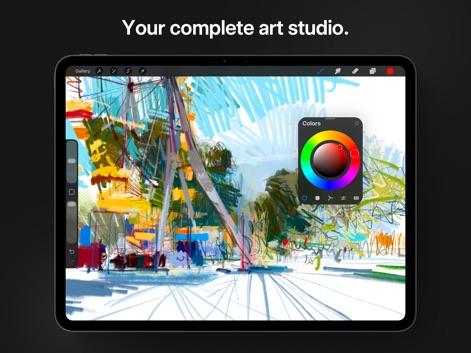
このアプリは、あらゆるクリエイティブなニーズに応える包括的なアートスタジオを提供します。ユーザーは、直感的なカラーピッカーと高度なブラシツールを活用して、表現豊かな作品を制作できます。
完全なるアートスタジオ
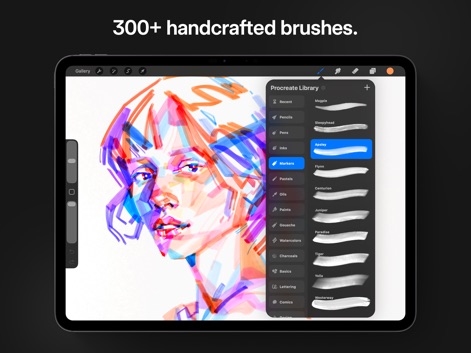
300種類以上の手作りのブラシを搭載し、ユーザーはあらゆるスタイルに対応する多様な表現力を手に入れます。鉛筆やマーカーなど、豊富なブラシカテゴリから理想の描画ツールを選択できます。
多彩なブラシコレクション
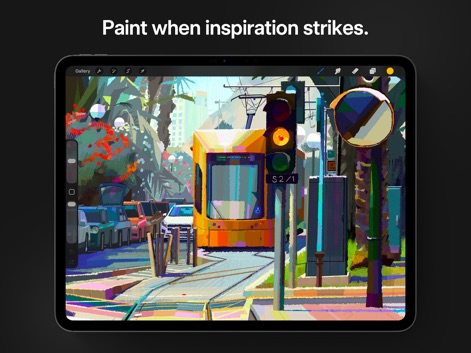
どこでもインスピレーションを形にできる本アプリは、ユーザーがアイデアを瞬時にアートへと昇華させることを可能にします。iPadに最適化された直感的なインターフェースと高速な描画エンジンが、スムーズな創作体験を提供します。
ひらめきを絵に

洗練されたカリグラフィー機能により、ユーザーは美しいタイポグラフィ作品を制作できます。ストリームライン機能とスタビライゼーション機能が、滑らかで均一なストロークを可能にし、プロフェッショナルな仕上がりを実現します。
優美なカリグラフィー
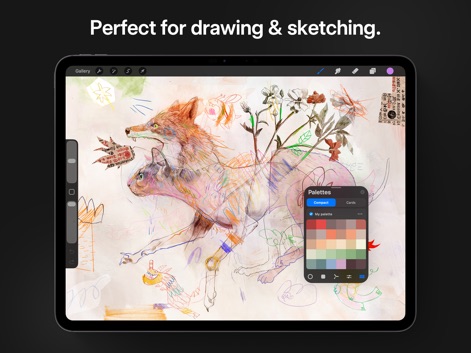
詳細な描画やラフスケッチに最適なこのアプリは、ユーザーの創造性を自由に表現することをサポートします。多様なカラーパレットオプションとカスタマイズ可能なブラシ設定により、どんなアイデアも形にできます。
スケッチと描画に最適
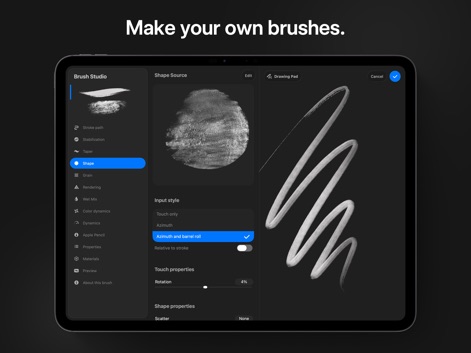
本ツールに搭載されたブラシスタジオでは、100以上のカスタマイズ設定を駆使して、ユーザー独自のブラシを作成できます。シェイプソースとタッチプロパティを調整することで、無限の表現の可能性が広がります。
ブラシを自在に作成
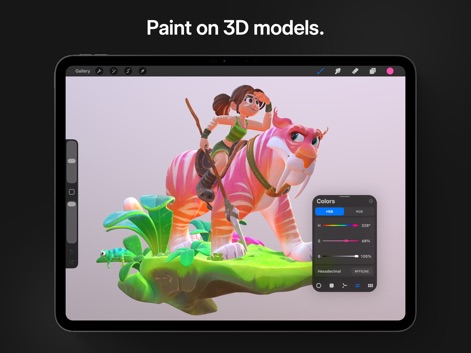
3Dペイント機能により、ユーザーは詳細なテクスチャと色彩を3Dモデルに直接適用できます。直感的なHSBカラースライダーとライティングスタジオを活用して、リアルな質感と深みのある作品を生み出します。
3Dモデルにペイント
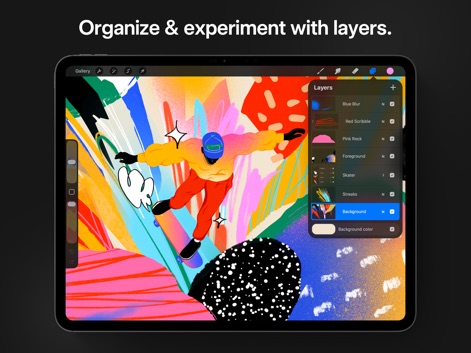
高度なレイヤーシステムにより、ユーザーはアート作品を精密に制御し、構成を自由に実験できます。レイヤーマスクとクリッピングマスクを活用することで、非破壊編集を実現し、創造性を最大限に引き出します。
レイヤーで整理と実験
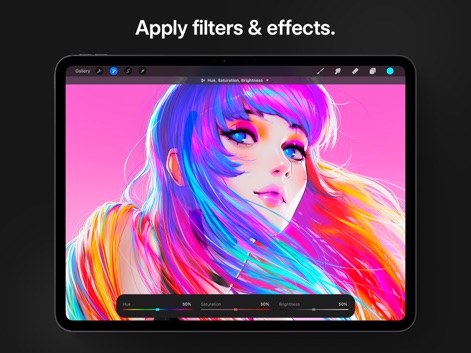
本アプリは、作品に劇的な変化をもたらす多様なフィルターとエフェクトを提供します。色相・彩度・明るさ調整機能や、グリッチ、ブルームといった高度な効果を適用して、アートに新たな次元を加えることができます。
フィルターとエフェクト
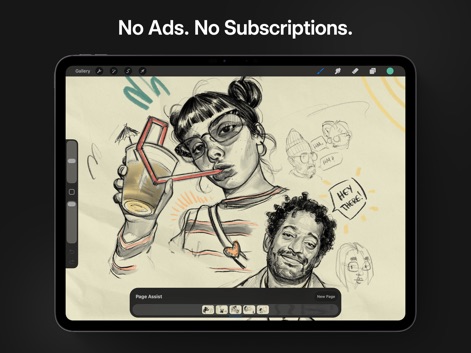
ユーザーは広告表示や月額購読なしで、集中して作品制作に取り組めます。ページアシスト機能により、複数のページやコマ割りをスムーズに管理し、ストーリーボードやコミックを効率的に作成できます。
広告なし、購読不要
説明
Download
類似アプリ
似た機能とユーザー体験を持つアプリ

Sketchbook®
Sketchbook, Inc.

Mental Canvas Draw
Mental Canvas, Inc.

ibis Paint
ibis inc.

ibis Paint X
ibis inc.

Paper: Sketch, Draw & Create
Evernote Corporation

Adobe Fresco: Draw & Paint App
Adobe Inc.

Art Set 4
Lofopi Ltd

MediBang Paint – Drawing & Art
MediBang inc.

Tayasui Sketches
SKETCHES SRL
このページはアプリまたはその開発者の公式ページではなく、情報提供および論評を目的として作成された独立した編集出版物です。明示的に別段の記載がない限り、アプリおよびその開発者は、MWM、Apple、Google Play、アプリのパブリッシャー、またはアプリの開発者と提携、承認、後援、認可、またはその他の公式的な関係はなく、このページのいかなる内容も、アプリがMWMのサービスを使用して開発されたことを意味するものではありません。すべての商標、ロゴ、スクリーンショット、その他のコンテンツはそれぞれの所有者の財産です。