
このページはアプリまたはその開発者の公式ページではなく、情報提供および論評を目的として作成された独立した編集出版物です。明示的に別段の記載がない限り、アプリおよびその開発者は、MWM、Apple、Google Play、アプリのパブリッシャー、またはアプリの開発者と提携、承認、後援、認可、またはその他の公式的な関係はなく、このページのいかなる内容も、アプリがMWMのサービスを使用して開発されたことを意味するものではありません。すべての商標、ロゴ、スクリーンショット、その他のコンテンツはそれぞれの所有者の財産です。


Scanner: Document Scan App
このアプリは、紙の山を瞬時にデジタル資産へと変える。ユーザーは、まるで未来のテクノロジーを手にしているかのような感覚を覚えるだろう。
ダウンロード
2.5M+ユーザー評価
評価数
126.9K開発元
カテゴリ
Productivity対応言語
5最新バージョン
8.9サイズ
11.1 MBリリース日
2018年6月14日忙しいプロフェッショナル、学生、中小企業経営者のための効率的なデジタルドキュメント管理ソリューション
「Scanner: Document Scan App」の主要機能分析
高速ドキュメントスキャン
物理的な書類を素早くデジタル化し、自動トリミングや遠近法補正により高品質なスキャンを実現します。これにより、様々な種類のドキュメントを効率的に処理できます。
高精度OCR文字認識
画像内のテキストを高精度で認識し、編集可能なデジタルコンテンツに変換します。本機能により、テキストの検索、コピー、エクスポート、および多言語翻訳が可能になります。
PDFファイル生成・編集
スキャンした画像やアルバム内の写真を業界標準のPDF形式に変換します。このアプリは、透かしの追加・削除、ページ番号調整、サイズ設定、PDFのパスワード保護などの編集機能を提供します。
写真翻訳機能
写真や画像内のテキストを直接認識し、多言語に翻訳します。翻訳されたテキストは、ユーザーが自由に編集、保存、共有することが可能です。
強力なファイル管理
デジタル化されたドキュメントを効率的に整理し、一括エクスポート、コピー、移動などの機能を通じてアクセスしやすい状態に保ちます。
自動画像補正とレイアウト復元
スキャン時に自動でエッジ認識、トリミング、遠近法補正を行い、元のレイアウトを最大限に復元することで、プロフェッショナルな見た目のドキュメントを作成します。
身分証明書スキャン
各種身分証明書を自動でスキャンし、A4用紙に1:1で縮小して出力できます。本機能は、行政手続きや事務作業を効率化するために役立ちます。
選定範囲のテキスト抽出
画像全体ではなく、特定のテキストコンテンツや個別の領域を自由に選択して抽出できます。これにより、ユーザーは必要な情報のみを効率的に取得することが可能です。
よくある質問
について知っておくべきこと Scanner: Document Scan App
What are the core functionalities of the Scanner: Document Scan App?
The Scanner: Document Scan App provides document scanning, high-precision text recognition (OCR), PDF creation with editing tools, and photo translation capabilities. It efficiently processes various documents for work and study.
Does the Scanner: Document Scan App feature OCR (Optical Character Recognition)?
Yes, the Scanner app offers high-precision OCR technology. It converts text from images into editable content, allowing users to modify, copy, export, and translate the recognized text into many languages.
How does the Scanner app improve document scanning quality and options?
The Scanner app enhances scans with advanced image recognition, automatic edge detection, cropping, and perspective correction. It offers various filters and options for watermarks or PDF passwords to optimize output.
Can I create PDF documents using the Scanner: Document Scan App?
Yes, the Scanner app generates PDF files from scanned documents or existing photos. Users define conversion areas and can export the resulting PDFs via email, mobile, or various sharing platforms.
Does the Scanner: Document Scan App provide photo translation services?
The Scanner app offers photo translation for text content within pictures or albums. It supports multiple languages, and users can directly edit, save, and share the translated content.
Is ID card scanning supported by the Scanner: Document Scan App?
Yes, the Scanner app includes ID scanning functionality. It performs a 1:1 reduction of ID documents to A4 paper size, which is practical for various official and study purposes.
What are the automatic renewal terms for the Scanner app subscription?
The Scanner app subscription automatically renews unless cancelled at least 24 hours before the current period ends. iTunes directly deducts the subscription fee. Cancelling mid-period is not possible.
How can I manage or cancel my Scanner app subscription?
Users manage or cancel their Scanner app subscription through their iTunes account settings. Cancellation must occur at least 24 hours before the current subscription period concludes to prevent automatic renewal.
以下のスクリーンショットと説明は、アプリの公式ストアリスティングから直接取得されたものであり、アプリ開発者の所有物です。
アプリストア
スクリーンショット
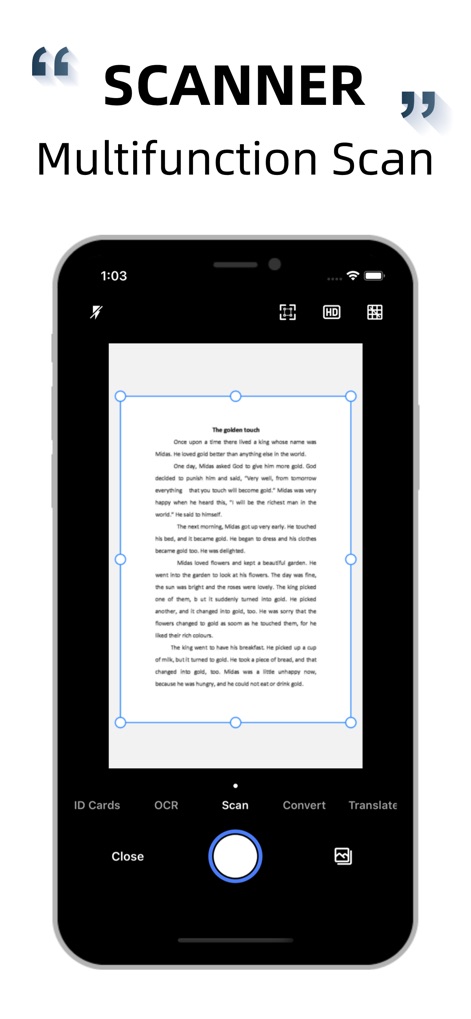
このアプリは、自動エッジ認識による高速ドキュメントスキャンと、OCRや翻訳などの多様な機能を一つの画面で提供します。
多機能スキャン
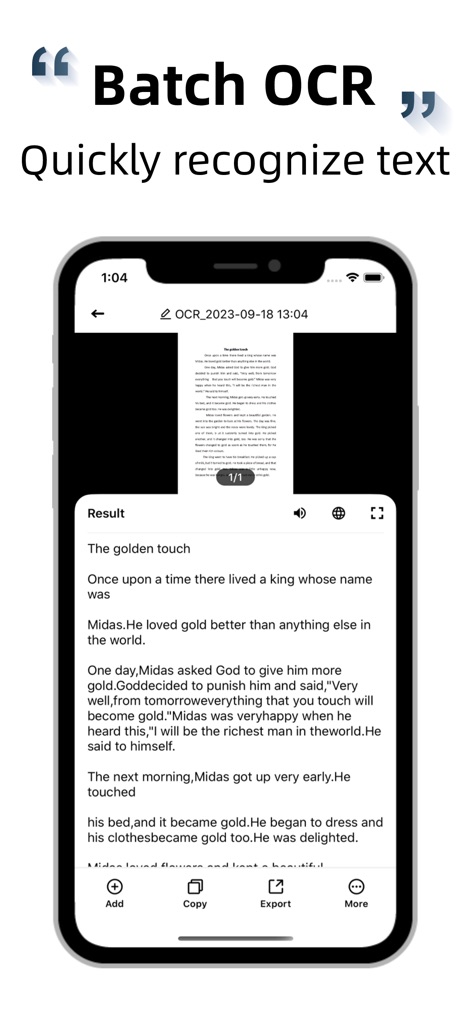
高度な文字認識(OCR)技術により、画像からテキストを正確に抽出し、ユーザーは抽出したテキストを容易に編集・エクスポートできます。
高精度OCR

スキャンした文書をPDF形式で生成し、ウォーターマーク追加やパスワード保護といった多彩な編集ツールで、文書をより安全かつプロフェッショナルに管理できます。
PDF作成・編集

ドキュメントの視認性を高めるための多彩なフィルター(強調、白黒など)と、クリップや回転などの精密な画像調整ツールが利用可能です。
画像補正フィルター
説明
Download
類似アプリ
似た機能とユーザー体験を持つアプリ

PDF PRO Scan Image & Documents
Balzo srl

The PDF Scanner, PDF editor HQ
NEXT K.U.M. LTD

CamScanner - PDF Scanner App
INTSIG Information Co., Ltd

Adobe Scan: PDF & OCR Scanner
Adobe Inc.

WPS Office: PDF, Docs, Sheets
KINGSOFT OFFICE SOFTWARE CORPORATION LIMITED

iLovePDF - PDF Editor & Scan
ILOVEPDF S.L.

Scanner App: Genius Scan
The Grizzly Labs

Microsoft Lens: PDF Scanner
Microsoft Corporation

Clear Scan: Doc Scanner App
INDY MOBILE APP COMPANY LIMITED
このページはアプリまたはその開発者の公式ページではなく、情報提供および論評を目的として作成された独立した編集出版物です。明示的に別段の記載がない限り、アプリおよびその開発者は、MWM、Apple、Google Play、アプリのパブリッシャー、またはアプリの開発者と提携、承認、後援、認可、またはその他の公式的な関係はなく、このページのいかなる内容も、アプリがMWMのサービスを使用して開発されたことを意味するものではありません。すべての商標、ロゴ、スクリーンショット、その他のコンテンツはそれぞれの所有者の財産です。