
このページはアプリまたはその開発者の公式ページではなく、情報提供および論評を目的として作成された独立した編集出版物です。明示的に別段の記載がない限り、アプリおよびその開発者は、MWM、Apple、Google Play、アプリのパブリッシャー、またはアプリの開発者と提携、承認、後援、認可、またはその他の公式的な関係はなく、このページのいかなる内容も、アプリがMWMのサービスを使用して開発されたことを意味するものではありません。すべての商標、ロゴ、スクリーンショット、その他のコンテンツはそれぞれの所有者の財産です。


Slideshow Maker & Music Video
写真と動画の寄せ集めを、あっという間に見応えのある作品へ変貌させる。このアプリは、あなたの記憶に命を吹き込む、ただのツールではない。
ダウンロード
2.5M+ユーザー評価
評価数
24.8K開発元
カテゴリ
Photo & Video対応言語
1最新バージョン
4.1.2サイズ
104.2 MBリリース日
2013年11月29日この分析は、アプリの主要機能と、ソーシャルメディア活動が活発な個人、カジュアルなコンテンツクリエイター、思い出の記録者に対するそれぞれの影響度を評価します。
Slideshow Maker & Music Videoの機能分析:ソーシャルメディア時代のクリエイティブツール
簡単なスライドショー作成
このアプリは、写真、動画、背景音楽を組み合わせて、ユーザー独自のパーソナライズされたスライドショー動画を短時間で作成できます。
高品質エクスポートと多様なアスペクト比
本ツールは、ソーシャルメディアでの共有に適した高解像度(最大60 FPS)でのエクスポートをサポートし、1:1、16:9、9:16など多様なアスペクト比に対応しています。
音楽と音声の編集
ユーザーは、iTunesライブラリからの楽曲追加、音声録音、音楽のトリミング、再生タイミング調整、音量制御により、スライドショーに最適なオーディオトラックを組み込めます。
自動スライドショー生成
ユーザーが写真や動画を選択するだけで、アプリケーションが自動的にスライドショーを生成するため、プロの編集スキルがなくても手軽に動画作成を開始できます。
テキストオーバーレイとアニメーション
このアプリは、スライドショーにテキストを追加し、フォント、色、スタイル、アニメーションをカスタマイズできるため、メッセージを効果的に伝えられます。
スライド管理とトランジション編集
ユーザーは、タイムライン上でスライドの順序変更、挿入、削除、およびスライド間のトランジションの種類を編集し、動画のストーリーフローを細かく調整できます。
個別スライド編集
本ツールは、写真スライドの表示時間、動画スライドのトリミングと再生速度変更、さらには画像の位置調整と拡大縮小アニメーションを個別に制御する機能を提供します。
プロジェクト保存機能
ユーザーは作成中のスライドショーをプロジェクトとして保存し、後で編集を再開できるため、柔軟な作業フローが可能です。
よくある質問
について知っておくべきこと Slideshow Maker & Music Video
What is PicMusic: Slideshow Maker?
PicMusic: Slideshow Maker combines photos, videos, and background music to create unique slideshow videos. The app offers easy-to-use editing tools for quick creation and customization.
How can I create a slideshow video using PicMusic?
Yes, you can create a slideshow by selecting photos and/or videos. PicMusic automatically generates a slideshow which you can then export or edit using various tools.
Can I add music to my slideshows in PicMusic?
Yes, PicMusic allows adding background music, loading songs from iTunes Library, or recording your voice. You can also trim the song, adjust its volume, and set its play position.
What video editing options are available for slides in PicMusic?
PicMusic offers slide editing with duration control for photos. Video slides can be trimmed and their playing speed adjusted to 0.5x, 1x, 2x, or 4x.
Can I add text to videos with the PicMusic app?
Yes, PicMusic allows adding text, customizing its font, color, and styles. You can animate text and manage its duration within the slideshow timeline, similar to audio items.
What are the export options for slideshows created with PicMusic?
PicMusic slideshows export in high resolution and up to 60 FPS. The app supports multiple aspect ratios for sharing, including 1:1, 16:9, 9:16, 4:3, and 3:4.
What are the subscription options for Pic Music Pro?
Pic Music Pro offers two subscription options: $5.99 Weekly and $29.99 Annually. Prices may vary depending on the user's location.
Does a Pic Music Pro subscription automatically renew?
Yes, Pic Music Pro subscriptions automatically renew. Auto-renewal must be turned off at least 24 hours before the current period ends to avoid being charged.
How do I cancel my Pic Music Pro subscription?
You can manage and cancel your Pic Music Pro subscription by accessing 'Manage App Subscriptions' within your iTunes Account settings.
Where can I find the privacy policy for PicMusic: Slideshow Maker?
The Privacy Policy for PicMusic: Slideshow Maker is available on the app's official terms page, specifically at http://typimage.com/terms.html#privacy.
Does PicMusic offer templates for creating slideshows?
Yes, PicMusic offers various templates for quick slideshow creation, including themes for birthdays, celebrations, and anniversaries. These templates are fully customizable.
Can I create video collages using PicMusic: Slideshow Maker?
Yes, PicMusic functions as a video collage maker. It supports 'Crossover collages', allowing users to arrange multiple images within their video projects effectively.
以下のスクリーンショットと説明は、アプリの公式ストアリスティングから直接取得されたものであり、アプリ開発者の所有物です。
アプリストア
スクリーンショット

このアプリは、数回のタップでスライドショーを簡単に作成できることを示しており、ユーザーは「Vlog」や「Birthday」といった既存のプロジェクトやテンプレートから選択できます。
スライドショーを簡単作成

ユーザーは「Choose Template」画面から、誕生日や記念日などのライフイベントに合わせた多様なテンプレートを簡単に選択し、クリエイティブな表現を始めることができます。
豊富なテンプレート
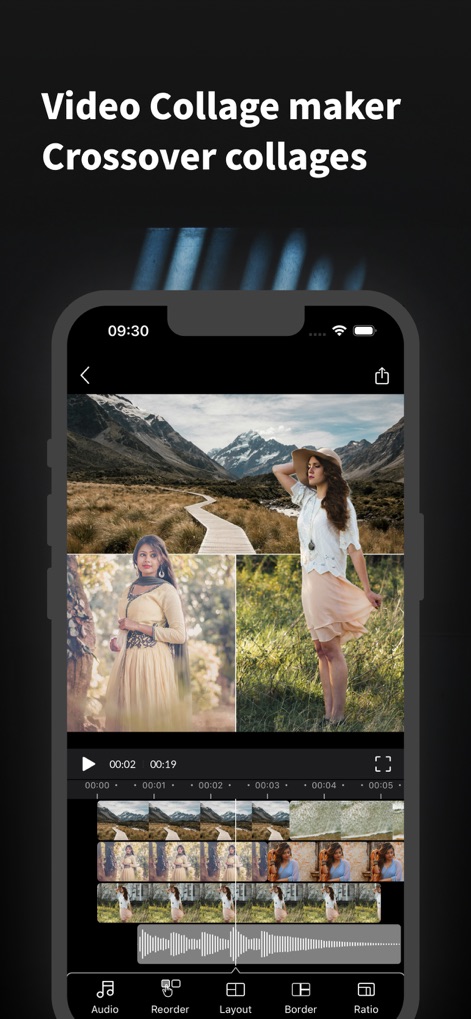
本ツールは複数の写真を組み合わせたビデオコラージュ作成を可能にし、画面下部のタイムラインで各素材の配置や再生順序を直感的に編集できます。
ビデオコラージュ作成

ユーザーはテンプレートを基に素早く動画を作成しつつ、オーディオやテキストといった多様な編集タブを活用して、細部にわたるカスタマイズが可能です。
テンプレートで高速編集

このアプリは、スライド間の場面転換を「Warp」や「SoftWipe」などの複数のトランジションタイプから選択して編集できるだけでなく、切り替え時間をスライダーで微調整することが可能です。
スムーズな場面転換

ユーザーはオーディオタイムラインで音楽の波形を確認しながら、背景音楽を追加し、動画の雰囲気に合わせて音量調整スライダーで簡単に音量を変更できます。
BGMで感動を演出

本ツールでは、動画にオーバーレイテキストを追加し、「Pop」や「Stroke」などの多彩なスタイルオプションやカラーパレットを使用して、視覚的に魅力的なタイトルやキャプションを作成できます。
テキストオーバーレイ

このアプリは、Instagramのフルスクリーン用「IG Full 4:5」や「Square 1:1」など、さまざまなソーシャルネットワークに最適なアスペクト比を提供し、ユーザーは目的に合わせて簡単に動画サイズを調整できます。
ソーシャル最適化
説明
Download
類似アプリ
同じカテゴリのトップランクアプリ

CapCut: Photo & Video Editor
BYTEDANCE PTE. LTD.

Instagram, Inc.

YouTube
Google LLC

Canva: AI Photo & Video Editor
Canva Pty Ltd

Snapchat
Snap, Inc.

快手
Beijing Kwai Technology Co., Ltd.

Edits: Video Editor
Instagram, Inc.

Meitu- AI Photo & Video Editor
Xiamen Meitu Technology Co., Ltd.

Google Photos: Backup & Edit
Google LLC
このページはアプリまたはその開発者の公式ページではなく、情報提供および論評を目的として作成された独立した編集出版物です。明示的に別段の記載がない限り、アプリおよびその開発者は、MWM、Apple、Google Play、アプリのパブリッシャー、またはアプリの開発者と提携、承認、後援、認可、またはその他の公式的な関係はなく、このページのいかなる内容も、アプリがMWMのサービスを使用して開発されたことを意味するものではありません。すべての商標、ロゴ、スクリーンショット、その他のコンテンツはそれぞれの所有者の財産です。