
このページはアプリまたはその開発者の公式ページではなく、情報提供および論評を目的として作成された独立した編集出版物です。明示的に別段の記載がない限り、アプリおよびその開発者は、MWM、Apple、Google Play、アプリのパブリッシャー、またはアプリの開発者と提携、承認、後援、認可、またはその他の公式的な関係はなく、このページのいかなる内容も、アプリがMWMのサービスを使用して開発されたことを意味するものではありません。すべての商標、ロゴ、スクリーンショット、その他のコンテンツはそれぞれの所有者の財産です。


ダウンロード
12.5M+ユーザー評価
評価数
156.5K開発元
カテゴリ
Photo & Video対応言語
17最新バージョン
25.12サイズ
179.4 MBリリース日
2011年9月7日ストップモーションスタジオ:創造性を解き放つ分析
専門家が評価する主要機能とインパクト
プライバシーと安心の創作空間
広告、トラッキング、サブスクリプションが一切ないため、ユーザーはデータのプライバシーが保護された環境で、安心して創造的な制作に集中できます。
プロ級の精密編集機能
オニオンスキニング、アニメーションガイド、インタラクティブなタイムラインにより、フレーム単位での完璧なアライメントと精密な編集が可能となり、作品の質を飛躍的に向上させます。
表現力を高めるエフェクトとサウンド
グリーンバック効果、フィルター、トランジションによって映画のような仕上がりを実現し、ボイスオーバー録音やBGMの追加で物語に深みと感情を加えることができます。
柔軟なカメラ制御と遠隔操作
焦点、露出、ISO、ホワイトバランスなど、完全に手動でカメラを制御でき、Apple Watchを含む別デバイスをリモートカメラとして使用することで、撮影の自由度と品質が大幅に向上します。
作品発表を支える高画質出力
制作したアニメーションを4Kまたは1080p HDで出力し、YouTubeやTikTokへの直接共有、GIFやiMessageステッカーとしての保存など、多様な方法で作品を公開できます。
Apple製品間での作業継続性
iPhoneでプロジェクトを開始し、Macで仕上げるといったAppleデバイス間での作業の継続が可能で、制作の効率性と柔軟性が向上します。
制作スキルを磨く学習ガイド
ステップバイステップのチュートリアル、クリエイティブなヒント、内蔵マニュアルが提供され、初心者から上級者まで、ユーザーのスキル向上と新しいアイデアの発見をサポートします。
高度なフレーム操作と調整
フレームのコピー、ペースト、カット、挿入が容易に行え、不要なオブジェクトの消去、顔の表情やレイヤーの追加により、作品に洗練されたタッチを加え、表現の幅を広げます。
よくある質問
について知っておくべきこと Stop Motion Studio
What is Stop Motion Studio?
Stop Motion Studio is an Apple-featured app for creating stop motion animation films. It offers powerful creative tools designed for both beginners and experienced animators.
Does Stop Motion Studio offer professional editing features?
Yes, Stop Motion Studio provides professional editing features. These include onion skinning, animation guides, an interactive timeline, frame-by-frame editing, and rotoscoping for precision.
Can I record voiceovers and add music in Stop Motion Studio?
Yes, Stop Motion Studio allows users to record voiceovers directly within the app. It also supports adding sound effects, background music, or importing audio from a personal library.
Does Stop Motion Studio support green screen effects?
Yes, Stop Motion Studio includes green screen effects. This feature enables users to place characters or objects onto any desired background, enhancing creative possibilities.
What export options are available in Stop Motion Studio?
Stop Motion Studio offers various export options. Users can export films in 4K or 1080p HD, share directly to YouTube, TikTok, or save as GIFs or iMessage stickers.
Does Stop Motion Studio require a subscription?
No, Stop Motion Studio explicitly states it has "no subscriptions." The app operates on a model of no ads and no tracking, focusing on user privacy.
Are there any in-app purchases in Stop Motion Studio?
Yes, some features in Stop Motion Studio require in-app purchases to unlock. However, all features are included without additional purchases in the Pro version of the app.
Does Stop Motion Studio track user data?
No, Stop Motion Studio affirms that it conducts "no tracking." The app prioritizes user data privacy and ensures that creativity remains private.
Can I use Stop Motion Studio on multiple Apple devices?
Yes, Stop Motion Studio supports cross-device use. Users can begin projects on an iPhone and seamlessly complete them on a Mac, as work stays in sync.
Does Stop Motion Studio provide tutorials for beginners?
Yes, Stop Motion Studio provides resources for beginners. It includes step-by-step tutorials, creative tips, and a built-in manual for quick guidance and inspiration.
Can Stop Motion Studio add facial expressions to characters?
Yes, Stop Motion Studio offers tools to add facial expressions. Users can apply various expressions or layers to characters within their animation projects.
Does Stop Motion Studio have manual camera controls?
Yes, Stop Motion Studio features full manual camera controls. These controls include adjustments for focus, exposure, ISO, and white balance, allowing precise capture.
Can I use a remote device to capture frames in Stop Motion Studio?
Yes, Stop Motion Studio enables users to employ an Apple Watch or another compatible device as a remote camera. This allows for convenient frame capture.
Does Stop Motion Studio include drawing tools?
Yes, Stop Motion Studio incorporates built-in drawing tools. Additionally, it provides features like text cards and speech bubbles to enhance animated films.
以下のスクリーンショットと説明は、アプリの公式ストアリスティングから直接取得されたものであり、アプリ開発者の所有物です。
アプリストア
スクリーンショット
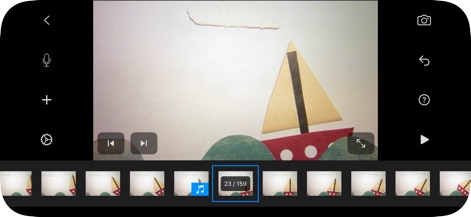
タイムライン編集
直感的なタイムラインでフレームを正確に管理し、サウンドトラックの追加位置を視覚的に確認できます。
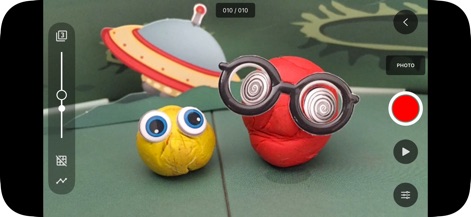
精密なカメラ制御
ライブカメラビューで被写体を確認しながら、高度なマニュアルカメラコントロールで細やかな露出調整が可能です。

サウンドを完璧に
音声の波形表示によりサウンドの編集ポイントを正確に把握し、トリミングやフェード機能でプロフェッショナルなオーディオを実現できます。
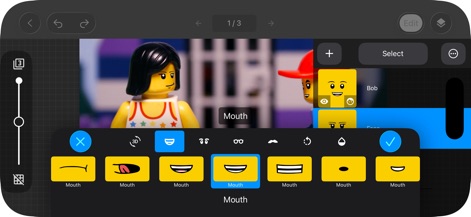
豊かな表情表現
レゴキャラクターに多様な口の形状を適用して豊かな表情を生み出し、レイヤー管理で編集の柔軟性を高めることができます。
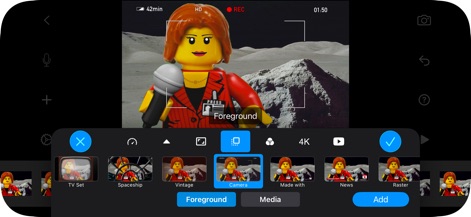
創造的なビジュアル
豊富なフィルターやエフェクトを適用して映像に独特の雰囲気を与え、前景と背景を分離して自由な合成が可能です。
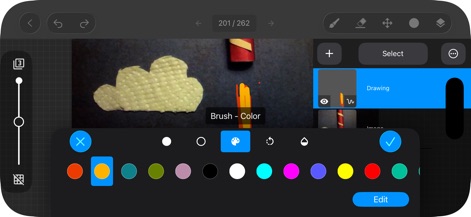
直感的な描画編集
内蔵描画ツールと豊富なカラーパレットを使ってアートワークを直接追加し、レイヤー機能で複雑なイラストも効率的に作成できます。
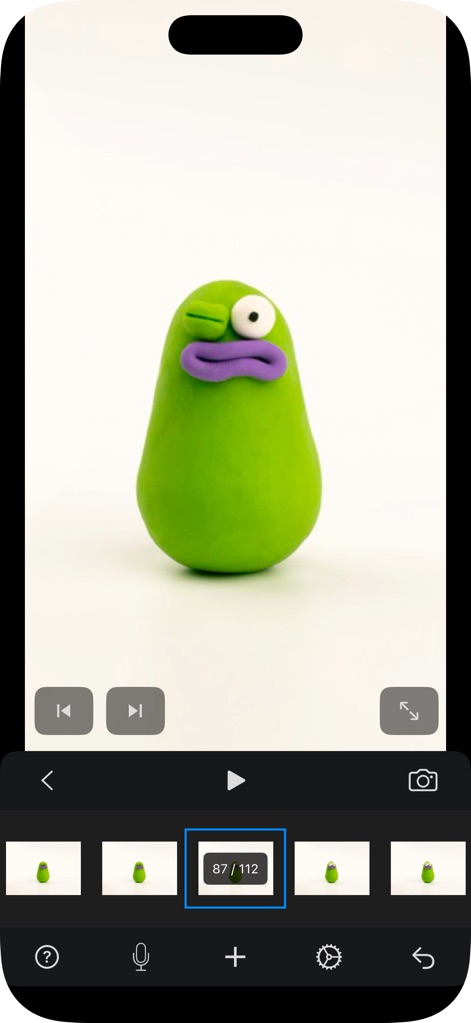
スムーズなプレビュー
ポートレートモードで作成中の作品全体を効果的に確認し、下部のフレームプレビューと再生コントロールで編集中のアニメーションをリアルタイムで検証できます。
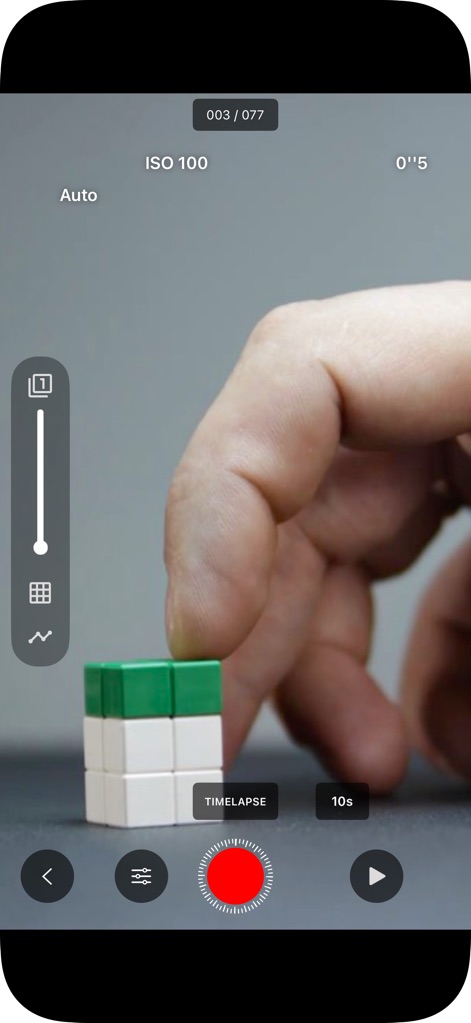
自動撮影で効率化
タイムラプス撮影モードを利用して自動的にフレームをキャプチャし、ISO調整などの詳細なカメラ設定で理想的な露出を実現します。
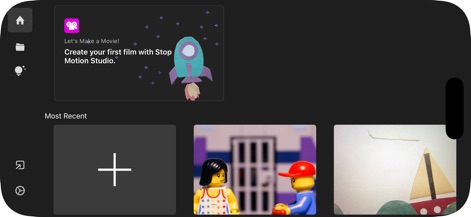
プロジェクトを管理
すべてのプロジェクトを一覧で管理し、新規プロジェクトの作成や「Let's Make a Movie!」チュートリアルを通じてスムーズに制作を開始できます。
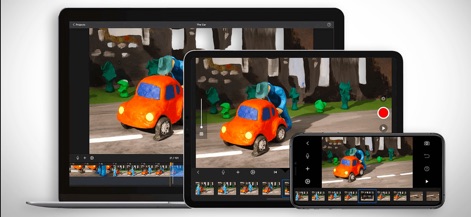
デバイス間で連携
iPhone、iPad、MacなどのAppleデバイス間でプロジェクトをシームレスに同期し、どこからでも制作を継続できるクロスプラットフォーム連携が可能です。
説明
Download
類似アプリ
似た機能とユーザー体験を持つアプリ
Stick Nodes Pro - Animator
ForTheLoss Games, Inc
FlipaClip: Create 2D Animation
Visual Blasters, LLC
Stick Nodes - Animator
ForTheLoss Games, Inc

Stop Motion Studio Pro
CATEATER, LLC
Animation Creator: Flipbook 2D
CEM SOFTWARE COMPANY LIMITED

2d animation creator, stickman
Trang Phi Thi

Stop Motion Factory
壮 董

FlipArtify - 2D Draw Animation
CEM SOFTWARE COMPANY LIMITED

MotionBook - Draw & Animate
亮 彭
このページはアプリまたはその開発者の公式ページではなく、情報提供および論評を目的として作成された独立した編集出版物です。明示的に別段の記載がない限り、アプリおよびその開発者は、MWM、Apple、Google Play、アプリのパブリッシャー、またはアプリの開発者と提携、承認、後援、認可、またはその他の公式的な関係はなく、このページのいかなる内容も、アプリがMWMのサービスを使用して開発されたことを意味するものではありません。すべての商標、ロゴ、スクリーンショット、その他のコンテンツはそれぞれの所有者の財産です。