Things 3

Things 3

ダウンロード: App Store
ロゴ: Things 3

Things 3:明晰で集中した心のための、受賞歴のあるタスクマネージャー

日常のタスクから人生の大きな目標まで、美しさ、シンプルさ、そして流れのためにデザインされたインターフェースで、あなたの人生のあらゆる領域を整理しましょう。

ダウンロード: App Store

開発元

Cultured Code GmbH & Co. KG

カテゴリ

Productivity

ダウンロード

832K+

ユーザー評価

4.8/5

評価数

48K+

対応言語

9

エレガンスを実際に

このインターフェースを利用する 832K+ 人のユーザー.

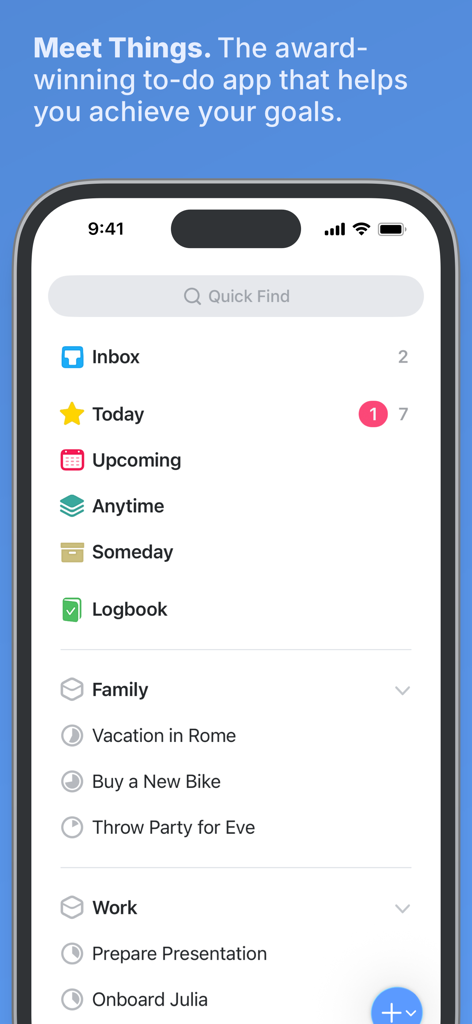
iPhone上のThings 3タスクマネージャーアプリのメインダッシュボード。整理されたプロジェクトリストとミニマリストデザインが表示されています。
iPhone上のThings 3タスクマネージャーアプリのメインダッシュボード。整理されたプロジェクトリストとミニマリストデザインが表示されています。

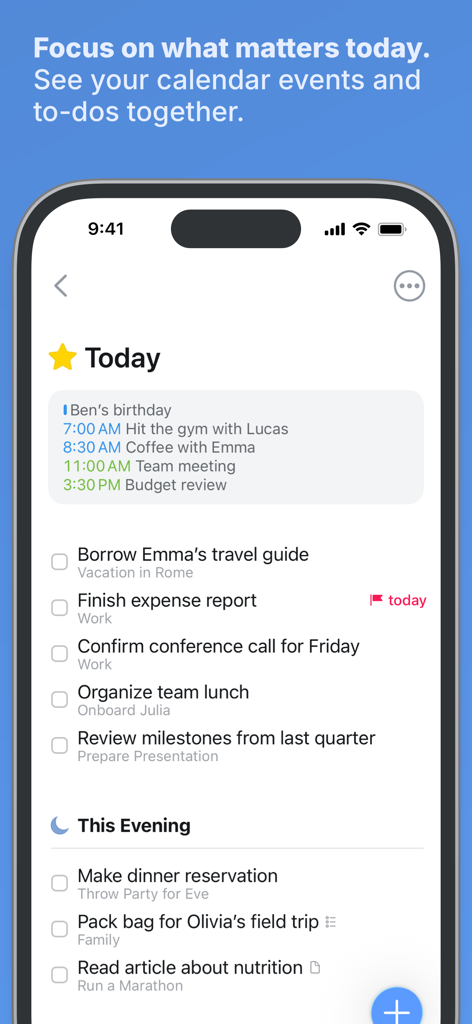
iPhone上のThings 3アプリ。カレンダーのイベントと整理されたToDoが表示された「今日」リストを表示しています。
iPhone上のThings 3アプリ。カレンダーのイベントと整理されたToDoが表示された「今日」リストを表示しています。

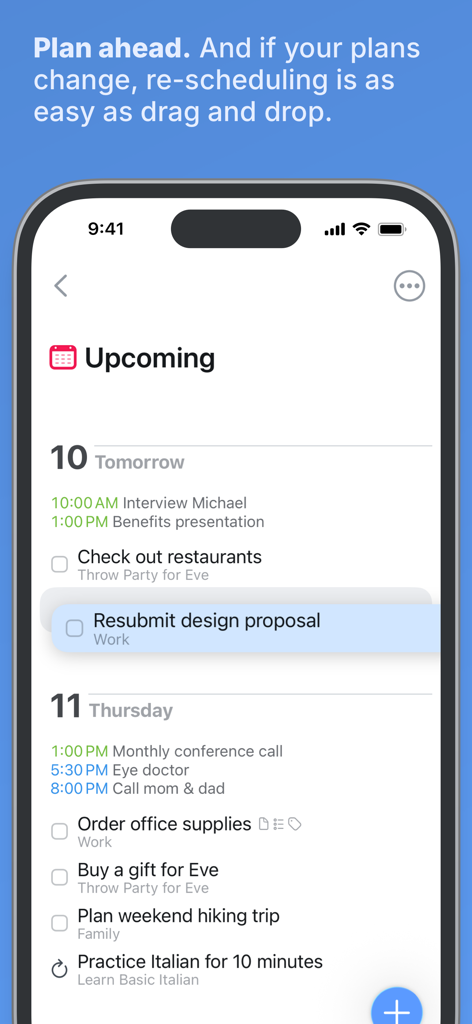
Things 3アプリのスクリーンショット。今後のタスクリストとドラッグ&ドロップによる再スケジュール機能が表示されています。
Things 3アプリのスクリーンショット。今後のタスクリストとドラッグ&ドロップによる再スケジュール機能が表示されています。

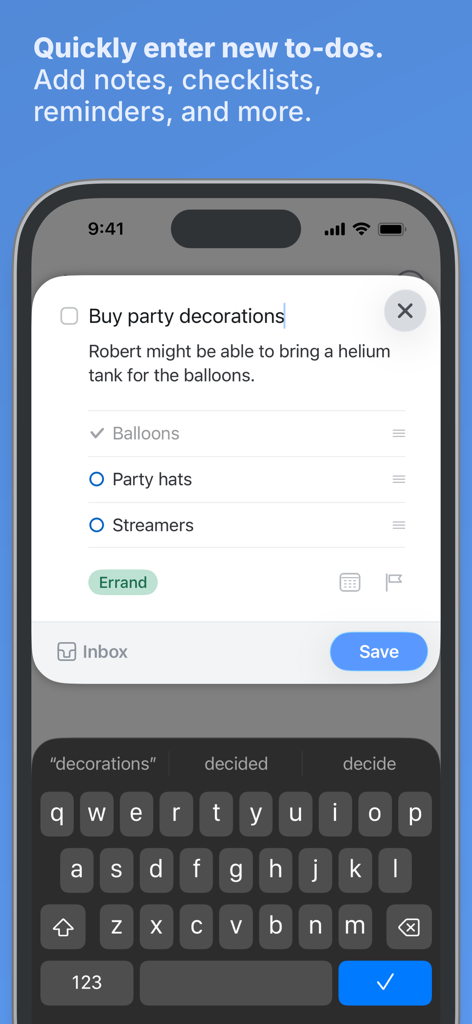
iPhoneのスクリーンショット。メモとチェックリストを含む新しいタスクを作成するためのThings 3クイックエントリーインターフェースが表示されています。
iPhoneのスクリーンショット。メモとチェックリストを含む新しいタスクを作成するためのThings 3クイックエントリーインターフェースが表示されています。

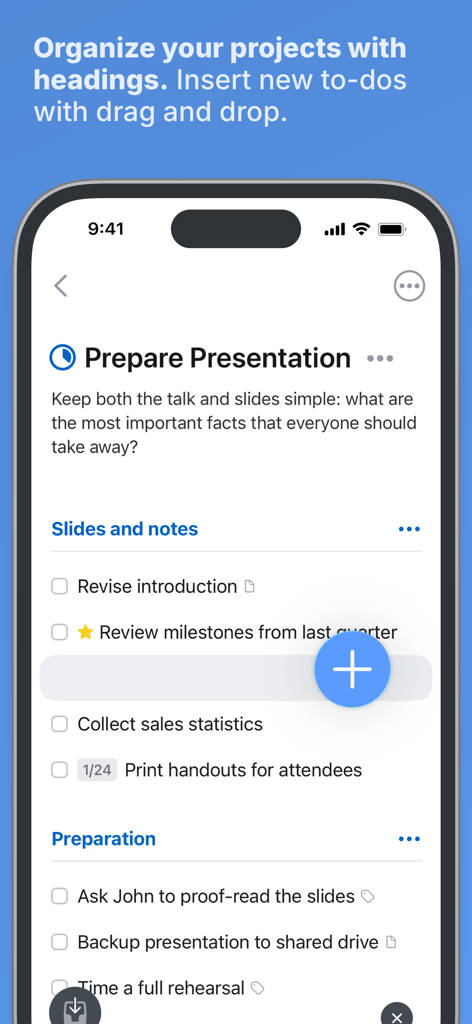
Things 3のインターフェース。見出しとToDoのドラッグ&ドロップ機能によるプロジェクト整理が表示されています。
Things 3のインターフェース。見出しとToDoのドラッグ&ドロップ機能によるプロジェクト整理が表示されています。

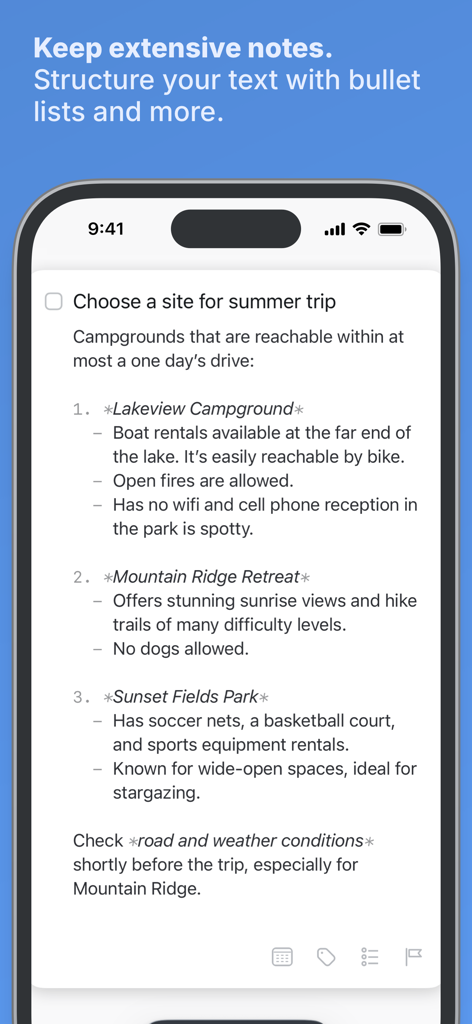
Things 3のタスク。箇条書きとMarkdownフォーマットを使用した構造化されたメモが表示されています。
Things 3のタスク。箇条書きとMarkdownフォーマットを使用した構造化されたメモが表示されています。

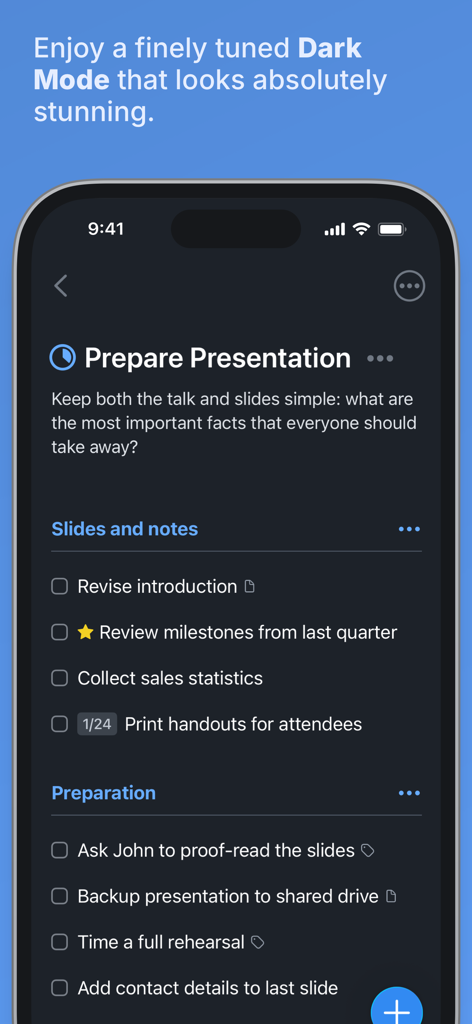
iPhone上のThings 3タスクマネージャーアプリのダークモードインターフェース。プロジェクトリストが表示されています。
iPhone上のThings 3タスクマネージャーアプリのダークモードインターフェース。プロジェクトリストが表示されています。

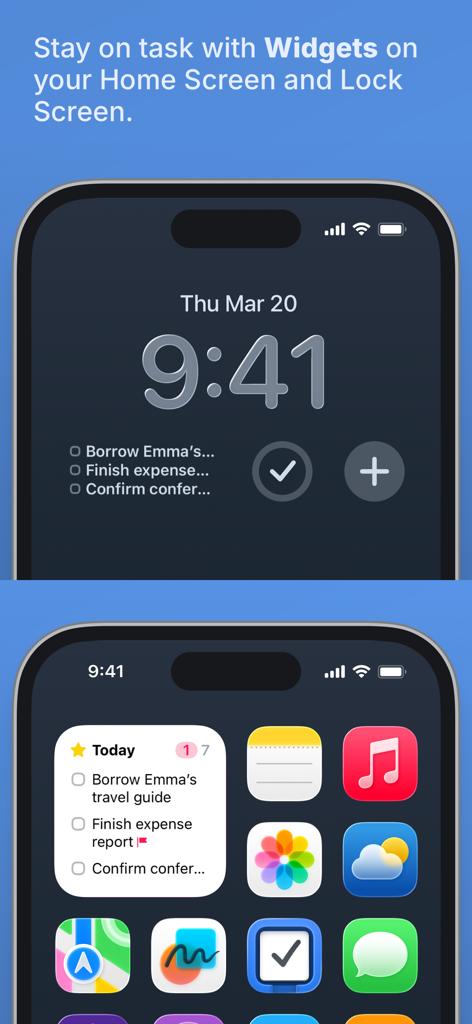
iPhoneのホーム画面とロック画面に表示されているThings 3アプリのウィジェット。

iPhoneのホーム画面とロック画面に表示されているThings 3アプリのウィジェット。

楽な整理で一日をマスターする

このアプリを際立たせるツール、 832K+ 人のユーザーが選択.

🗓️

あなたの1日をシンプルに

カレンダーのイベントとやるべきことを、きれいで見やすい「今日」リストで一緒に表示し、雑然とすることなく次にやるべきことに集中できるようにします。

📂

あらゆる領域のための構造

キャリアや家庭など、明確な領域に世界を整理し、プロジェクトを使用して大きな野心を実行可能なステップに変換します。

シームレスなApple連携

Siri、ウィジェット、ショートカットにより、iPhone、Watch、Mac全体で完全な調和を体験し、摩擦のないワークフローを実現します。

アプリについて

について知っておくべきこと Things 3.

説明

Get things done! The award-winning Things app helps you plan your day, manage your projects, and make real progress toward your goals. Best of all, it’s easy to use. Within the hour, you’ll have everything off your mind and neatly organized—from routine tasks to your biggest life goals—and you can start focusing on what matters today. “Things offers the best combination of design and functionality of any app we tested, with nearly all the features of other power user applications and a delightful interface that never gets in the way of your work.” —Wirecutter, The New York Times KEY FEATURES • Your To-Dos Your basic building block is the almighty To-Do—each a small step toward a great accomplishment. You can add notes, tag it, schedule it, and break it down into smaller steps. • Your Projects Create a Project for any big goal, then add the to-dos to reach it. Use headings to structure your list as you outline your plan. There’s also a place to jot down your notes, and a deadline to keep you on schedule. • Your Areas Create an Area for each sphere of your life, such as Work, Family, Finance, and so on. This keeps everything neatly organized, and helps you see the big picture as you set your plans in motion. • Your Plan Everything on your schedule is neatly laid out in the Today and Upcoming lists, which show your to-dos and calendar events. Each morning, see what you planned for Today and decide what you want to do. The rest is down to you :) MORE THINGS TO LOVE As you dive deeper, you’ll find Things packed with helpful features. Here are just a few: • Reminders — set a time and Things will remind you. • Repeaters — automatically repeat to-dos on a schedule you set. • This Evening — a special place for your evening plans. • Calendar integration — see your events and to-dos together. • Tags — categorize your to-dos and quickly filter lists. • Quick Find — instantly find to-dos or switch between lists. • Magic Plus — drag the + button to insert to-dos anywhere in a list. • Share extension — create to-dos with content from other apps. • Widgets — see lists on your home/lock screens. • Mail to Things — forward an email to Things; now it’s a to-do. • Markdown — structure & style your notes. • And much more! MADE FOR IPHONE Things is tailored to the iPhone with deep system integrations as well. A great example is the Share extension, which allows you to create to-dos with content from other apps, such as a link to a website you want to get back to. You can also enjoy a beautiful dark mode at sunset, connect your calendars, add a variety of widgets, create to-dos via Siri, import from Reminders—Things can do it all! There’s even Shortcuts integration if you want to automate your workflows. MADE FOR APPLE WATCH Things comes with a great app for Apple Watch. Just raise your wrist to glance at your Today list, mark to-dos complete as you go, and dictate new ones on the fly—all synced instantly with your iPhone, iPad, and Mac. AWARD-WINNING DESIGN Made in Stuttgart, with two Apple Design Awards to its name, Things is a fine example of German engineering: designed not only to look fantastic, but to be perfectly functional as well. Every detail is thoughtfully considered, then polished to perfection. “It’s like the unicorn of productivity tools: deep enough for serious work, surprisingly easy to use, and gorgeous enough to enjoy staring at.” —Apple GET THINGS TODAY Whatever it is you want to accomplish in life, Things can help you get there. Install the app today and see what you can do! • Things is also available for Mac, iPad, and Apple Vision Pro (sold separately). • Sync is provided for free via our Things Cloud service. • A free trial is available for Mac: www.things.app If you have any questions, please get in touch. We provide professional support and will be glad to help you!

最新バージョン

3.22.6

サイズ

124.9 MB

リリース日

2017年5月18日

集中力を取り戻す準備はできましたか?

Appleエコシステムのために構築された受賞歴のあるタスクマネージャーを使用している832,000人以上のハイスコアラーに加わりましょう。サブスクリプションなしの買い切り購入で、デジタルな平穏への旅を今日から始めましょう。

ダウンロード: App Store
FAQ

よくある質問

について知っておくべきこと Things 3

Things 3アプリとは何ですか?

Things 3は、ユーザーがその日の計画を立て、プロジェクトを管理し、目標に向かって進歩するのに役立つ、受賞歴のあるToDoアプリです。タスクや生活の領域を整理するための使いやすいインターフェースを提供します。

Things 3でタスクをプロジェクトに整理できますか?

はい、Things 3では、あらゆる大きな目標に対してプロジェクトを作成できます。それを達成するためのToDoを追加したり、見出しを使用してリストを構造化したり、メモを書き留めたり、期日を設定したりできます。

Things 3は繰り返しタスクをサポートしていますか?

はい、Things 3は「リピーター」機能を通じて繰り返しタスクをサポートしています。これにより、アプリ内で設定したスケジュールに従ってToDoが自動的に繰り返されます。

Things 3は、私の生活のさまざまな領域を整理するのにどのように役立ちますか?

Things 3では、ユーザーは仕事、家族、財務などの生活の各分野に対して「エリア」を作成できます。これにより、すべてが整理され、計画の概要を把握できます。

Things 3でToDoにメモやチェックリストを追加できますか?

はい、Things 3では、ユーザーはメモを追加したり、タグを付けたり、スケジュールを設定したり、ToDoを小さなステップに分解したりできます。アプリに表示されているように、タスク内にチェックリストを作成することもできます。

Things 3は私のカレンダーと統合されますか?

はい、Things 3はカレンダー統合を提供します。これにより、カレンダーのイベントがTodayおよびUpcomingリストのToDoと並べて表示され、スケジュールの統合ビューが得られます。

Things 3はMacやApple Watchなどの他のAppleデバイスでも利用できますか?

はい、Things 3はMac、iPad、Apple Vision Proで利用可能ですが、これらは別売りです。また、Apple Watch専用アプリも提供されており、インスタント同期が可能です。

Things 3はタスクのリマインダーをどのように処理しますか?

Things 3にはリマインダー機能があります。ユーザーは特定の時間を設定でき、アプリがToDoについて通知してくれるため、タスクの見落としを防ぎます。

Things 3はダークモードを提供していますか?

はい、Things 3には美しいダークモードが搭載されています。iPhone向けに最適化されており、夕暮れ時の自動ダークモードなど、システム機能と統合されて視覚的な快適性を向上させます。

Things 3でウィジェットを使用できますか?

はい、Things 3にはウィジェットが含まれています。これにより、ホーム画面やロック画面でタスクリストを直接確認でき、すばやくアクセスして未完了のタスクの概要をすぐに把握できます。

Things 3で特定のToDoをすばやく見つけるにはどうすればよいですか?

Things 3には「クイックファインド」機能があります。この機能により、アプリケーションインターフェース内で特定のToDoを瞬時に見つけたり、さまざまなリストを効率的に切り替えたりできます。

Things 3はタスクのクラウド同期を提供していますか?

はい、Things 3は、独自のThings Cloudサービスを通じて、すべてのAppleデバイス間で無料の同期を提供します。これにより、タスクとデータが常に最新の状態に保たれ、一貫性が確保されます。

Things 3の無料トライアルはありますか?

Things 3でメールからToDoを作成するにはどうすればよいですか?

Things 3では、メールをアプリに転送すると、そのメールの内容が新しいToDoに変換されます。この機能は「Mail to Things」として知られています。

Things 3はメモにMarkdownフォーマットをサポートしていますか?

はい、Things 3はMarkdownフォーマットをサポートしています。ユーザーはアプリ内でメモを構造化およびスタイル設定でき、整理された視覚的に強化されたテキストエントリが可能になります。

App information, icons, screenshots, and descriptions displayed on this page are sourced from the Apple App Store and are the property of their respective developers. Download estimates and rankings are based on MWM's proprietary models and may not reflect actual figures. This page is provided for informational and analytical purposes only.

Believe this page infringes your intellectual property? File a dispute