
このページはアプリまたはその開発者の公式ページではなく、情報提供および論評を目的として作成された独立した編集出版物です。明示的に別段の記載がない限り、アプリおよびその開発者は、MWM、Apple、Google Play、アプリのパブリッシャー、またはアプリの開発者と提携、承認、後援、認可、またはその他の公式的な関係はなく、このページのいかなる内容も、アプリがMWMのサービスを使用して開発されたことを意味するものではありません。すべての商標、ロゴ、スクリーンショット、その他のコンテンツはそれぞれの所有者の財産です。


ダウンロード
1M+ユーザー評価
評価数
17.6K開発元
カテゴリ
Photo & Video対応言語
13最新バージョン
2.6サイズ
168.3 MBリリース日
2017年3月28日テックアナリストが、アート初心者から愛好家までを対象としたトレースアプリの革新性と利便性を解析します。
'Trace Table - Light Box' アプリ分析:主要機能の評価
ARイメージプロジェクター
ユーザーは、AR(拡張現実)機能を用いて、画像を現実のキャンバスや紙に直接投影し、トレースすることが可能です。これにより、物理的な素材への描画が容易になります。
デジタルペイント機能
本アプリは、ブラシや鉛筆など様々なツールを備えたデジタルペイント機能を提供します。ユーザーは、デジタルキャンバス上で直接絵を描き、創造性を表現できます。
画面ロック機能
トレース中に誤って画像が動くことを防ぐため、画面をロックできます。これにより、ユーザーは中断されることなく、集中して描画作業に取り組むことが可能です。
最大輝度管理
本ツールは、画面の輝度を最大化することで、下絵の線をはっきりと視認できるようにします。これにより、トレース作業の精度と効率が向上します。
アウトラインモード
写真をトレースしやすいように調整するアウトラインモードを備えています。この機能により、画像の線がより明確になり、ユーザーは簡単にトレースを開始できます。
画像インポートと調整機能
ユーザーは、写真やカメラからトレースしたい画像をインポートできます。また、画像のサイズ変更、移動、回転、反転が可能であり、描画に合わせて柔軟に調整できます。
よくある質問
について知っておくべきこと Trace Table - Light Box
What is Trace Table - Light Box?
Trace Table - Light Box is an app that functions as a light box for tracing drawings, photos, and various artworks. It helps users trace by maximizing screen brightness and locking artwork in place.
Can I use my own photos for tracing in Trace Table?
Yes, Trace Table allows users to trace artwork directly from their photos or camera. The app also offers options to resize, move, and rotate the imported artwork.
Does Trace Table offer an augmented reality (AR) feature for tracing?
Yes, Trace Table includes an AR Image Projector. This feature allows users to position their device above a canvas and view both the image and canvas directly on the screen for tracing.
Can I draw directly within the Trace Table app?
Yes, Trace Table features a Digital Paint function. Users can unleash creativity with various digital tools like brushes and pencils on a digital canvas within the app.
How does the Outline Mode work in Trace Table?
Outline Mode in Trace Table easily adjusts photos to help users see lines more clearly for tracing. This simplifies the process of creating clear line art from existing images.
Does Trace Table offer drawing lessons or guides?
Yes, Trace Table provides drawing lessons. These lessons present layered images to guide users step-by-step through the process of creating various drawings.
Is a subscription required to access premium features in Trace Table?
Yes, subscribing is necessary to access premium app features in Trace Table. Subscriptions are available in weekly, monthly, and yearly lengths.
How do I manage my Trace Table subscription?
Users can manage their Trace Table subscriptions and turn off auto-renewal from their iTunes Account Settings after purchase. Auto-renewal must be turned off 24 hours before the current period ends.
Does Trace Table prevent accidental screen movement during tracing?
Yes, Trace Table allows users to lock their artwork in place. This feature prevents accidental movement from a hand while tracing, ensuring stability and precision.
What types of art can I trace with Trace Table - Light Box?
Trace Table - Light Box supports tracing various art forms including drawings, photos, tattoos, flash, lettering, inking, line work, comics, and homework. It offers versatility for artists.
以下のスクリーンショットと説明は、アプリの公式ストアリスティングから直接取得されたものであり、アプリ開発者の所有物です。
アプリストア
スクリーンショット

このスクリーンショットでは、ユーザーが複雑なポートレートをトレースしている様子が描かれており、描画中にアートワークが動かないように固定できる画面ロック機能も利用できます。
光源トレースで描画

本スクリーンショットは、ユーザーがAR投影機能を用いてアニメスタイルの画像を紙に直接重ねてトレースする様子を示し、下部に表示される不透明度調整スライダーで投影画像の濃淡を細かく設定できます。
AR投影で簡単トレース
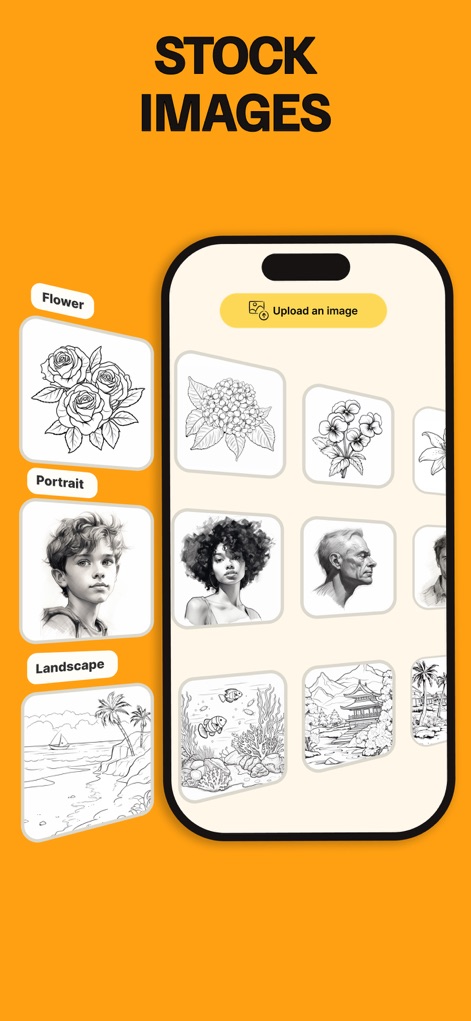
この画面では、花、ポートレート、風景といったカテゴリ別に整理された豊富なストック画像が提供されており、ユーザーはデバイスから個人の画像をアップロードして利用することも可能です。
豊富な画像素材
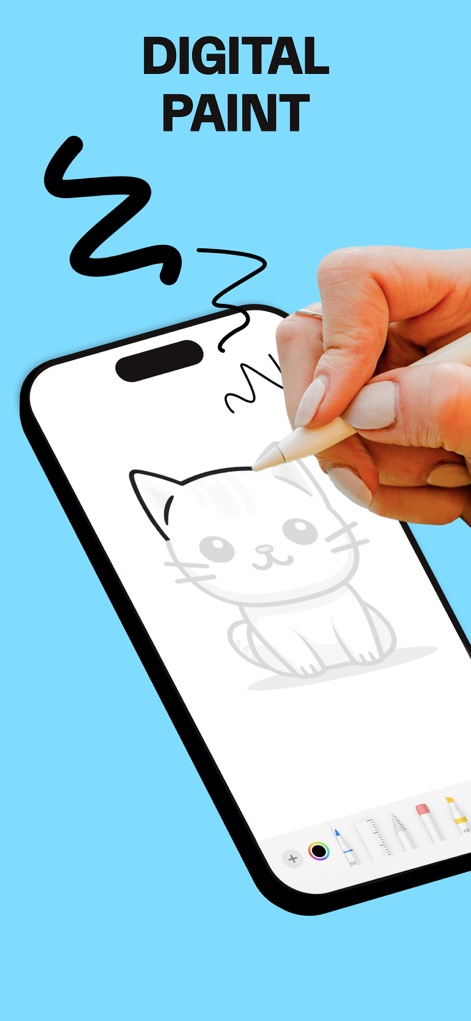
このスクリーンショットは、ユーザーが直感的なデジタルペイント機能を使って、画面下部に表示される多様なブラシや色を選択し、オリジナルのイラストを自由に作成するプロセスを映し出しています。
デジタルで自由に描く
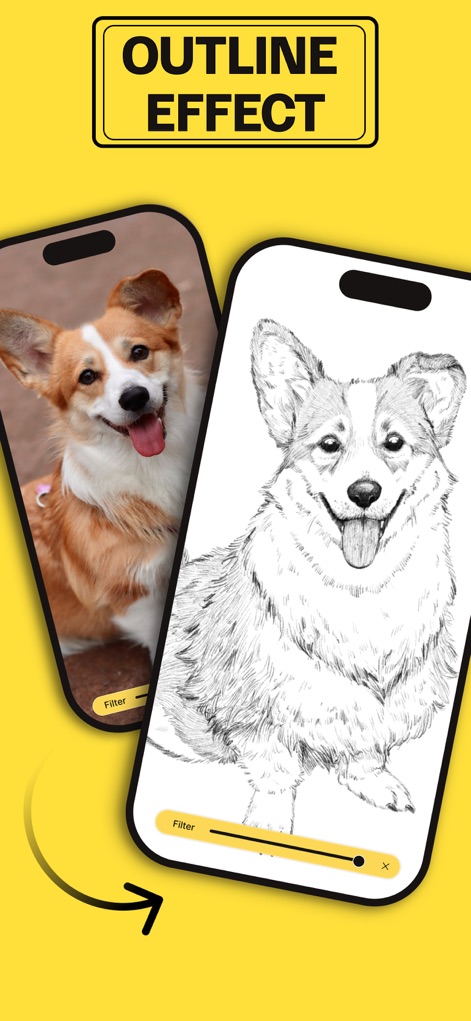
本スクリーンショットでは、本アプリのアウトライン化機能が、通常の写真を鮮明な線画に瞬時に変換する様子を示しており、画面下部のフィルター調整バーで線の濃さや細かさを自在に操作できます。
写真を線画に変換

この画面では、ユーザーが複雑なイラストも段階的な描画レッスンを通じて習得できる様子が示されており、基礎的なスケッチから完成形までのレイヤー表示でプロセスを視覚的に理解できます。
段階レッスンで上達
説明
Download
類似アプリ
似た機能とユーザー体験を持つアプリ

AR Drawing Paint Sketch Trace
DROIDFUN LIMITED

Camera Lucida™: AR Drawing
Big Idea Design LLC

AR Drawing Sketch App: ArtEasy
SMDA GROUP SP Z O O SP KOMANDYTOWA

PicTrace: AR Drawing & Sketch
ANDROID VIETNAM TECHNOLOGY CORPORATION

AR Draw: Sketching & Painting
EIGEN SOFTWARE LIMITED

AR Drawing How to Draw Sketch
Magomed Dzhamalov

Da Vinci Eye: AR Trace & Draw
Da Vinci Eye LLC

AR Drawing - AR Sketch
Ketanbhai Khokhani

HEY CLAY®
HEY CLAY LTD
このページはアプリまたはその開発者の公式ページではなく、情報提供および論評を目的として作成された独立した編集出版物です。明示的に別段の記載がない限り、アプリおよびその開発者は、MWM、Apple、Google Play、アプリのパブリッシャー、またはアプリの開発者と提携、承認、後援、認可、またはその他の公式的な関係はなく、このページのいかなる内容も、アプリがMWMのサービスを使用して開発されたことを意味するものではありません。すべての商標、ロゴ、スクリーンショット、その他のコンテンツはそれぞれの所有者の財産です。