
このページはアプリまたはその開発者の公式ページではなく、情報提供および論評を目的として作成された独立した編集出版物です。明示的に別段の記載がない限り、アプリおよびその開発者は、MWM、Apple、Google Play、アプリのパブリッシャー、またはアプリの開発者と提携、承認、後援、認可、またはその他の公式的な関係はなく、このページのいかなる内容も、アプリがMWMのサービスを使用して開発されたことを意味するものではありません。すべての商標、ロゴ、スクリーンショット、その他のコンテンツはそれぞれの所有者の財産です。

Trello: Organize anything!
指先一つで、アイデアの奔流を完璧なプロジェクトに変える。これぞ究極のモバイル司令塔だ。
ダウンロード
12.5M+ユーザー評価
評価数
37.0K開発元
カテゴリ
Productivity対応言語
21最新バージョン
2026.7サイズ
203.9 MBリリース日
2011年9月13日Trello: Organize anything! の主要機能分析
モバイル生産性を最大化するTrelloの革新的な特徴
タスクをカードとして記録・整理
ユーザーは、タスク、アイデア、メモをTrelloカードとして簡単に記録し、期日、コメント、チェックリスト、説明、ファイルを詳細に追加して整理できます。
カスタマイズ可能なカンバンボード
本アプリは、ユーザーのワークフローに合わせてカスタマイズ可能なカンバンボードとリストを提供し、視覚的かつ直感的にカードを整理することを可能にします。
カレンダー同期とスケジューラー
ユーザーは、GoogleまたはOutlookカレンダーと同期されたTrelloプランナーで、日々のスケジュールを確認し、タスクのフォーカス時間を設定して効率的に作業を進めることができます。
iOS連携とウィジェット
本アプリは、Siriからのタスク追加、iOS共有シートからのコンテンツ共有、ホーム画面ウィジェットからのタスク管理など、Appleエコシステムとの深い連携を提供し、スムーズなモバイル体験を実現します。
リアルタイム通知
ユーザーは、期日、変更、タスク完了など、重要な更新に関するタイムリーなプッシュ通知を受け取ることで、常に最新の状態を把握し、タスクを見逃すことを防げます。
オフライン作業機能
ユーザーは、インターネット接続がない環境でもアイデアを記録し、ボードを更新できます。オンラインに戻ると、変更は自動的に同期されます。
外部アプリからのコンテンツ収集
アプリは、SlackやMicrosoft Teamsなどの人気のある仕事用アプリからのメッセージ保存、写真の撮影、メールのTrelloへの転送など、複数の情報源からコンテンツを一元的に収集する機能を提供します。
AIによるタスク要約
本ツールは、保存されたTo-DoをTrelloカードに自動で要約するAI機能を備えており、ユーザーが重要な情報を見落とすことなく、効率的にタスクを管理できるよう支援します。
よくある質問
について知っておくべきこと Trello: Organize anything!
What is the Trello: Organize anything! app used for?
Trello: Organize anything! is a mobile app for capturing to-dos as cards and organizing them into lists and customizable kanban boards. It helps users manage tasks and deadlines effectively, ensuring productivity while on-the-go.
Is the Trello: Organize anything! mobile app free?
Yes, the Trello: Organize anything! app is free to download and use. Certain advanced Planner features, such as scheduling focus time, are available for users with Standard and Premium subscriptions.
Can I use Trello: Organize anything! when offline?
Yes, Trello: Organize anything! supports offline functionality. Users can capture ideas and update boards without an internet connection. All changes automatically sync to the cloud once the device is back online.
Does Trello: Organize anything! sync with Google or Outlook calendars?
Yes, Trello: Organize anything! integrates with external calendars. The Trello Planner feature syncs with Google and Outlook calendars, allowing users to view their daily schedule and allocate focus time.
What is the Trello Inbox in Trello: Organize anything!?
The Trello Inbox is a central feature where all captured tasks, ideas, and notes are initially stored as cards. From the Inbox, users can review, prioritize, and easily organize their work across different Trello boards.
Can I add tasks to Trello: Organize anything! using a home screen widget?
Yes, users can add new to-dos and mark tasks as complete directly from the Trello: Organize anything! home screen widget. This allows for quick task management without needing to open the full application.
How do I capture tasks in the Trello: Organize anything! app?
Users capture to-dos by creating Trello cards. These cards support adding due dates, comments, checklists, descriptions, and files. Tasks can also be captured from Slack or Microsoft Teams messages, photos, or forwarded emails.
Does Trello: Organize anything! use AI features?
Yes, Trello: Organize anything! incorporates AI to enhance task management. The AI assists by summarizing saved to-dos into Trello cards, ensuring that no important information or tasks are overlooked.
以下のスクリーンショットと説明は、アプリの公式ストアリスティングから直接取得されたものであり、アプリ開発者の所有物です。
アプリストア
スクリーンショット
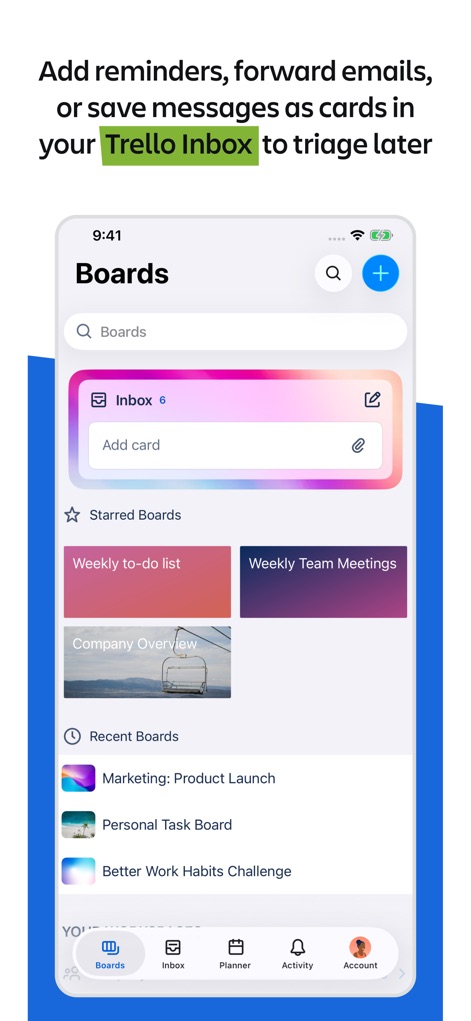
ボードで整理整頓
本アプリは、受信トレイへのカード追加機能と、スター付きボードや最近使用したボードの表示により、作業の優先順位付けとボード間の移動を容易にします。
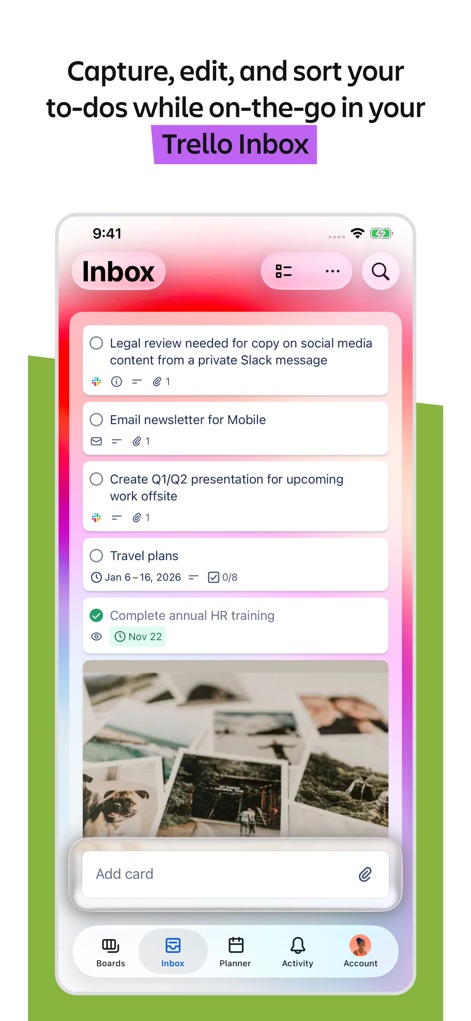
受信トレイでタスク管理
ユーザーは、期限やチェックリスト付きの詳細な受信トレイカードと、移動中でもタスクをキャプチャして並べ替える機能によって、進行中の作業を効率的に管理できます。
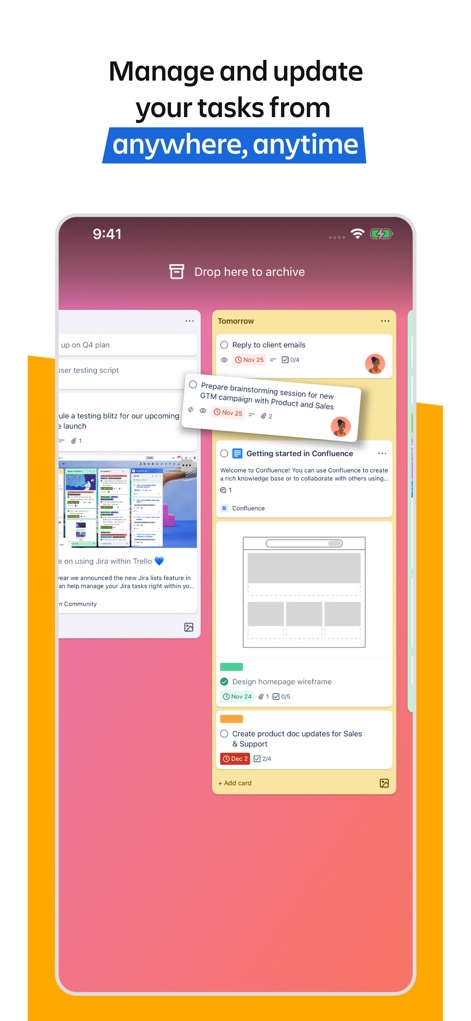
場所を選ばずタスクを管理
このアプリは、カードをリスト間でドラッグ&ドロップできる機能と、画像、担当者、期限を表示する詳細なタスクカードによって、いつでもどこでもタスクを管理および更新することを可能にします。
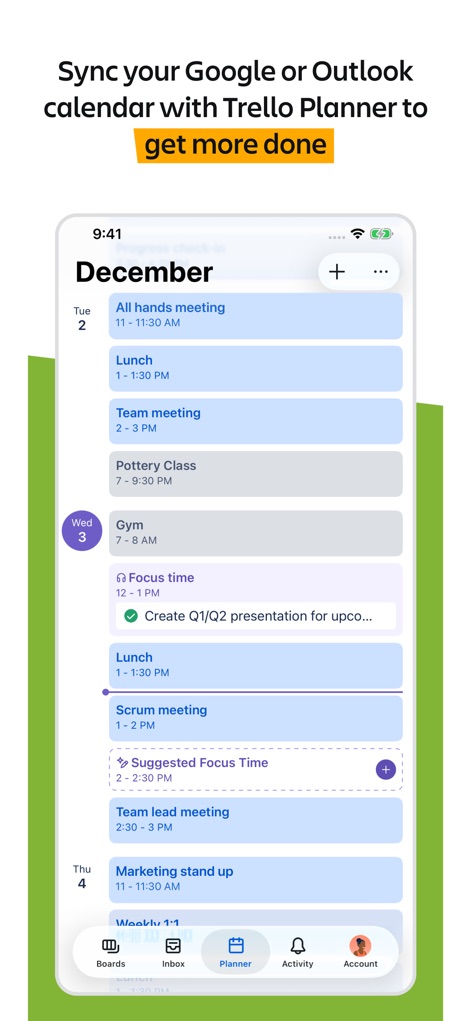
カレンダー連携で計画
本ツールは、GoogleまたはOutlookカレンダーとの同期機能と、毎日の予定と集中時間を表示するPlanner機能により、ユーザーのスケジュール管理と効率向上を支援します。
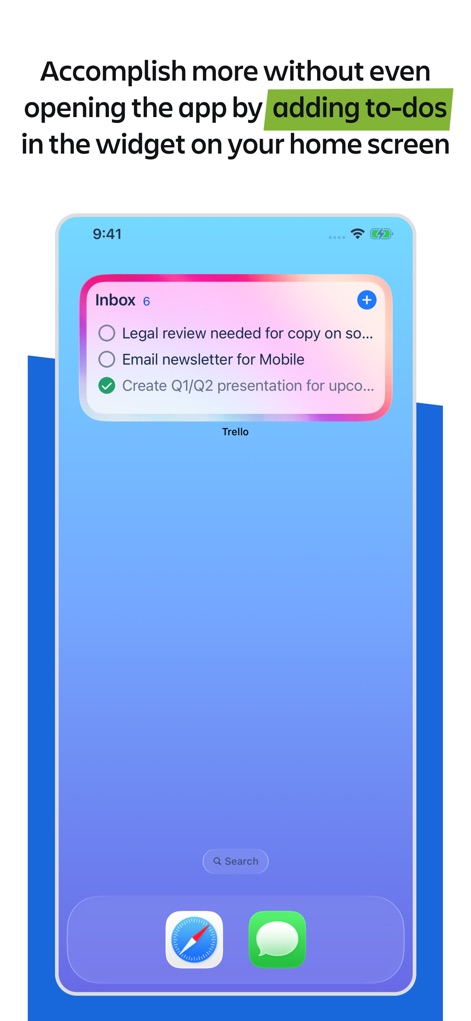
ウィジェットで高速アクセス
ユーザーは、ホーム画面に表示される受信トレイタスクウィジェットと、アプリを開かずに直接タスクを追加および管理できる機能によって、より迅速に作業を完了できます。
説明
Download
類似アプリ
似た機能とユーザー体験を持つアプリ

Notion: Notes, Tasks, AI
Notion Labs, Incorporated

Freenotes®: AI Notes Taking
Hangzhou Free Notes Technology Co., Ltd

Structured - Daily Planner
unorderly GmbH

Google Tasks: Get Things Done
Google LLC

TickTick:To-Do List & Calendar
Appest Limited

Noteful: Notes & PDF Markup
Noteful Technologies Ltd

Todoist: To Do List & Calendar
Doist Inc.

To do list MinimaList & Widget
Inner Grow Limited

monday.com - Work Platform
monday.com Ltd.
このページはアプリまたはその開発者の公式ページではなく、情報提供および論評を目的として作成された独立した編集出版物です。明示的に別段の記載がない限り、アプリおよびその開発者は、MWM、Apple、Google Play、アプリのパブリッシャー、またはアプリの開発者と提携、承認、後援、認可、またはその他の公式的な関係はなく、このページのいかなる内容も、アプリがMWMのサービスを使用して開発されたことを意味するものではありません。すべての商標、ロゴ、スクリーンショット、その他のコンテンツはそれぞれの所有者の財産です。