
このページはアプリまたはその開発者の公式ページではなく、情報提供および論評を目的として作成された独立した編集出版物です。明示的に別段の記載がない限り、アプリおよびその開発者は、MWM、Apple、Google Play、アプリのパブリッシャー、またはアプリの開発者と提携、承認、後援、認可、またはその他の公式的な関係はなく、このページのいかなる内容も、アプリがMWMのサービスを使用して開発されたことを意味するものではありません。すべての商標、ロゴ、スクリーンショット、その他のコンテンツはそれぞれの所有者の財産です。


Unzip – ZIP RAR 7Z Extractor
iPhoneやiPadで、ファイル形式の呪縛から完全に解放される。このアプリは、圧縮の壁をぶち壊し、デバイス単体で全てを掌握する能力をユーザーに与えていることがわかる。
ダウンロード
25M+ユーザー評価
評価数
709.0K開発元
カテゴリ
Productivity対応言語
9最新バージョン
6.7.3サイズ
235.8 MBリリース日
2018年7月28日アプリケーション分析: 'Unzip – ZIP RAR 7Z Extractor'
モバイルデバイスでの包括的なファイル管理と圧縮ファイル処理機能の評価
高速な圧縮・解凍機能と幅広いフォーマット対応
多様な圧縮形式に対応し、高速かつ安定した性能で、複雑なアーカイブもモバイルデバイスで容易に処理できます。パスワード付きやマルチパート形式にも対応しており、ユーザーのあらゆるニーズに応えます。
クラウド・ネットワークストレージ連携
iCloud Drive、Google Drive、Dropbox、OneDriveなどの主要なクラウドサービスに加え、FTP、SMB、WebDAVなどのネットワークドライブにも接続可能です。これにより、ユーザーは複数のストレージに保存されたファイルを一元的に管理し、デバイス間で容易に連携できます。
圧縮ファイル内の直接ビデオ再生
ZIPファイルを開くことなく、アーカイブ内に含まれるビデオファイルを直接ストリーミング再生できます。MKV、MP4、MOVなどの主要な形式に対応し、字幕表示や4Kハードウェアデコーディングもサポートしているため、ユーザーは手間なく高品質な視聴体験を得られます。
デスクトップ級のファイル管理
フォルダの作成、移動、コピー、名前変更、削除といった基本的な操作から、一括処理、ファイルカテゴリ分けまで、PCに匹敵する高度なファイル管理機能を提供します。ユーザーはモバイルデバイス上で効率的にファイルを整理し、管理できます。
多様なドキュメント形式の閲覧
TXT、PDF、Markdown、DOCなど、幅広いドキュメント形式の閲覧に対応しています。ユーザーはアーカイブ内の資料や文書を直接開いて読んだり、検索したり、ダークモードで快適に閲覧したりできます。
圧縮ファイル内のオーディオ再生
MP3、AAC、FLAC、WAVなどのオーディオファイルを圧縮ファイル内から直接再生できます。ユーザーは音楽ライブラリを簡単にインポート・整理し、外出先でもお気に入りの音楽を楽しめます。
よくある質問
について知っておくべきこと Unzip – ZIP RAR 7Z Extractor
What is Unzip – ZIP RAR 7Z Extractor?
Unzip is an all-in-one app for iPhone and iPad that extracts, views, and manages various file types without needing a computer. It handles compressed files, streams videos, browses documents, and organizes files efficiently.
What archive file formats does Unzip support for extraction?
Unzip supports extraction of DZIP, ZIP, RAR, 7Z, LZH, TAR, GZ, ISO, ZIPX, GZIP, BZIP, TGZ, TBZ, DEB, CAB, JAR, and RPM formats. It also works with multi-part archives and extracts encrypted files.
Can Unzip – ZIP RAR 7Z Extractor create new archive files?
Yes, Unzip can create ZIP, 7Z, and DZIP archive files. It allows for one-tap compression of multiple files and folders, providing fast and stable performance even for large files.
Does Unzip provide a file management system?
Unzip includes a desktop-style file manager that enables creating, managing, moving, copying, renaming, and deleting files and folders. It also supports batch operations and file categorization.
Can Unzip – ZIP RAR 7Z Extractor play videos directly from archives?
Yes, Unzip features a Super Video Player that supports MKV, MP4, MOV, and more. It includes automatic subtitle loading, external subtitle support, full-screen mode, playback speed control, and 4K hardware decoding.
Does Unzip – ZIP RAR 7Z Extractor integrate with cloud storage platforms?
Yes, Unzip connects to various cloud storage services including iCloud Drive, Google Drive, Dropbox, and OneDrive. It also supports FTP, SMB, and WebDAV protocols for enhanced file accessibility.
How does Unzip – ZIP RAR 7Z Extractor handle user privacy and data?
Unzip prioritizes user privacy. The app explicitly states, 'Your files are yours. We don’t read or upload any of your content,' ensuring that user data remains private and secure.
What are the premium upgrade options available for Unzip?
Unzip offers two optional premium upgrades: 'Lifetime Pro,' a one-time purchase for permanent access, and 'Annual Pro (Auto-Renew),' which provides full access with an automatic yearly renewal.
Can Unzip transfer files between different devices?
Yes, Unzip facilitates file transfer between devices using Wi-Fi transfer and a QR code scanner. This feature simplifies sharing files without additional software.
Does Unzip – ZIP RAR 7Z Extractor support extracting password-protected archives?
Yes, Unzip is capable of extracting encrypted archives. Users can open these protected files by providing the necessary passwords directly within the application.
以下のスクリーンショットと説明は、アプリの公式ストアリスティングから直接取得されたものであり、アプリ開発者の所有物です。
アプリストア
スクリーンショット

多様な圧縮形式
本アプリは「DZIP」や「RAR」といった多様な圧縮ファイル形式を一覧表示し、ファイルの種類を直感的に識別する「アイコン」を提供します。
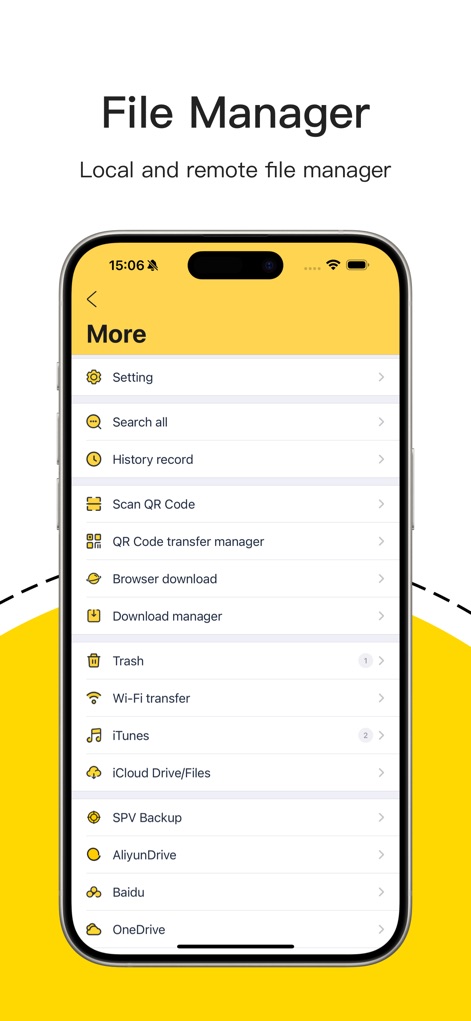
多機能連携マネージャー
この画面では「iCloud Drive/Files」との連携や「Wi-Fi転送」機能など、豊富なオプションを通じてファイル管理の幅を広げます。
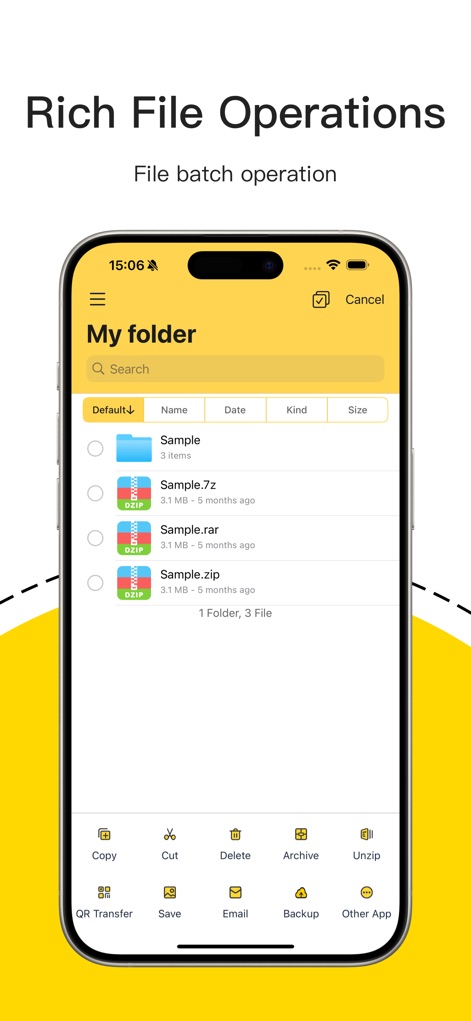
効率的なファイル操作
複数のファイルを「一括選択」し、「コピー」や「解凍」などの操作を迅速に実行できるため、作業効率が向上します。
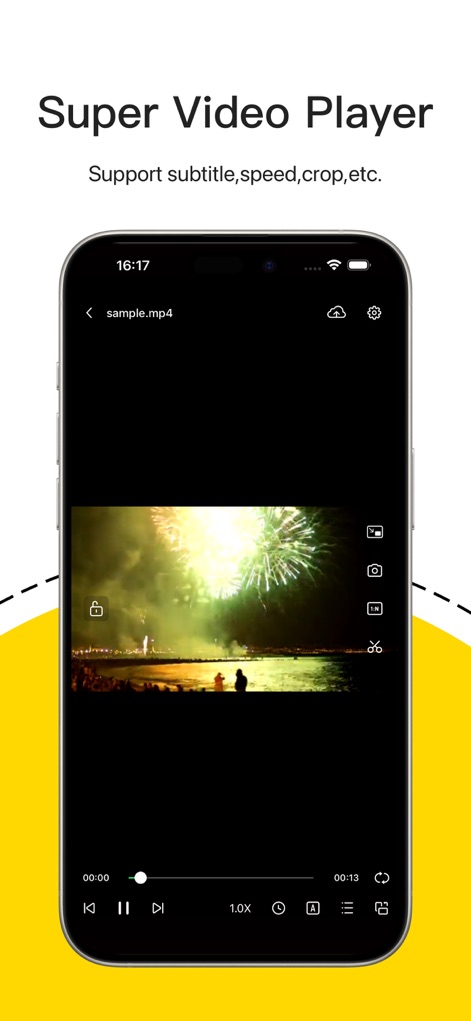
高機能ビデオプレーヤー
本プレーヤーは動画の「再生速度調整」と「字幕表示」に対応し、多様なニーズに応える快適な視聴環境を提供します。

快適な音楽再生
アプリ内の「ミュージックプレーヤー」では、「MP3」などのオーディオファイルを直接再生し、再生時間や曲名を確認できます。

進化した読書体験
テキストリーダーは「文字サイズ調整」や「背景色の変更」など、ユーザーが読書環境を自在にカスタマイズできる詳細設定を備えています。
説明
Download
類似アプリ
似た機能とユーザー体験を持つアプリ

Unzip - zip,rar,7z file opener
书勇 贾

Zip & RAR File Extractor
PENGHUI ZHAO

iZip – Zip Unzip Unrar
ComcSoft Corporation

Zip, RAR, 7z File Extractor
FANGZHOU INTERACTIVE TECHNOLOGY CO., LIMITED

ZArchiver: UnZip, UnRar, 7Z
TIMON SOFTWARE SOLUTIONS COMPANY LIMITED

iRAR - zip,rar,7z file opener
书敏 贾

Zip & RAR & 7z File Extractor
琳 胡

MT管理器
瑞 胡

iZip Pro -Zip Unzip Unrar Tool
ComcSoft Corporation
このページはアプリまたはその開発者の公式ページではなく、情報提供および論評を目的として作成された独立した編集出版物です。明示的に別段の記載がない限り、アプリおよびその開発者は、MWM、Apple、Google Play、アプリのパブリッシャー、またはアプリの開発者と提携、承認、後援、認可、またはその他の公式的な関係はなく、このページのいかなる内容も、アプリがMWMのサービスを使用して開発されたことを意味するものではありません。すべての商標、ロゴ、スクリーンショット、その他のコンテンツはそれぞれの所有者の財産です。