
このページはアプリまたはその開発者の公式ページではなく、情報提供および論評を目的として作成された独立した編集出版物です。明示的に別段の記載がない限り、アプリおよびその開発者は、MWM、Apple、Google Play、アプリのパブリッシャー、またはアプリの開発者と提携、承認、後援、認可、またはその他の公式的な関係はなく、このページのいかなる内容も、アプリがMWMのサービスを使用して開発されたことを意味するものではありません。すべての商標、ロゴ、スクリーンショット、その他のコンテンツはそれぞれの所有者の財産です。


ダウンロード
12.5M+ユーザー評価
評価数
43.1K開発元
カテゴリ
Photo & Video対応言語
1最新バージョン
3.7.21サイズ
64.6 MBリリース日
2015年6月25日「Video Maker with Music Editor」アプリ分析
ソーシャルメディア世代に向けた動画制作ツールの主要機能評価
動画への無制限の音楽トラック追加
ユーザーは、トレンドのBGMや独自のサウンドを動画に簡単に組み込み、コンテンツの魅力を最大限に引き出すことができます。
豊富な音楽トラックコレクション
ソーシャルメディアで人気のある多様なジャンルの音楽から選択でき、ユーザーは動画の雰囲気やテーマに合わせて最適なBGMを見つけることができます。
オーディオ編集(トリミング、フェードイン、フェードアウト)
プロフェッショナルなサウンドトランジションを簡単に実現し、動画全体のクオリティを高めることで、視聴者のエンゲージメントを維持します。
動画へのボイスオーバー録音
ユーザーは動画に自分の声でナレーションや解説を追加し、よりパーソナルでオリジナリティのあるコンテンツを作成して、視聴者とのつながりを深めることができます。
動画編集(フレームごとのトリミング&カット)
不要な部分を正確に削除し、動画のテンポを調整することで、短く魅力的なソーシャルメディア向けコンテンツを効率的に制作できます。
オーディオの音量調整
BGMとボイスオーバーの音量バランスを細かく調整することで、クリアで聞き取りやすい高品質な動画を作成し、視聴体験を向上させます。
よくある質問
について知っておくべきこと Video Maker with Music Editor
How can I add music to my videos using Video Maker with Music Editor?
Yes, Video Maker with Music Editor allows users to add music from their iPhone, the app's track list, or by recording. Users press the '+ Add Music' button, then edit and trim audio.
Does Video Maker with Music Editor offer video trimming features?
Yes, Video Maker with Music Editor provides video trimming and cutting capabilities. Users can trim and cut videos frame by frame to remove unwanted sections from their footage.
Can I record my own voice over a video in Video Maker with Music Editor?
Yes, Video Maker with Music Editor enables users to record their own voice over videos. This feature is integrated into the app's audio editing functionalities.
What music categories are available in Video Maker with Music Editor?
Video Maker with Music Editor offers diverse music categories including Free, Club/Party, Cinematic, Rock, Romantic, Sad/Emotional, Acoustic, Pop, Ambient, and Relaxing soundtracks.
Is Video Maker with Music Editor a subscription-based app?
Yes, Video Maker with Music Editor operates on a subscription model. Access to its features requires an auto-renewable In-App Purchase, with a weekly subscription length.
How do I manage my subscription for Video Maker with Music Editor?
Users manage their Video Maker with Music Editor subscription and auto-renewal settings via their iTunes Account Settings. This process is accessible after the initial purchase.
Can I adjust audio levels in Video Maker with Music Editor?
Yes, Video Maker with Music Editor includes volume control for audios. It also supports audio trimming, fade-in, and fade-out effects for comprehensive sound editing.
以下のスクリーンショットと説明は、アプリの公式ストアリスティングから直接取得されたものであり、アプリ開発者の所有物です。
アプリストア
スクリーンショット
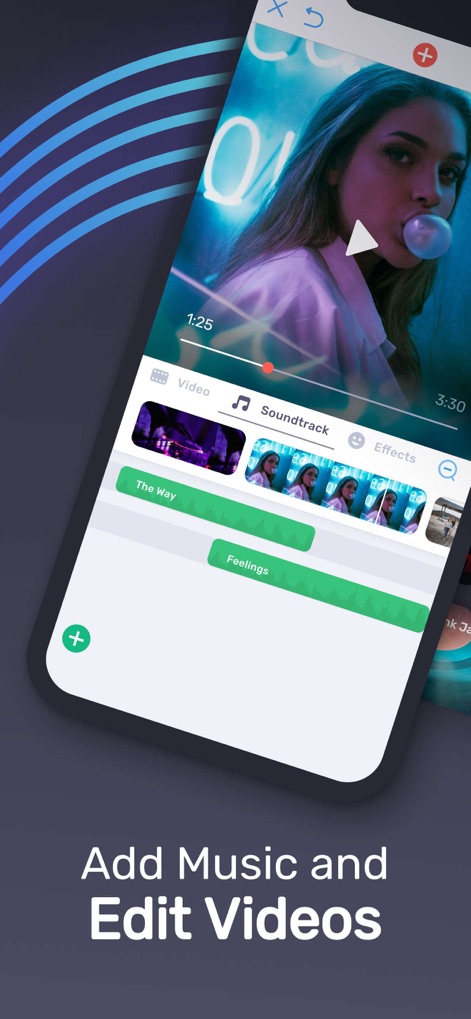
音楽とビジュアル編集
ユーザーは直感的な編集画面で、動画の視覚コンテンツと複数の音楽トラックをシームレスに同期・調整できます。

豊富な楽曲ライブラリ
ユーザーは「ポップ」や「シネマティック」など多様な音楽カテゴリから、動画に最適なサウンドトラックを簡単に見つけられます。

動画を精密に編集
ユーザーは動画のタイムラインを「トリミング」し、再生「速度」を調整することで、思い通りのクリップを作成できます。
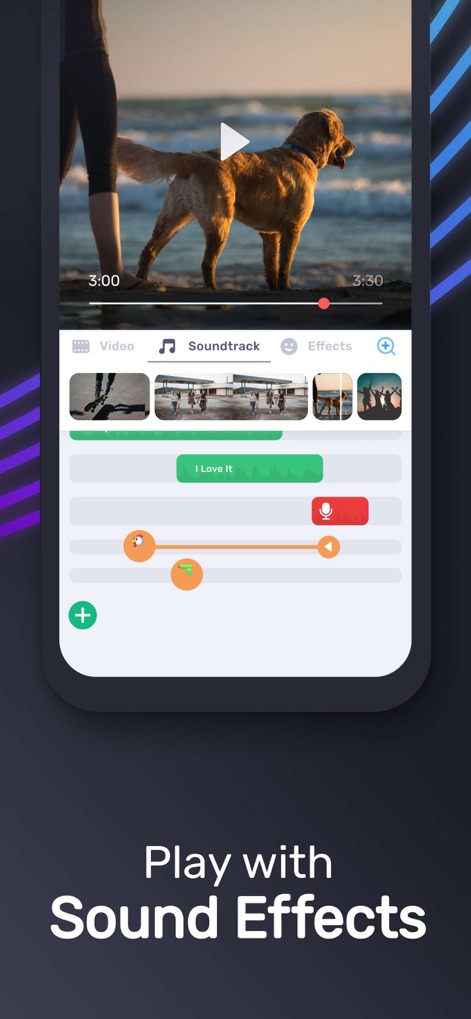
効果音と音声編集
ユーザーは動画に「効果音」や「ボイスオーバー」を加え、各音声トラックの細かな調整が可能です。
説明
Download
類似アプリ
似た機能とユーザー体験を持つアプリ

Dolby On: Record Audio & Video
Dolby Laboratories, Inc.

Add Music to Video, Maker
Honk Honk Punch Pty Ltd

Clips - Video Editor
Video Bakery Ltd.

Add Music into Video Editor
Saturday Technologies Incorporated

Add Background Music To Video
Mosaic S.r.l.

Add Music to Video Editor
Add Music to Video Maker & Editor LLC

Add Music to Video Voice Over
Brain Craft Ltd

Add Music to Video
Md Jasim Uddin

Video Music Add Background
Raja Ahmad Ayaz Noor
このページはアプリまたはその開発者の公式ページではなく、情報提供および論評を目的として作成された独立した編集出版物です。明示的に別段の記載がない限り、アプリおよびその開発者は、MWM、Apple、Google Play、アプリのパブリッシャー、またはアプリの開発者と提携、承認、後援、認可、またはその他の公式的な関係はなく、このページのいかなる内容も、アプリがMWMのサービスを使用して開発されたことを意味するものではありません。すべての商標、ロゴ、スクリーンショット、その他のコンテンツはそれぞれの所有者の財産です。