WinZip: #1 zip & unzip tool

WinZip: #1 zip & unzip tool

ダウンロード: App Store
ロゴ: WinZip: #1 zip & unzip tool

WinZip:iPhoneとiPad向けの、世界ナンバーワンのプロフェッショナルファイルユーティリティ

モバイルのボトルネックを突破しましょう。RAR、7z、Zipファイルを楽に開き、AES暗号化でドキュメントを保護し、すべてのクラウドストレージアカウントを1つの強力で合理化されたワークフローで管理します。

開発元

WinZip Computing LLC

カテゴリ

Utilities

ダウンロード

3M+

ユーザー評価

4.0/5

評価数

14K+

対応言語

8

あなたのワークフローを視覚化

このインターフェースを利用する 3M+ 人のユーザー.

整理されたフォルダと画像が表示されているWinZipアプリのMy Filesインターフェイスのスクリーンショット

整理されたフォルダと画像が表示されているWinZipアプリのMy Filesインターフェイスのスクリーンショット

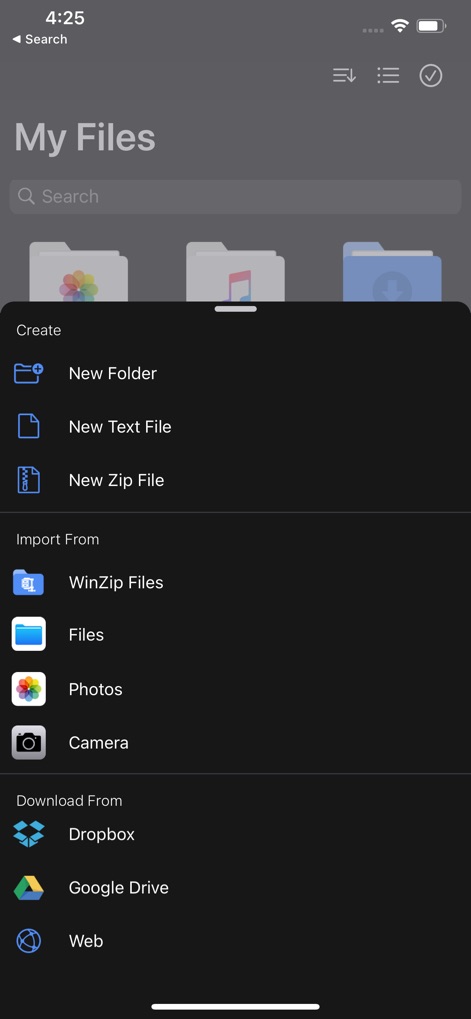
DropboxやGoogle Driveなどのクラウドストレージサービスから、ファイルの作成、電話からのインポート、ダウンロードのオプションが表示されているWinZipアプリのインターフェイス。

DropboxやGoogle Driveなどのクラウドストレージサービスから、ファイルの作成、電話からのインポート、ダウンロードのオプションが表示されているWinZipアプリのインターフェイス。

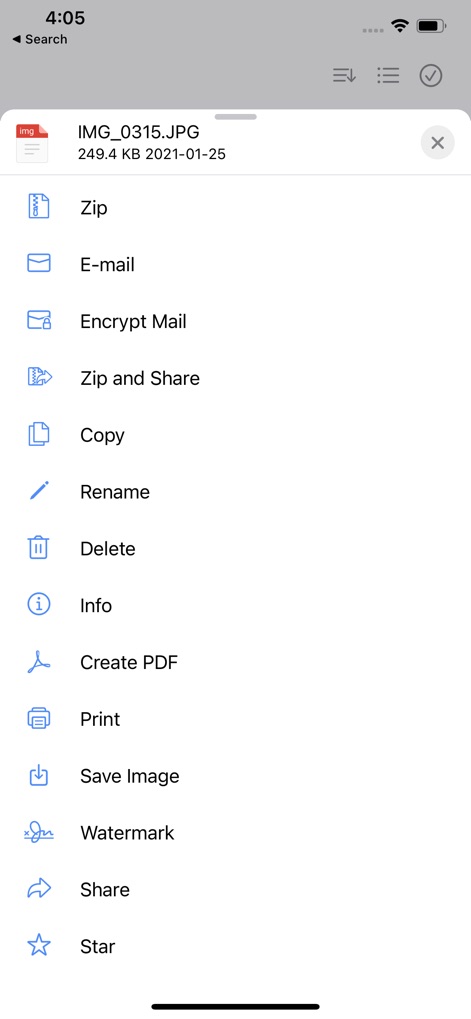
Zip、メールの暗号化、透かし、PDFの作成など、ファイル管理オプションのリストが表示されているWinZipモバイルアプリのスクリーンショット。

Zip、メールの暗号化、透かし、PDFの作成など、ファイル管理オプションのリストが表示されているWinZipモバイルアプリのスクリーンショット。

ファイル管理オプションと選択したアイテムのアクションメニューが表示されているWinZipモバイルアプリのインターフェイス。

ファイル管理オプションと選択したアイテムのアクションメニューが表示されているWinZipモバイルアプリのインターフェイス。

接続されているクラウドストレージアカウントとサーバーオプションが表示されているWinZip iOSアプリのインターフェイス。

接続されているクラウドストレージアカウントとサーバーオプションが表示されているWinZip iOSアプリのインターフェイス。

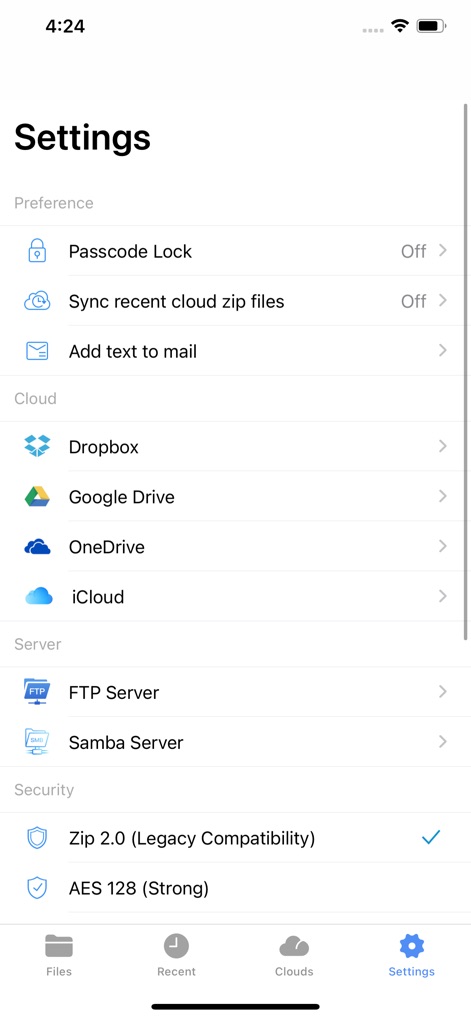
クラウドストレージオプション、サーバー接続、セキュリティ暗号化設定が表示されているWinZip iOSアプリの設定メニュー。

クラウドストレージオプション、サーバー接続、セキュリティ暗号化設定が表示されているWinZip iOSアプリの設定メニュー。

Zip化または共有のために2つの写真が選択されているWinZipアプリのMy Files画面のiPhoneでのスクリーンショット。

Zip化または共有のために2つの写真が選択されているWinZipアプリのMy Files画面のiPhoneでのスクリーンショット。

ファイル作成とクラウドストレージインポートメニューが表示されているWinZipモバイルアプリのインターフェイス。

ファイル作成とクラウドストレージインポートメニューが表示されているWinZipモバイルアプリのインターフェイス。

Zipと共有、透かし、PDFの作成を含むオプションメニューを備えた花の写真が表示されているWinZipアプリ。

Zipと共有、透かし、PDFの作成を含むオプションメニューを備えた花の写真が表示されているWinZipアプリ。

URL入力フィールドとキーボードが表示されているWebからのダウンロード機能が表示されているiPhoneのWinZipアプリ画面。

URL入力フィールドとキーボードが表示されているWebからのダウンロード機能が表示されているiPhoneのWinZipアプリ画面。

モバイルワークフローのマスター

このアプリを際立たせるツール、 3M+ 人のユーザーが選択.

📂

すべてを展開

モバイルファイルの制限で苦労するのはやめましょう。ZIP、RAR、7zなどをメールの添付ファイルやWebブラウザから直接即座に開きます。

☁️

あなたのクラウド、接続済み

Zip、解凍、Google Drive、Dropbox、OneDrive間での共有を、アプリを切り替えることなく行えます。すべてのプロフェッショナルストレージのための1つのハブ。

🛡️

銀行レベルの暗号化

機密性の高いビジネスドキュメントを共有したり、クラウドに保存したりする前に、強力な256ビットAES暗号化で保護します。

レビュー分析

ユーザーレビューの分析.

感情スコア

29%
ネガティブ

概要

The app receives largely negative feedback, reflected in its low sentiment score, primarily due to widespread issues. Many users report significant problems with crashes and instability, particularly after updating to iOS 18 or iPadOS 18, which often prevents them from opening files or folders. A major source of frustration stems from the app's monetization strategy, with numerous complaints about mandatory subscriptions, paywalls for basic features, high costs, and instances of being charged during supposed free trials. While some users find the app easy to use and generally useful, and one reviewer noted a crash issue being resolved, core functionalities like zipping and unzipping documents are frequently cited as problematic or non-existent without payment.

主なテーマ

Overall App Satisfaction(6)
User Interface & Experience(3)
Crashes & Stability(1)
Pricing & Subscriptions(1)
Core Functionality (Zip/Unzip)(1)

アプリについて

について知っておくべきこと WinZip: #1 zip & unzip tool.

説明

Get the world’s #1 zip file opener utility on iOS! Create Zip and Zipx files, extract files, encrypt, open Zip, Zipx, 7z, RAR or LHA files, send large files by email, share to Dropbox, Google Drive, OneDrive, iCloud, Twitter or Facebook. The reviews are unanimous! “Trying to open zip files a zip file on your mobile phone? Good luck -- unless you happen to have this handy tool installed. It launches directly from your inbox to give you a look inside those pesky file packages. “ - Mashable CNET (download.com) gives WinZip for iOS a 5 star rating, saying "We love apps that are simple and straightforward to use. WinZip definitely fits that description. We recommend it for all users." If you frequently use your iOS device to send and receive documents and large image files, you'll find a friend in the new WinZip app for iPhones and iPads, according to CIO.com blogger James A. Martin. From AppPicker: "Why not sink a few dollars into this fantastic full version of WinZip for your iPhone and iPad!" WinZip makes it easy to handle major compressed types of files on your iPhone, iPad or iPod Touch! Whether you receive a Zip, Zipx, 7z, RAR or LHA file as an email attachment, or want to extract download and view the contents of a Zip, Zipx, 7z, RAR or LHA file from the web, just “Open with WinZip”. Sharing files is safe and simple too, with direct integration with Dropbox, Google Drive, OneDrive and iCloud, and support for AirDrop. Now you can: • Connect directly to your Dropbox, Google Drive, OneDrive and iCloud accounts to zip, unzip and share files • Zip your cloud storage files, unzip files to your accounts, and create and save .zip and .zipx files to your accounts • Send or copy links to your files in your cloud storage accounts • Copy files from your cloud storage accounts and save them on your device • Unzip major compressed file types, including .ZIP, .Zipx, .RAR, .7z and LHA with just a tap • Choose Zip or Zipx format to compress and email large files, photos and videos with ease • Zip and share photos and videos from your Camera Roll • Use WinZip to access music files on your device and save them to your cloud accounts • Send files to other iOS users with integrated support for AirDrop • Protect your files before you save and share with powerful 128- or 256-bit AES encryption • Open and save email attachments to your connected cloud storage accounts or My Documents folder on your iPhone or iPad • Easily view all images in a Zip file with the enhanced image viewer • Browse your Photo Album and easily multi-select, zip and share photo collections • Share photos in your zip files to Facebook and Twitter • Download or upload files from/to WinZip through iTunes/iTools • Unzip and view most common file types, including: .doc, .docx, .xls, .xlsx, .ppt, .pptx, .pages (including new iWork 13), .numbers (including new iWork 13), .key, .rtf, .pdf, .jpg, .png, .bmp, .gif, .tif, and more View any of the following types of files within your Zip or RAR file: • Word documents (.doc, .docx) • Excel spreadsheets (.xls, .xlsx) • PowerPoint presentations (.ppt, .pptx) • PDF files (.pdf) • Photos and images (.jpg, .jpeg, .png, .bmp, .gif, .tif, .tiff, .heic) • Text files (.txt, .ini, .inf, .bat, .js, .log, .xml, .css, .java, .cs, .h, .m, .cpp, .c, .sql) • Web documents (.htm, .html, .jsp, .asp) • Rich Text Format documents (.rtf) • Keynote presentations (.key) • Numbers spreadsheets (.numbers) • Pages documents (.pages) • Media files (.m4a, .mp3, .wav, .mp4, .mov) Would you like to translate WinZip from English into your native language? Please contact help(at)winzip.com using the subject line "Translate WinZip into XXX", replacing XXX with your native language. In recognition of your efforts, your name will be included in the application description.

最新バージョン

7.14

サイズ

56.3 MB

リリース日

2012年2月13日

モバイルワークフローを強化する準備はできましたか?

iPhoneとiPadで大容量ファイルをシームレスに管理、保護、共有するために、世界ナンバーワンのユーティリティを信頼する300万人以上のプロフェッショナルに加わりましょう。

ダウンロード: App Store

App information, icons, screenshots, and descriptions displayed on this page are sourced from the Apple App Store and are the property of their respective developers. Download estimates and rankings are based on MWM's proprietary models and may not reflect actual figures. This page is provided for informational and analytical purposes only.

Believe this page infringes your intellectual property? File a dispute