Archipad ™

Archipad ™

다운로드: App Store
로고: Archipad ™

Archipad™: 서류 작업 없는 전문 현장 보고서 및 펀치 리스트

iPad에서 직접 세련된 보고서를 생성하여 사무실 시간을 절약하세요. 도면에 관찰 내용을 기록하고, 서명을 받고, 집에 가기 전에 현장 작업을 완료하세요.

개발사

Bigsool

카테고리

Productivity

다운로드

39K+

사용자 평점

4.5/5

총 평가 수

2K+

지원 언어

5

작업 중인 효율성

이 인터페이스를 사용하는 39K+ 명의 사용자.

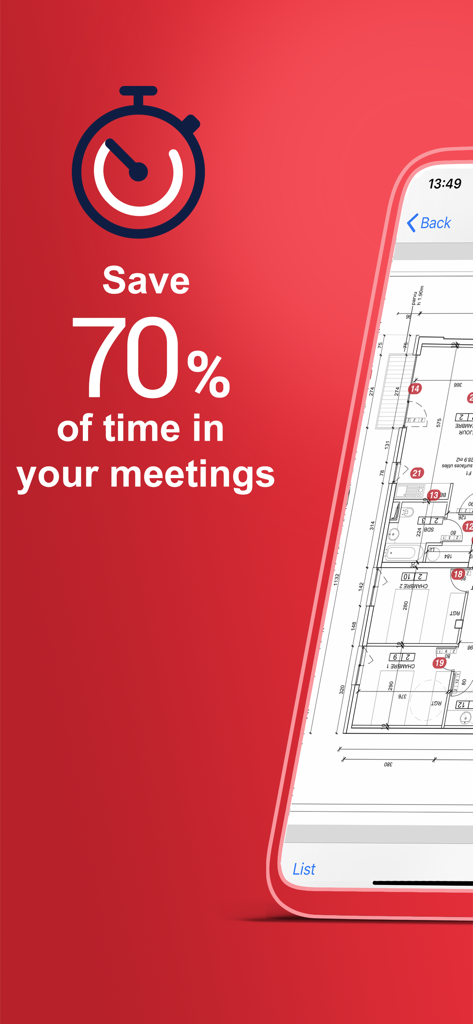
Archipad 앱 홍보 화면, 건설 회의 및 디지털 평면도에 대한 70% 시간 절약 표시
Archipad 앱 홍보 화면, 건설 회의 및 디지털 평면도에 대한 70% 시간 절약 표시

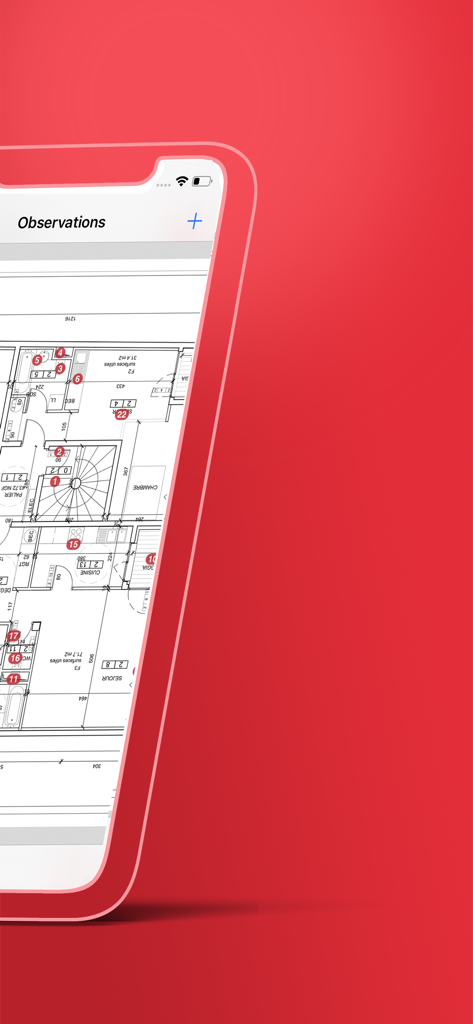
Archipad 앱 인터페이스, 건축 평면도에 번호가 매겨진 현장 관찰 내용 표시
Archipad 앱 인터페이스, 건축 평면도에 번호가 매겨진 현장 관찰 내용 표시

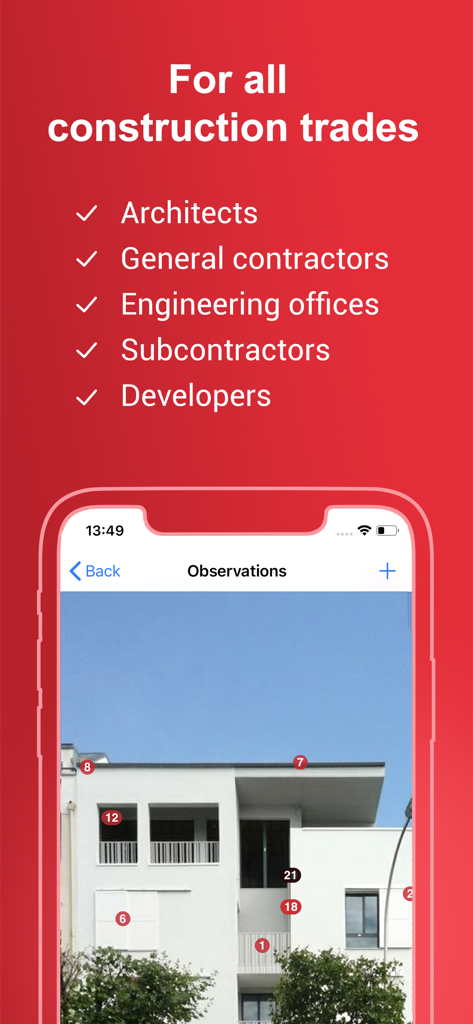
Archipad 앱, 건설 전문가를 위한 건물 사진에 번호가 매겨진 마커로 현장 관찰 내용 표시
Archipad 앱, 건설 전문가를 위한 건물 사진에 번호가 매겨진 마커로 현장 관찰 내용 표시

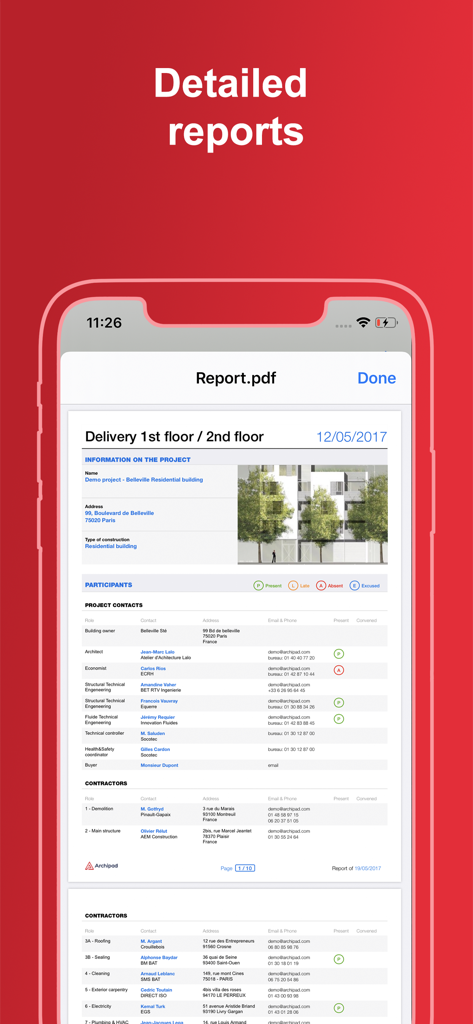
프로젝트 정보 및 모바일 장치의 참가자 목록을 표시하는 상세한 건설 현장 보고서

프로젝트 정보 및 모바일 장치의 참가자 목록을 표시하는 상세한 건설 현장 보고서

현장 방문 마스터하기

이 앱을 돋보이게 하는 도구, 39K+ 명의 사용자가 선택.

🚀

즉석 현장 보고

회의가 끝나자마자 전문 PDF 회의록 및 서명된 펀치 리스트를 배포하세요. 사무실 기반 데이터 입력을 없애 저녁 시간을 되찾으세요.

🏗️

청사진 통합 작업

모든 관찰 내용을 발생한 위치에 정확하게 찾으세요. 값비싼 소통 오류를 제거하기 위해 디지털 도면에 직접 핀을 떨어뜨리세요.

🧠

스마트 컨텍스트 학습

사용자의 특정 기술 어휘를 학습하고 일반적인 현장 관찰 내용을 자동으로 제안하는 AI 기반 입력 줄임 기능으로 시간을 절약하세요.

앱 소개

에 대해 알아야 할 모든 것 Archipad ™.

설명

Archipad is the new way to manage your on-site meetings, and the easiest way to write down observations, removing many fastidious steps in the process. Archipad allows you to easily create punch lists, and allows you to send a report, the punch list and drawings with item locations, directly from the site. No need to go back to the office to prepare minutes and reports, no more losing precious hours formatting your documents. Archipad is created for construction professionals, architects, engineers, contractors, project managers, assistants, promoters... Archipad Classic on iPad offers a unique and easy to use solution to manage observations, punch lists, drawings, and meetings. The iPad is what we all have been waiting for to do on-site visits, witch even if they last all day, your iPad will not run out of battery when correctly charged at start. Archipad has an optional subscription for reports and projects sharing. You can upgrade to Premium using an In app purchase. Archipad strong points: - User friendly and extremely simple to use: no training required. - Optimize your time and use the iPad as a data entry tool, pointing observations directly on plans and drawings, and reduced typing with our auto-enhancing typing reducer: as you add observations, Archipad will learn your vocabulary and sentences and propose auto completion, the smart way. - A flat fee and moderate price. You will know what you pay up front, and will not be billed by the project or number of hours used. In just a couple of meetings your purchase will pay back by the time you saved. - Reports with punch lists with drawings indicating the locations of each observation can be made per work package or per drawing, making it easy to read for all those working on the project, whether they are contractors or architects. The reports have been thought as actual meeting minutes, by allowing each person attending the meeting to sign a presence sheet your reports will show the signature of all attendances. IN SHORT From construction to delivery - one tool for all • Manage construction site meetings • Organize your observations and retentions • Reduce the time to enter observations Information management • Send out the report at the end of the meeting • Keep track of previous visits • All your plans and drawings in one location Tracking and managing the construction site • Point observations directly on your drawings • All your documents available to use on-site • A cost-effective tool for improved tracking of work Terms of use : https://archipad.com/en/terms-of-service/ Privacy policy : https://archipad.com/en/privacy-policy/

최신 버전

8.22.0

크기

210.2 MB

출시일

2013년 6월 12일

차에 타기도 전에 현장 보고서 완료

사무실 서류 작업을 없애고 저녁 시간을 되찾은 39,000명 이상의 AEC 전문가와 함께하세요. 지금 Archipad를 다운로드하고 iPad에서 직접 전문 펀치 리스트 생성을 시작하세요.

다운로드: App Store
FAQ

자주 묻는 질문

에 대해 알아야 할 모든 것 Archipad ™

Archipad는 무엇인가요?

Archipad는 건설 전문가들이 현장 회의, 관찰 및 완료 목록을 관리하도록 설계된 모바일 애플리케이션입니다. 사용자가 건설 현장에서 직접 보고서를 작성하고 보낼 수 있도록 하여 보고 프로세스를 간소화합니다.

Archipad는 누구를 위해 설계되었나요?

Archipad는 건축가, 엔지니어, 계약자, 프로젝트 관리자, 보조원 및 개발자를 포함한 건설 전문가를 위해 설계되었습니다. 건설 프로젝트에 관련된 다양한 역할을 지원합니다.

Archipad는 회의 효율성을 어떻게 향상시키나요?

Archipad는 사용자가 계획 및 도면에서 직접 관찰 항목을 지적하고, 완료 목록을 만들고, 현장에서 보고서를 생성할 수 있도록 하여 시간을 최적화합니다. 이를 통해 사무실 기반 문서 준비의 필요성이 사라져 회의 시간을 최대 70%까지 절약할 수 있습니다.

Archipad는 구독 서비스를 제공하나요?

네, Archipad는 보고서 및 프로젝트 공유를 위한 옵션 구독 서비스를 제공합니다. 또한 인앱 구매를 통해 프리미엄 버전으로 업그레이드하여 향상된 기능에 액세스할 수 있습니다.

Archipad의 보고 기능은 무엇인가요?

Archipad는 관찰 위치를 나타내는 도면과 함께 완료 목록을 포함한 상세 보고서를 생성합니다. 이 보고서는 작업 패키지 또는 도면별로 생성될 수 있으며, 회의록 역할을 하고 참석자가 출석부에 서명할 수 있도록 합니다.

Archipad는 관찰에 대한 데이터 입력을 어떻게 지원하나요?

Archipad는 사용자 어휘 및 문장을 학습하는 자동 향상 타이핑 감축기를 사용합니다. 자동 완성 기능을 제안하여 계획 및 도면에 직접 관찰 항목을 추가할 때 타이핑 노력을 크게 줄여줍니다.

사용자는 Archipad 내에서 계획 및 도면을 볼 수 있나요?

네, Archipad는 사용자가 모든 계획 및 도면을 한 곳에서 볼 수 있도록 합니다. 사용자는 현장 방문 중에 정확한 문서화를 위해 이러한 도면에서 직접 관찰 항목을 지적할 수 있습니다.

App information, icons, screenshots, and descriptions displayed on this page are sourced from the Apple App Store and are the property of their respective developers. Download estimates and rankings are based on MWM's proprietary models and may not reflect actual figures. This page is provided for informational and analytical purposes only.

Believe this page infringes your intellectual property? File a dispute