Site Audit Pro

Site Audit Pro

다운로드: App Store다운로드: Google Play
로고: Site Audit Pro

Site Audit Pro: 이동 중에도 가장 빠르게 점검하고 감사하세요

현장에서 직접 전문적이고 브랜드화된 보고서를 생성하여 사무실에서 보내는 수많은 시간을 절약하세요. 현장 점검, 하자 보수 및 안전 감사를 간소화하는 수천 명의 전문가들과 함께 하세요.

개발사

Veam Studios Ltd

카테고리

Productivity

다운로드

467K+

사용자 평점

4.8/5

총 평가 수

30K+

지원 언어

1

모든 프레임에 담긴 효율성

이 인터페이스를 사용하는 467K+ 명의 사용자.

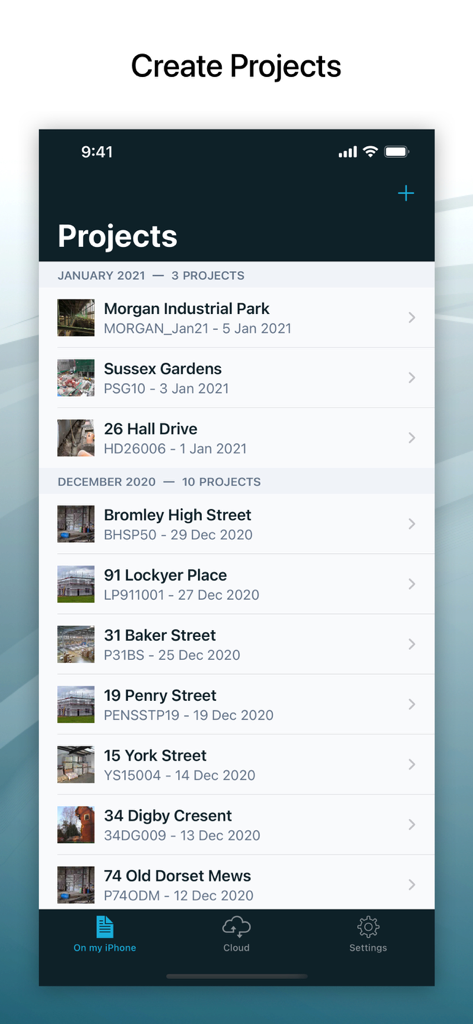
Site Audit Pro 모바일 앱 인터페이스에서 감사 및 점검 프로젝트 목록 표시
Site Audit Pro 모바일 앱 인터페이스에서 감사 및 점검 프로젝트 목록 표시

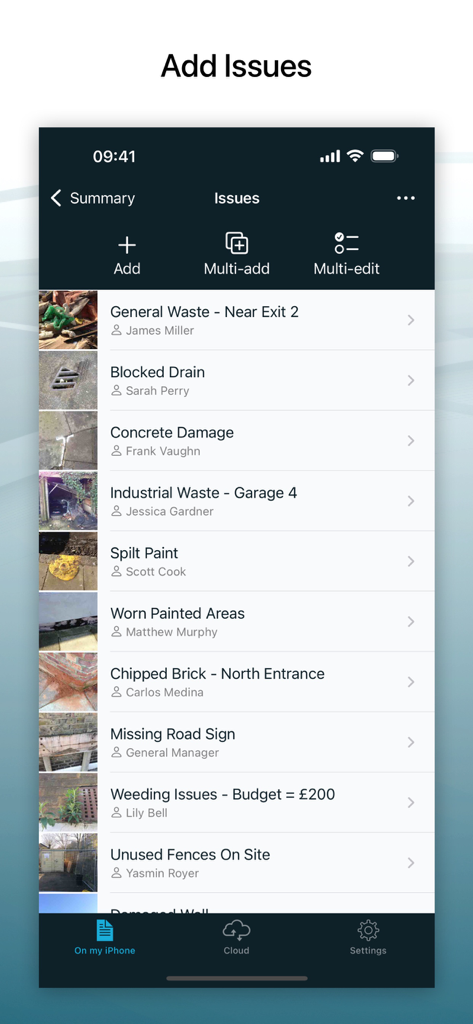
사진 및 담당자가 포함된 기록된 현장 점검 문제 목록을 표시하는 Site Audit Pro 모바일 앱 인터페이스
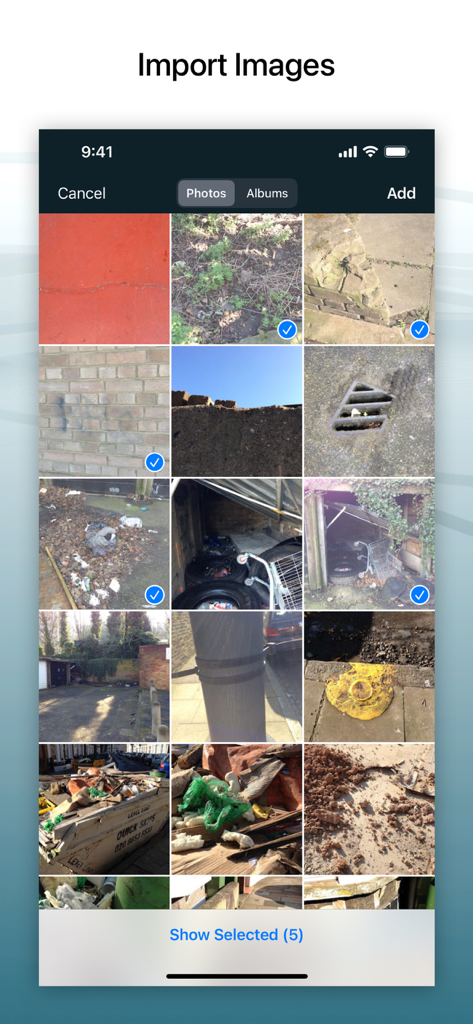
사진 및 담당자가 포함된 기록된 현장 점검 문제 목록을 표시하는 Site Audit Pro 모바일 앱 인터페이스

사진 갤러리에서 감사 보고서로 가져올 여러 현장 사진을 선택하는 Site Audit Pro의 모바일 인터페이스.
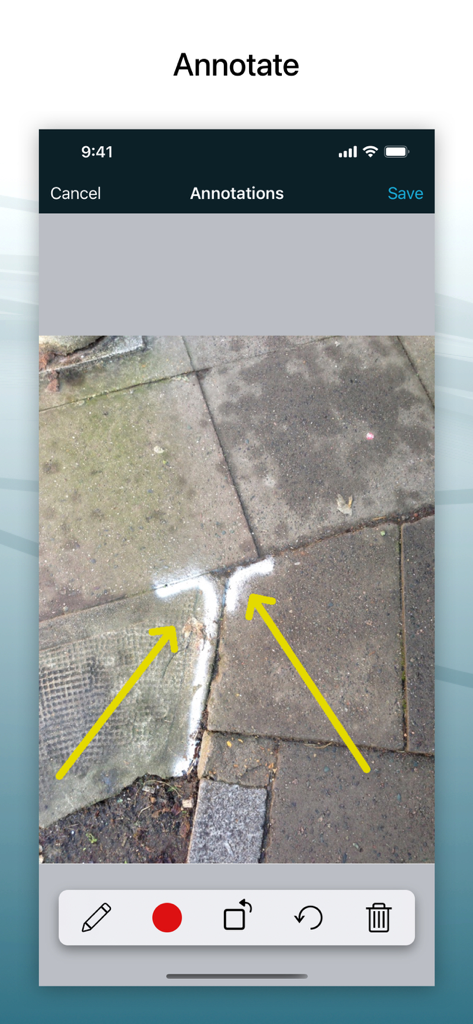
사진 갤러리에서 감사 보고서로 가져올 여러 현장 사진을 선택하는 Site Audit Pro의 모바일 인터페이스.

화살표로 건설 현장 사진에 주석을 다는 모바일 앱 인터페이스.
화살표로 건설 현장 사진에 주석을 다는 모바일 앱 인터페이스.

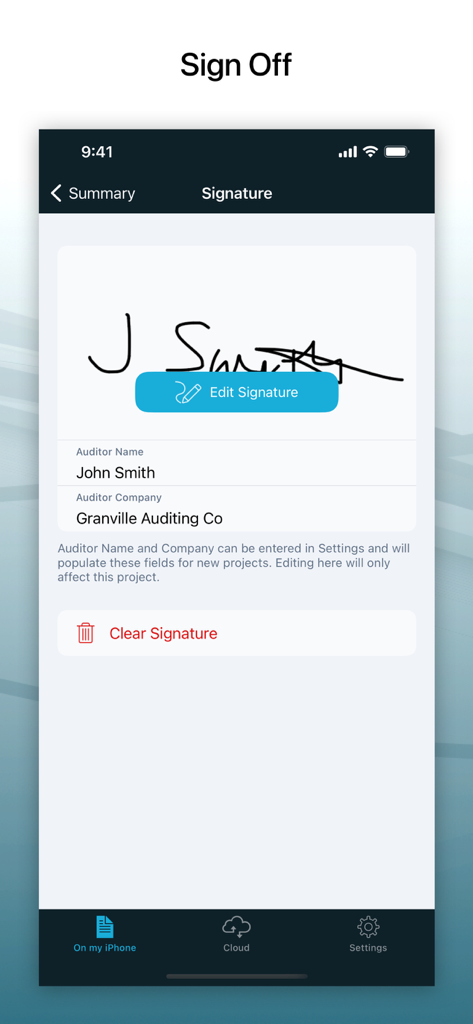
Site Audit Pro 앱에서 감사자 서명을 위한 디지털 서명 캡처 화면.
Site Audit Pro 앱에서 감사자 서명을 위한 디지털 서명 캡처 화면.

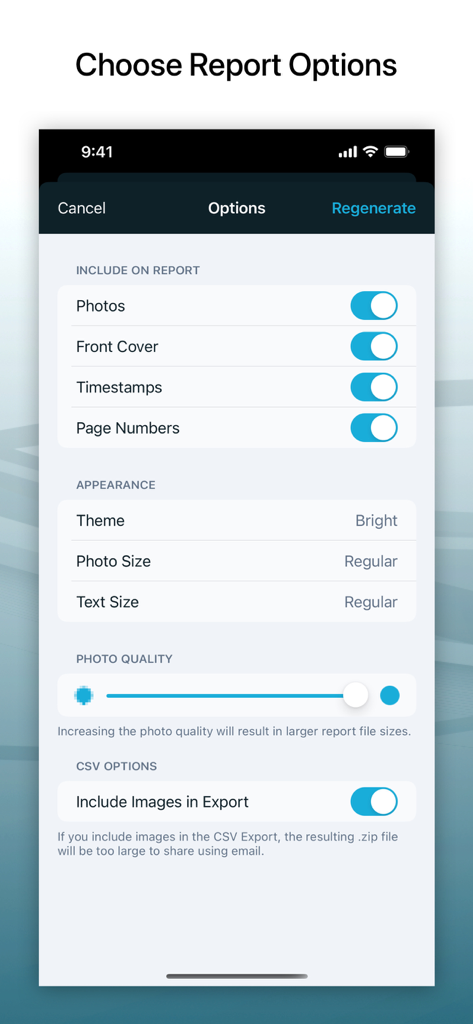
사진 품질 및 타임스탬프를 포함한 감사 보고서 옵션 사용자 정의를 위한 인터페이스
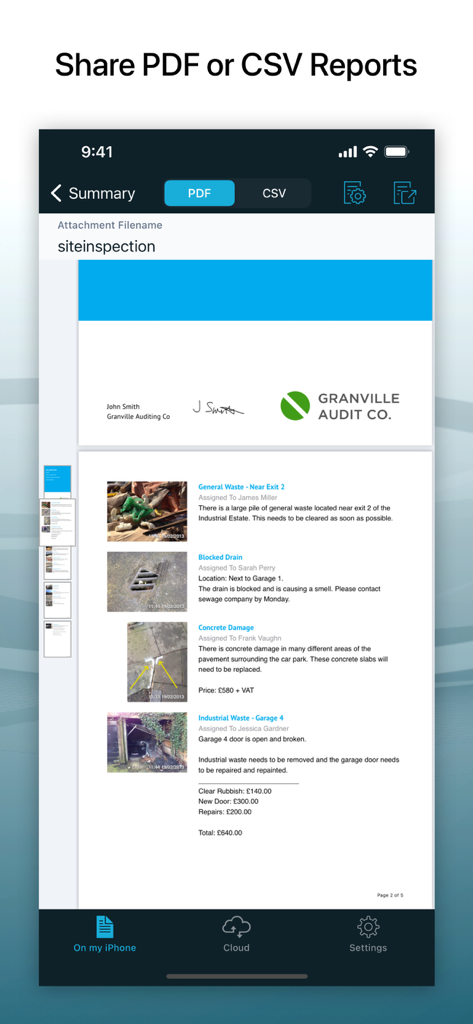
사진 품질 및 타임스탬프를 포함한 감사 보고서 옵션 사용자 정의를 위한 인터페이스

사진 및 문제 설명이 포함된 전문 PDF 감사 보고서를 보여주는 모바일 앱 인터페이스
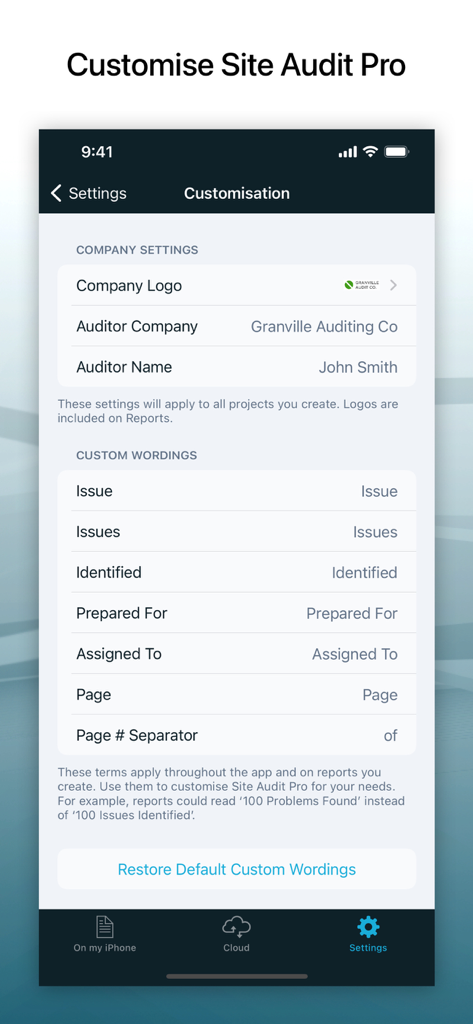
사진 및 문제 설명이 포함된 전문 PDF 감사 보고서를 보여주는 모바일 앱 인터페이스

회사 브랜딩 및 보고서 용어 사용자 정의를 위한 Site Audit Pro 앱 인터페이스

회사 브랜딩 및 보고서 용어 사용자 정의를 위한 Site Audit Pro 앱 인터페이스

몇 분 안에 현장 작업을 마스터하세요

이 앱을 돋보이게 하는 도구, 467K+ 명의 사용자가 선택.

🚀

현장 작업 후 서류 작업 제로

이중 입력의 피로를 없애세요. 현장에서 떠나기 전에 모바일 기기에서 즉시 조사 결과를 취합하고 전문적인 PDF 보고서를 공유하세요.

✏️

정확한 사진 주석

이미지에 직접 그림을 그려 현장 문제를 명확하게 전달하세요. 결함, 안전 위험 또는 작업 목록 항목을 강조 표시하여 팀이 정확히 무엇에 주의를 기울여야 하는지 알 수 있도록 하세요.

🏗️

전문적인 브랜딩 및 규정 준수

GPS 스탬프가 찍힌 이미지와 회사 로고, 감사자 서명 및 모든 클라이언트에게 깊은 인상을 줄 전문적인 레이아웃이 포함된 맞춤형 보고서로 비즈니스를 보호하세요.

앱 소개

에 대해 알아야 할 모든 것 Site Audit Pro.

설명

‘The fastest way to audit on the go’ Site Audit Pro helps thousands of businesses worldwide improve their productivity by making audits and inspections quicker to carry out and easier to manage. Whether performing a safety inspection, snagging issues, creating a punch list, or providing a quotation, Site Audit Pro will help you collate and share your findings on the go with customised Reports to add a personal and professional touch. --- FEATURES - Record Issues: Add a title, assignee, and comments to document each Issue. - Add and Annotate Images: Highlight and draw important information directly on Images to emphasise key points. - Organise Issues into Projects: Add Site and Client details specific to each Project for better organisation and clarity. - Image Details: Optionally show timestamps and GPS locations on each Image in the Report for precise documentation of when and where Issues were recorded. - Share Professional Audit Reports: Eliminate the need to return to the office by sharing a PDF or CSV via email, Dropbox, device file sharing, and more. --- CUSTOMISATIONS - Add personal details to your Reports; include Company Name, Logo, Auditor Name and Signature. - Change the content to reflect your industry. Instead of ‘Identified 12 Issues’, why not use ‘Found 12 Problems’ or ‘Examined 12 Properties’? - Choose from and customise a range of 8 professional Report designs. --- GREAT FOR - Audits - Inspections - Punch Lists - Snag Lists - Documenting various items Site Audit Pro is adaptable to a number of industries. Whenever you need to capture and report important data, choose Site Audit Pro. Download Site Audit Pro today to save time, improve productivity and make audits and inspections organised and hassle-free. --- SUBSCRIPTION Site Audit Pro Cloud is our subscription service that allows you to store your projects in the cloud and access them from the web. Whilst the subscription does give you access to some of the more advanced features and access, it is not required to use and generate Reports. The features below are what you would gain access to by subscribing, whereas the features above are what are already included in the base app. SUBSCRIPTION FEATURES 1. ACCESS PROJECTS FROM THE WEB Create, edit and share Reports from our web app. Using the website allows you to quickly type up comments using your computer keyboard as well as accessing your Projects from any browser. 2. MULTIPLE IMAGES You can show more than one Image for each Issue. This is useful for showing several angles of the same Issue, or to compare before and after Images. 3. SYNCING Sync your projects between devices. Start your project with your iPhone, type it up on an iPad, and do final editing on your PC or laptop. Reports can be generated from any location. 4. FOLDERS Organise your Projects into Folders. Name your Folders after the property, area, client, group, site or anything you want to keep organised! 5. MORE PROJECT INFORMATION Add a site address for each Project, as well as a Project photo to give the finishing touch to your Report’s cover. 6. ISSUE DUE DATES Give Issues a Due Date so your Assignees know exactly how long they have to complete any tasks required. 7. COMPLETE ISSUES Mark your Issues as completed. If all your Issues are completed, you can even mark the whole Project as completed. 8. REPORT COLOURS In addition to more themes, you can set up your own colour scheme! Use this to match your company branding or specific report types. --- *** Subscription Information *** Subscriptions will automatically renew unless cancelled within 24-hours before the end of the current period. You can cancel anytime with your Apple account settings. Any unused portion of a free trial will be forfeited if you purchase a subscription. *** Subscription Terms *** You can find the terms and conditions of the subscription here: https://www.siteauditpro.com/terms

최신 버전

8.25.0

크기

69.5 MB

출시일

2011년 4월 26일

현장 트럭으로 돌아오기 전에 보고서 작성을 완료하세요

이중 입력의 피로를 없앤 467,000명 이상의 전문가들과 함께하세요. 지금 Site Audit Pro를 다운로드하고 현장에서 직접 전문적이고 브랜드화된 보고서를 제공하세요.

다운로드: App Store다운로드: Google Play
FAQ

자주 묻는 질문

에 대해 알아야 할 모든 것 Site Audit Pro

Site Audit Pro는 비즈니스 생산성을 어떻게 향상시키나요?

Site Audit Pro는 감사 및 검사를 더 빠르고 쉽게 수행하고 관리할 수 있도록 하여 기업의 생산성 향상을 돕습니다. 맞춤 보고서로 조사 결과를 종합하고 공유합니다.

Site Audit Pro는 문제에 대한 이미지 주석을 지원하나요?

예, Site Audit Pro를 사용하면 감사 및 검사 문서의 명확성을 높이기 위해 문제에 이미지를 직접 추가하고 주석을 달아 핵심 사항을 강조할 수 있습니다.

Site Audit Pro 보고서에는 어떤 사용자 정의 옵션을 사용할 수 있나요?

Site Audit Pro는 회사 이름 및 로고 추가, 산업별 문구 변경, 8가지 전문 보고서 디자인 중에서 선택하여 개인적인 느낌을 더하는 등의 보고서 사용자 정의를 제공합니다.

Site Audit Pro로 보고서를 생성하려면 구독이 필요한가요?

아니요, 기본 앱 및 보고서 생성을 사용하기 위해 Site Audit Pro Cloud 구독이 필요하지 않습니다. 구독은 고급 클라우드 기반 기능에 대한 액세스를 제공합니다.

Site Audit Pro Cloud 구독에는 어떤 고급 기능이 포함되어 있나요?

Site Audit Pro Cloud 구독은 프로젝트 웹 액세스, 문제당 여러 이미지, 장치 동기화, 프로젝트 폴더, 추가 프로젝트 정보, 문제 마감일 및 사용자 지정 보고서 색상과 같은 기능을 제공합니다.

사용자는 Site Audit Pro 내에서 감사 프로젝트를 구성할 수 있나요?

예, Site Audit Pro를 사용하면 사용자가 프로젝트를 구성할 수 있으며, 이는 '프로젝트 만들기'라는 제목의 스크린샷 #1에서 다양한 프로젝트 목록을 보여주며 시연됩니다.

Site Audit Pro를 사용하면 감사 보고서에 서명을 포함할 수 있나요?

예, Site Audit Pro는 보고서에 서명을 추가하는 것을 지원합니다. '서명'이라는 제목의 스크린샷 #5는 감사자 이름 및 회사 필드와 함께 서명 영역을 보여줍니다.

Site Audit Pro를 사용하여 PDF 보고서를 생성할 수 있나요?

예, Site Audit Pro는 PDF 보고서를 생성할 수 있습니다. 'PDF 또는 CSV 보고서 공유'라는 제목의 스크린샷 #7은 이미지와 조사 결과가 포함된 전문 PDF 보고서의 미리 보기를 보여줍니다.

Site Audit Pro의 구독 약관은 어디에서 찾을 수 있나요?

Site Audit Pro 구독 약관은 앱 설명에 제공된 링크를 통해 액세스할 수 있는 공식 웹사이트에서 확인할 수 있습니다.

App information, icons, screenshots, and descriptions displayed on this page are sourced from the Apple App Store and are the property of their respective developers. Download estimates and rankings are based on MWM's proprietary models and may not reflect actual figures. This page is provided for informational and analytical purposes only.

Believe this page infringes your intellectual property? File a dispute