
이 페이지는 앱이나 개발자의 공식 페이지가 아니며, 정보 제공 및 논평을 목적으로 작성된 독립 편집 간행물입니다. 명시적으로 달리 언급되지 않는 한, 해당 앱이나 개발자는 MWM, Apple, Google Play, 앱 퍼블리셔 또는 앱 개발자와 제휴, 보증, 후원, 승인 또는 공식적으로 연결되어 있지 않으며, 이 페이지의 어떤 내용도 해당 앱이 MWM의 서비스를 사용하여 개발되었음을 의미하지 않습니다. 모든 상표, 로고, 스크린샷 및 기타 콘텐츠는 해당 소유자의 자산입니다.


Audio Editor - AI Music Editor
당신의 오디오는 더 이상 평범하지 않을 것입니다. 이 앱은 당신의 모든 사운드에 날카로운 통제력을 부여합니다.
다운로드
250k+사용자 평점
총 평가 수
1.0K개발사
카테고리
Music지원 언어
9최신 버전
1.4.9크기
126.5 MB출시일
2024년 2월 23일강력한 기능으로 음악 및 오디오 콘텐츠 제작을 혁신하는 다재다능한 도구
"Audio Editor - AI Music Editor" 앱 분석
비디오에 음악 추가 및 공유
이 앱은 무제한의 사진과 비디오를 프로젝트에 추가하고, 여러 배경 오디오 트랙을 비디오에 삽입할 수 있도록 합니다. 오디오 및 비디오 트리밍 기능, 워터마크 없음, 비압축 내보내기, 그리고 TikTok, Snapchat, Instagram, Facebook 등 주요 소셜 네트워크로의 직접 공유를 지원하여 소셜 미디어 콘텐츠 제작자에게 매우 유용합니다.
고급 오디오 편집 기능
이 앱은 오디오 믹싱, 페이드 인/아웃, 볼륨 조절, 톤 및 템포 변경, 오디오 속도 조절, 사용자 정의 이퀄라이저, 무제한 실행 취소/다시 실행, 좌우 밸런스 조절 등 포괄적인 오디오 편집 도구를 제공하여 사용자가 전문적인 사운드 조작을 할 수 있도록 해줍니다.
AI 보컬 분리
이 도구는 머신러닝을 활용하여 보컬 및 악기 스템을 분리합니다. 파일 업로드나 대기열 없이 모든 AI 처리가 사용자의 기기에서 로컬로 수행되어 빠르고 효율적인 오디오 분리 기능을 제공합니다.
다중 기기 프로젝트 동기화
프로젝트가 백그라운드에서 자동으로 동기화되어 iPhone, iPad, 데스크톱 등 모든 기기에서 작업할 수 있습니다. Google Drive, iCloud 등 주요 클라우드 플랫폼을 지원하여 사용자가 프로젝트를 간편하게 관리하고 저장 공간을 효율적으로 활용할 수 있습니다.
협업 및 프로젝트 관리
사용자는 트랙을 프로젝트와 폴더로 체계화하고, iPhone 및 웹 기기 간에 동기화할 수 있습니다. 음악 링크를 공유하고, 접근 권한을 관리하며, 영감이 떠오를 때마다 녹음할 수 있습니다. 또한 Dropbox 및 SoundCloud 수준의 암호화로 미공개 음악을 안전하게 보호합니다.
다양한 사운드 효과
사용자는 피치(예: 로리타 및 삼촌 목소리), 리버브(예: 방, 거실, 교회), 디스토션(예: 일렉트로닉, 에코, 메탈), 딜레이 등 다양한 사운드 효과를 적용할 수 있으며, 10개 섹션의 주파수를 가진 사용자 정의 이퀄라이저를 통해 세밀한 오디오 조정을 할 수 있습니다.
음성 변조
이 앱은 사용자가 음색, 피치 및 음색을 변경하여 독특한 캐릭터를 만들거나 보컬 성능을 향상시키는 등 음성 변조 기능을 통해 무한한 창의적 가능성을 탐색할 수 있도록 해줍니다.
유연한 가져오기 및 내보내기
이 앱은 Wi-Fi를 통한 가져오기 및 내보내기, 다른 애플리케이션으로부터의 직접 가져오기, 앨범 비디오 및 모바일 음악 라이브러리 직접 사용 등 다양한 방식으로 파일을 가져오고 내보낼 수 있는 유연성을 제공합니다.
자주 묻는 질문
에 대해 알아야 할 모든 것 Audio Editor - AI Music Editor
What is "Audio Editor - AI Music Editor"?
"Audio Editor - AI Music Editor" is a powerful audio editor for listening, sharing, and organizing music. It features AI for vocal separation, sound effects, voice changing, and video integration.
What audio editing features does Audio Editor offer?
Audio Editor offers mixing, fade in/out, volume changes, tone/tempo/speed adjustments, custom equalization, balance settings (R-CH and L-CH), and unlimited undo/redo.
Can Audio Editor handle multi-track audio?
Yes, Audio Editor supports multitrack audio editing. Users can manage multiple audio tracks, as shown in the editing interface, and record new tracks directly within the project.
Does Audio Editor support unlimited undo and redo?
Yes, Audio Editor supports unlimited times of undo and redo. This feature is available to revert or reapply changes during the editing process.
How does Audio Editor help organize music projects?
Audio Editor organizes tracks into projects and folders. These are synced across iPhone and web. Users can also drag and drop files from their desktop into the web app.
Can users collaborate on projects with Audio Editor?
Yes, Audio Editor allows collaboration on projects. Users can share links to their music and manage access, including granting permission for others to edit and download tracks.
Is music shared through Audio Editor secure?
Yes, Audio Editor states its encryption is on par with Dropbox and SoundCloud. It aims to be a secure place for unreleased music, protecting users' content.
What is the AI Vocal Separator feature in Audio Editor?
The AI Vocal Separator in Audio Editor employs machine learning to isolate vocal and instrumental stems from audio tracks. It extracts vocals and instruments separately.
Does the AI Vocal Separator process files locally?
Yes, the AI Vocal Separator processes all AI tasks locally on your device. This means there is no need to upload files or wait in line for processing.
What sound effects are available in Audio Editor?
Audio Editor provides pitch effects (rising/falling, voice changes), reverb (room, living room, church), distortion (electronic, echo, metal), and delay effects up to 2 seconds.
Can I change my voice with Audio Editor?
Yes, Audio Editor includes a Voice Changer feature. It allows users to alter their voice by transforming tone, pitch, and timbre to create unique characters or enhance vocal performances.
Does Audio Editor include an equalizer?
Yes, Audio Editor includes a custom equalizer with 10 sections of frequency. It also offers presets like bass boost and human voice resonance for clear and rhythmic audio.
Can I add music to videos using Audio Editor?
Yes, Audio Editor allows users to add unlimited photos and videos to projects. It supports adding multiple background audio tracks, music, and voice to videos.
Does Audio Editor add watermarks to exported videos?
No, Audio Editor states that videos are exported without compression and without watermarks. This ensures high-quality output for sharing on social networks.
How can I import audio files into Audio Editor?
Audio Editor supports Wi-Fi import and export. It also allows direct import from other applications, and direct use of the album's video and mobile music library.
Can Audio Editor create ringtones?
Yes, Audio Editor functions as an amazing ringtone cutter. Users can trim music and cut any part of their favorite songs to create custom ringtones.
Does Audio Editor support project synchronization across devices?
Yes, Audio Editor offers background sync that automatically updates projects. Users can access and use their projects on iPhone, iPad, and desktop devices.
Which platforms does Audio Editor sync projects with?
Audio Editor supports syncing projects across major platforms. This includes Google Drive, iCloud, and others, allowing users to access their work from multiple cloud services.
What are the subscription options for Audio Editor Pro?
Audio Editor Pro Unlimited subscription is billed either weekly or annually. The rate corresponds to the specific plan selected by the user.
Does Audio Editor Pro auto-renew subscriptions?
Yes, Audio Editor Pro subscriptions automatically renew. Auto-renewal turns off if not canceled at least 24 hours before the current period ends, and accounts are charged for renewal.
다음 스크린샷과 설명은 앱의 공식 스토어 목록에서 직접 가져온 것이며 앱 개발자의 자산입니다.
앱 스토어
스크린샷

이 앱은 사용자가 여러 오디오 트랙을 동시에 편집하고, 트랙별 볼륨을 조절하며 새로운 오디오를 녹음할 수 있도록 지원합니다.
다중 트랙 편집
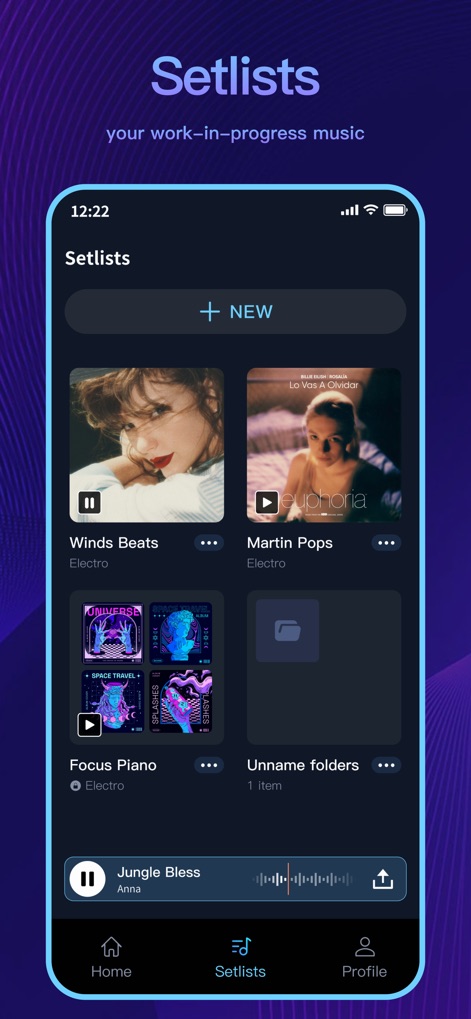
이 앱은 사용자의 작업물을 프로젝트와 폴더로 체계적으로 정리하여, 진행 중인 음악을 한눈에 확인하고 새로운 세트리스트를 쉽게 생성할 수 있도록 돕습니다.
프로젝트 관리
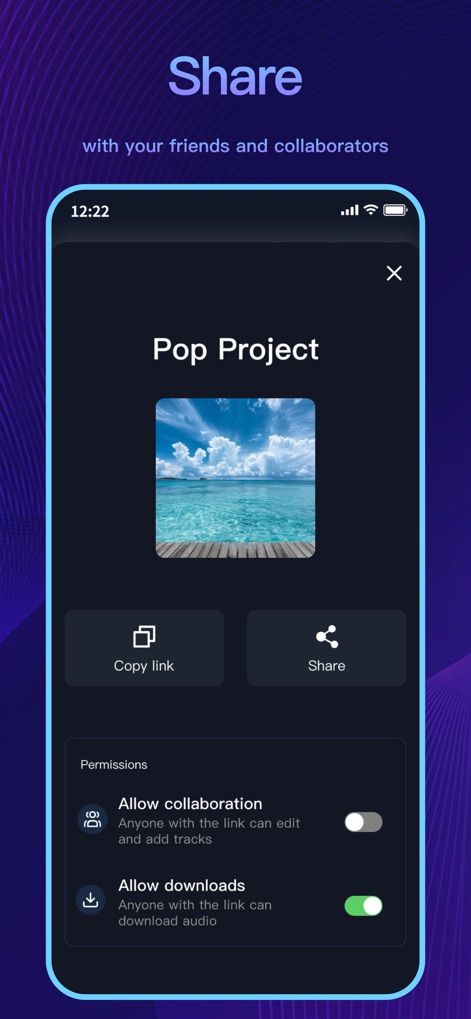
사용자는 완성된 음악 프로젝트를 친구 및 공동 작업자와 쉽게 공유할 수 있으며, 공동 작업 허용 여부와 다운로드 권한을 직접 설정할 수 있습니다.
간편한 공유
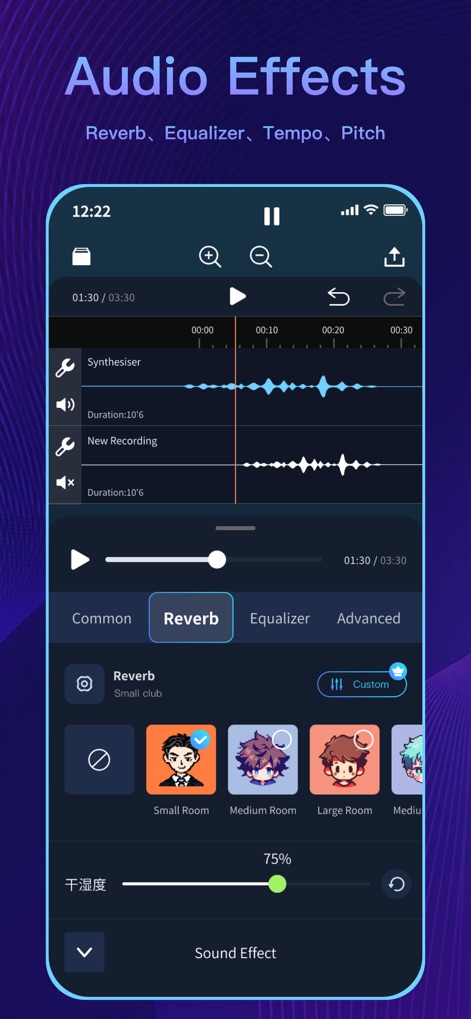
이 도구는 다양한 오디오 효과를 제공하며, 사용자는 리버브 프리셋을 선택하여 공간감을 조절하거나 건습도 슬라이더로 효과의 강도를 미세 조정할 수 있습니다.
풍부한 오디오 효과
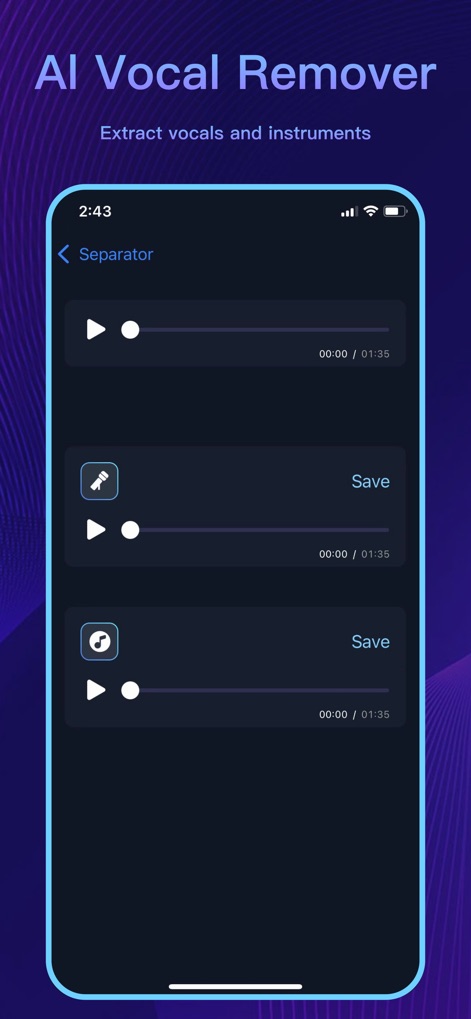
이 앱은 인공지능을 활용하여 오디오 트랙에서 보컬과 악기 사운드를 분리하며, 사용자는 분리된 보컬 또는 악기 트랙을 개별적으로 재생하고 저장할 수 있습니다.
AI 보컬 분리
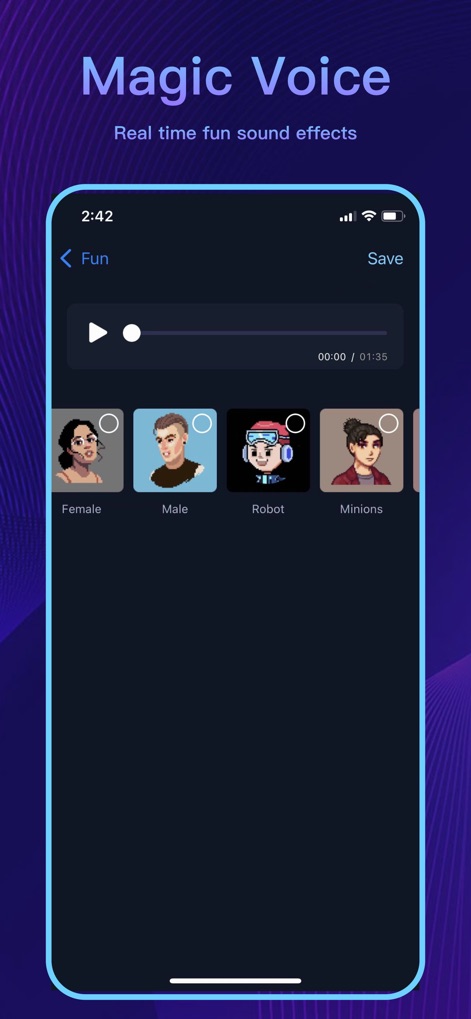
사용자는 '매직 보이스' 기능을 통해 음성을 재미있게 변조할 수 있으며, 여성, 남성, 로봇 등 다양한 음성 프리셋을 선택하여 실시간으로 효과를 미리 들어볼 수 있습니다.
마법 같은 음성 변조
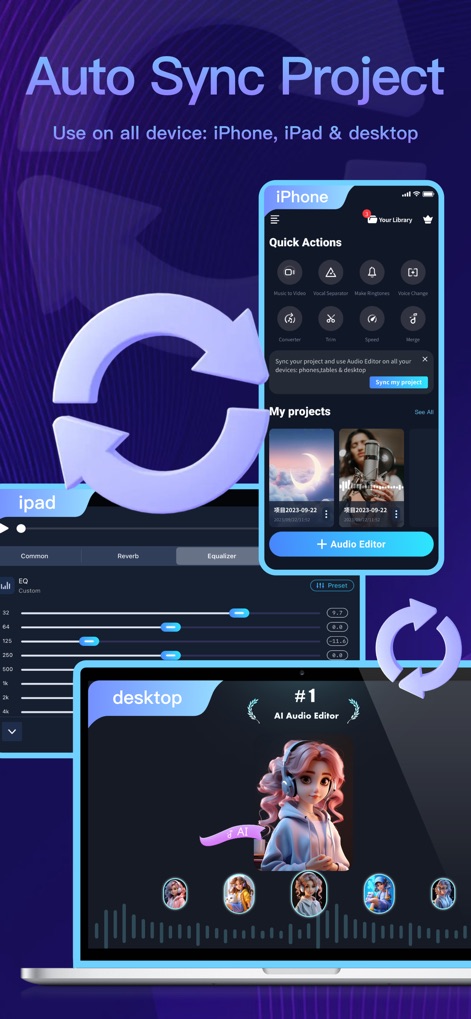
이 앱은 프로젝트를 여러 기기에서 자동 동기화하여, 사용자가 iPhone, iPad 및 데스크톱을 오가며 seamlessly 작업하고 프로젝트를 간편하게 관리할 수 있도록 지원합니다.
기기간 자동 동기화
설명
Download
비슷한 앱
유사한 기능과 사용자 경험을 가진 앱

WavePad音频和音乐编辑器
NCH Software

Audio Editor - Music editor
苏娟 陈

SoundLab - Audio Editor
孛 刘

Microphone Live-Voice Recorder
Arpenik Katikyan

Ferrite Recording Studio
Wooji Juice Ltd

WavePad Music and Audio Editor
NCH Software

Audio Editor - AudioLab, Mixer
Innovation Software Development 360 LLC

au editor - audio cutter
龙刚 李

Audio Editor: Video to Audio
文 夏
이 페이지는 앱이나 개발자의 공식 페이지가 아니며, 정보 제공 및 논평을 목적으로 작성된 독립 편집 간행물입니다. 명시적으로 달리 언급되지 않는 한, 해당 앱이나 개발자는 MWM, Apple, Google Play, 앱 퍼블리셔 또는 앱 개발자와 제휴, 보증, 후원, 승인 또는 공식적으로 연결되어 있지 않으며, 이 페이지의 어떤 내용도 해당 앱이 MWM의 서비스를 사용하여 개발되었음을 의미하지 않습니다. 모든 상표, 로고, 스크린샷 및 기타 콘텐츠는 해당 소유자의 자산입니다.