
이 페이지는 앱이나 개발자의 공식 페이지가 아니며, 정보 제공 및 논평을 목적으로 작성된 독립 편집 간행물입니다. 명시적으로 달리 언급되지 않는 한, 해당 앱이나 개발자는 MWM, Apple, Google Play, 앱 퍼블리셔 또는 앱 개발자와 제휴, 보증, 후원, 승인 또는 공식적으로 연결되어 있지 않으며, 이 페이지의 어떤 내용도 해당 앱이 MWM의 서비스를 사용하여 개발되었음을 의미하지 않습니다. 모든 상표, 로고, 스크린샷 및 기타 콘텐츠는 해당 소유자의 자산입니다.


Audio Editor : Audiolab
모바일 기기에서 오디오를 지배하는 능력을 부여합니다. 이 앱은 당신의 스마트폰을 음향 편집의 지배자로 변모시킵니다.
다운로드
1M+사용자 평점
총 평가 수
4.0K개발사
카테고리
Music지원 언어
12최신 버전
1.8.6크기
97.5 MB출시일
2023년 3월 16일모바일 오디오 편집의 새로운 기준을 제시하는 핵심 기능들
Audio Editor : Audiolab 주요 기능 분석
AI 기반 보컬/악기 분리
이 앱은 AI 기술을 활용하여 모든 오디오 파일에서 보컬, 반주 및 다양한 악기 사운드를 정밀하게 분리해줍니다.
멀티트랙 오디오 편집 및 믹싱
이 도구는 사용자가 여러 오디오 트랙을 동시에 편집하고 정교하게 믹싱할 수 있도록 지원하며, 전문적인 양자화 및 간섭 방지 필터로 고품질 사운드를 보장합니다.
고급 오디오 효과 및 개선 도구
이 앱은 리버브, 코러스, 게인, 템포, 피치, 10밴드 이퀄라이저, 노이즈 감소 등 다양한 고급 오디오 효과와 개선 기능을 제공하여 사운드를 정밀하게 조절할 수 있게 합니다.
비디오 오디오 추출 및 더빙
이 앱은 비디오 파일에서 오디오 트랙을 자동으로 추출하고, 사용자가 비디오에 새로운 음성이나 음악을 쉽게 더빙할 수 있도록 지원합니다.
정밀한 오디오 클리핑 및 비선형 편집
사용자는 이 앱을 통해 고정밀 확대/축소로 오디오를 자르고, 클리핑하며, 복사, 붙여넣기, 이동 등 비선형 편집 작업을 완벽한 실행 취소/다시 실행 기능과 함께 수행할 수 있습니다.
고품질 음성 녹음 및 관리
이 도구는 원터치 녹음 기능을 제공하며, AirPods 및 기타 블루투스 헤드셋을 통한 녹음을 지원하여 고품질의 음성 녹음 및 관리를 용이하게 합니다.
자주 묻는 질문
에 대해 알아야 할 모든 것 Audio Editor : Audiolab
What is Audio Editor : Audiolab?
Audio Editor : Audiolab is a powerful audio editing tool that mixes music, creates ringtones, and provides features like vocal removal, audio enhancement, multi-track editing, and format conversion.
Can Audio Editor : Audiolab remove vocals from a song?
Yes, Audio Editor : Audiolab extracts vocals, accompaniment, and various instruments from any audio using its AI-powered vocal remover. It supports splitting tracks into 2, 4, or 5 stems for precise control.
Does Audio Editor : Audiolab support multi-track audio editing?
Yes, Audio Editor : Audiolab supports multitrack audio editing and mixing, allowing an unlimited number of tracks. Users can perform non-linear editing actions including splicing, cutting, copying, pasting, and moving segments.
What audio effects are available in Audio Editor : Audiolab?
Audio Editor : Audiolab offers Pitch, Tempo, Reverb with various scenarios, Distortion, Delay, and a 10-section Equalizer with presets. It also includes a Denoise feature for clear audio.
Can I record audio directly within Audio Editor : Audiolab?
Yes, Audio Editor : Audiolab includes a voice recorder for one-tap recording. It supports AirPods and other Bluetooth headsets. Users can also monitor live audio with in-ear monitoring while recording or overdubbing.
What audio formats does Audio Editor : Audiolab support for import and export?
Audio Editor : Audiolab supports importing and exporting M4A, MP3, WAV, and AAC media files. It also offers format conversion for MP3, WAV, and AIFF to meet various user needs.
How do I get Audio Editor : Audiolab Pro features?
Audio Editor : Audiolab Pro features are obtained via a subscription. Users can access a free trial, after which monthly or annual charges apply through iTunes, unless the subscription is canceled beforehand.
Does Audio Editor : Audiolab allow setting edited audio as a ringtone?
Yes, Audio Editor : Audiolab allows users to set their edited audio as a phone ringtone directly within the application. This feature is accessible after completing audio modifications.
Can Audio Editor : Audiolab extract audio from video files?
Yes, Audio Editor : Audiolab extracts lossless MP3 or other audio formats from videos. It includes a built-in audio extractor that automatically separates audio tracks when importing from video files.
Does Audio Editor : Audiolab provide denoise functionality?
Yes, Audio Editor : Audiolab includes a Denoise feature. It utilizes Recurrent Neural Network Noise Reduction to enhance audio clarity by effectively reducing unwanted background noise from recordings.
다음 스크린샷과 설명은 앱의 공식 스토어 목록에서 직접 가져온 것이며 앱 개발자의 자산입니다.
앱 스토어
스크린샷

이 앱은 파형이 표시된 다수의 트랙과 '트랙 추가' 버튼을 통해 직관적인 멀티트랙 편집을 제공하여 사용자가 복잡한 오디오 프로젝트를 쉽게 관리할 수 있습니다.
멀티트랙 편집

사용자는 피치 및 템포 슬라이더를 사용하여 오디오의 음정과 속도를 섬세하게 조절할 수 있으며, 다양한 리버브 옵션과 드라이/웻 컨트롤로 공간감을 부여합니다.
사운드 효과 제어

이 앱은 딜레이 효과를 위한 지속 시간 및 피드백 슬라이더와 함께, 팝, 베이스 등의 프리셋과 10개 주파수 대역의 커스텀 조절이 가능한 이퀄라이저를 제공합니다.
정밀한 이퀄라이저

이 도구는 강력한 AI 알고리즘을 사용하여 보컬 및 악기 트랙 분리 기능을 제공하며, 2개, 4개 또는 5개 스템으로 오디오를 분할하여 정밀한 편집을 가능하게 합니다.
AI 음원 분리

사용자는 보컬, 베이스, 드럼, 피아노와 같은 개별 악기 트랙에 대한 독립적인 볼륨 페이더를 활용하여 자신만의 오디오 믹스를 제작하고 재생할 수 있습니다.
나만의 믹스 마스터
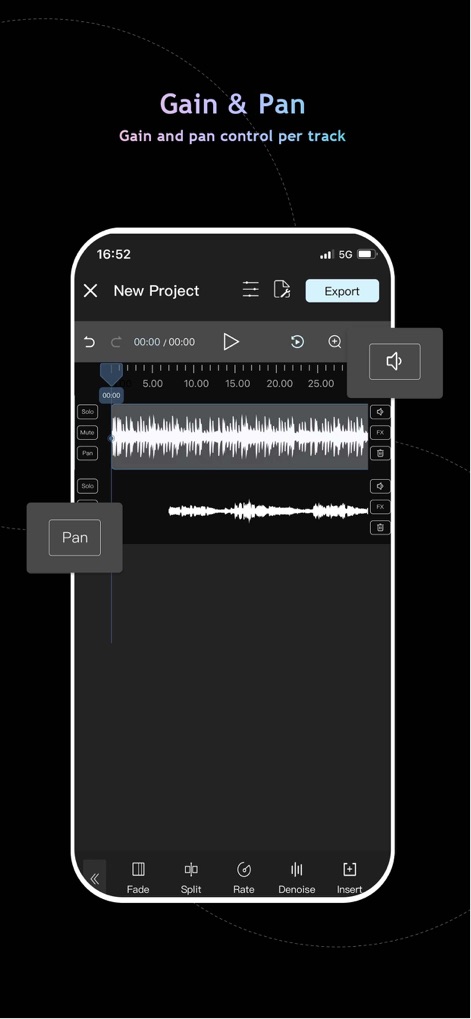
이 앱은 멀티트랙 인터페이스에서 각 트랙에 대한 게인 조절 버튼과 팬 조절 버튼을 제공하여 사용자가 개별 오디오 채널의 볼륨과 공간 배치를 정밀하게 제어할 수 있습니다.
정교한 채널 컨트롤

이 스튜디오 기능은 라이브 오디오 모니터링을 위한 헤드폰 설정을 지원하며, 배경 음악 가져오기 및 음악 페이드 인/아웃과 같은 BGM 설정을 통해 완벽한 녹음을 돕습니다.
녹음 스튜디오 기능

사용자는 MP3, WAV, FLAC, AAC를 포함한 다양한 오디오 파일 형식을 관리할 수 있으며, 이 라이브러리에서 오디오 편집, 효과 적용, 벨소리 설정 등의 작업을 수행합니다.
유연한 형식 지원
설명
Download
비슷한 앱
유사한 기능과 사용자 경험을 가진 앱

WavePad音频和音乐编辑器
NCH Software

Audio Editor - Music editor
苏娟 陈

SoundLab - Audio Editor
孛 刘

Microphone Live-Voice Recorder
Arpenik Katikyan

Ferrite Recording Studio
Wooji Juice Ltd

WavePad Music and Audio Editor
NCH Software

Audio Editor - AudioLab, Mixer
Innovation Software Development 360 LLC

au editor - audio cutter
龙刚 李

Audio Editor: Video to Audio
文 夏
이 페이지는 앱이나 개발자의 공식 페이지가 아니며, 정보 제공 및 논평을 목적으로 작성된 독립 편집 간행물입니다. 명시적으로 달리 언급되지 않는 한, 해당 앱이나 개발자는 MWM, Apple, Google Play, 앱 퍼블리셔 또는 앱 개발자와 제휴, 보증, 후원, 승인 또는 공식적으로 연결되어 있지 않으며, 이 페이지의 어떤 내용도 해당 앱이 MWM의 서비스를 사용하여 개발되었음을 의미하지 않습니다. 모든 상표, 로고, 스크린샷 및 기타 콘텐츠는 해당 소유자의 자산입니다.