
이 페이지는 앱이나 개발자의 공식 페이지가 아니며, 정보 제공 및 논평을 목적으로 작성된 독립 편집 간행물입니다. 명시적으로 달리 언급되지 않는 한, 해당 앱이나 개발자는 MWM, Apple, Google Play, 앱 퍼블리셔 또는 앱 개발자와 제휴, 보증, 후원, 승인 또는 공식적으로 연결되어 있지 않으며, 이 페이지의 어떤 내용도 해당 앱이 MWM의 서비스를 사용하여 개발되었음을 의미하지 않습니다. 모든 상표, 로고, 스크린샷 및 기타 콘텐츠는 해당 소유자의 자산입니다.


Canon PRINT Business
이 앱은 사무실 환경을 손안에 넣는 것처럼 작동합니다. 캐논 레이저 복합기 및 프린터를 스마트폰에서 직접 제어하는 능력을 사용자에게 부여합니다. 더 이상 PC에 얽매이지 않습니다. 작업 흐름은 사용자의 명령에 따라 흐릅니다.
다운로드
2.5M+사용자 평점
총 평가 수
770개발사
카테고리
Business지원 언어
12최신 버전
8.3.3크기
23.8 MB출시일
2012년 11월 26일캐논 레이저 복합기 사용자를 위한 모바일 효율성 및 통합 기능 평가
Canon PRINT Business 앱 심층 분석
모바일 인쇄 및 문서 관리
사용자는 모바일 기기에서 다양한 문서와 이미지를 직접 인쇄하고, 로컬 및 클라우드 저장소의 파일을 관리하여 사무실 업무 효율성을 극대화할 수 있습니다.
원격 장치 운영 및 모니터링
이 도구는 모바일 기기에서 복합기/프린터의 제어판을 원격으로 조작하고, 상세한 장치 상태를 확인할 수 있는 기능을 제공하여 IT 관리자와 사용자의 편의성을 높입니다.
간편한 장치 검색 및 연결
이 앱은 네트워크 상의 복합기/프린터를 자동으로 감지하거나 IP 주소, DNS, 블루투스, QR 코드를 통해 쉽게 검색 및 등록할 수 있게 하여 설치 및 연결 과정을 간소화합니다.
모바일 스캔 및 데이터 처리
사용자는 복합기에서 스캔한 데이터를 모바일 기기로 직접 읽어오고, 필요에 따라 클라우드 저장소에 업로드할 수 있어 문서 디지털화 워크플로우를 효율적으로 지원합니다.
직접 워크플로우 작업
이 앱은 복합기를 통해 복사, 팩스 전송, 스캔 후 이메일 전송과 같은 핵심 사무실 작업을 모바일 기기에서 직접 실행할 수 있도록 지원하여 업무 흐름을 간소화합니다.
모바일 기기 로그인 및 인증
블루투스 기능을 통해 모바일 단말기를 복합기에 터치하여 로그인할 수 있는 기능을 제공하여, 보안을 강화하면서도 사용자의 접근성을 향상시킵니다.
자주 묻는 질문
에 대해 알아야 할 모든 것 Canon PRINT Business
What is Canon PRINT Business?
Canon PRINT Business is a free application for iPhone and iPad. It enables printing, scanning, and uploading data to cloud storage from Canon laser multi-function devices or laser printers.
Is Canon PRINT Business a free application?
Yes, Canon PRINT Business is a free application. It allows users to print, scan, and manage documents from compatible Canon laser devices using an iPhone or iPad.
What are the main features of Canon PRINT Business?
Canon PRINT Business allows printing, scanning data, capturing images, and working with local or cloud storage files. It also supports device detection, remote operation, copying, faxing, and emailing.
How do I connect a printer to Canon PRINT Business?
Canon PRINT Business can automatically detect devices on a network or manually search via IP address/DNS. Users can also connect using Bluetooth or register devices with a QR code.
Which devices are supported by Canon PRINT Business?
Canon PRINT Business supports imageRUNNER ADVANCE, Color imageRUNNER, imageRUNNER, Color imageCLASS, imageCLASS, i-SENSYS, imagePRESS, LBP, Satera, Laser Shot, and Business Inkjet series.
Can I print photos with Canon PRINT Business?
Yes, Canon PRINT Business allows users to print photographs, documents, camera roll photos, and web pages from an iPhone or iPad to compatible Canon laser devices.
What settings can be adjusted when printing with Canon PRINT Business?
Print settings in Canon PRINT Business include output method, Department ID Management, User Authentication, output size, copies, print range, paper source, color, 2-sided, staple, and image quality.
What settings can be adjusted when scanning with Canon PRINT Business?
Scan settings in Canon PRINT Business include color, resolution, original size, file format, 2-sided, original type, density, and original placement.
Can I scan and send documents via email using Canon PRINT Business?
Yes, Canon PRINT Business allows users to scan and send documents by e-mail directly from a multi-function device or printer using the app.
Is Canon PRINT Business being replaced?
Yes, Canon PRINT Business has been merged with Canon PRINT. Users are advised to use Canon PRINT in the future for their printing and scanning needs.
Does Canon PRINT Business support Bluetooth connectivity for devices?
Yes, Canon PRINT Business can search for multi-function devices and/or printers using Bluetooth. It also supports logging in by touching the mobile terminal to a Bluetooth-installed machine.
다음 스크린샷과 설명은 앱의 공식 스토어 목록에서 직접 가져온 것이며 앱 개발자의 자산입니다.
앱 스토어
스크린샷
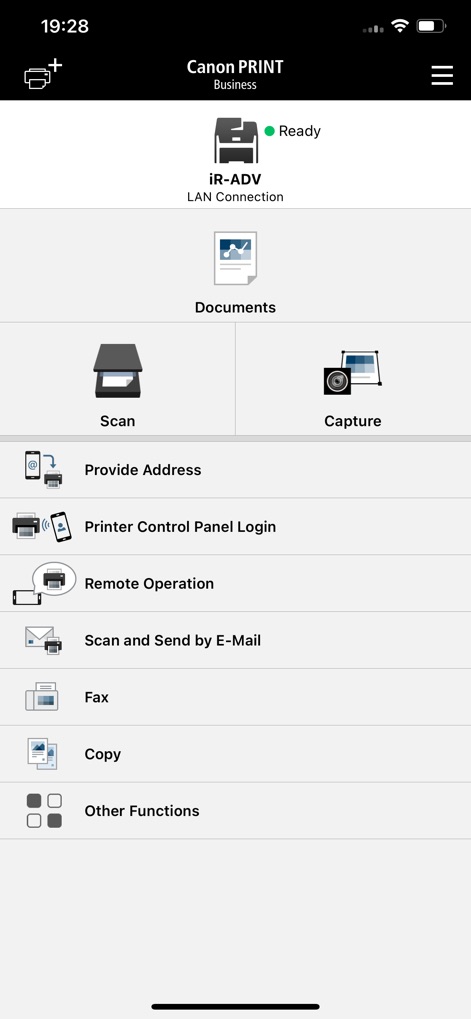
이 앱은 사용자가 연결된 장치의 상태를 즉시 확인하고("iR-ADV Ready"), 다양한 문서 작업 메뉴("Scan" 및 "Copy")에 빠르게 접근할 수 있도록 직관적인 홈 화면을 제공합니다.
모바일 사무실 제어

인쇄 전 이 미리보기 화면은 문서가 최종 출력될 모습을 정확하게 보여주어, 사용자가 "프린터 정보"와 "인쇄 범위"를 확인하고 조정할 수 있게 합니다.
출력 전 최종 확인

이 스캔 설정 화면은 사용자가 "해상도" 및 "파일 형식"과 같은 세부 옵션을 조절하여 최적의 스캔 결과를 얻을 수 있도록 돕습니다.
정교한 스캔 옵션

이 화면은 사용자가 "자동 검색" 또는 "QR 코드"를 통해 네트워크 상의 프린터를 쉽게 찾아 연결할 수 있도록 지원합니다.
장치 검색 및 연결
설명
Download
비슷한 앱
유사한 기능과 사용자 경험을 가진 앱

DJI Mimo
SZ DJI TECHNOLOGY CO., LTD

DJI Ronin
SZ DJI TECHNOLOGY CO., LTD

Roku TV Remote Control & Cast
Aleh Piashkou

Remote for Hisense TV.
Duscov Stepan

Alpha Linker - Camera Transfer
恒茂 刘

MyCentsys Pro
Centurion Systems (Pty) Ltd

Roku TV Remote Control・
Artur Belov

Luminair
Synthe FX, LLC

FUJIFILM XApp
FUJIFILM Corporation
이 페이지는 앱이나 개발자의 공식 페이지가 아니며, 정보 제공 및 논평을 목적으로 작성된 독립 편집 간행물입니다. 명시적으로 달리 언급되지 않는 한, 해당 앱이나 개발자는 MWM, Apple, Google Play, 앱 퍼블리셔 또는 앱 개발자와 제휴, 보증, 후원, 승인 또는 공식적으로 연결되어 있지 않으며, 이 페이지의 어떤 내용도 해당 앱이 MWM의 서비스를 사용하여 개발되었음을 의미하지 않습니다. 모든 상표, 로고, 스크린샷 및 기타 콘텐츠는 해당 소유자의 자산입니다.