
이 페이지는 앱이나 개발자의 공식 페이지가 아니며, 정보 제공 및 논평을 목적으로 작성된 독립 편집 간행물입니다. 명시적으로 달리 언급되지 않는 한, 해당 앱이나 개발자는 MWM, Apple, Google Play, 앱 퍼블리셔 또는 앱 개발자와 제휴, 보증, 후원, 승인 또는 공식적으로 연결되어 있지 않으며, 이 페이지의 어떤 내용도 해당 앱이 MWM의 서비스를 사용하여 개발되었음을 의미하지 않습니다. 모든 상표, 로고, 스크린샷 및 기타 콘텐츠는 해당 소유자의 자산입니다.


Compress Video - Shrink Size
비디오 파일 크기는 더 이상 당신의 통제 밖에 있지 않습니다. 이 앱은 당신의 저장 공간을 해방시키는 직접적인 수단으로 작동합니다.
다운로드
1M+사용자 평점
총 평가 수
15.2K개발사
카테고리
Photo & Video지원 언어
17최신 버전
10.0.7크기
27.1 MB출시일
2020년 10월 21일저장 공간 효율성을 극대화하고 비디오 품질을 유지하는 핵심 도구 평가
Compress Video - Shrink Size 앱 주요 기능 분석
핵심 비디오 압축
이 도구는 비디오를 효율적으로 압축하여 사용자의 기기 저장 공간을 확보하고 관리할 수 있도록 돕습니다.
압축 품질 실시간 비교
사용자는 압축된 비디오와 원본 비디오를 한 화면에서 실시간으로 비교하고, Pro 버전에서는 동시 재생을 통해 압축 품질 변화를 시각적으로 명확하게 확인하여 최적의 설정을 결정할 수 있습니다.
맞춤형 압축 설정
이 앱은 사용자가 해상도와 비트레이트 설정을 직접 조절하여 화질과 파일 크기 사이에서 원하는 최적의 균형을 찾을 수 있도록 합니다.
파일 형식 및 코덱 변환
MOV 및 MP4 형식으로, H.264 및 HEVC(H.265) 코덱으로 변환을 지원하여 다양한 기기 및 플랫폼에서 비디오 호환성을 보장합니다.
간편한 비디오 관리
압축된 비디오를 쉽게 저장하거나 공유할 수 있으며, 압축 결과 확인 후 원본 비디오를 삭제하여 저장 공간을 효율적으로 관리하도록 돕습니다.
비디오 정보 시각화
비디오 목록 썸네일에서 파일 크기, 해상도, 재생 시간, 파일 형식, 코덱, 비트레이트 등 상세 정보를 표시하여 사용자가 원하는 비디오를 빠르고 효율적으로 찾을 수 있도록 합니다.
오디오 제거 기능
이 도구는 비디오에서 오디오를 제거하여 파일 크기를 더욱 줄일 수 있게 하며, 특정 상황에서 불필요한 오디오를 제거하는 데 유용하게 활용됩니다.
원본 메타데이터 보존
압축된 비디오에서도 원본의 위치, 날짜, 시간, 카메라 정보 등 중요한 메타데이터를 유지하여 사용자가 정보 손실 없이 비디오를 관리할 수 있습니다.
자주 묻는 질문
에 대해 알아야 할 모든 것 Compress Video - Shrink Size
What is Easy Video Compressor - Resize?
Easy Video Compressor - Resize is an app that efficiently compresses videos to increase free storage space on your device. It offers features like dimension and bitrate adjustment, format conversion, and before/after compression comparison.
Can Easy Video Compressor - Resize adjust video dimensions?
Yes, Easy Video Compressor - Resize allows users to set the dimension for compression. Available options include 360p, SD, HD, FHD, and 4K, providing flexibility in video output size and quality.
Does Easy Video Compressor - Resize allow bitrate adjustment?
Yes, Easy Video Compressor - Resize provides a slider to adjust the bitrate for video compression. This feature gives users control over the video's quality and final file size.
Can I remove audio from videos using Easy Video Compressor - Resize?
Yes, Easy Video Compressor - Resize includes an option to turn off audio during video compression. This can help further reduce the file size of your compressed videos.
What video formats can Easy Video Compressor - Resize convert?
Easy Video Compressor - Resize supports converting video file formats to MOV and MP4. This allows users to choose the most suitable format for their needs after compression.
Which video codecs does Easy Video Compressor - Resize support for conversion?
Easy Video Compressor - Resize supports converting video codecs to H.264 and HEVC (H.265). These modern codecs ensure efficient compression and broad compatibility for your videos.
How does Easy Video Compressor - Resize allow users to compare videos?
Easy Video Compressor - Resize allows users to compare pre- and post-compression videos on a single screen. The Pro version enhances this with simultaneous playback for direct visual comparison.
Does Easy Video Compressor - Resize retain video metadata after compression?
Yes, Easy Video Compressor - Resize can retain crucial video metadata in the compressed file, including location, date and time, and camera information from the original video.
What additional features does the Pro version of Easy Video Compressor - Resize offer?
The Pro version of Easy Video Compressor - Resize includes features such as sorting videos by duration, width, and height, and simultaneous playback for comparing original and compressed videos.
Can Easy Video Compressor - Resize compress multiple videos at once?
Yes, Easy Video Compressor - Resize enables batch compression. Users can select multiple videos within the app's interface to process them simultaneously, saving time and effort.
How much storage space can Easy Video Compressor - Resize save?
Easy Video Compressor - Resize significantly reduces video file sizes, directly saving storage space. For instance, the app can decrease a video's size from 70.5 GB to 8.3 GB.
다음 스크린샷과 설명은 앱의 공식 스토어 목록에서 직접 가져온 것이며 앱 개발자의 자산입니다.
앱 스토어
스크린샷
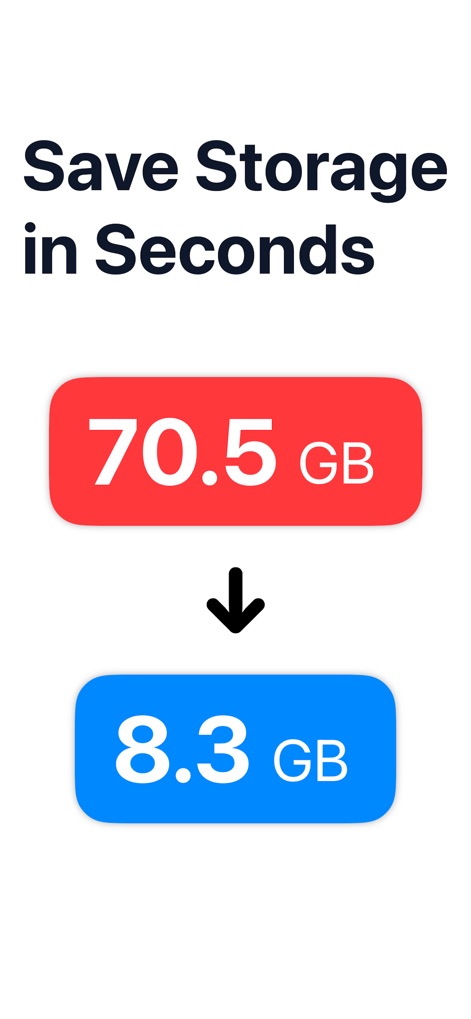
이 앱은 70.5 GB의 비디오 용량을 8.3 GB로 줄여주는 용량 최적화와 저장 공간 확보의 이점을 명확히 보여줍니다.
용량 절약 시작

사용자는 비디오 압축 전에 해상도를 1080 x 1620에서 720 x 1080으로, 비트레이트를 13.6 Mbps에서 1.5 Mbps로 조정하여 최적화된 파일 크기와 품질을 설정할 수 있습니다.
맞춤형 압축 설정

이 앱은 원본 비디오의 1920x1080 해상도와 49.6 MB 용량을, 852x480 해상도와 2.4 MB로 압축된 결과와 나란히 비교하여 즉각적인 용량 절감 효과를 시각적으로 보여줍니다.
압축 효과 미리보기

이 도구는 원본 비디오(1080x1080, 20.8 MB)와 압축된 비디오(720x720, 4.5 MB)의 용량 차이를 명확히 보여주며, 사용자가 저장 공간을 효율적으로 확보할 수 있도록 돕습니다.
효율적인 용량 절감

이 앱은 비디오 썸네일에 표시된 177.3 MB, 15.4 MB와 같은 파일 크기 정보와 다중 선택 체크박스를 활용하여 여러 비디오를 동시에 선택해 일괄 압축할 수 있습니다.
여러 비디오 일괄 압축

사용자는 'Simultaneous Play' 기능을 통해 원본(1080x1080)과 압축된(720x720) 비디오를 동시에 재생하여, 압축 전후의 품질과 용량 변화를 직접 비교할 수 있습니다.
압축 전후 시각 비교

이 도구는 썸네일에 표시된 100 MB, 125.5 MB와 같은 파일 크기 정보와 길이별 필터링 슬라이더를 통해 사용자가 대용량 비디오를 빠르게 식별하고 관리할 수 있도록 돕습니다.
대용량 비디오 검색
설명
Download
비슷한 앱
유사한 기능과 사용자 경험을 가진 앱

Video compressor - save space
俊杰 阮

SlimSpace - Compressor
琛 王

转换猫-视频音频图片格式转换
ZHN Co., Ltd.

Video Compressor - HQ Compress
LightByte Co., Ltd.

The Video Compressor
Dalian Hengwei Electronics Co., Ltd

Media Converter - video to mp3
俊杰 阮

Compress Videos & Resize Video
New Marketing Lab, Inc

Video Compress - Shrink Vids
Brachmann Online Marketing GmbH & Co. KG

Panda - Video Compressor
Farluner Apps Grzegorz Balcerzak
이 페이지는 앱이나 개발자의 공식 페이지가 아니며, 정보 제공 및 논평을 목적으로 작성된 독립 편집 간행물입니다. 명시적으로 달리 언급되지 않는 한, 해당 앱이나 개발자는 MWM, Apple, Google Play, 앱 퍼블리셔 또는 앱 개발자와 제휴, 보증, 후원, 승인 또는 공식적으로 연결되어 있지 않으며, 이 페이지의 어떤 내용도 해당 앱이 MWM의 서비스를 사용하여 개발되었음을 의미하지 않습니다. 모든 상표, 로고, 스크린샷 및 기타 콘텐츠는 해당 소유자의 자산입니다.