Duet Display

Duet Display

다운로드: App Store다운로드: Google Play
로고: Duet Display

Duet Display: iPad를 지연 없는 전문가용 모니터로 변환

2백만 명 이상의 전문가와 함께 iPad 또는 iPhone을 고성능 보조 디스플레이로 전환하세요. 전직 Apple 엔지니어가 개발한 Duet Display는 터치, 제스처 및 Apple Pencil 지원을 통해 데스크톱 수준의 경험을 제공합니다.

개발사

Duet, Inc.

카테고리

Productivity

다운로드

2M+

사용자 평점

4.4/5

총 평가 수

136K+

지원 언어

15

최고의 생산성 시각화

이 인터페이스를 사용하는 2M+ 명의 사용자.

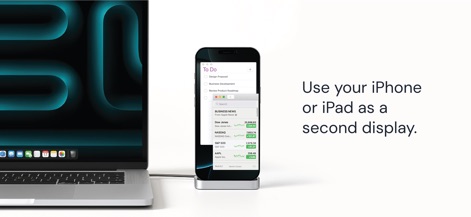
노트북에 연결된 iPhone이 멀티태스킹 및 생산성을 위한 보조 디스플레이 역할을 하는 모습

노트북에 연결된 iPhone이 멀티태스킹 및 생산성을 위한 보조 디스플레이 역할을 하는 모습

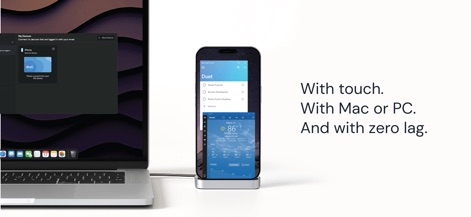
Duet Display를 사용하여 지연 없는 보조 터치스크린 모니터를 만드는 데 사용되는 노트북에 연결된 iPhone

Duet Display를 사용하여 지연 없는 보조 터치스크린 모니터를 만드는 데 사용되는 노트북에 연결된 iPhone

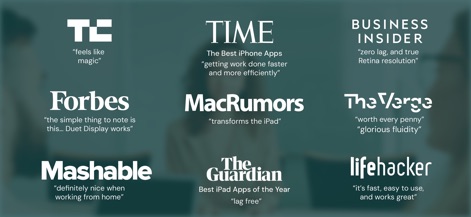
Duet Display에 대한 주요 언론 매체의 리뷰 및 추천

Duet Display에 대한 주요 언론 매체의 리뷰 및 추천

작업 공간을 최대화하고 마찰을 최소화하세요

이 앱을 돋보이게 하는 도구, 2M+ 명의 사용자가 선택.

지연 없는 성능

전직 Apple 엔지니어가 개발하여 네이티브 데스크톱 환경을 위한 선명한 Retina 해상도와 부드러운 60fps 경험을 제공합니다.

🖱️

인터랙티브 터치 및 제스처

두 손가락 스크롤, 이동, 확대/축소를 포함한 자연스러운 iOS 제스처로 Mac 또는 PC를 제어하여 촉각적인 워크플로를 경험하세요.

✏️

Apple Pencil 최적화

압력 및 기울기 감지 기능을 갖춘 iPad를 Photoshop과 같은 데스크톱 앱을 위한 전문가용 그래픽 태블릿으로 변환하세요.

리뷰 분석

사용자 리뷰 인사이트.

감정 점수

27%
부정적

요약

The app receives mixed but predominantly negative feedback, primarily due to its controversial subscription model and associated high costs, which many users perceive as deceptive or a forced change from previous one-time purchases. While praised by some for extending the utility of older iPads and offering solid performance as a wired second display, numerous users report critical issues such as persistent connection instability, significant lag, input delays, blurry images, and version-specific bugs that hinder functionality, especially after recent updates. Customer support experiences are also polarized, with some users reporting excellent assistance while others describe it as slow, unresponsive, or making cancellation unnecessarily difficult.

주요 테마

Reliability & Connection(6)
Customer Support(4)
Legacy Device Compatibility(4)
Subscription Model & Pricing(2)
Performance & Image Quality(1)
Drawing & Stylus Features(1)

앱 소개

에 대해 알아야 할 모든 것 Duet Display.

설명

#1 best-selling iPad app in US, Japan, UK, Germany, and 17 other countries! Duet turns your iPad or iPhone into the most advanced extra display for your Mac & PC. Developed by a team of ex-Apple engineers, Duet offers unparalleled performance and display quality - all with zero lag. — DO MORE — Be twice as productive by multitasking with two screens. And for those that travel, have a portable way to stay productive. — INCREDIBLY SIMPLE — To get started, plug your iPad into your desktop using your charging cable. The free Duet desktop app will automatically detect your device, and transform it into a high performance touchscreen display. There’s no need to worry about unreliable Wi-Fi, laggy performance, pixelated screens or managing network passwords. — TOUCHSCREEN — Interact with Mac & PC like never before, with touch & gestures, including two-finger scrolling, pan and zoom. And with our latest release, you can even add a touch bar to any iPad with any Mac. — PERFECT FOR APPLE PENCIL — With Duet Pro, you can turn your iPad and Apple Pencil into a professional graphics tablet. We’ve re-engineered our rendering algorithms for ultra-responsive drawing, optimized specifically for designers, illustrators and artists. Duet Pro also unlocks pressure & tilt sensitivity, hover, palm rejection, and more to seamlessly draw in the most powerful programs for professionals. Get precise control in Photoshop, Corel Painter, Lightroom, ToonBoom, Illustrator, Manga Studio and more.  — PRESS — TechCrunch - "Feels Like Magic" TIME - "Getting Work Done Faster and More Efficiently" The Guardian - "Lag-free" Forbes - "The simple thing to note is this...Duet Display works." The Verge - "Glorious Fluidity" Lifehacker - "It's fast, easy to use, and works great" Business Insider - "Zero lag and true retina resolution” Wall Street Journal - “It’s as easy as just plugging it in" — REVIEWS — “Awesome! My iPad Pro can be an extra monitor! Cool app” ~CEO of T-Mobile, John Legere “Very smooth and responsive indeed, plus you could use the touch screen to “click” on screen interfaces!” ~Photographer, Lok Cheung “Love the ability to use my iPad as a monitor with Duet.” ~Former Chief Evangelist of Apple, Guy Kawasaki “Just started using this app called Duet… Kinda love it so far.” ~Comedian and Youtube, Phillip DeFranco “All my mac folks look at the Duet app… GREAT!” ~Actor and Comedian, Sinbad  "I really like the app, I suppose the biggest compliment I can give is that it's so easy to setup it almost seems like an Apple product.” ~Early Adopter, M. Nightingale "Amazing solution for me by the way. Works as I was hoping for and actually my main reason for getting an iPad : )” ~Early Adopter, M. Gemzoe Duet Works With: All iPhones and iPads with iOS 7.0 and later All Macs with 10.9 (Mavericks) and later All PCs with Windows 7 and later Duet Pro Works With: All iPad Pros with Apple Pencil All Macs with 10.9 (Mavericks) and later All PCs with Windows 8.1 and later (64 bit) Duet Pro is an optional upgrade for additional features, and price may vary by location. Duet Pro subscriptions will be charged to your credit card through your iTunes account. Your subscription will automatically renew unless canceled at least 24 hours before the end of the current period. You will not be able to cancel the subscription once activated. Manage Duet Pro in Account Settings after the optional upgrade. Learn more at http://www.duetdisplay.com Terms: https://www.duetdisplay.com/help-center/duet-terms-and-conditions Privacy Policy: https://www.duetdisplay.com/help-center/duet-privacy-policy

최신 버전

3.0.3

크기

67.3 MB

출시일

2014년 12월 18일

몇 초 만에 작업 공간 두 배로 늘리기

전직 Apple 엔지니어가 개발한 지연 없는 디스플레이를 사용하는 2백만 명 이상의 전문가들과 함께하세요. 지금 Duet을 다운로드하고 iPad를 Mac 및 PC를 위한 최고의 생산성 도구로 전환하세요.

다운로드: App Store다운로드: Google Play
FAQ

자주 묻는 질문

에 대해 알아야 할 모든 것 Duet Display

Duet Display란 무엇인가요?

Duet Display는 iPad 또는 iPhone을 Mac 또는 PC의 고급 추가 디스플레이로 변환하여 터치 기능을 포함한 뛰어난 성능과 제로 지연을 제공합니다.

Duet Display로 기기를 어떻게 연결하나요?

네, Duet Display는 충전 케이블로 iPad 또는 iPhone을 데스크톱에 연결하여 작동합니다. 무료 Duet 데스크톱 앱이 장치를 자동으로 감지하여 고성능 디스플레이로 변환합니다.

Duet Display는 지연이 발생하나요?

아니요, Duet Display는 제로 지연 성능과 높은 디스플레이 품질을 제공합니다. The Guardian 및 Business Insider와 같은 언론 보도에서 확인된 바와 같이 불안정한 Wi-Fi 또는 지연 성능에 대한 우려를 해소합니다.

Duet Display는 터치 상호 작용을 지원하나요?

네, Duet Display는 Mac 및 PC 모두에서 터치스크린 상호 작용을 지원합니다. 두 손가락 스크롤, 팬, 줌과 같은 제스처를 포함하며 모든 Mac과 함께 모든 iPad에 터치 바를 추가할 수 있습니다.

Duet Pro에는 어떤 기능이 포함되어 있나요?

Duet Pro는 iPad와 Apple Pencil을 전문 그래픽 태블릿으로 변환하는 선택적 업그레이드입니다. 크리에이티브 소프트웨어를 위한 초고속 그리기, 압력 및 기울기 감도, 호버, 손바닥 거부 기능을 제공합니다.

Duet Display 및 Duet Pro와 호환되는 기기는 무엇인가요?

Duet Display는 iOS 7.0 이상을 실행하는 모든 iPhone 및 iPad, OS 10.9 이상을 실행하는 모든 Mac, Windows 7 이상을 실행하는 모든 PC와 호환됩니다. Duet Pro는 Apple Pencil이 탑재된 iPad Pro와 PC의 경우 Windows 8.1 이상(64비트)이 필요합니다.

App information, icons, screenshots, and descriptions displayed on this page are sourced from the Apple App Store and are the property of their respective developers. Download estimates and rankings are based on MWM's proprietary models and may not reflect actual figures. This page is provided for informational and analytical purposes only.

Believe this page infringes your intellectual property? File a dispute