
이 페이지는 앱이나 개발자의 공식 페이지가 아니며, 정보 제공 및 논평을 목적으로 작성된 독립 편집 간행물입니다. 명시적으로 달리 언급되지 않는 한, 해당 앱이나 개발자는 MWM, Apple, Google Play, 앱 퍼블리셔 또는 앱 개발자와 제휴, 보증, 후원, 승인 또는 공식적으로 연결되어 있지 않으며, 이 페이지의 어떤 내용도 해당 앱이 MWM의 서비스를 사용하여 개발되었음을 의미하지 않습니다. 모든 상표, 로고, 스크린샷 및 기타 콘텐츠는 해당 소유자의 자산입니다.


GlideX
당신은 항상 제한된 화면에 갇혀있었지만, 더 이상은 아닙니다. GlideX는 디지털 장벽을 허물고 기기 간의 마법 같은 흐름을 가능하게 합니다.
다운로드
500k+사용자 평점
총 평가 수
13.2K개발사
카테고리
Productivity지원 언어
29최신 버전
4.0.2크기
127.4 MB출시일
2021년 12월 14일연결성과 생산성을 극대화하는 교차 장치 통합 솔루션
GlideX 앱 심층 분석
화면 확장 (Screen Extend)
이 앱은 사용자가 스마트폰이나 태블릿을 보조 디스플레이로 활용하여 듀얼 모니터 환경을 구현하고 작업 공간을 확장할 수 있게 해줍니다. 여러 문서나 시각 자료를 동시에 참조해야 할 때 특히 유용합니다.
원격 액세스 (Remote Access)
이 도구는 사용자가 모바일 장치를 통해 ASUS PC에 저장된 파일에 원격으로 액세스하고, PC를 개인 클라우드처럼 활용할 수 있도록 지원합니다. 출장 중이거나 재택근무 시 사무실 파일에 접근해야 하는 상업 사용자에게 특히 효과적입니다.
화면 미러링 (Screen Mirror)
이 앱은 사용자의 휴대폰 화면을 PC에 미러링하여 PC의 키보드와 마우스를 사용하여 휴대폰을 조작할 수 있게 해줍니다. 이는 작은 휴대폰 화면의 가상 키보드 대신 더욱 풍부하고 제약 없는 시각적 경험과 향상된 생산성을 제공합니다.
통합 제어 (Unify Control)
이 기능은 사용자가 하나의 PC에서 단일 마우스와 키보드로 여러 장치와 운영체제를 넘나들며 제어하고 파일을 전송할 수 있도록 합니다. 이를 통해 장치 간 전환 없이 매끄러운 작업 흐름을 유지할 수 있습니다.
파일 전송 (File Transfer)
이 앱은 드래그 앤 드롭 방식으로 다른 PC나 모바일 장치로 파일을 빠르게 전송할 수 있는 기능을 제공합니다. 기존 블루투스 파일 전송보다 훨씬 빠르고 사용자 친화적인 경험으로 장치 간 원활한 전송을 보장합니다.
공유 카메라 (Shared Cam)
이 도구는 사용자의 모바일 장치 카메라를 웹캠으로 변환해 줍니다. PC 화상 회의 앱에서 'GlideX – Shared Cam'을 비디오 소스로 선택하기만 하면 원활한 웹캠 공유를 쉽게 즐길 수 있습니다.
핸즈프리 통화 (Hands-Free Phone Calls)
이 앱은 사용자가 PC의 스피커와 마이크를 통해 전화를 걸고 받을 수 있도록 합니다. 또한 PC에서 휴대폰 연락처에 액세스하여 연락처를 검색하고 직접 전화를 걸 수 있어, 휴대폰을 찾을 필요 없이 편리함을 제공합니다.
URL 공유 (URL Share)
이 기능은 PC 브라우저에서 공유 아이콘을 클릭한 후 GlideX를 선택하기만 하면, 현재 표시된 웹페이지 링크가 다른 PC 또는 연결된 모바일 장치로 즉시 전송되어 자동으로 열리게 해줍니다. 이를 통해 이동 중에도 원활한 편의성을 제공합니다.
자주 묻는 질문
에 대해 알아야 할 모든 것 GlideX
What is the GlideX Screen Mirror feature?
GlideX Screen Mirror projects your phone's screen onto your PC, enabling control with your PC's keyboard and mouse. This improves productivity and offers a richer visual experience.
Can GlideX extend my PC display to my mobile device?
Yes, GlideX Screen Extend uses your phone or tablet as a secondary display. This expands your screen space for dual-display convenience, especially useful for cross-referencing documents.
How does GlideX Unify Control work?
GlideX Unify Control lets you manage multiple devices and transfer files using a single mouse and keyboard across different operating systems. This eliminates the need to switch between devices.
Does GlideX support file transfer between devices?
Yes, GlideX provides a File Transfer feature. Users can simply drag and drop files between PCs and mobile devices, offering a faster and more seamless experience than traditional Bluetooth.
Can I use my phone's camera as a webcam with GlideX?
Yes, GlideX Shared Cam turns your mobile device camera into a webcam. Select "GlideX – Shared Cam" as the video source in your PC video conference app for seamless sharing.
Does GlideX allow hands-free phone calls?
Yes, GlideX enables hands-free phone calls. You can make and take calls routed through your PC's speakers and microphone, and access phone contacts directly from your PC.
What is GlideX Remote Access?
GlideX Remote Access allows your mobile device to access files stored on your ASUS PC remotely. It serves as a personal cloud replacement, including Remote File Access and Remote Desktop features.
Is GlideX Remote Desktop compatible with Windows 10 Home?
No, GlideX Remote Desktop is not supported on Windows 10 Home edition. It is important to check your Windows version for full compatibility with this feature.
How do I share URLs using GlideX?
To share URLs, click the Share icon in your PC's browser and select GlideX. The webpage link instantly sends to another PC or connected mobile device, opening automatically.
How do I connect mobile devices to my PC using GlideX?
GlideX supports connecting mobile devices to your PC via Wi-Fi and/or USB. This offers flexible options for establishing a link between your devices for various features.
Do I need a separate app for GlideX on Windows?
Yes, the GlideX mobile app must be used together with GlideX for Windows. The Windows application is available for Windows 10/11 devices to ensure full functionality.
다음 스크린샷과 설명은 앱의 공식 스토어 목록에서 직접 가져온 것이며 앱 개발자의 자산입니다.
앱 스토어
스크린샷

PC 화면을 모바일 장치로 확장하여 보조 디스플레이로 활용할 수 있습니다. 시각적으로는 'Extend (PC to Mobile)' 문구와 함께 노트북 화면의 그래픽 디자인 작업 화면이 돋보입니다.
화면 확장

모바일 장치 화면을 PC에 미러링하여 더 큰 화면 공간을 활용할 수 있습니다. 이 기능은 'Mirror'라는 명확한 레이블과 함께 모바일 앱이 PC 화면에 복제된 모습을 보여줍니다.
화면 미러링

모바일 장치 화면을 PC 데스크톱에 독립적인 창으로 표시하여 멀티태스킹 효율성을 높일 수 있습니다. 이 스크린샷은 노트북 화면 위에 떠 있는 휴대폰 화면과 그 안의 이미지 편집 도구 모음을 보여줍니다.
다중 화면 작업

하나의 마우스와 키보드로 여러 장치를 원활하게 제어하고 파일을 전송할 수 있습니다. 이 스크린샷은 'Unify Control' 아이콘과 함께 마우스 커서가 파일을 다른 장치로 드래그하는 장면을 보여줍니다.
통합 제어

PC와 모바일 장치 간에 파일을 쉽게 전송할 수 있습니다. 이 스크린샷은 'File Transfer' 인터페이스와 'Drag your files here' 메시지를 통해 직관적인 전송 방식을 강조합니다.
간편한 파일 전송

다양한 장치 간의 원활한 통신 환경을 제공합니다. 스크린샷 상단에 'Communication'이라는 명확한 레이블이 있으며, 하단에는 노트북과 모바일 장치 간의 파일 전송 인터페이스가 시각적으로 나타납니다.
연결된 장치 통신

PC를 통해 모바일 장치의 전화를 걸고 받을 수 있습니다. 이 스크린샷은 PC 화면의 다이얼 패드와 연락처 목록, 그리고 연결을 위한 모바일 장치의 블루투스 페어링 안내를 보여줍니다.
PC로 전화 걸기

모바일 장치 카메라를 PC의 웹캠으로 활용하여 화상 회의에 참여할 수 있습니다. 'Shared Cam'이라는 명확한 레이블과 함께 노트북에 모바일 장치 카메라가 연결되어 있는 아이콘이 표시됩니다.
모바일 웹캠 활용
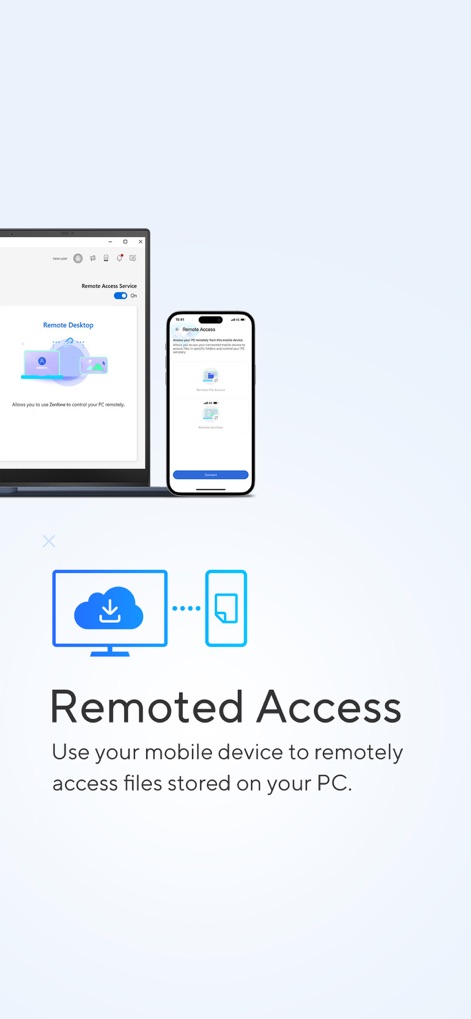
모바일 장치를 사용하여 PC에 저장된 파일에 원격으로 액세스할 수 있습니다. 스크린샷 상단에 'Remoted Access' 레이블과 함께 원격 파일 액세스 및 원격 데스크톱 설정이 나타납니다.
원격 파일 접속
설명
Download



이 페이지는 앱이나 개발자의 공식 페이지가 아니며, 정보 제공 및 논평을 목적으로 작성된 독립 편집 간행물입니다. 명시적으로 달리 언급되지 않는 한, 해당 앱이나 개발자는 MWM, Apple, Google Play, 앱 퍼블리셔 또는 앱 개발자와 제휴, 보증, 후원, 승인 또는 공식적으로 연결되어 있지 않으며, 이 페이지의 어떤 내용도 해당 앱이 MWM의 서비스를 사용하여 개발되었음을 의미하지 않습니다. 모든 상표, 로고, 스크린샷 및 기타 콘텐츠는 해당 소유자의 자산입니다.